Auto-renewal automatically extends your subscription bastion hosts before they expire, preventing service interruptions caused by missed manual renewals.
Prerequisites
Before you begin, make sure that:
Your subscription bastion hosts have not expired
How auto-renewal works
| Behavior | Details |
|---|---|
| Effective time | Takes effect the next day after you enable it |
| First renewal attempt | 9 days before the expiration date |
| Retry on failure | Once daily until the bastion host expires or is renewed |
| Renewal cycle | Matches the duration you select (for example, one year renews for one year each cycle) |
| Billing cycle basis | Based on the expiration date of your bastion host |
| Manual renewal priority | If you manually renew before the auto-renewal payment deduction, auto-renewal skips the current billing cycle |
| Coupon support | Coupons can be applied to auto-renewal payments |
| Failure notification | Text message and email. Respond promptly to prevent your bastion host from being stopped |
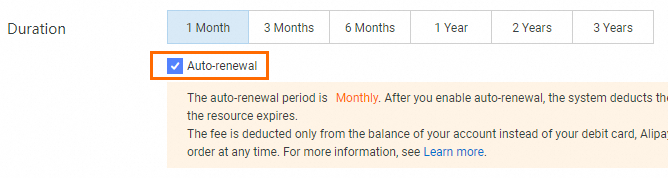
Enable auto-renewal on the buy page
Select auto-renewal when purchasing a bastion host. For details, see Purchase a bastion host.
Enable auto-renewal on the Renewal page
Log on to the Bastionhost console.
In the top navigation bar, choose Expenses > Renewal Management.

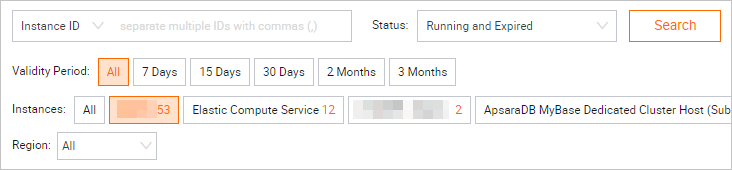
On the Renewal page, set Instances to Bastionhost and specify the Validity Period and Region to filter your bastion hosts.
Click the Manual tab.
Enable auto-renewal:
Single bastion host: Find the bastion host and click Enable Auto Renewal in the Actions column.
Multiple bastion hosts: Select the bastion hosts and click Enable Auto Renewal below the list.
After you enable auto-renewal, the bastion hosts appear on the Auto tab.