When external traffic enters your service mesh through an ingress gateway, you need a way to verify that each request comes from a legitimate user. Service Mesh (ASM) supports JSON Web Token (JWT) authentication at the ingress gateway, so you can validate end-user identity before requests reach backend services.
JWT authentication in ASM relies on two Istio security resources:
RequestAuthentication -- Defines how to validate JWTs (issuer, signing keys). Rejects requests that carry an *invalid* token, but still allows requests with *no* token.
AuthorizationPolicy -- Enforces access rules based on JWT presence or claims. Pair it with RequestAuthentication to block requests that lack a valid token.
A RequestAuthentication policy alone does not reject tokenless requests. To require a valid JWT on every request, you must also create an AuthorizationPolicy as described in Enforce JWT requirements with an authorization policy.
This guide walks through a complete example: deploy a sample service, create a RequestAuthentication policy, verify token validation, and then add AuthorizationPolicy rules to enforce token requirements.
Prerequisites
A cluster added to the ASM instance. For more information, see Add a cluster to an ASM instance.
An ingress gateway service deployed. For more information, see Create an ingress gateway.
Deploy the httpbin test service
This section deploys the httpbin service behind the ASM ingress gateway. If you already have a service exposed through the gateway, skip to Create a request authentication policy.
Enable automatic sidecar injection
Log on to the ASM console.
In the left-side navigation pane, choose Service Mesh > Mesh Management.
On the details page of the ASM instance, choose ASM Instance > Global Namespace in the left-side navigation pane.
On the Global Namespace page, find the default namespace and click Enable Automatic Sidecar Proxy Injection in the Automatic Sidecar Injection column.
In the Submit message, click OK.
Deploy httpbin
Connect to a Container Service for Kubernetes (ACK) cluster by using kubectl. For more information, see Obtain the kubeconfig file of a cluster and use kubectl to connect to the cluster.
Create an httpbin.yaml file with the following content:
   apiVersion: v1
   kind: ServiceAccount
   metadata:
     name: httpbin
   ---
   apiVersion: v1
   kind: Service
   metadata:
     name: httpbin
     labels:
       app: httpbin
       service: httpbin
   spec:
     ports:
     - name: http
       port: 8000
       targetPort: 80
     selector:
       app: httpbin
   ---
   apiVersion: apps/v1
   kind: Deployment
   metadata:
     name: httpbin
   spec:
     replicas: 1
     selector:
       matchLabels:
         app: httpbin
         version: v1
     template:
       metadata:
         labels:
           app: httpbin
           version: v1
       spec:
         serviceAccountName: httpbin
         containers:
         - image: docker.io/kennethreitz/httpbin
           imagePullPolicy: IfNotPresent
           name: httpbin
           ports:
           - containerPort: 80
Deploy the service:
kubectl apply -f httpbin.yaml -n default
Create an Istio gateway and a virtual service
Log on to the ASM console. In the left-side navigation pane, choose Service Mesh > Mesh Management.
On the Mesh Management page, click the name of the ASM instance. In the left-side navigation pane, choose ASM Gateways > Gateway. On the page that appears, click Create from YAML.
Select default from the Namespace drop-down list, paste the following YAML into the code editor, and then click Create.
   apiVersion: networking.istio.io/v1beta1
   kind: Gateway
   metadata:
     name: httpbin-gateway
     namespace: default
   spec:
     selector:
       istio: ingressgateway
     servers:
       - hosts:
           - '*'
         port:
           name: http
           number: 80
           protocol: HTTP
On the details page of the ASM instance, choose Traffic Management Center > VirtualService in the left-side navigation pane. Click Create from YAML.
Select default from the Namespace drop-down list, paste the following YAML into the code editor, and then click Create.
   apiVersion: networking.istio.io/v1beta1
   kind: VirtualService
   metadata:
     name: httpbin
     namespace: default
   spec:
     gateways:
       - httpbin-gateway
     hosts:
       - '*'
     http:
       - route:
           - destination:
               host: httpbin
               port:
                 number: 8000
Create a request authentication policy
To create a RequestAuthentication policy, first generate a JSON Web Key (JWK) for signature verification, then configure the policy in the ASM console.
Generate a JWK
Generate a 2048-bit RSA private key with OpenSSL:
openssl genrsa -out rsa-private-key.pem 2048Extract the public key:
openssl rsa -in rsa-private-key.pem -pubout -out rsa-public-key.pemConvert the public key to JWK format. Open the JWK to PEM Convertor online tool, select PEM-to-JWK (RSA Only), paste the contents of
rsa-public-key.peminto the code editor, and click submit. The tool outputs a JWK similar to: Save this JWK for the next step.{ "kty": "RSA", "e": "AQAB", "kid": "59399e22-7a9a-45ed-8c76-7add7863915c", "n": "2dnwOlDKEwII9Cyh9w7o59a5y3RS2gWUKYC3HSBJL1FhYIZa7sjTCKxwEuG-vCRQkR6augWxYWseSDfgtyivzi3CxxkF8WnQbECOCGm5xAYKmMcXeOpv0zsJTHN122Tt_tsd6K2OC3yGwKtmp7m-MOpHagqWRqFtvyEOm_1JW1-t0n1VsGSeWww8dvcmnJPKAKHbAU40jdV1hMn9AA3RfSpDY6nfrUkpXA5-aQ6rJRjMn36DatZ5ykVL4LKPOUxZdfK_yNIPkCnwIKesqiOpr4s-iCM8pMiZuejDZ1qoX-uBjggESf4G9_L-laDSeoDmXeOZ9kzN3Jw8ay69ihIFEQ" }
Configure the RequestAuthentication policy
Log on to the ASM console.
In the left-side navigation pane, choose Service Mesh > Mesh Management.
On the Mesh Management page, find the ASM instance and click its name or click Manage in the Actions column.
Choose Mesh Security Center > RequestAuthentication in the left-side navigation pane. Click Create.
Configure the following parameters and click Create.
Parameter Value Namespace Select istio-system. Name Enter a name for the policy. Matching Label Click Add Matching Label. Set Name to istioand Value toingressgateway.JWT Rule Set Click Add and configure the fields described in the following table. JWT Rule Set fields:
Field Description Example value issuer The JWT issuer identifier. testing@asm.test.ioaudiences The services allowed to use the JWT. Leave empty to allow all services. (empty) jwks The signing key in {"keys":[<your-JWK>]}format.{"keys":[{"kty":"RSA","e":"AQAB","kid":"59399e22-7a9a-45ed-8c76-7add786****"}]}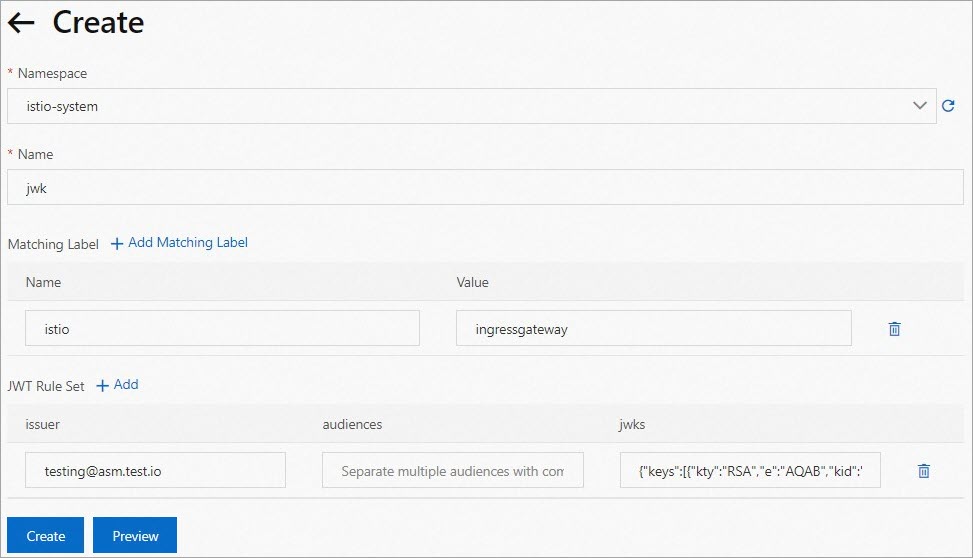
Verify the request authentication policy
Generate a test JWT
Use the JWT tool to encode a test token. In the Decoded section, configure the following fields:
HEADER: Set
algtoRS256,kidto the key ID from your JWK, andtyptoJWT.PAYLOAD: Set
isstotesting@asm.test.io. Add other claims as needed.VERIFY SIGNATURE: Paste the public key and private key generated in Generate a JWK.
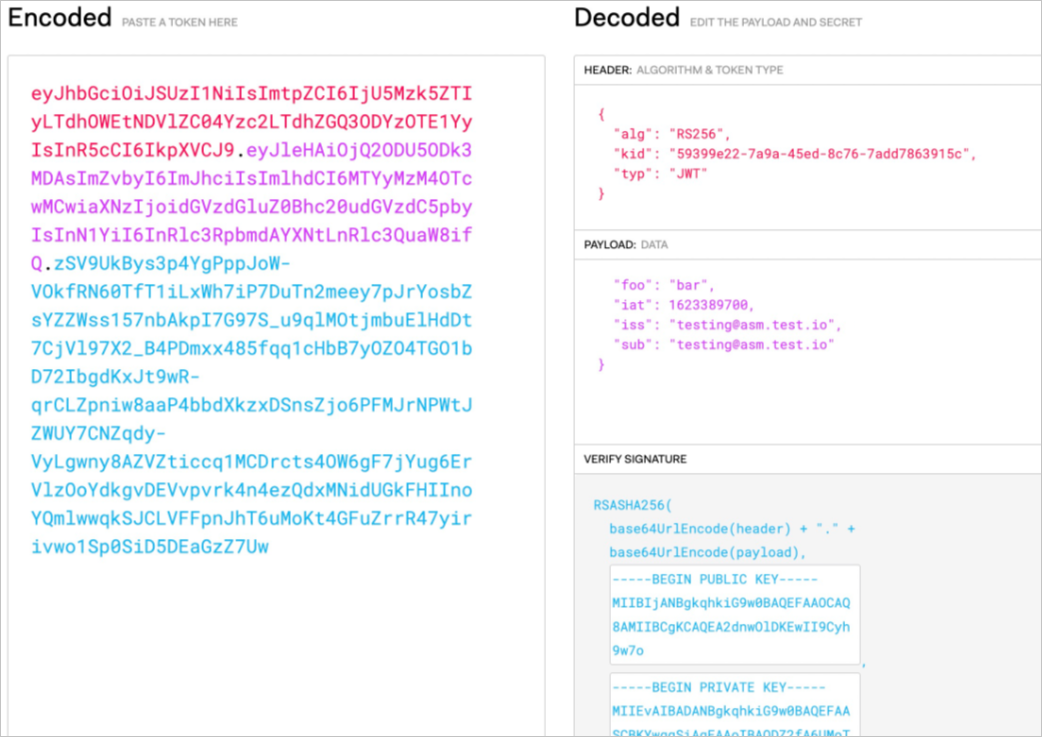
Copy the JWT string from the Encoded section and store it in a TOKEN environment variable for the following tests.
Test the policy
Run the following commands, replacing <ingress-gateway-ip> with the IP address of your ingress gateway.
Request with a valid JWT:
curl -I -H "Authorization: Bearer $TOKEN" http://<ingress-gateway-ip>/Expected response:
HTTP/1.1 200 OK
server: istio-envoy
date: Fri, 18 Mar 2022 07:27:54 GMT
Request with an invalid JWT:
curl -I -H "Authorization: Bearer invalidToken" http://<ingress-gateway-ip>/Expected response:
HTTP/1.1 401 Unauthorized
www-authenticate: Bearer realm="http://<ingress-gateway-ip>/", error="invalid_token"
content-length: 79
content-type: text/plain
date: Fri, 18 Mar 2022 07:59:00 GMT
server: istio-envoy
Request with no JWT:
curl -I http://<ingress-gateway-ip>/Expected response:
HTTP/1.1 200 OK
server: istio-envoy
date: Fri, 18 Mar 2022 07:27:54 GMT
These results confirm the RequestAuthentication policy works correctly:
| Request type | Expected result | Reason |
|---|---|---|
| Valid JWT | 200 OK | Token passes signature and issuer validation. |
| Invalid JWT | 401 Unauthorized | Token fails signature validation. |
| No JWT | 200 OK | RequestAuthentication does not reject tokenless requests. |
Tokenless requests still succeed at this point. To require a valid JWT on every request, create an AuthorizationPolicy as described in the next section.
Enforce JWT requirements with an authorization policy
Require a valid JWT for all requests
This AuthorizationPolicy rejects any request that does not carry a valid JWT.
Log on to the ASM console.
In the left-side navigation pane, choose Service Mesh > Mesh Management.
Click the name of the ASM instance or click Manage in the Actions column.
Choose Mesh Security Center > AuthorizationPolicy in the left-side navigation pane. Click Create.
Configure the following parameters and click Create. Setting
RequestPrincipalsto*matches any authenticated principal, which requires a valid JWT on every request.Parameter Value Name Enter a name for the policy. Policy Type Select ALLOW. Gateway Scope On the Gateway Scope tab, set ASM Gateway to ingressgateway. In the Add Request Source section, turn on RequestPrincipals and enter *.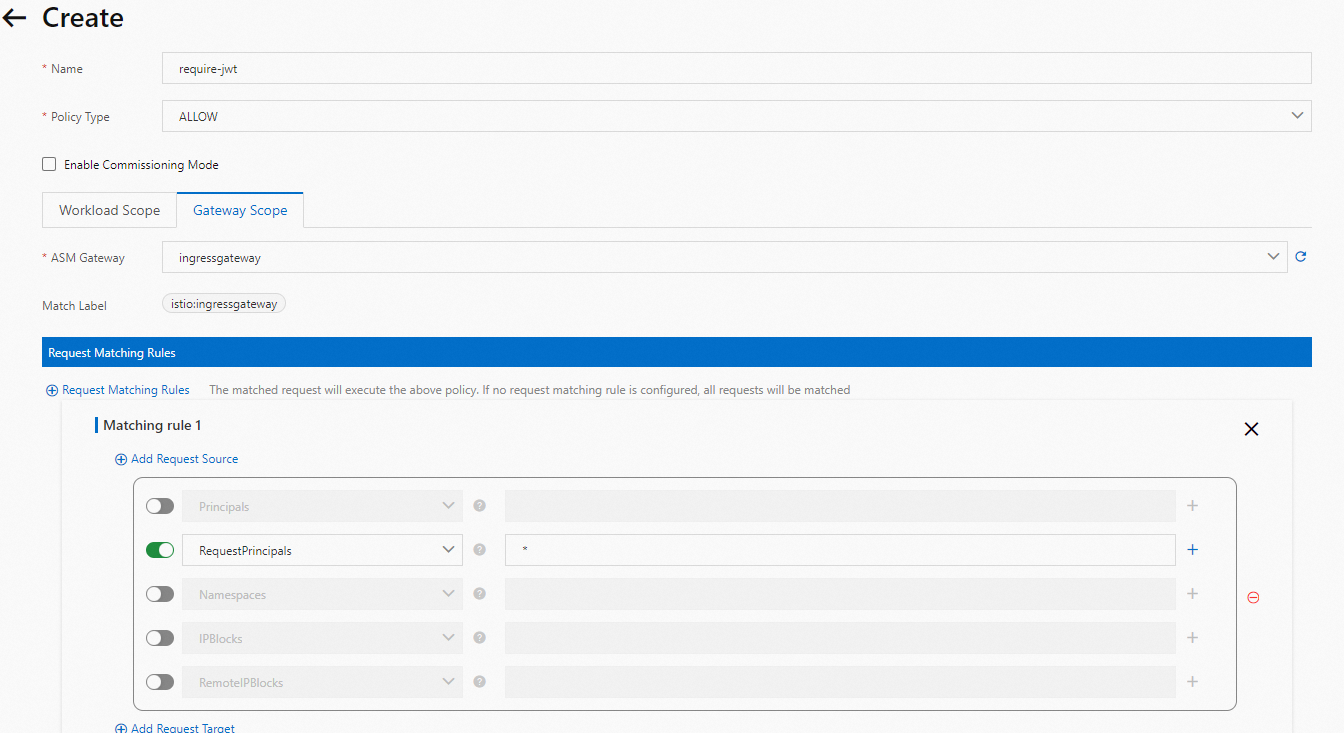
Verify
No-token request (now blocked):
curl -I http://<ingress-gateway-ip>/Expected response:
HTTP/1.1 401 Unauthorized
www-authenticate: Bearer realm="http://<ingress-gateway-ip>/", error="invalid_token"
content-length: 79
content-type: text/plain
date: Fri, 18 Mar 2022 07:59:00 GMT
server: istio-envoy
Valid-token request (still allowed):
curl -I -H "Authorization: Bearer $TOKEN" http://<ingress-gateway-ip>/Expected response:
HTTP/1.1 200 OK
server: istio-envoy
date: Fri, 18 Mar 2022 07:27:54 GMT
Tokenless requests now return 401 Unauthorized, confirming the AuthorizationPolicy enforces JWT requirements.
Restrict access to a specific issuer and subject
This AuthorizationPolicy allows only requests whose JWT contains a specific issuer *and* subject claim. The expected principal format is <issuer>/<subject>.
In this example, only JWTs with iss: testing@asm.test.io and sub: demo@asm.test.io are accepted.
Log on to the ASM console.
In the left-side navigation pane, choose Service Mesh > Mesh Management.
Click the name of the ASM instance or click Manage in the Actions column.
Choose Mesh Security Center > AuthorizationPolicy in the left-side navigation pane. Click Create.
Configure the following parameters and click Create.
Parameter Value Name Enter a name for the policy. Policy Type Select ALLOW. Gateway Scope On the Gateway Scope tab, set ASM Gateway to ingressgateway. In the Add Request Source section, turn on RequestPrincipals and set the value to testing@asm.test.io/demo@asm.test.io.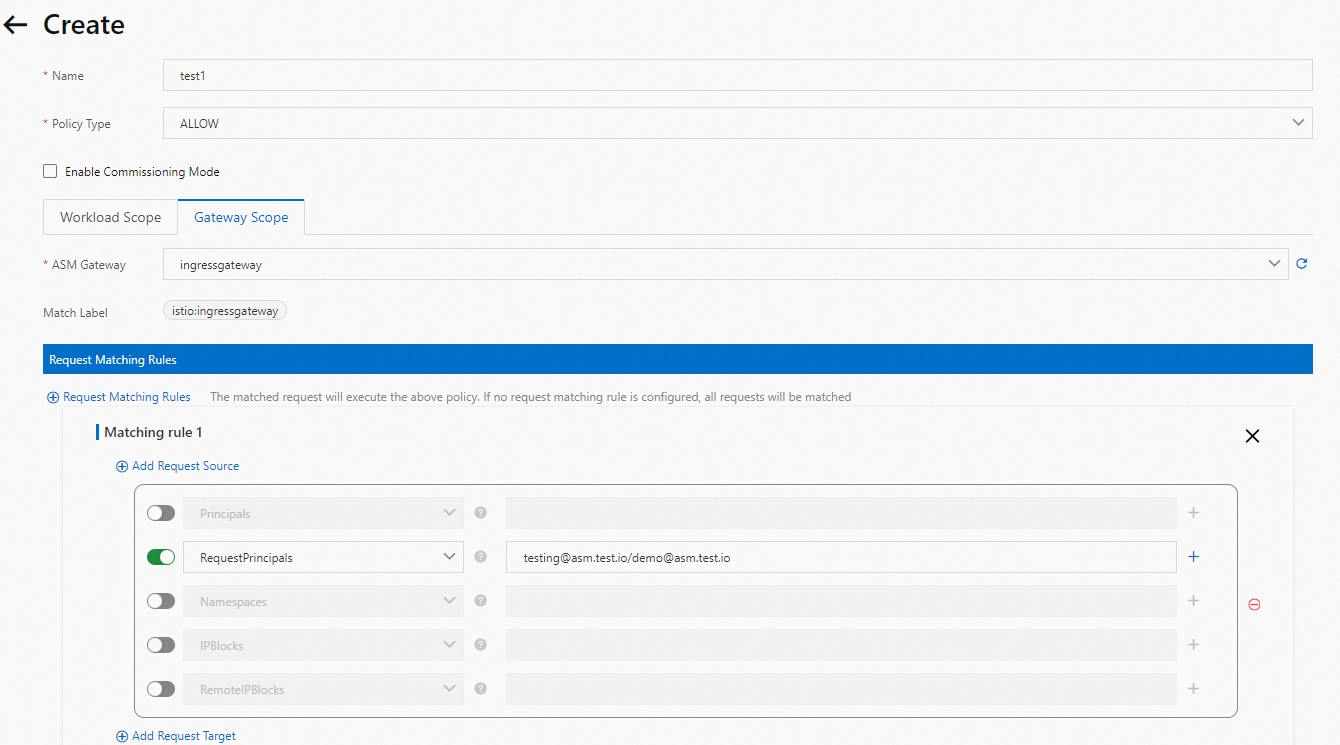
Verify
Request with the original JWT (iss only, no sub) -- rejected:
curl -I -H "Authorization: Bearer $TOKEN" http://<ingress-gateway-ip>/Expected response:
HTTP/1.1 401 Unauthorized
www-authenticate: Bearer realm="http://<ingress-gateway-ip>/", error="invalid_token"
content-length: 79
content-type: text/plain
date: Fri, 18 Mar 2022 07:59:00 GMT
server: istio-envoy
The policy requires the principal testing@asm.test.io/demo@asm.test.io, but the original JWT only contains iss: testing@asm.test.io without a sub claim, so the request is denied.
Generate a new JWT with both issuer and subject:
In the JWT tool, update the PAYLOAD section:
{
  "iss": "testing@asm.test.io",
  "sub": "demo@asm.test.io"
}
Keep all other settings the same as before.
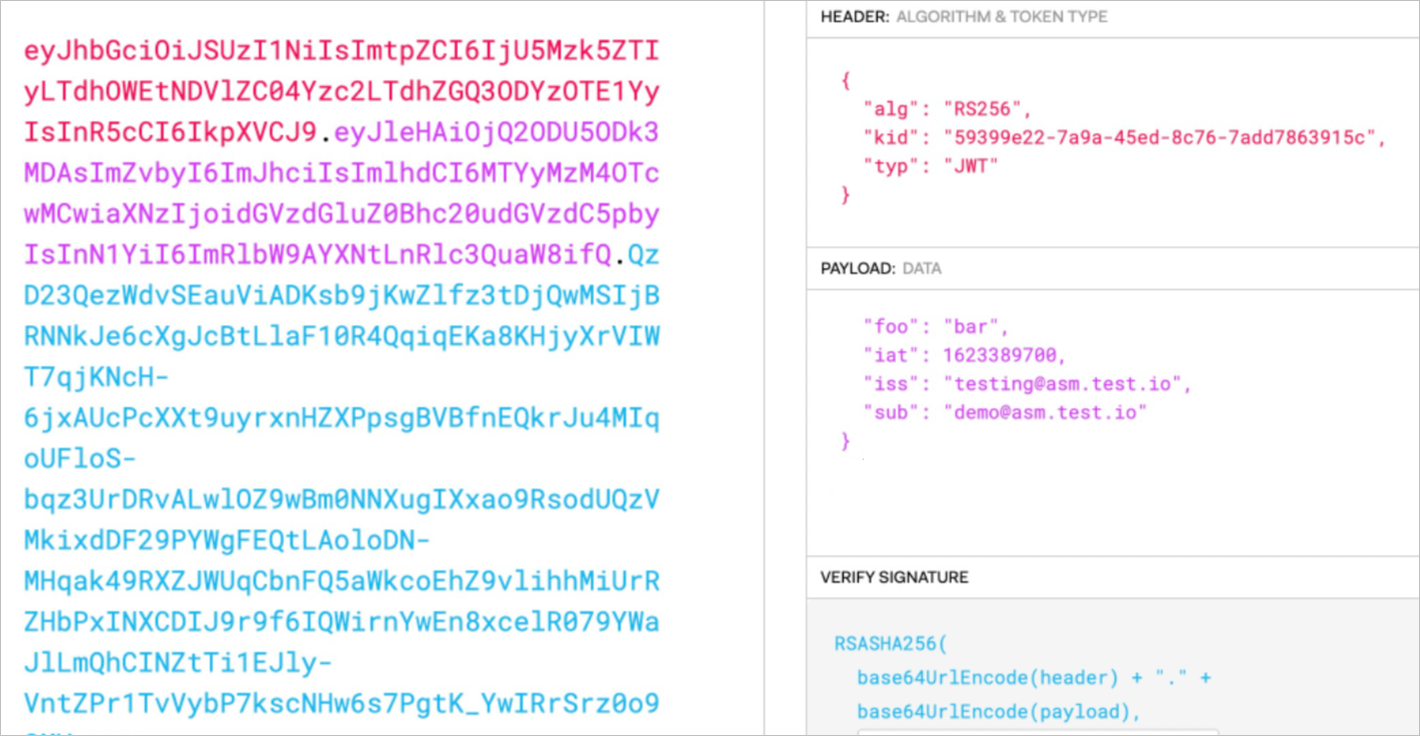
Request with the new JWT -- allowed:
curl -I -H "Authorization: Bearer $TOKEN" http://<ingress-gateway-ip>/Expected response:
HTTP/1.1 200 OK
server: istio-envoy
date: Fri, 18 Mar 2022 07:27:54 GMT
Only the JWT matching the exact <issuer>/<subject> principal passes the authorization check.
Best practices
Use jwksUri for key rotation
This guide uses inline jwks with key material embedded directly in the policy. For production deployments, use the jwksUri field to point to a remote JSON Web Key Set (JWKS) endpoint:
Supports automatic key rotation without updating the RequestAuthentication resource.
Follows the standard OpenID Connect (OIDC) discovery pattern.
Keeps the policy configuration clean and readable.
Adopt a default-deny posture
Always pair RequestAuthentication with an AuthorizationPolicy. RequestAuthentication alone does not block tokenless requests -- it only rejects *invalid* tokens. Create an ALLOW policy with RequestPrincipals: * to require a valid JWT on every request.
Exempt health check paths
Not every path needs JWT authentication. Use the to.operation.paths field in AuthorizationPolicy to exempt paths like /healthz or /readyz from token requirements while protecting application endpoints.
Troubleshooting
Requests return 401 even with a valid token
| Possible cause | Solution |
|---|---|
| Expired token | Check the exp claim in the JWT payload. Generate a new token if it has expired. |
| Issuer mismatch | Confirm that the iss claim matches the issuer value in the RequestAuthentication policy. |
| Key mismatch | Verify that the JWK in the policy matches the key pair used to sign the token. Regenerate both if needed. |
| Clock skew | Verify that cluster node clocks are synchronized. JWT validation is sensitive to time differences. |
Requests return 403 after adding an AuthorizationPolicy
| Possible cause | Solution |
|---|---|
| Missing principal | An ALLOW policy with RequestPrincipals: * requires a valid JWT. Requests without a token are denied because no authenticated principal can be established. |
| Wrong principal format | When restricting by issuer and subject, the expected format is <issuer>/<subject>. Verify that both iss and sub claims are present in your JWT. |
JWKS fetch failures (when using jwksUri)
Verify that the JWKS endpoint URL is accessible from within the mesh.
Check that the endpoint returns valid JSON with a
keysarray.Review Envoy proxy logs for detailed error messages:
kubectl logs <ingress-gateway-pod> -c istio-proxy
Related topics
Configure mutual TLS authentication in ASM -- Secure service-to-service communication within the mesh.
Istio security concepts -- Learn more about the RequestAuthentication and AuthorizationPolicy model.