Each NGINX Ingress Controller ConfigMap parameter maps to one or more Istio or Envoy settings on a Service Mesh (ASM) gateway. The tables in this topic cover the most commonly used parameters and their ASM equivalents. For the complete parameter list, see the Ingress NGINX ConfigMap reference.
How ASM gateway configuration differs from NGINX
NGINX consolidates all settings in a single ConfigMap. ASM splits configuration across three Istio resource types:
| Istio resource | What it controls | Typical NGINX equivalents |
|---|---|---|
| Gateway | Listener ports, TLS termination, HTTPS redirects | ssl-redirect |
| VirtualService | Routing rules, path rewrites, per-route timeouts | Route-level annotations |
| DestinationRule | Connection pools, keepalive, circuit breaking | keep-alive-requests, proxy-connect-timeout, upstream-keepalive-*, max-worker-connections |
To apply a mapped setting, create or update the corresponding Istio resource in your cluster.
Connection and keepalive parameters
These parameters control connection pooling, keepalive behavior, and connection limits. In ASM, most of them map to the connectionPool section of a DestinationRule.
| NGINX parameter | NGINX behavior | ASM equivalent |
|---|---|---|
keep-alive-requests | Maximum requests per keepalive connection. The connection closes after this limit. | connectionPool.maxRequestsPerConnection in a DestinationRule. |
max-worker-connections | Maximum simultaneous connections per NGINX worker process. | connectionPool.tcp.maxConnections in a DestinationRule. Sets the maximum connections to a single destination host. |
upstream-keepalive-connections | Maximum idle keepalive connections cached per worker process. | connectionPool.tcp.maxConnections in a DestinationRule. Note This field controls the total connection count to a host, not just idle connections. A direct 1:1 value transfer is not appropriate because the scoping differs. Review your connection requirements before migrating this value. |
upstream-keepalive-timeout | Timeout for idle keepalive connections to upstream servers. | connectionPool.http.idleTimeout in a DestinationRule. |
Example: configure connection pooling in a DestinationRule
apiVersion: networking.istio.io/v1
kind: DestinationRule
metadata:
  name: my-service-pool
spec:
  host: my-service.prod.svc.cluster.local
  trafficPolicy:
    connectionPool:
      tcp:
        maxConnections: 100
      http:
        maxRequestsPerConnection: 1000
        idleTimeout: 60s
Timeout parameters
| NGINX parameter | NGINX behavior | ASM equivalent |
|---|---|---|
proxy-connect-timeout | Timeout for establishing a connection to an upstream server. Cannot exceed 75 seconds. | connectionPool.http.connectTimeout in a DestinationRule. |
Example: set a connect timeout
apiVersion: networking.istio.io/v1
kind: DestinationRule
metadata:
  name: my-service-timeout
spec:
  host: my-service.prod.svc.cluster.local
  trafficPolicy:
    connectionPool:
      http:
        connectTimeout: 30s
Header handling parameters
These parameters control how headers are processed, generated, and validated.
| NGINX parameter | NGINX behavior | ASM equivalent |
|---|---|---|
allow-backend-server-header | Allows the backend to return its own Server header instead of the default NGINX string. | Enabled by default on ASM gateways. Default: true. |
enable-underscores-in-headers | Allows underscores in HTTP header names. | Maps to the Envoy headers_with_underscores_action parameter. Default: true. |
ignore-invalid-headers | Ignores headers with invalid names. Valid names contain letters, digits, and hyphens. Underscore support depends on the underscores_in_headers setting. | Envoy uses a Header Validator. Without explicit configuration, Envoy applies its default validation and returns 400 Bad Request for invalid headers. 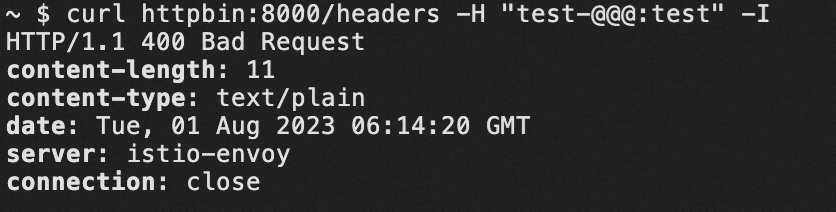 |
generate-request-id | Generates a random X-Request-ID value if the header is absent from the incoming request. | Maps to the Envoy generate_request_id parameter. Default: true. Modify through an ASM plugin. |
server-tokens | Controls whether NGINX sends its version in the Server response header and on error pages. Default: disabled. | ASM gateways set the Server header to the Envoy header by default. Error pages do not display version information. |
Forwarding and proxy headers
Three NGINX parameters control X-Forwarded-For behavior. In Istio, they all map to the gateway network topology configuration.
| NGINX parameter | NGINX behavior | ASM equivalent |
|---|---|---|
compute-full-forwarded-for | Appends the remote address to the X-Forwarded-For header instead of replacing it. | Controlled by the Envoy use_remote_address parameter. Default: true. See Configuring gateway network topology. |
forwarded-for-header | Specifies which header identifies the client's originating IP address. | ASM gateways use X-Forwarded-For and do not support custom header names for this purpose. |
use-forwarded-headers | When true, NGINX passes through incoming X-Forwarded-* headers. This is typical when NGINX sits behind another Layer 7 proxy. When false, NGINX ignores incoming values and generates new ones. | See Configuring gateway network topology. |
TLS and redirect parameters
| NGINX parameter | NGINX behavior | ASM equivalent |
|---|---|---|
ssl-redirect | Globally redirects HTTP to HTTPS when the server has a TLS certificate. | Configure tls.httpsRedirect in a Gateway resource. |
Example: redirect HTTP to HTTPS
apiVersion: networking.istio.io/v1
kind: Gateway
metadata:
  name: my-gateway
spec:
  servers:
  - port:
      number: 80
      name: http
      protocol: HTTP
    hosts:
    - "example.com"
    tls:
      httpsRedirect: true  # Returns 301 for HTTP requests
Logging and observability
| NGINX parameter | NGINX behavior | ASM equivalent |
|---|---|---|
log-format-upstream | Customizes the upstream log format. | Configure the log format on the Observability Settings page in the ASM console. See Configure observability settings. |
Request body limits
| NGINX parameter | NGINX behavior | ASM equivalent |
|---|---|---|
proxy-body-size | Maximum allowed client request body size. Returns 413 Request Entity Too Large if exceeded. | ASM does not have an equivalent setting. Use chunked transfer encoding for large payloads. |
Worker and process parameters
| NGINX parameter | NGINX behavior | ASM equivalent |
|---|---|---|
reuse-port | Creates a separate listening socket per worker process by using SO_REUSEPORT, which allows the kernel to distribute connections across workers. Default: true. | Enabled by default on ASM gateways. Default: true. |
worker-cpu-affinity | Binds worker processes to specific CPU sets. | Not applicable in container environments. Use the default setting. |
Configuration extensibility
| NGINX parameter | NGINX behavior | ASM equivalent |
|---|---|---|
allow-snippet-annotations | Allows custom NGINX configuration snippets in Ingress annotations. | ASM does not support annotation-based snippets. Edit the IstioGateway YAML directly to customize gateway behavior. |
References
Ingress NGINX ConfigMap reference -- Full list of NGINX Ingress Controller ConfigMap parameters
Istio DestinationRule API reference -- Connection pool, load balancing, and circuit breaker settings
Istio Gateway API reference -- Port listeners, TLS termination, and HTTPS redirects
Configuring gateway network topology --
X-Forwarded-Forprocessing and trusted proxy configurationEnvoy Header Validator -- Header validation rules
Configure observability settings -- Access log customization in the ASM console