When you run Python microservices across distributed environments, you need end-to-end visibility into requests as they cross service boundaries. The SkyWalking Python agent automatically instruments 30+ libraries -- including Django, Flask, Redis, Kafka, and MySQL -- so you can report trace data to Managed Service for OpenTelemetry with minimal code changes.
This topic walks you through installing the agent, obtaining your endpoint, and configuring the agent to report traces.
Background information
Apache SkyWalking is an application performance monitoring (APM) and distributed tracing system designed for microservices, cloud-native architectures, and containers such as Docker, Kubernetes, and Mesos. SkyWalking-Python is the official Python agent repository of SkyWalking. You can use SkyWalking-Python to automatically instrument third-party libraries such as Kafka, AIOHTTP, Redis, and WebSockets.
Prerequisites
Before you begin, make sure that you have:
Python 3.7 or later installed
A Python project where you want to add tracing
pip available to install packages
Install the SkyWalking Python agent:
pip install apache-skywalkingGet the SkyWalking endpoint
To connect the agent to Managed Service for OpenTelemetry, obtain the endpoint and authentication token from the console.
Log on to the Managed Service for OpenTelemetry console.
In the left-side navigation pane, click Cluster Configurations. On the page that appears, click the Access point information tab.
In the top navigation bar, select a region. In the Cluster Information section, turn on Show Token.
Set the Client parameter to SkyWalking.
In the Related Information column, copy the endpoint and token.
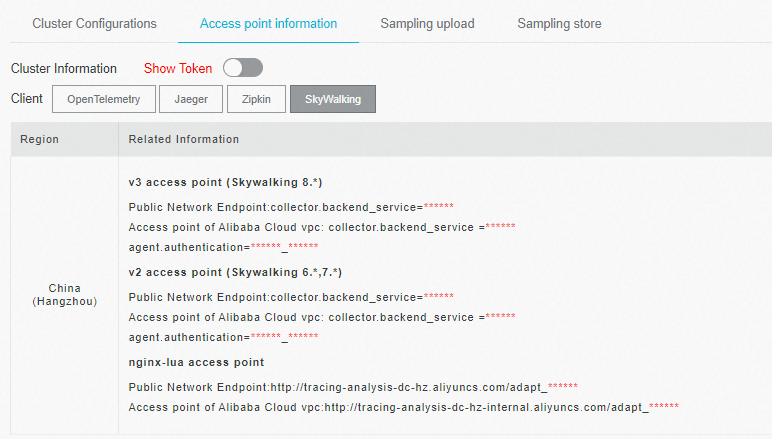
If your application runs in an Alibaba Cloud production environment, use the VPC endpoint. Otherwise, use the public endpoint.
Instrument your Python application
The SkyWalking Python agent supports two configuration methods: in-code configuration and environment variables. Pick whichever fits your deployment.
Option 1: Configure in code
Import the SkyWalking modules and call config.init() with your endpoint, token, and service name before starting the agent.
from skywalking import agent, config

# Replace placeholders with your actual values
config.init(
    agent_collector_backend_services='<endpoint>',   # SkyWalking endpoint from the console
    agent_authentication='<auth-token>',             # Authentication token from the console
    agent_name='<your-service-name>',                # A name to identify your application
    agent_protocol='grpc',                           # Reporting protocol
    agent_log_reporter_active=False,                 # Disable log reporting (not supported)
    agent_meter_reporter_active=False                # Disable meter reporting (not supported)
)

agent.start()
Replace the following placeholders with your actual values:
| Placeholder | Description | Example |
|---|---|---|
<endpoint> | SkyWalking endpoint from the console | <your-endpoint> |
<auth-token> | Authentication token from the console | xxxxxxxxxxxx |
<your-service-name> | A name to identify your application in traces | my-python-app |
Option 2: Configure through environment variables
Set the following environment variables and start the agent in your code without passing parameters.
export SW_AGENT_COLLECTOR_BACKEND_SERVICES=<endpoint>
export SW_AGENT_AUTHENTICATION=<auth-token>
export SW_AGENT_NAME=<your-service-name>
export SW_AGENT_PROTOCOL=grpc
export SW_AGENT_LOG_REPORTER_ACTIVE=false
export SW_AGENT_METER_REPORTER_ACTIVE=false
Then start the agent in your Python code:
from skywalking import agent, config

config.init()
agent.start()
For Docker containers, add the environment variables to the environment section of your docker-compose.yaml file:
services:
  my-app:
    image: my-python-app
    environment:
      SW_AGENT_COLLECTOR_BACKEND_SERVICES: "<endpoint>"
      SW_AGENT_AUTHENTICATION: "<auth-token>"
      SW_AGENT_NAME: "my-python-app"
      SW_AGENT_PROTOCOL: "grpc"
      SW_AGENT_LOG_REPORTER_ACTIVE: "false"
      SW_AGENT_METER_REPORTER_ACTIVE: "false"
After you configure the agent, restart your application to start reporting trace data.
Configuration reference
For more information about optional parameters, see the Apache SkyWalking Python configuration reference.
Sample code
For a complete working example, see the skywalking-demo repository on GitHub.
The demo application uses Flask to handle HTTP requests and route them between services, with MySQL database operations along the way. After the agent reports data, you can view cross-process traces and MySQL call monitoring data in the Managed Service for OpenTelemetry console.
FAQ
Method not found: skywalking.v3.LogReportService/collect
Managed Service for OpenTelemetry does not support SkyWalking log collection. Disable the log reporter:
config.init(agent_log_reporter_active=False)Or set the environment variable:
export SW_AGENT_LOG_REPORTER_ACTIVE=falseMethod not found: skywalking.v3.MeterReportService/collect when reporting over gRPC
The backend does not support SkyWalking metrics collection. Disable the meter reporter:
config.init(agent_meter_reporter_active=False)Or set the environment variable:
export SW_AGENT_METER_REPORTER_ACTIVE=falseBoth parameters are already set to False in the configuration examples in this topic. If you followed the examples, these errors do not occur.