A private endpoint lets a Grafana workspace access data sources and domain names inside a virtual private cloud (VPC) that is not reachable over the public internet. It installs a network interface controller (NIC) inside the VPC so the workspace can reach VPC-internal resources directly.
How it works
After you enable a private endpoint, Managed Service for Grafana installs a private NIC in the VPC and vSwitch that you specify. The workspace receives a private domain name that resolves to an IP address within that VPC. All traffic between the Grafana workspace and VPC-internal data sources flows through this private NIC instead of the public internet.
A security group controls which resources the workspace can reach through the private NIC. You manage these rules in the Elastic Compute Service (ECS) console, the same way you manage any other security group in your VPC.
Prerequisites
Before you begin, ensure that you have:
Managed Service for Grafana Pro or Advanced Edition activated
A Grafana workspace created after August 31, 2023
A VPC in the same region as the Grafana workspace
Private endpoints are available only for workspaces created after August 31, 2023.
Enable a private endpoint
Log on to the ARMS console. In the left-side navigation pane, choose Managed Service for Grafana > Workspace Management.
On the Workspace Management page, click the ID of the workspace that you want to configure.
In the left-side navigation pane, click Whitelists and Security Groups.
On the Private IP Address Whitelist tab, click Enable Private Endpoint.
In the dialog box that appears, configure the following parameters:
Parameter Description VPC The VPC where your data sources reside. The Grafana workspace connects to this VPC through the private NIC. vSwitch The vSwitch (subnet) within the selected VPC. The private NIC is created in this vSwitch and receives a private IP address from its CIDR block. Security Group The security group that controls inbound and outbound traffic for the private NIC. Make sure the security group rules allow traffic to your target data sources. Click Activate.
Verify the private endpoint
After activation, the Private IP Address Whitelist tab displays the following information:
| Field | Description |
|---|---|
| VPC | The VPC that the private NIC is installed in |
| vSwitch | The vSwitch that the private NIC belongs to |
| Security group | The security group attached to the private NIC |
| Private domain name | The domain name that resolves to the private IP address inside the VPC |
| Security group policy | The current security group rule summary |
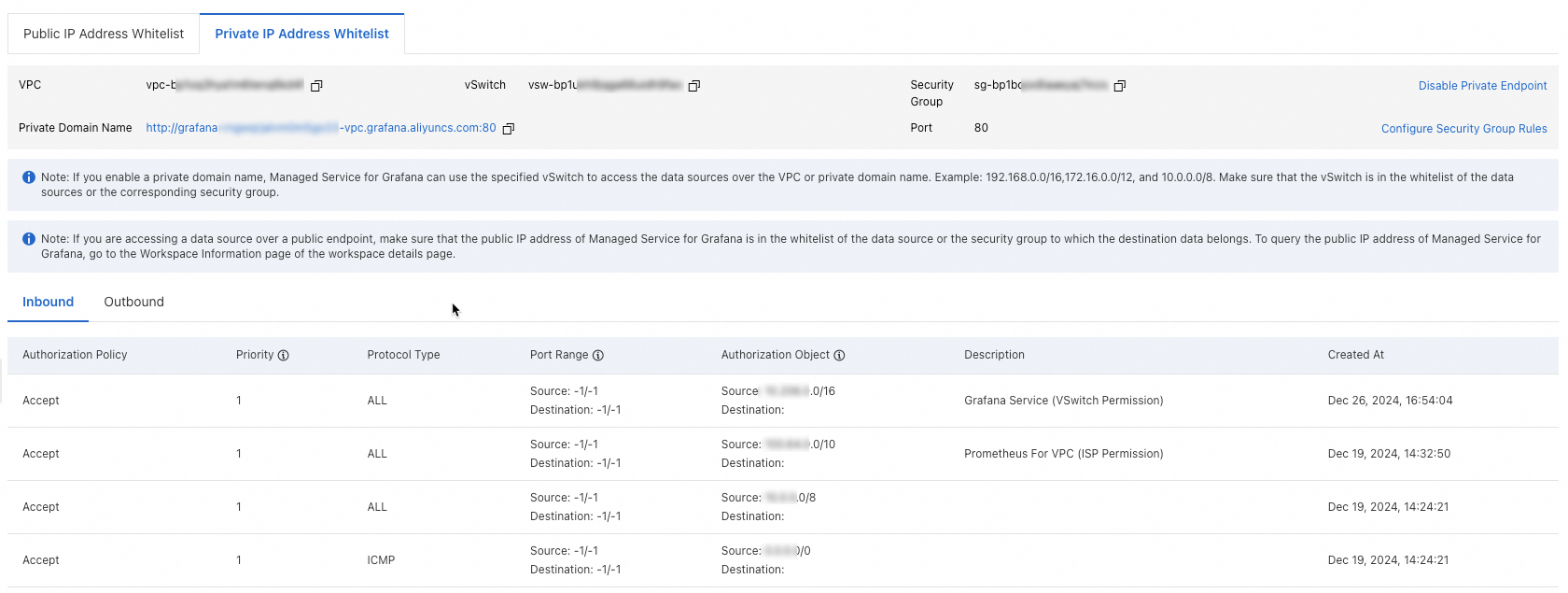
The private domain name also appears on the Basic Information page of the workspace.

Use the private domain name when you configure data sources in Grafana. Avoid hardcoding the private IP address, because the address may change if you disable and re-enable the private endpoint.
Configure security group rules
To adjust which resources the Grafana workspace can access through the private endpoint:
On the Private IP Address Whitelist tab, click Configure Security Group Rules in the upper-right corner.
Configure the rules in the ECS console as prompted.
Make sure the security group rules allow traffic from the Grafana workspace to the ports and IP addresses of your target data sources.
Disable the private endpoint
To remove the private NIC and stop the private domain name from resolving:
On the Private IP Address Whitelist tab, click Disable Private Endpoint.
In the confirmation dialog box, click OK.
Disabling the private endpoint removes the private NIC and stops the private domain name from resolving. The Grafana workspace loses access to any VPC-internal data sources that depend on this connection.