ARMS provides system policies such as AliyunARMSFullAccess and AliyunARMSReadOnlyAccess, but these policies are coarse-grained. They grant access to all ARMS features or none. To control access at the feature level, such as allowing a RAM user to manage alerts but not application monitoring, create a custom policy and attach it to the RAM user.
Prerequisites
Before you begin, make sure that:
You have a basic understanding of Resource Access Management (RAM) policy elements, including
Action,Effect, andResourceThe ReadOnlyAccess or AliyunARMSReadOnlyAccess system policy is attached to the RAM user, so the user can log on to the Application Real-Time Monitoring Service (ARMS) console
ImportantTo grant the read-only permissions on all ARMS features to a specific resource group, you must attach the AliyunARMSReadOnlyAccess policy to and grant the ReadTraceApp permission to the resource group. Otherwise, ARMS cannot display the application list that belongs to the authenticated resource group.
The AliyunARMSFullAccess system policy is not attached to the RAM user
Step 1: Create a custom policy
Log on to the RAM console as a RAM user who has administrative rights.
In the left-side navigation pane, choose .
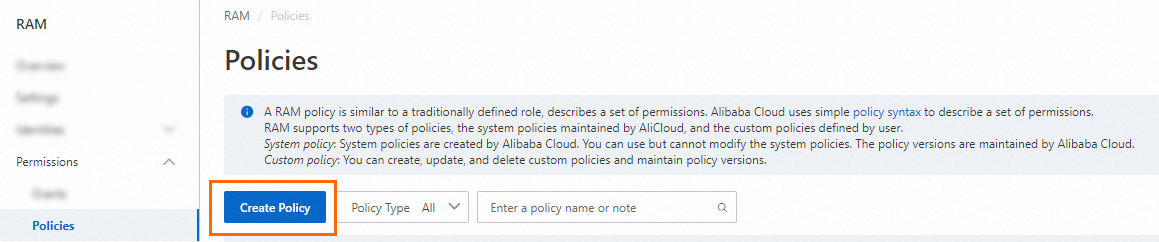
On the Policies page, click Create Policy.
On the Create Policy page, click the JSON tab and enter your policy in the editor.
The following example grants read and write access to all Alert Management features:
{
    "Version": "1",
    "Statement": [
        {
            "Action": [
                "arms:Describe*",
                "arms:List*",
                "arms:Get*",
                "arms:Search*",
                "arms:Check*",
                "arms:Query*",
                "arms:*Alert*",
                "arms:*Contact*",
                "arms:*Webhook*",
                "arms:*PrometheusRule*",
                "arms:*Alarm*",
                "arms:*Incident*",
                "arms:*DispatchRule*",
                "arms:*NotificationPolicy*",
                "arms:*EventBridgeIntegration*",
                "arms:*PrometheusAlertTemplate*",
                "arms:*IncidentWorkFlow*",
                "arms:*EscalationPolicy*",
                "arms:UpdateAlertCommercialConfig",
                "arms:*OnCallSchedule",
                "arms:UpdateIntegration",
                "arms:ListIntegration"
            ],
            "Resource": "*",
            "Effect": "Allow"
        }
    ]
}
For details about each action, see Alert Management actions.
Click Optimize in the upper part. In the Optimize message, click Perform to optimize the policy.
The system performs the following operations during the advanced optimization:
Split resources or conditions that are incompatible with actions.
Narrow down resources.
Deduplicate or merge policy statements.
On the Create Policy page, click OK.
In the Create Policy dialog box, configure the Policy Name and Description parameters and click OK.
Step 2: Attach the custom policy to a RAM user
Log on to the RAM console as a RAM administrator.
In the left-side navigation pane, choose .
On the Users page, find the required RAM user, and click Add Permissions in the Actions column.

You can also select multiple RAM users and click Add Permissions in the lower part of the page to grant permissions to the RAM users at a time.
In the Grant Permission panel, grant permissions to the RAM user.
Configure the Resource Scope parameter.
Account: The authorization takes effect on the current Alibaba Cloud account.
Resource Group: The authorization takes effect on a specific resource group.
ImportantIf you select Resource Group for the Resource Scope parameter, make sure that the required cloud service supports resource groups. For more information, see Services that work with Resource Group. For more information about how to grant permissions on a resource group, see Use a resource group to restrict a RAM user to managing only specific ECS instances.
Configure the Principal parameter.
The principal is the RAM user to which you want to grant permissions. The current RAM user is automatically selected.
Configure the Policy parameter.
A policy contains a set of permissions. Policies can be classified into system policies and custom policies. You can select multiple policies at a time.
System policies: policies that are created by Alibaba Cloud. You can use but cannot modify these policies. Version updates of the policies are maintained by Alibaba Cloud. For more information, see Services that work with RAM.
NoteThe system automatically identifies high-risk system policies, such as AdministratorAccess and AliyunRAMFullAccess. We recommend that you do not grant unnecessary permissions by attaching high-risk policies.
Custom policies: You can manage and update custom policies based on your business requirements. You can create, update, and delete custom policies. For more information, see Create a custom policy.
Click OK.
Click Close.
Alert Management actions
The following tables list the actions available for Alert Management, grouped by functional area. Use these actions in the Action element of your custom policy.
Alerts and rules
| Action | Description | Access level |
|---|---|---|
arms:*Alert* | All alert operations | Read/Write |
arms:*Alarm* | Alert operations in the legacy Alert Management system | Read/Write |
arms:*DispatchRule* | Dispatch rules in the legacy Alert Management system | Read/Write |
arms:*Incident* | Alert events | Read/Write |
arms:*IncidentWorkFlow* | Incident workflows | Read/Write |
Notification and escalation
| Action | Description | Access level |
|---|---|---|
arms:*Contact* | Contacts and contact groups | Read/Write |
arms:*Webhook* | Webhooks | Read/Write |
arms:*NotificationPolicy* | Notification policies | Read/Write |
arms:*EscalationPolicy* | Escalation policies | Read/Write |
arms:*OnCallSchedule | On-call schedules | Read/Write |
Prometheus integration
| Action | Description | Access level |
|---|---|---|
arms:*PrometheusRule* | Managed Service for Prometheus alert rules | Read/Write |
arms:*PrometheusAlertTemplate* | Managed Service for Prometheus alert rule templates | Read/Write |
Integration and configuration
| Action | Description | Access level |
|---|---|---|
arms:*EventBridgeIntegration* | EventBridge integration | Read/Write |
arms:UpdateIntegration | Update integrations | Write |
arms:ListIntegration | List integrations | Read |
arms:UpdateAlertCommercialConfig | Update alert internationalization configurations | Write |
Policy elements
Each RAM policy consists of the following elements:
| Element | Description |
|---|---|
Effect | Whether the statement allows or denies access. Valid values: Allow, Deny. |
Action | The API operations that the policy covers. Supports wildcards (*). |
Resource | The resources that the policy applies to. Use * for all resources. |
For the full syntax reference, see Policy elements.