The live watermark feature adds watermarks to live videos. This document describes how to use this feature.
Scenarios
Copyright protection: Watermarks are a common way to protect copyrights. ApsaraVideo Live provides a live watermark feature that you can use to add watermarks to your live videos.
Advertising: During a live stream, you can use the live watermark feature to display advertising labels, such as information about promotional events.
Prerequisites
To use the watermark feature, you need a watermark image. ApsaraVideo Live supports only image watermarks. If you need a text watermark, you must create a PNG image of the text. Watermark images can be in JPG or PNG format.
A URL for the watermark image is required. ApsaraVideo Live can only access watermark images from a URL. You cannot upload images directly. When you use the live watermark feature, ensure that ApsaraVideo Live has long-term access to your watermark image URL.
Feature configuration
To use the live watermark feature, you must configure its settings. The configuration has two parts: Watermark Templates and Watermark Rules.
A watermark template configures watermark information, such as the watermark's position in the live video, its transparency, and the watermark image URL.
A watermark rule configures the rules for applying the watermark. This includes the AppName, StreamName, and the associated watermark template.
Configure a watermark template
You can configure a watermark template in the console or using the API.
In the navigation pane on the left, select Feature Management > Watermarks. On the Watermarks page, click the Watermark Templates tab.
Select the streaming domain that you want to configure.
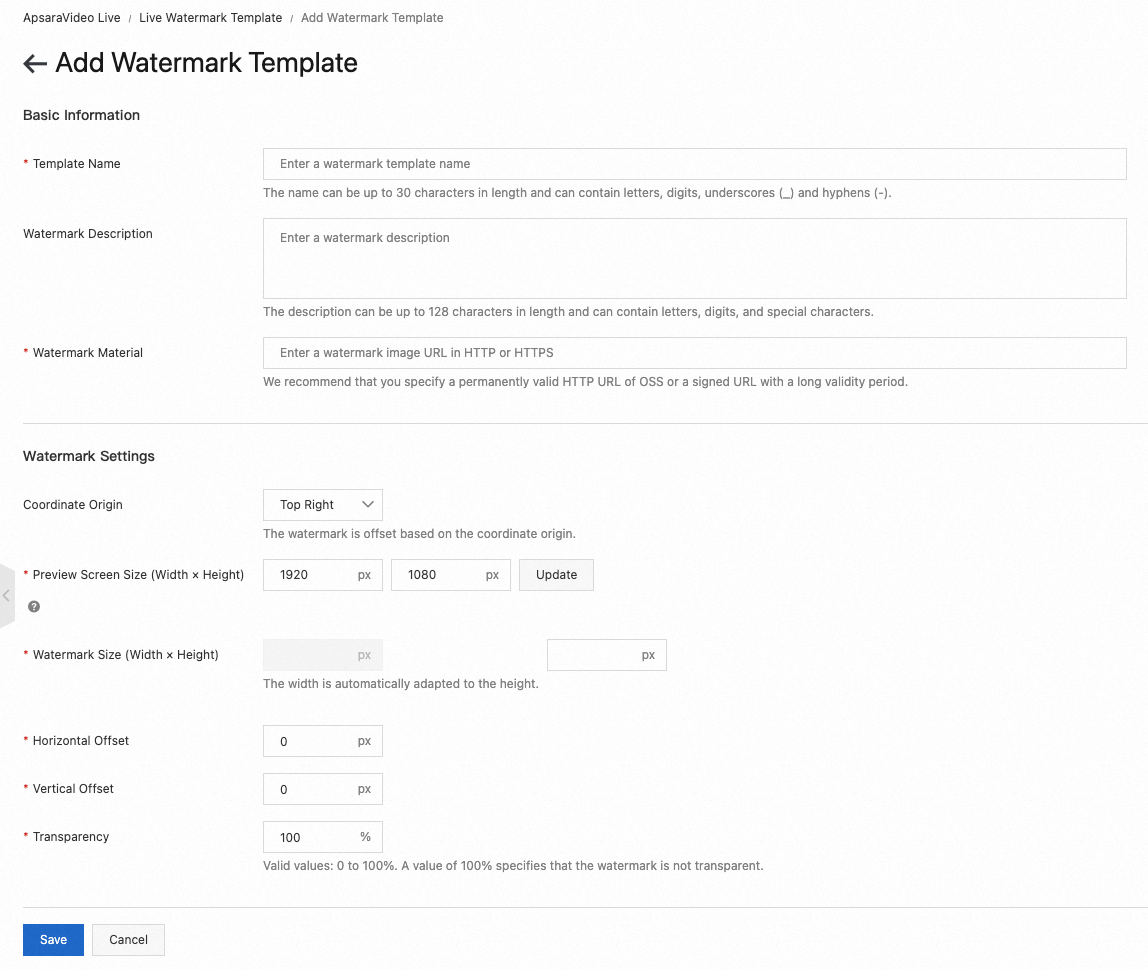
Click Add Watermark Template and configure the watermark template.
You can view the watermark effect in the preview area. You can adjust the preview screen size, watermark size, and position to preview the effect in real time. The following table describes the watermark template parameters.
Parameter
Description
Template Name
The name of the watermark template. It can contain Chinese characters, English letters, digits, hyphens (-), and underscores (_). The name can be up to 30 characters long.
Watermark Description
A description of the watermark. It can contain Chinese characters, English letters, digits, and other characters. The description can be up to 128 characters long.
Watermark Material
Enter the URL of the watermark image. The URL must start with HTTP or HTTPS.
We recommend that you use a permanent HTTP URL of an Object Storage Service (OSS) object or a URL that is valid for a long time.
Coordinate Origin
The approximate position of the watermark in the output video. This marks the initial position of the watermark. The watermark is offset from this origin. Valid values:
Top right (default)
Bottom right
Top left
Bottom left
Preview Screen Size (Width × Height)
Enter the dimensions based on your actual video to preview the display position and effect. Unit: pixel.
Watermark Size (Width × Height)
The size of the watermark image. The width is automatically adjusted based on the height.
Valid values: [0, 4096].
Unit: pixel.
Horizontal Offset
The horizontal offset of the watermark in the output video.
Valid values: [0, 4096].
Unit: pixel.
Vertical Offset
The vertical offset of the watermark in the output video.
Valid values: [0, 4096].
Unit: pixel.
Transparency
The transparency of the watermark image. A smaller value indicates higher transparency. A value of 100% means the image is opaque.
Valid values: [0, 100].
Unit: percent.
Click Save to complete the watermark template configuration.
After you add a watermark template, a dialog box appears that prompts you to add a watermark rule. You can click Add to add a watermark rule for this template. For more information about how to configure watermark rules, see Configure a watermark rule.
Note
After you configure the watermark template, you must add a watermark rule and associate it with the template. The AppName and StreamName in the rule must match the AppName and StreamName in the ingest URL. Then, you must restart the stream ingest for the watermark to appear during playback.
Configure a watermark template using the API
We recommend that you use the console to configure a watermark template, even if you plan to use the API. The parameters for a watermark template are complex. The console provides a visualization interface where you can drag the watermark and preview its position.
First, add a watermark template in the ApsaraVideo Live console.
After you configure the parameters, query the watermark template information.
// This file is auto-generated, don't edit it. Thanks.
package demo;

import com.aliyun.auth.credentials.Credential;
import com.aliyun.auth.credentials.provider.StaticCredentialProvider;
import com.aliyun.core.http.HttpClient;
import com.aliyun.core.http.HttpMethod;
import com.aliyun.core.http.ProxyOptions;
import com.aliyun.httpcomponent.httpclient.ApacheAsyncHttpClientBuilder;
import com.aliyun.sdk.service.live20161101.models.*;
import com.aliyun.sdk.service.live20161101.*;
import com.google.gson.Gson;
import darabonba.core.RequestConfiguration;
import darabonba.core.client.ClientOverrideConfiguration;
import darabonba.core.utils.CommonUtil;
import darabonba.core.TeaPair;

//import javax.net.ssl.KeyManager;
//import javax.net.ssl.X509TrustManager;
import java.net.InetSocketAddress;
import java.time.Duration;
import java.util.*;
import java.util.concurrent.CompletableFuture;
import java.io.*;

public class DescribeLiveStreamWatermarks {
    public static void main(String[] args) throws Exception {

        // HttpClient Configuration
        /*HttpClient httpClient = new ApacheAsyncHttpClientBuilder()
                .connectionTimeout(Duration.ofSeconds(10)) // Set the connection timeout. The default is 10 seconds.
                .responseTimeout(Duration.ofSeconds(10)) // Set the response timeout. The default is 20 seconds.
                .maxConnections(128) // Set the connection pool size.
                .maxIdleTimeOut(Duration.ofSeconds(50)) // Set the connection pool timeout. The default is 30 seconds.
                // Configure the proxy.
                .proxy(new ProxyOptions(ProxyOptions.Type.HTTP, new InetSocketAddress("<your-proxy-hostname>", 9001))
                        .setCredentials("<your-proxy-username>", "<your-proxy-password>"))
                // For an HTTPS connection, you must configure the certificate or ignore it (.ignoreSSL(true)).
                .x509TrustManagers(new X509TrustManager[]{})
                .keyManagers(new KeyManager[]{})
                .ignoreSSL(false)
                .build();*/

        // Configure credentials, including the AccessKey ID, AccessKey secret, and token.
        StaticCredentialProvider provider = StaticCredentialProvider.create(Credential.builder()
                // Make sure that the ALIBABA_CLOUD_ACCESS_KEY_ID and ALIBABA_CLOUD_ACCESS_KEY_SECRET environment variables are set.
                .accessKeyId(System.getenv("ALIBABA_CLOUD_ACCESS_KEY_ID"))
                .accessKeySecret(System.getenv("ALIBABA_CLOUD_ACCESS_KEY_SECRET"))
                //.securityToken(System.getenv("ALIBABA_CLOUD_SECURITY_TOKEN")) // Use an STS token.
                .build());

        // Configure the client.
        AsyncClient client = AsyncClient.builder()
                .region("<Your RegionId>") // Region ID.
                //.httpClient(httpClient) // Use the configured HttpClient. Otherwise, the default Apache HttpClient is used.
                .credentialsProvider(provider)
                //.serviceConfiguration(Configuration.create()) // Service-level configuration.
                // Override the client-level configuration. You can set the endpoint, HTTP request parameters, and more.
                .overrideConfiguration(
                        ClientOverrideConfiguration.create()
                                  // For the endpoint, see https://api.aliyun.com/product/live.
                                .setEndpointOverride("live.aliyuncs.com")
                        //.setConnectTimeout(Duration.ofSeconds(30))
                )
                .build();

        // Set the parameters for the API request.
        DescribeLiveStreamWatermarksRequest describeLiveStreamWatermarksRequest = DescribeLiveStreamWatermarksRequest.builder()
                .regionId("<Your RegionId>")
                .domain("<Your Domain>")
                .keyWord("<Your KeyWord>")
                // Override the request-level configuration. You can set HTTP request parameters and more.
                // .requestConfiguration(RequestConfiguration.create().setHttpHeaders(new HttpHeaders()))
                .build();

        // Asynchronously get the return value of the API request.
        CompletableFuture<DescribeLiveStreamWatermarksResponse> response = client.describeLiveStreamWatermarks(describeLiveStreamWatermarksRequest);
        // Synchronously get the return value of the API request.
        DescribeLiveStreamWatermarksResponse resp = response.get();
        System.out.println(new Gson().toJson(resp));
        // Asynchronously process the return value.
        /*response.thenAccept(resp -> {
            System.out.println(new Gson().toJson(resp));
        }).exceptionally(throwable -> { // Handle exceptions.
            System.out.println(throwable.getMessage());
            return null;
        });*/

        // Finally, close the client.
        client.close();
    }

}
Note
You can query the list of watermark templates by template ID or name. For more information, see the DescribeLiveStreamWatermarks API documentation.
You can save the queried watermark template information as a template in your business system.
Add the watermark template configuration.
// This file is auto-generated, don't edit it. Thanks.
package demo;

import com.aliyun.auth.credentials.Credential;
import com.aliyun.auth.credentials.provider.StaticCredentialProvider;
import com.aliyun.core.http.HttpClient;
import com.aliyun.core.http.HttpMethod;
import com.aliyun.core.http.ProxyOptions;
import com.aliyun.httpcomponent.httpclient.ApacheAsyncHttpClientBuilder;
import com.aliyun.sdk.service.live20161101.models.*;
import com.aliyun.sdk.service.live20161101.*;
import com.google.gson.Gson;
import darabonba.core.RequestConfiguration;
import darabonba.core.client.ClientOverrideConfiguration;
import darabonba.core.utils.CommonUtil;
import darabonba.core.TeaPair;

//import javax.net.ssl.KeyManager;
//import javax.net.ssl.X509TrustManager;
import java.net.InetSocketAddress;
import java.time.Duration;
import java.util.*;
import java.util.concurrent.CompletableFuture;
import java.io.*;

public class AddLiveStreamWatermark {
    public static void main(String[] args) throws Exception {

        // HttpClient Configuration
        /*HttpClient httpClient = new ApacheAsyncHttpClientBuilder()
                .connectionTimeout(Duration.ofSeconds(10)) // Set the connection timeout. The default is 10 seconds.
                .responseTimeout(Duration.ofSeconds(10)) // Set the response timeout. The default is 20 seconds.
                .maxConnections(128) // Set the connection pool size.
                .maxIdleTimeOut(Duration.ofSeconds(50)) // Set the connection pool timeout. The default is 30 seconds.
                // Configure the proxy.
                .proxy(new ProxyOptions(ProxyOptions.Type.HTTP, new InetSocketAddress("<your-proxy-hostname>", 9001))
                        .setCredentials("<your-proxy-username>", "<your-proxy-password>"))
                // For an HTTPS connection, you must configure the certificate or ignore it (.ignoreSSL(true)).
                .x509TrustManagers(new X509TrustManager[]{})
                .keyManagers(new KeyManager[]{})
                .ignoreSSL(false)
                .build();*/

        // Configure credentials, including the AccessKey ID, AccessKey secret, and token.
        StaticCredentialProvider provider = StaticCredentialProvider.create(Credential.builder()
                // Make sure that the ALIBABA_CLOUD_ACCESS_KEY_ID and ALIBABA_CLOUD_ACCESS_KEY_SECRET environment variables are set.
                .accessKeyId(System.getenv("ALIBABA_CLOUD_ACCESS_KEY_ID"))
                .accessKeySecret(System.getenv("ALIBABA_CLOUD_ACCESS_KEY_SECRET"))
                //.securityToken(System.getenv("ALIBABA_CLOUD_SECURITY_TOKEN")) // Use an STS token.
                .build());

        // Configure the client.
        AsyncClient client = AsyncClient.builder()
                .region("<Your RegionId>") // Region ID.
                //.httpClient(httpClient) // Use the configured HttpClient. Otherwise, the default Apache HttpClient is used.
                .credentialsProvider(provider)
                //.serviceConfiguration(Configuration.create()) // Service-level configuration.
                // Override the client-level configuration. You can set the endpoint, HTTP request parameters, and more.
                .overrideConfiguration(
                        ClientOverrideConfiguration.create()
                                  // For the endpoint, see https://api.aliyun.com/product/live.
                                .setEndpointOverride("live.aliyuncs.com")
                        //.setConnectTimeout(Duration.ofSeconds(30))
                )
                .build();

        // Set the parameters for the API request.
        AddLiveStreamWatermarkRequest addLiveStreamWatermarkRequest = AddLiveStreamWatermarkRequest.builder()
                .regionId("<Your RegionId>")
                .type(1)
                .name("<Your Name>")
                .refWidth(1920)
                .refHeight(1080)
                .xOffset(50F)
                .yOffset(100F)
                .height(200)
                .transparency(255)
                .offsetCorner("<Your OffsetCorner>")
                .pictureUrl("<Your PictureUrl>")
                // Override the request-level configuration. You can set HTTP request parameters and more.
                // .requestConfiguration(RequestConfiguration.create().setHttpHeaders(new HttpHeaders()))
                .build();

        // Asynchronously get the return value of the API request.
        CompletableFuture<AddLiveStreamWatermarkResponse> response = client.addLiveStreamWatermark(addLiveStreamWatermarkRequest);
        // Synchronously get the return value of the API request.
        AddLiveStreamWatermarkResponse resp = response.get();
        System.out.println(new Gson().toJson(resp));
        // Asynchronously process the return value.
        /*response.thenAccept(resp -> {
            System.out.println(new Gson().toJson(resp));
        }).exceptionally(throwable -> { // Handle exceptions.
            System.out.println(throwable.getMessage());
            return null;
        });*/

        // Finally, close the client.
        client.close();
    }

}
In the navigation pane on the left, select Feature Management > Watermarks. On the Watermarks page, click the Watermark Rules tab.
Select the streaming domain that you want to configure.
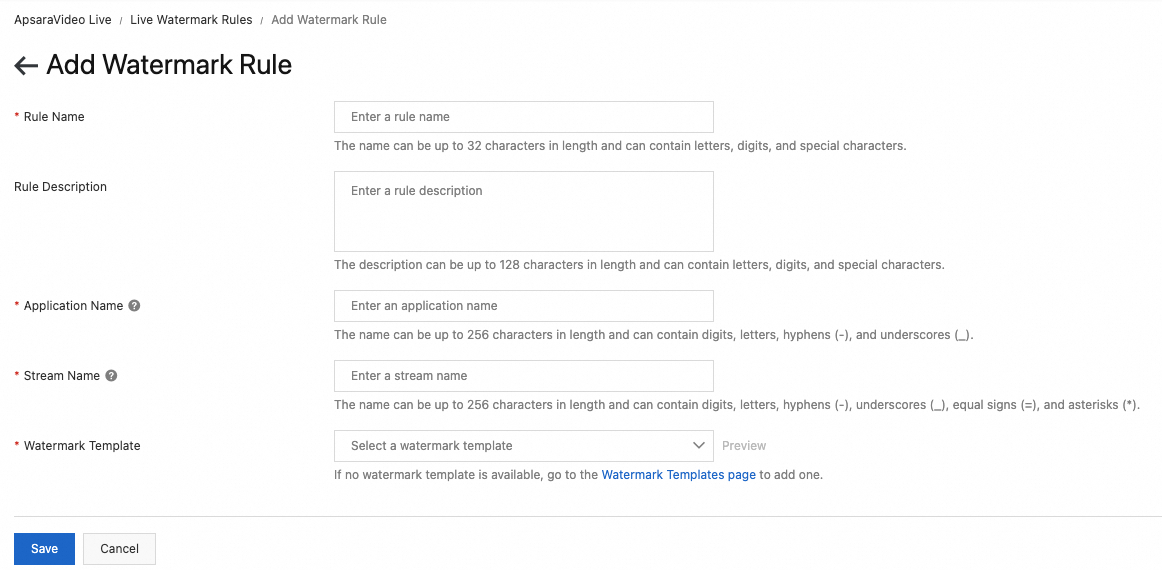
Click Add Watermark Rule.
The following table describes the watermark rule parameters.
Parameter
Description
Rule Name
The name of the watermark rule. It can contain Chinese characters, English letters, digits, and other characters. The name can be up to 32 characters long.
Rule Description
A description of the watermark rule. It can contain Chinese characters, English letters, digits, and other characters. The description can be up to 128 characters long.
Application Name
The name of the application to which the stream belongs. The AppName must be the same as the AppName in the ingest URL for the watermark template to take effect. It can contain digits, uppercase and lowercase letters, hyphens (-), and underscores (_). The name can be up to 256 characters long.
Stream Name
The name of the live stream. The rules are as follows:
Enter a specific stream name to match only that stream. Example: liveStreamA.
You can use wildcard matching.
To match all live streams, enter an asterisk (*).
You can also perform prefix or suffix matching. The format requires that you enclose matching items in parentheses (), separate multiple items with a vertical line |, and place the asterisk (*) for fuzzy matching only at the beginning or end of the string. For example, (abc|123)* matches all streams with a prefix of abc or 123, and *(t1|t2) matches all streams with a suffix of t1 or t2.
It can contain digits, uppercase and lowercase letters, hyphens (-), underscores (_), asterisks (*), and equal signs (=). The name can be up to 256 characters long.
Watermark Templates
Select a configured watermark template. If no template is available, add one first. For more information, see Configure a watermark template.
Click Save to complete the watermark rule configuration.
Note
After you configure the watermark rule, you must restart the stream ingest for the watermark to appear during playback.
Configure a watermark rule using the API
// This file is auto-generated, don't edit it. Thanks.
package demo;

import com.aliyun.auth.credentials.Credential;
import com.aliyun.auth.credentials.provider.StaticCredentialProvider;
import com.aliyun.core.http.HttpClient;
import com.aliyun.core.http.HttpMethod;
import com.aliyun.core.http.ProxyOptions;
import com.aliyun.httpcomponent.httpclient.ApacheAsyncHttpClientBuilder;
import com.aliyun.sdk.service.live20161101.models.*;
import com.aliyun.sdk.service.live20161101.*;
import com.google.gson.Gson;
import darabonba.core.RequestConfiguration;
import darabonba.core.client.ClientOverrideConfiguration;
import darabonba.core.utils.CommonUtil;
import darabonba.core.TeaPair;

//import javax.net.ssl.KeyManager;
//import javax.net.ssl.X509TrustManager;
import java.net.InetSocketAddress;
import java.time.Duration;
import java.util.*;
import java.util.concurrent.CompletableFuture;
import java.io.*;

public class AddLiveStreamWatermarkRule {
    public static void main(String[] args) throws Exception {

        // HttpClient Configuration
        /*HttpClient httpClient = new ApacheAsyncHttpClientBuilder()
                .connectionTimeout(Duration.ofSeconds(10)) // Set the connection timeout. The default is 10 seconds.
                .responseTimeout(Duration.ofSeconds(10)) // Set the response timeout. The default is 20 seconds.
                .maxConnections(128) // Set the connection pool size.
                .maxIdleTimeOut(Duration.ofSeconds(50)) // Set the connection pool timeout. The default is 30 seconds.
                // Configure the proxy.
                .proxy(new ProxyOptions(ProxyOptions.Type.HTTP, new InetSocketAddress("<your-proxy-hostname>", 9001))
                        .setCredentials("<your-proxy-username>", "<your-proxy-password>"))
                // For an HTTPS connection, you must configure the certificate or ignore it (.ignoreSSL(true)).
                .x509TrustManagers(new X509TrustManager[]{})
                .keyManagers(new KeyManager[]{})
                .ignoreSSL(false)
                .build();*/

        // Configure credentials, including the AccessKey ID, AccessKey secret, and token.
        StaticCredentialProvider provider = StaticCredentialProvider.create(Credential.builder()
                // Make sure that the ALIBABA_CLOUD_ACCESS_KEY_ID and ALIBABA_CLOUD_ACCESS_KEY_SECRET environment variables are set.
                .accessKeyId(System.getenv("ALIBABA_CLOUD_ACCESS_KEY_ID"))
                .accessKeySecret(System.getenv("ALIBABA_CLOUD_ACCESS_KEY_SECRET"))
                //.securityToken(System.getenv("ALIBABA_CLOUD_SECURITY_TOKEN")) // Use an STS token.
                .build());

        // Configure the client.
        AsyncClient client = AsyncClient.builder()
                .region("<Your RegionId>") // Region ID.
                //.httpClient(httpClient) // Use the configured HttpClient. Otherwise, the default Apache HttpClient is used.
                .credentialsProvider(provider)
                //.serviceConfiguration(Configuration.create()) // Service-level configuration.
                // Override the client-level configuration. You can set the endpoint, HTTP request parameters, and more.
                .overrideConfiguration(
                        ClientOverrideConfiguration.create()
                                  // For the endpoint, see https://api.aliyun.com/product/live.
                                .setEndpointOverride("live.aliyuncs.com")
                        //.setConnectTimeout(Duration.ofSeconds(30))
                )
                .build();

        // Set the parameters for the API request.
        AddLiveStreamWatermarkRuleRequest addLiveStreamWatermarkRuleRequest = AddLiveStreamWatermarkRuleRequest.builder()
                .regionId("<Your RegionId>")
                .name("<Your Name>")
                .domain("<Your Domain>")
                .app("<Your App>")
                .stream("<Your Stream>")
                .templateId("<Your TemplateId>")
                // Override the request-level configuration. You can set HTTP request parameters and more.
                // .requestConfiguration(RequestConfiguration.create().setHttpHeaders(new HttpHeaders()))
                .build();

        // Asynchronously get the return value of the API request.
        CompletableFuture<AddLiveStreamWatermarkRuleResponse> response = client.addLiveStreamWatermarkRule(addLiveStreamWatermarkRuleRequest);
        // Synchronously get the return value of the API request.
        AddLiveStreamWatermarkRuleResponse resp = response.get();
        System.out.println(new Gson().toJson(resp));
        // Asynchronously process the return value.
        /*response.thenAccept(resp -> {
            System.out.println(new Gson().toJson(resp));
        }).exceptionally(throwable -> { // Handle exceptions.
            System.out.println(throwable.getMessage());
            return null;
        });*/

        // Finally, close the client.
        client.close();
    }

}
Note
The <AppName> can contain up to 256 characters, including digits, uppercase and lowercase letters, hyphens (-), and underscores (_). Asterisks (*) are Not Supported.
Watermark rule matching has a priority. Rules in which <StreamName> is not an asterisk (*) are matched first.
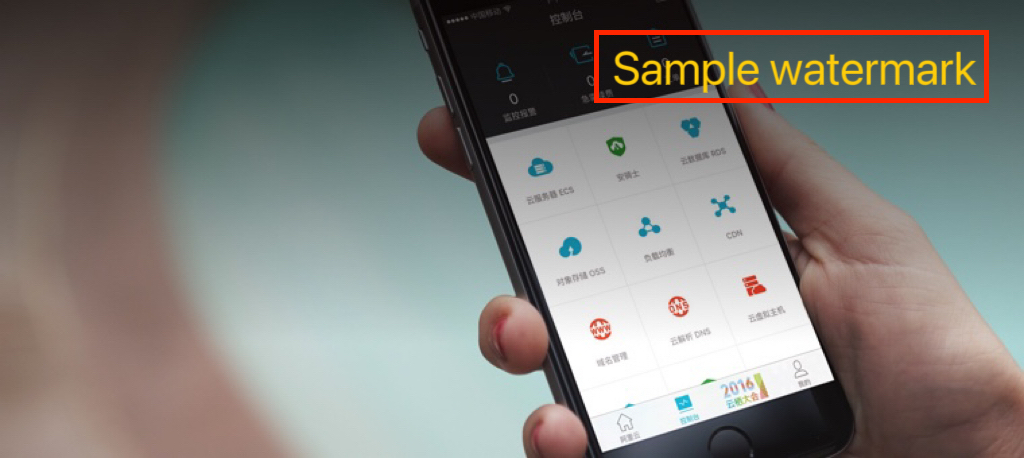
After you configure the watermark template and watermark rule, you can use the live watermark feature by starting stream ingest and playback. The following figure shows an example of a live video that has a watermark.
In this example, the watermark was created from a PNG image of the text.
Set watermark transparency
The following code shows an example of how to set the watermark transparency:
// The transparency of the watermark. A smaller value indicates higher transparency. Valid values: 0 to 255. Default value: 255.
addLiveStreamWatermarkRequest.setTransparency(255);
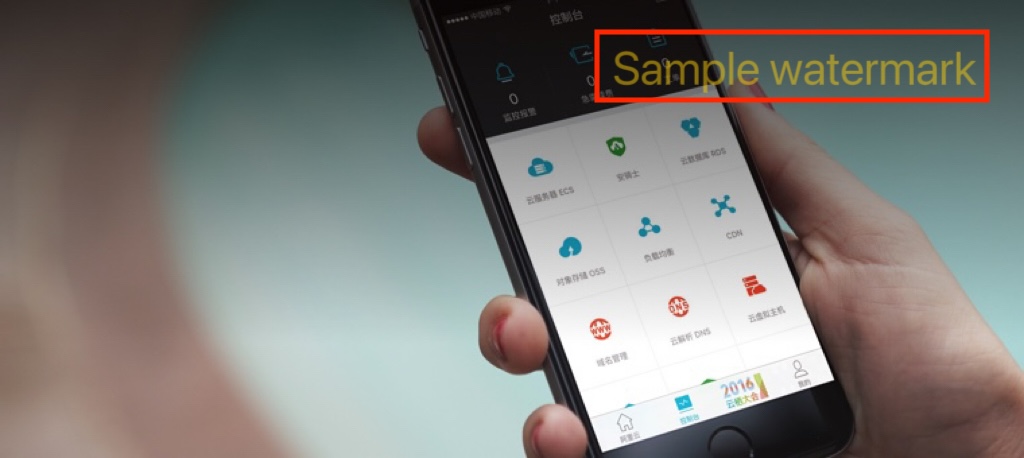
For example, if you set the transparency to 128, the sample live video appears as shown in the following figure:
Update a watermark
Sample code for updating a watermark template
// This file is auto-generated, don't edit it. Thanks.
package demo;

import com.aliyun.auth.credentials.Credential;
import com.aliyun.auth.credentials.provider.StaticCredentialProvider;
import com.aliyun.core.http.HttpClient;
import com.aliyun.core.http.HttpMethod;
import com.aliyun.core.http.ProxyOptions;
import com.aliyun.httpcomponent.httpclient.ApacheAsyncHttpClientBuilder;
import com.aliyun.sdk.service.live20161101.models.*;
import com.aliyun.sdk.service.live20161101.*;
import com.google.gson.Gson;
import darabonba.core.RequestConfiguration;
import darabonba.core.client.ClientOverrideConfiguration;
import darabonba.core.utils.CommonUtil;
import darabonba.core.TeaPair;

//import javax.net.ssl.KeyManager;
//import javax.net.ssl.X509TrustManager;
import java.net.InetSocketAddress;
import java.time.Duration;
import java.util.*;
import java.util.concurrent.CompletableFuture;
import java.io.*;

public class UpdateLiveStreamWatermark {
    public static void main(String[] args) throws Exception {

        // HttpClient Configuration
        /*HttpClient httpClient = new ApacheAsyncHttpClientBuilder()
                .connectionTimeout(Duration.ofSeconds(10)) // Set the connection timeout. The default is 10 seconds.
                .responseTimeout(Duration.ofSeconds(10)) // Set the response timeout. The default is 20 seconds.
                .maxConnections(128) // Set the connection pool size.
                .maxIdleTimeOut(Duration.ofSeconds(50)) // Set the connection pool timeout. The default is 30 seconds.
                // Configure the proxy.
                .proxy(new ProxyOptions(ProxyOptions.Type.HTTP, new InetSocketAddress("<your-proxy-hostname>", 9001))
                        .setCredentials("<your-proxy-username>", "<your-proxy-password>"))
                // For an HTTPS connection, you must configure the certificate or ignore it (.ignoreSSL(true)).
                .x509TrustManagers(new X509TrustManager[]{})
                .keyManagers(new KeyManager[]{})
                .ignoreSSL(false)
                .build();*/

        // Configure credentials, including the AccessKey ID, AccessKey secret, and token.
        StaticCredentialProvider provider = StaticCredentialProvider.create(Credential.builder()
                // Make sure that the ALIBABA_CLOUD_ACCESS_KEY_ID and ALIBABA_CLOUD_ACCESS_KEY_SECRET environment variables are set.
                .accessKeyId(System.getenv("ALIBABA_CLOUD_ACCESS_KEY_ID"))
                .accessKeySecret(System.getenv("ALIBABA_CLOUD_ACCESS_KEY_SECRET"))
                //.securityToken(System.getenv("ALIBABA_CLOUD_SECURITY_TOKEN")) // Use an STS token.
                .build());

        // Configure the client.
        AsyncClient client = AsyncClient.builder()
                .region("<Your RegionId>") // Region ID.
                //.httpClient(httpClient) // Use the configured HttpClient. Otherwise, the default Apache HttpClient is used.
                .credentialsProvider(provider)
                //.serviceConfiguration(Configuration.create()) // Service-level configuration.
                // Override the client-level configuration. You can set the endpoint, HTTP request parameters, and more.
                .overrideConfiguration(
                        ClientOverrideConfiguration.create()
                                  // For the endpoint, see https://api.aliyun.com/product/live.
                                .setEndpointOverride("live.aliyuncs.com")
                        //.setConnectTimeout(Duration.ofSeconds(30))
                )
                .build();

        // Set the parameters for the API request.
        UpdateLiveStreamWatermarkRequest updateLiveStreamWatermarkRequest = UpdateLiveStreamWatermarkRequest.builder()
                .regionId("<Your RegionId>")
                .templateId("<Your templateId>")
                .name("<Your name>")
                .description("<Your description>")
                // Override the request-level configuration. You can set HTTP request parameters and more.
                // .requestConfiguration(RequestConfiguration.create().setHttpHeaders(new HttpHeaders()))
                .build();

        // Asynchronously get the return value of the API request.
        CompletableFuture<UpdateLiveStreamWatermarkResponse> response = client.updateLiveStreamWatermark(updateLiveStreamWatermarkRequest);
        // Synchronously get the return value of the API request.
        UpdateLiveStreamWatermarkResponse resp = response.get();
        System.out.println(new Gson().toJson(resp));
        // Asynchronously process the return value.
        /*response.thenAccept(resp -> {
            System.out.println(new Gson().toJson(resp));
        }).exceptionally(throwable -> { // Handle exceptions.
            System.out.println(throwable.getMessage());
            return null;
        });*/

        // Finally, close the client.
        client.close();
    }

}
Note
The <regionId> must be the same as the region of the live center for the domain name that corresponds to the template. To obtain the region ID, see Service endpoints.
// This file is auto-generated, don't edit it. Thanks.
package demo;

import com.aliyun.auth.credentials.Credential;
import com.aliyun.auth.credentials.provider.StaticCredentialProvider;
import com.aliyun.core.http.HttpClient;
import com.aliyun.core.http.HttpMethod;
import com.aliyun.core.http.ProxyOptions;
import com.aliyun.httpcomponent.httpclient.ApacheAsyncHttpClientBuilder;
import com.aliyun.sdk.service.live20161101.models.*;
import com.aliyun.sdk.service.live20161101.*;
import com.google.gson.Gson;
import darabonba.core.RequestConfiguration;
import darabonba.core.client.ClientOverrideConfiguration;
import darabonba.core.utils.CommonUtil;
import darabonba.core.TeaPair;

//import javax.net.ssl.KeyManager;
//import javax.net.ssl.X509TrustManager;
import java.net.InetSocketAddress;
import java.time.Duration;
import java.util.*;
import java.util.concurrent.CompletableFuture;
import java.io.*;

public class UpdateLiveStreamWatermarkRule {
    public static void main(String[] args) throws Exception {

        // HttpClient Configuration
        /*HttpClient httpClient = new ApacheAsyncHttpClientBuilder()
                .connectionTimeout(Duration.ofSeconds(10)) // Set the connection timeout. The default is 10 seconds.
                .responseTimeout(Duration.ofSeconds(10)) // Set the response timeout. The default is 20 seconds.
                .maxConnections(128) // Set the connection pool size.
                .maxIdleTimeOut(Duration.ofSeconds(50)) // Set the connection pool timeout. The default is 30 seconds.
                // Configure the proxy.
                .proxy(new ProxyOptions(ProxyOptions.Type.HTTP, new InetSocketAddress("<your-proxy-hostname>", 9001))
                        .setCredentials("<your-proxy-username>", "<your-proxy-password>"))
                // For an HTTPS connection, you must configure the certificate or ignore it (.ignoreSSL(true)).
                .x509TrustManagers(new X509TrustManager[]{})
                .keyManagers(new KeyManager[]{})
                .ignoreSSL(false)
                .build();*/

        // Configure credentials, including the AccessKey ID, AccessKey secret, and token.
        StaticCredentialProvider provider = StaticCredentialProvider.create(Credential.builder()
                // Make sure that the ALIBABA_CLOUD_ACCESS_KEY_ID and ALIBABA_CLOUD_ACCESS_KEY_SECRET environment variables are set.
                .accessKeyId(System.getenv("ALIBABA_CLOUD_ACCESS_KEY_ID"))
                .accessKeySecret(System.getenv("ALIBABA_CLOUD_ACCESS_KEY_SECRET"))
                //.securityToken(System.getenv("ALIBABA_CLOUD_SECURITY_TOKEN")) // Use an STS token.
                .build());

        // Configure the client.
        AsyncClient client = AsyncClient.builder()
                .region("<Your RegionId>") // Region ID.
                //.httpClient(httpClient) // Use the configured HttpClient. Otherwise, the default Apache HttpClient is used.
                .credentialsProvider(provider)
                //.serviceConfiguration(Configuration.create()) // Service-level configuration.
                // Override the client-level configuration. You can set the endpoint, HTTP request parameters, and more.
                .overrideConfiguration(
                        ClientOverrideConfiguration.create()
                                  // For the endpoint, see https://api.aliyun.com/product/live.
                                .setEndpointOverride("live.aliyuncs.com")
                        //.setConnectTimeout(Duration.ofSeconds(30))
                )
                .build();

        // Set the parameters for the API request.
        UpdateLiveStreamWatermarkRuleRequest updateLiveStreamWatermarkRuleRequest = UpdateLiveStreamWatermarkRuleRequest.builder()
                .regionId("<Your RegionId>")
                .ruleId("")
                // Override the request-level configuration. You can set HTTP request parameters and more.
                // .requestConfiguration(RequestConfiguration.create().setHttpHeaders(new HttpHeaders()))
                .build();

        // Asynchronously get the return value of the API request.
        CompletableFuture<UpdateLiveStreamWatermarkRuleResponse> response = client.updateLiveStreamWatermarkRule(updateLiveStreamWatermarkRuleRequest);
        // Synchronously get the return value of the API request.
        UpdateLiveStreamWatermarkRuleResponse resp = response.get();
        System.out.println(new Gson().toJson(resp));
        // Asynchronously process the return value.
        /*response.thenAccept(resp -> {
            System.out.println(new Gson().toJson(resp));
        }).exceptionally(throwable -> { // Handle exceptions.
            System.out.println(throwable.getMessage());
            return null;
        });*/

        // Finally, close the client.
        client.close();
    }

}
Note
The <regionId> must be the same as the region of the live center for the domain name that corresponds to the template. To obtain the region ID, see Service endpoints.
When you update a watermark rule, you can update other information in the rule. For more information, see the UpdateLiveStreamWatermarkRule API documentation.
After you update a watermark template or rule, you must restart the stream ingest for the changes to take effect. However, you may sometimes need to update a watermark during a live stream. You can do this using the dynamically update watermarks feature.
// This file is auto-generated, don't edit it. Thanks.
package demo;

import com.aliyun.auth.credentials.Credential;
import com.aliyun.auth.credentials.provider.StaticCredentialProvider;
import com.aliyun.core.http.HttpClient;
import com.aliyun.core.http.HttpMethod;
import com.aliyun.core.http.ProxyOptions;
import com.aliyun.httpcomponent.httpclient.ApacheAsyncHttpClientBuilder;
import com.aliyun.sdk.service.live20161101.models.*;
import com.aliyun.sdk.service.live20161101.*;
import com.google.gson.Gson;
import darabonba.core.RequestConfiguration;
import darabonba.core.client.ClientOverrideConfiguration;
import darabonba.core.utils.CommonUtil;
import darabonba.core.TeaPair;

//import javax.net.ssl.KeyManager;
//import javax.net.ssl.X509TrustManager;
import java.net.InetSocketAddress;
import java.time.Duration;
import java.util.*;
import java.util.concurrent.CompletableFuture;
import java.io.*;

public class DynamicUpdateWaterMarkStreamRule {
    public static void main(String[] args) throws Exception {

        // HttpClient Configuration
        /*HttpClient httpClient = new ApacheAsyncHttpClientBuilder()
                .connectionTimeout(Duration.ofSeconds(10)) // Set the connection timeout. The default is 10 seconds.
                .responseTimeout(Duration.ofSeconds(10)) // Set the response timeout. The default is 20 seconds.
                .maxConnections(128) // Set the connection pool size.
                .maxIdleTimeOut(Duration.ofSeconds(50)) // Set the connection pool timeout. The default is 30 seconds.
                // Configure the proxy.
                .proxy(new ProxyOptions(ProxyOptions.Type.HTTP, new InetSocketAddress("<your-proxy-hostname>", 9001))
                        .setCredentials("<your-proxy-username>", "<your-proxy-password>"))
                // For an HTTPS connection, you must configure the certificate or ignore it (.ignoreSSL(true)).
                .x509TrustManagers(new X509TrustManager[]{})
                .keyManagers(new KeyManager[]{})
                .ignoreSSL(false)
                .build();*/

        // Configure credentials, including the AccessKey ID, AccessKey secret, and token.
        StaticCredentialProvider provider = StaticCredentialProvider.create(Credential.builder()
                // Make sure that the ALIBABA_CLOUD_ACCESS_KEY_ID and ALIBABA_CLOUD_ACCESS_KEY_SECRET environment variables are set.
                .accessKeyId(System.getenv("ALIBABA_CLOUD_ACCESS_KEY_ID"))
                .accessKeySecret(System.getenv("ALIBABA_CLOUD_ACCESS_KEY_SECRET"))
                //.securityToken(System.getenv("ALIBABA_CLOUD_SECURITY_TOKEN")) // Use an STS token.
                .build());

        // Configure the client.
        AsyncClient client = AsyncClient.builder()
                .region("<Your RegionID>") // Region ID.
                //.httpClient(httpClient) // Use the configured HttpClient. Otherwise, the default Apache HttpClient is used.
                .credentialsProvider(provider)
                //.serviceConfiguration(Configuration.create()) // Service-level configuration.
                // Override the client-level configuration. You can set the endpoint, HTTP request parameters, and more.
                .overrideConfiguration(
                        ClientOverrideConfiguration.create()
                                  // For the endpoint, see https://api.aliyun.com/product/live.
                                .setEndpointOverride("live.aliyuncs.com")
                        //.setConnectTimeout(Duration.ofSeconds(30))
                )
                .build();

        // Set the parameters for the API request.
        DynamicUpdateWaterMarkStreamRuleRequest dynamicUpdateWaterMarkStreamRuleRequest = DynamicUpdateWaterMarkStreamRuleRequest.builder()
                .regionId("<Your RegionId>")
                .domain("<Your Domain>")
                .app("<Your App>")
                .stream("<Your Stream>")
                .templateId("<Your TemplateId>")
                // Override the request-level configuration. You can set HTTP request parameters and more.
                // .requestConfiguration(RequestConfiguration.create().setHttpHeaders(new HttpHeaders()))
                .build();

        // Asynchronously get the return value of the API request.
        CompletableFuture<DynamicUpdateWaterMarkStreamRuleResponse> response = client.dynamicUpdateWaterMarkStreamRule(dynamicUpdateWaterMarkStreamRuleRequest);
        // Synchronously get the return value of the API request.
        DynamicUpdateWaterMarkStreamRuleResponse resp = response.get();
        System.out.println(new Gson().toJson(resp));
        // Asynchronously process the return value.
        /*response.thenAccept(resp -> {
            System.out.println(new Gson().toJson(resp));
        }).exceptionally(throwable -> { // Handle exceptions.
            System.out.println(throwable.getMessage());
            return null;
        });*/

        // Finally, close the client.
        client.close();
    }

}
Important
The <TemplateId> can be the ID of a new template or the original template. After you call this method, the watermark is updated based on the latest configuration of the template. This includes the image, transparency, and position.
Currently, you Cannot Dynamically Updatewatermark rules if fuzzy matching is configured for StreamName.
Delete a watermark template
To delete a Watermark Templates, you must first delete the associated watermark rule.
Sample code for deleting a watermark rule
// This file is auto-generated, don't edit it. Thanks.
package demo;

import com.aliyun.auth.credentials.Credential;
import com.aliyun.auth.credentials.provider.StaticCredentialProvider;
import com.aliyun.core.http.HttpClient;
import com.aliyun.core.http.HttpMethod;
import com.aliyun.core.http.ProxyOptions;
import com.aliyun.httpcomponent.httpclient.ApacheAsyncHttpClientBuilder;
import com.aliyun.sdk.service.live20161101.models.*;
import com.aliyun.sdk.service.live20161101.*;
import com.google.gson.Gson;
import darabonba.core.RequestConfiguration;
import darabonba.core.client.ClientOverrideConfiguration;
import darabonba.core.utils.CommonUtil;
import darabonba.core.TeaPair;

//import javax.net.ssl.KeyManager;
//import javax.net.ssl.X509TrustManager;
import java.net.InetSocketAddress;
import java.time.Duration;
import java.util.*;
import java.util.concurrent.CompletableFuture;
import java.io.*;

public class DeleteLiveStreamWatermarkRule {
    public static void main(String[] args) throws Exception {

        // HttpClient Configuration
        /*HttpClient httpClient = new ApacheAsyncHttpClientBuilder()
                .connectionTimeout(Duration.ofSeconds(10)) // Set the connection timeout. The default is 10 seconds.
                .responseTimeout(Duration.ofSeconds(10)) // Set the response timeout. The default is 20 seconds.
                .maxConnections(128) // Set the connection pool size.
                .maxIdleTimeOut(Duration.ofSeconds(50)) // Set the connection pool timeout. The default is 30 seconds.
                // Configure the proxy.
                .proxy(new ProxyOptions(ProxyOptions.Type.HTTP, new InetSocketAddress("<your-proxy-hostname>", 9001))
                        .setCredentials("<your-proxy-username>", "<your-proxy-password>"))
                // For an HTTPS connection, you must configure the certificate or ignore it (.ignoreSSL(true)).
                .x509TrustManagers(new X509TrustManager[]{})
                .keyManagers(new KeyManager[]{})
                .ignoreSSL(false)
                .build();*/

        // Configure credentials, including the AccessKey ID, AccessKey secret, and token.
        StaticCredentialProvider provider = StaticCredentialProvider.create(Credential.builder()
                // Make sure that the ALIBABA_CLOUD_ACCESS_KEY_ID and ALIBABA_CLOUD_ACCESS_KEY_SECRET environment variables are set.
                .accessKeyId(System.getenv("ALIBABA_CLOUD_ACCESS_KEY_ID"))
                .accessKeySecret(System.getenv("ALIBABA_CLOUD_ACCESS_KEY_SECRET"))
                //.securityToken(System.getenv("ALIBABA_CLOUD_SECURITY_TOKEN")) // Use an STS token.
                .build());

        // Configure the client.
        AsyncClient client = AsyncClient.builder()
                .region("<Your RegionId>") // Region ID.
                //.httpClient(httpClient) // Use the configured HttpClient. Otherwise, the default Apache HttpClient is used.
                .credentialsProvider(provider)
                //.serviceConfiguration(Configuration.create()) // Service-level configuration.
                // Override the client-level configuration. You can set the endpoint, HTTP request parameters, and more.
                .overrideConfiguration(
                        ClientOverrideConfiguration.create()
                                  // For the endpoint, see https://api.aliyun.com/product/live.
                                .setEndpointOverride("live.aliyuncs.com")
                        //.setConnectTimeout(Duration.ofSeconds(30))
                )
                .build();

        // Set the parameters for the API request.
        DeleteLiveStreamWatermarkRuleRequest deleteLiveStreamWatermarkRuleRequest = DeleteLiveStreamWatermarkRuleRequest.builder()
                .regionId("<Your RegionId>")
                .domain("<Your Domain>")
                // Override the request-level configuration. You can set HTTP request parameters and more.
                // .requestConfiguration(RequestConfiguration.create().setHttpHeaders(new HttpHeaders()))
                .build();

        // Asynchronously get the return value of the API request.
        CompletableFuture<DeleteLiveStreamWatermarkRuleResponse> response = client.deleteLiveStreamWatermarkRule(deleteLiveStreamWatermarkRuleRequest);
        // Synchronously get the return value of the API request.
        DeleteLiveStreamWatermarkRuleResponse resp = response.get();
        System.out.println(new Gson().toJson(resp));
        // Asynchronously process the return value.
        /*response.thenAccept(resp -> {
            System.out.println(new Gson().toJson(resp));
        }).exceptionally(throwable -> { // Handle exceptions.
            System.out.println(throwable.getMessage());
            return null;
        });*/

        // Finally, close the client.
        client.close();
    }

}
// This file is auto-generated, don't edit it. Thanks.
package demo;

import com.aliyun.auth.credentials.Credential;
import com.aliyun.auth.credentials.provider.StaticCredentialProvider;
import com.aliyun.core.http.HttpClient;
import com.aliyun.core.http.HttpMethod;
import com.aliyun.core.http.ProxyOptions;
import com.aliyun.httpcomponent.httpclient.ApacheAsyncHttpClientBuilder;
import com.aliyun.sdk.service.live20161101.models.*;
import com.aliyun.sdk.service.live20161101.*;
import com.google.gson.Gson;
import darabonba.core.RequestConfiguration;
import darabonba.core.client.ClientOverrideConfiguration;
import darabonba.core.utils.CommonUtil;
import darabonba.core.TeaPair;

//import javax.net.ssl.KeyManager;
//import javax.net.ssl.X509TrustManager;
import java.net.InetSocketAddress;
import java.time.Duration;
import java.util.*;
import java.util.concurrent.CompletableFuture;
import java.io.*;

public class DeleteLiveStreamWatermark {
    public static void main(String[] args) throws Exception {

        // HttpClient Configuration
        /*HttpClient httpClient = new ApacheAsyncHttpClientBuilder()
                .connectionTimeout(Duration.ofSeconds(10)) // Set the connection timeout. The default is 10 seconds.
                .responseTimeout(Duration.ofSeconds(10)) // Set the response timeout. The default is 20 seconds.
                .maxConnections(128) // Set the connection pool size.
                .maxIdleTimeOut(Duration.ofSeconds(50)) // Set the connection pool timeout. The default is 30 seconds.
                // Configure the proxy.
                .proxy(new ProxyOptions(ProxyOptions.Type.HTTP, new InetSocketAddress("<your-proxy-hostname>", 9001))
                        .setCredentials("<your-proxy-username>", "<your-proxy-password>"))
                // For an HTTPS connection, you must configure the certificate or ignore it (.ignoreSSL(true)).
                .x509TrustManagers(new X509TrustManager[]{})
                .keyManagers(new KeyManager[]{})
                .ignoreSSL(false)
                .build();*/

        // Configure credentials, including the AccessKey ID, AccessKey secret, and token.
        StaticCredentialProvider provider = StaticCredentialProvider.create(Credential.builder()
                // Make sure that the ALIBABA_CLOUD_ACCESS_KEY_ID and ALIBABA_CLOUD_ACCESS_KEY_SECRET environment variables are set.
                .accessKeyId(System.getenv("ALIBABA_CLOUD_ACCESS_KEY_ID"))
                .accessKeySecret(System.getenv("ALIBABA_CLOUD_ACCESS_KEY_SECRET"))
                //.securityToken(System.getenv("ALIBABA_CLOUD_SECURITY_TOKEN")) // Use an STS token.
                .build());

        // Configure the client.
        AsyncClient client = AsyncClient.builder()
                .region("<Your RegionId>") // Region ID.
                //.httpClient(httpClient) // Use the configured HttpClient. Otherwise, the default Apache HttpClient is used.
                .credentialsProvider(provider)
                //.serviceConfiguration(Configuration.create()) // Service-level configuration.
                // Override the client-level configuration. You can set the endpoint, HTTP request parameters, and more.
                .overrideConfiguration(
                        ClientOverrideConfiguration.create()
                                  // For the endpoint, see https://api.aliyun.com/product/live.
                                .setEndpointOverride("live.aliyuncs.com")
                        //.setConnectTimeout(Duration.ofSeconds(30))
                )
                .build();

        // Set the parameters for the API request.
        DeleteLiveStreamWatermarkRequest deleteLiveStreamWatermarkRequest = DeleteLiveStreamWatermarkRequest.builder()
                .regionId("<Your RegionId>")
                .templateId("<Your TemplateId>")
                // Override the request-level configuration. You can set HTTP request parameters and more.
                // .requestConfiguration(RequestConfiguration.create().setHttpHeaders(new HttpHeaders()))
                .build();

        // Asynchronously get the return value of the API request.
        CompletableFuture<DeleteLiveStreamWatermarkResponse> response = client.deleteLiveStreamWatermark(deleteLiveStreamWatermarkRequest);
        // Synchronously get the return value of the API request.
        DeleteLiveStreamWatermarkResponse resp = response.get();
        System.out.println(new Gson().toJson(resp));
        // Asynchronously process the return value.
        /*response.thenAccept(resp -> {
            System.out.println(new Gson().toJson(resp));
        }).exceptionally(throwable -> { // Handle exceptions.
            System.out.println(throwable.getMessage());
            return null;
        });*/

        // Finally, close the client.
        client.close();
    }

}
Note
The <regionId> must be the same as the region of the live center for the domain name that corresponds to the template. To obtain the region ID, see Service endpoints.