You can set custom pages to display when web requests fail. When a web request fails, the user is automatically redirected to the custom page. This topic describes how to customize an error page.
Background information
Alibaba Cloud provides two types of pages for status codes: default pages and custom pages. The following example uses the 404 status code to illustrate the difference between a default page and a custom page.
Default: If an HTTP response has a 404 status code, the server returns the default 404 Not Found page.
Custom: If an HTTP response has a 404 status code, the user is redirected to a custom 404 page. You must provide the full URL of the redirect page.
Alibaba Cloud provides a public 404 page. This page is a public resource and is free of charge.
Custom pages are your own resources. These pages are charged based on standard data transfer billing.
For more information about why 404 pages are returned, see Causes of custom 404 pages.
Procedure
Log on to the ApsaraVideo VOD console.
In the navigation pane on the left, under Configuration Management, click CDN Configuration > Domain Names.
Find the domain name that you want to configure and click Configure.
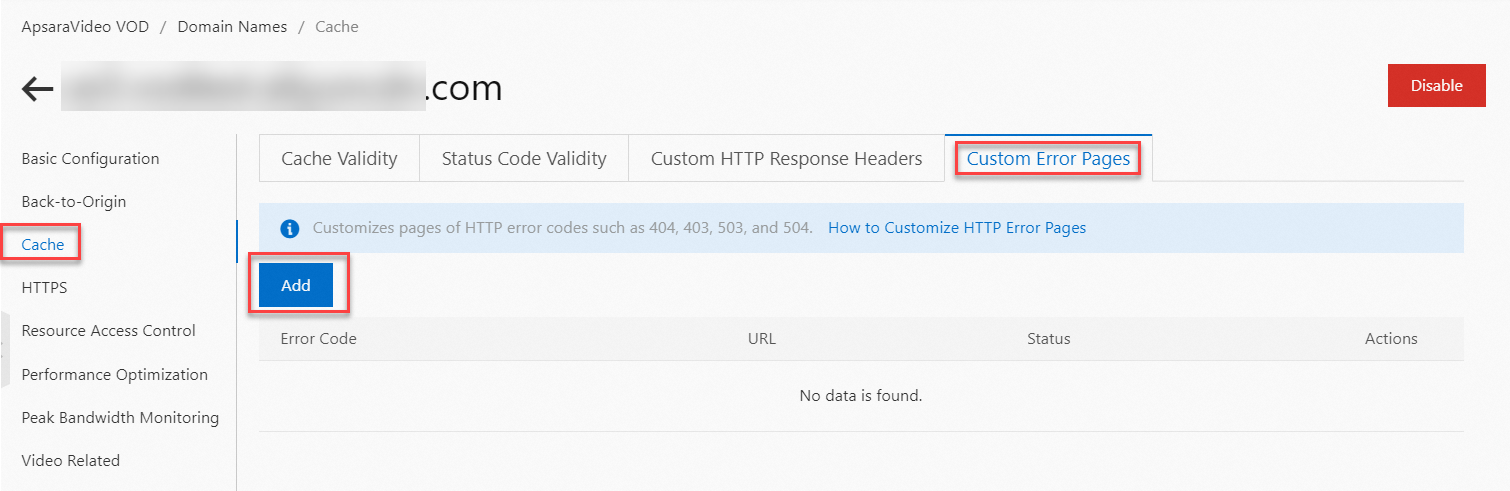
Click Cache, and on the Custom Error Pages tab, click Add.
Select an Error Code, enter the custom URL, and click OK.
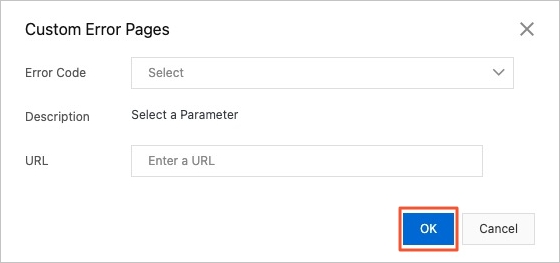
If you select the 404 error code, Alibaba Cloud provides a public 404 page that is free to use. To enable it, select Join NotFound Project and click OK.