To further improve the stability of the Message Queue for Apache RocketMQ service, we are upgrading the access for some 4.x series instances from non-regional endpoints to regional endpoints to improve the stability of the message production and consumption link.
Retirement date
The non-regional endpoints will be retired on May 15, 2026, at 00:00:00 (UTC+8). You must update the endpoint configurations for your producers and consumers before this date to prevent service disruptions.
Impact
Scope: This change affects clients that access Message Queue for Apache RocketMQ 4.x instances by using an endpoint that does not contain a region ID in its domain name, such as
http://xxxx.mq-internal.aliyuncs.com:8080.Consequences: After the retirement date, all requests to produce and consume messages that use a non-regional endpoint will fail. The new regional endpoints do not support cross-region access.
Migration path
Identify clients using non-regional endpoints
Log on to the Message Queue for Apache RocketMQ console.
In the left-side navigation pane, click Query Information.
In the Information About Accesses from Non-regional Endpoints section, view the instance IDs, Topics, and client IP addresses that are accessing your resources.
Update endpoint configuration
Use the new regional endpoint to access your Message Queue for Apache RocketMQ 4.x instance. Follow these steps to obtain the regional endpoint:
Log on to the Message Queue for Apache RocketMQ console.
In the left-side navigation pane, click Instances.
In the top navigation bar, select a region, such as China (Hangzhou), and then click the name of the target instance.
On the Instances page, click the Endpoints tab.
On the Endpoints tab, go to the TCP Endpoint section and find the endpoint where the Network is Internal Access.
Configure this endpoint in the code of your producers and consumers.
Java ons-client SDK
Client version required: 1.8.7.4.Final or later.
Change the parameter from ONSAddr to NAMESRV_ADDR and update the endpoint value.
// Before:
properties.put(PropertyKeyConst.ONSAddr, "http://xxxx.mq-internal.aliyuncs.com:8080");
// After:
properties.put(PropertyKeyConst.NAMESRV_ADDR, "http://xxxx.cn-hangzhou.mq-internal.aliyuncs.com:8080");
Java open source RocketMQ SDK
Client version required: 4.5.2 or later.
Update the parameter.
// For a producer, update the nameserver address before the producer starts.
// Before:
producer.setNamesrvAddr("http://xxxx.mq-internal.aliyuncs.com:8080");
// After:
producer.setNamesrvAddr("http://xxxx.cn-hangzhou.mq-internal.aliyuncs.com:8080");

// For a consumer, update the nameserver address before the consumer starts.
// Before:
consumer.setNamesrvAddr("http://xxxx.mq-internal.aliyuncs.com:8080");
// After:
consumer.setNamesrvAddr("http://xxxx.cn-hangzhou.mq-internal.aliyuncs.com:8080");
C/C++ SDK
Client version required: 1.1.0 or later.
Update the endpoint parameter. If you use ONSFactory.getInstance() for initialization, check the endpoint settings in ONSFactoryProperty.
If you use the ONSAddr parameter, change it to NAMESRV_ADDR and update the endpoint value.
// Before:
factoryInfo.setFactoryProperty(ONSFactoryProperty::ONSAddr, "http://XXX.mq-internal.aliyuncs.com:8080");
// After:
factoryInfo.setFactoryProperty(ONSFactoryProperty::NAMESRV_ADDR, "http://MQ_INST_XXXXXXXXXXX.cn-hangzhou.mq-internal.aliyuncs.com:8080");
If you already use the NAMESRV_ADDR parameter, update the endpoint value.
// Before:
factoryInfo.setFactoryProperty(ONSFactoryProperty::NAMESRV_ADDR, "http://MQ_INST_XXXXXXXXXXX.mq-internal.aliyuncs.com:8080");
// After:
factoryInfo.setFactoryProperty(ONSFactoryProperty::NAMESRV_ADDR, "http://MQ_INST_XXXXXXXXXXX.cn-hangzhou.mq-internal.aliyuncs.com:8080");
.NET SDK
Client version required: 1.1.0 or later.
Update the endpoint parameter. If you use ONSFactory.getInstance() for initialization, check the endpoint settings in ONSFactoryProperty.
If you use the ONSAddr parameter, change it to NAMESRV_ADDR and update the endpoint value.
// Before:
factoryInfo.setFactoryProperty(ONSFactoryProperty::ONSAddr, "http://XXX.mq-internal.aliyuncs.com:8080");
// After:
factoryInfo.setFactoryProperty(ONSFactoryProperty::NAMESRV_ADDR, "http://MQ_INST_XXXXXXXXXXX.cn-hangzhou.mq-internal.aliyuncs.com:8080");
If you already use the NAMESRV_ADDR parameter, update the endpoint value.
// Before:
factoryInfo.setFactoryProperty(ONSFactoryProperty::NAMESRV_ADDR, "http://MQ_INST_XXXXXXXXXXX.mq-internal.aliyuncs.com:8080");
// After:
factoryInfo.setFactoryProperty(ONSFactoryProperty::NAMESRV_ADDR, "http://MQ_INST_XXXXXXXXXXX.cn-hangzhou.mq-internal.aliyuncs.com:8080");
Background
To send and receive messages by using the Message Queue for Apache RocketMQ SDK over the TCP protocol, you must configure the corresponding parameters with your actual resource information. Note that the resources corresponding to the following parameters must be in the same region:
GROUP_ID: The group ID that you created in the Message Queue for Apache RocketMQ console.
Topic: The Topic that you created in the Message Queue for Apache RocketMQ console.
NAMESRV_ADDR: The endpoint that you obtained from the Instance Details page in the Message Queue for Apache RocketMQ console.
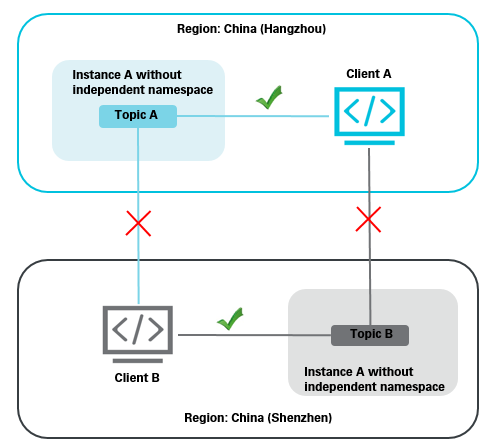
For example, you have a Message Queue for Apache RocketMQ instance A in the China (Hangzhou) region. You created Topic A and Group ID A for a client A that is also in that region. You also have another Message Queue for Apache RocketMQ instance B in the China (Shenzhen) region, where you created Topic B and Group ID B for a client B in that region. Note the following rules:
Only client A, which belongs to Group ID A in the China (Hangzhou) region, can send messages to or receive messages from Topic A.
Only client B, which belongs to Group ID B in the China (Shenzhen) region, can send messages to or receive messages from Topic B.
The following figure shows this relationship.