Quick start
This topic describes how to quickly use ApsaraMQ for RocketMQ to send and receive messages.
Usage flow
The following graph illustrates the process of sending and receiving messages using ApsaraMQ for RocketMQ.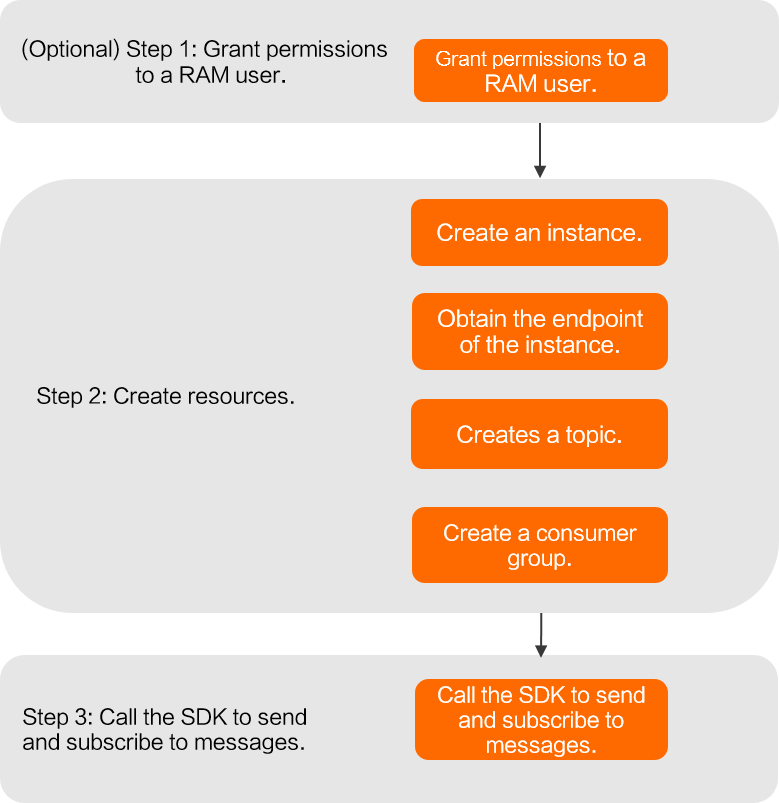
Usage notes
Permissions
If you are a RAM user, you must be granted permissions to access ApsaraMQ for RocketMQ and perform add, delete, modify, and query operations on specified resources of ApsaraMQ for RocketMQ. For more information, see Access Control Overview.
Endpoints
When you use a software development kit (SDK) to send and receive messages, you must configure the instance endpoint in your code. The endpoint connects the client to the ApsaraMQ for RocketMQ server. ApsaraMQ for RocketMQ can be accessed through a Virtual Private Cloud (VPC) or the public network.
VPC access (recommended): By default, ApsaraMQ for RocketMQ instances provide VPC endpoints. In a production environment, we recommend that you use a VPC to access the ApsaraMQ for RocketMQ service.
Public network access: To access the service through the public network, you must manually enable public network access. After this feature is enabled, the instance provides both a VPC endpoint and a public endpoint.
You are charged for outbound public network traffic. Use public network access only in a staging environment or an on-premises data center. For more information, see Public network access fees.