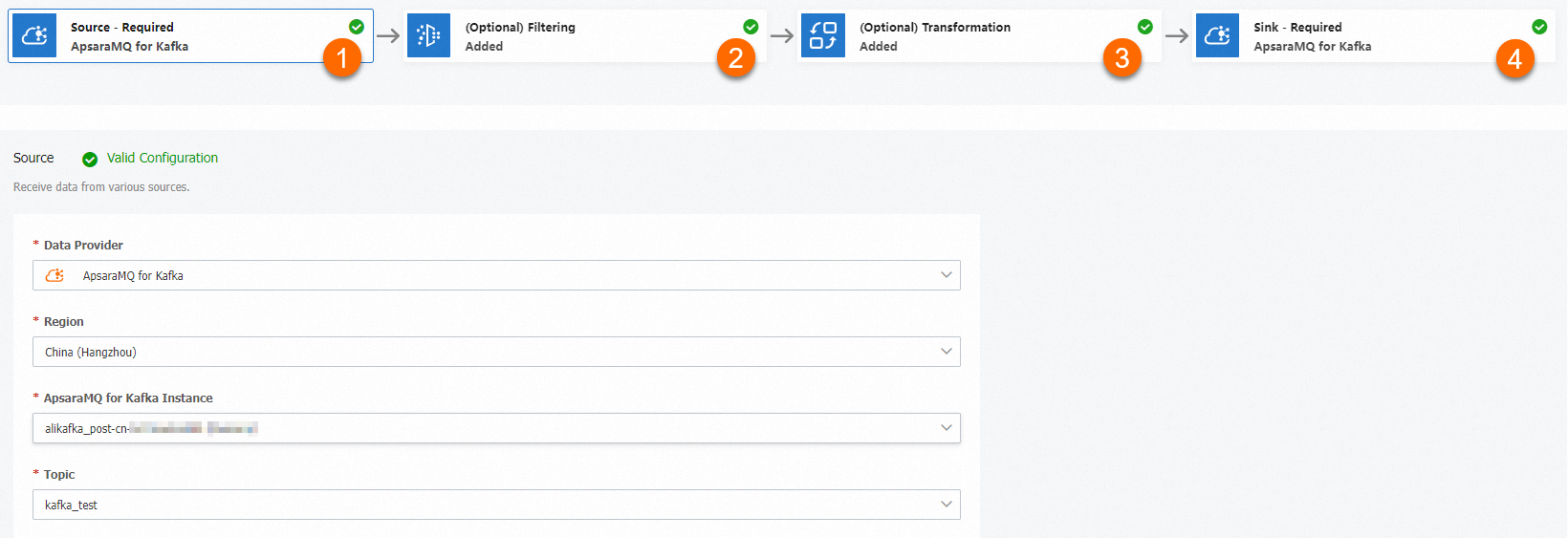
When messages flow between Kafka topics, you often need to split, route, enrich, or mask their content before delivery. Data cleansing handles these transformations inline -- powered by Function Compute templates.
How it works
A data cleansing task follows a four-stage pipeline:
Source -- The ApsaraMQ for Kafka instance and topic to consume messages from.
Filtering (optional) -- A pattern-matching rule that selects which messages to process. If no filter is set, all messages pass through.
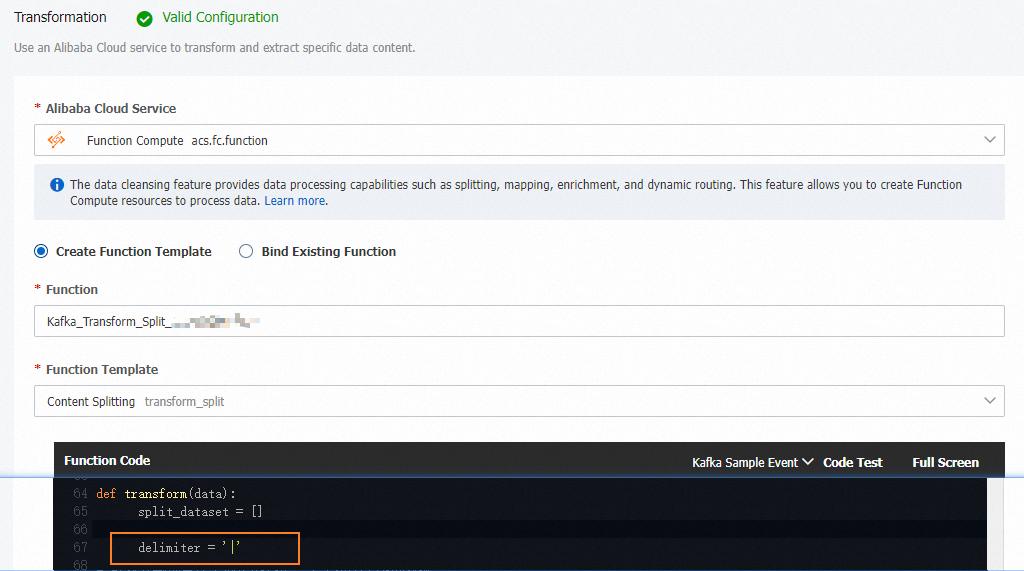
Transformation -- A Function Compute template that processes message content. Four built-in operators are available: content splitting, dynamic routing, content enrichment, and content mapping.
Sink -- The ApsaraMQ for Kafka instance and topic to deliver the processed messages to.
After you create a task, the corresponding function appears in the Function Compute console. Open it to view or edit the processing logic beyond what the template provides.
Data cleansing is also available for ApsaraMQ for RocketMQ, ApsaraMQ for MQTT, ApsaraMQ for RabbitMQ, and Simple Message Queue (formerly MNS).
Operators
| Operator | Description |
|---|---|
| Content splitting | Splits a single message into multiple messages based on a regular expression and sends each one individually to the sink. |
| Dynamic routing | Matches message content against regular expressions and routes each message to a different destination topic based on the match result. Unmatched messages go to a default topic. |
| Content enrichment | Looks up external data (for example, from a MySQL database) based on a field in the message and appends the result to the message body. |
| Content mapping | Applies regular expressions to transform message content -- for example, masking sensitive fields or reducing message size. |
Operator examples
Split a message into individual records
Split a single message that contains multiple records into individual messages, one per record.
Input: A message containing a list of student records, semicolon-delimited.
[Jack, Male, Class 4; Alice, Female, Class 3; John, Male, Class 4]Output: Three separate messages, each containing one student record.
[Jack, Male, Class 4][Alice, Female, Class 3][John, Male, Class 4]
Route messages by content pattern
Route messages to different destination topics based on content patterns.
Input: A message containing product entries from multiple brands.
[BrandA, toothpaste, $12.98, 100g
 BrandB, toothpaste, $7.99, 80g
 BrandC, toothpaste, $1.99, 100g]
Routing rules:
Messages starting with
BrandAgo toBrandA-item-topicandBrandA-discount-topic.Messages starting with
BrandBgo toBrandB-item-topicandBrandB-discount-topic.All other messages go to
Unknown-brand-topic.
These rules are defined in JSON:
{
  "defaultTopic": "Unknown-brand-topic",
  "rules": [
    {
      "regex": "^BrandA",
      "targetTopics": [
        "BrandA-item-topic",
        "BrandA-discount-topic"
      ]
    },
    {
      "regex": "^BrandB",
      "targetTopics": [
        "BrandB-item-topic",
        "BrandB-discount-topic"
      ]
    }
  ]
}
Enrich messages with external data
Append external data to messages by looking up a field value in an external data source.
Input: An access log entry containing an account ID and host IP.
{
  "accountID": "164901546557****",
  "hostIP": "192.168.XX.XX"
}
Enrichment source: A MySQL table that maps IP addresses to regions.
CREATE TABLE `tb_ip` (
    `IP` VARCHAR(256) NOT NULL,
    `Region` VARCHAR(256) NOT NULL,
    `ISP` VARCHAR(256) NOT NULL,
    PRIMARY KEY (`IP`)
);
Output: The original message with a region field appended.
{
  "accountID": "164901546557****",
  "hostIP": "192.168.XX.XX",
  "region": "beijing"
}
Mask sensitive fields in messages
Transform or mask specific fields in messages using regular expressions.
Input: Employee registration records containing sensitive data -- employee IDs and phone numbers.
James, Employee ID 1, 131 1111 1111
Mary, Employee ID 2, 132 2222 2222
David, Employee ID 3, 133 3333 3333
Output: The same records with sensitive fields masked.
Ja*, Employee ID *, ***********
Ma*, Employee ID *, ***********
Dav*, Employee ID *, ***********
Create a data cleansing task
Procedure
Log in to the ApsaraMQ for Kafka console. In the left-side navigation pane, choose . Click Create Task.
Configure the four pipeline stages on the Create Task page: Each template provides the base processing logic. To customize it, open the corresponding function in the Function Compute console after creating the task.
Stage Configuration Source and Sink Select different ApsaraMQ for Kafka instances. Filtering Specify a matching rule to filter events. Leave blank to match all events. For details, see Message filtering. Transformation Select a Function Compute template: Content Splitting, Content Mapping, Content Enrichment, or Dynamic Routing. In this example, the Content Splitting template is selected.