When your team monitors applications with Application Real-Time Monitoring Service (ARMS), switching between the ARMS console and your internal web application breaks workflow continuity. By embedding ARMS console pages directly into your web application through Security Token Service (STS) federation sign-in, your team can view application lists, application details, and traces without leaving your system. You can also use Resource Access Management (RAM) to control permissions, such as restricting access to read-only.
How it works
Embedding uses STS federation sign-in to produce a logon-free URL that you load in an iframe. The process has five steps:
Create a RAM user -- Grant it permission to call STS.
Create a RAM role -- Attach an ARMS access policy to the role.
Get temporary credentials -- Call the STS
AssumeRoleoperation.Get a logon token -- Exchange the temporary credentials for a federation logon token.
Build the logon-free URL -- Combine the logon token with the ARMS console page URL.

Prerequisites
Before you begin, make sure that you have:
An Alibaba Cloud account with RAM enabled
Permissions to create RAM users and RAM roles
The ARMS console activated in at least one region
Step 1: Create a RAM user and grant STS permissions
Create a RAM user that your application uses to call STS and assume the RAM role.
Create a RAM user. For details, see Create a RAM user.
Attach the AliyunSTSAssumeRoleAccess policy to the RAM user. For details, see Grant permissions to a RAM user.
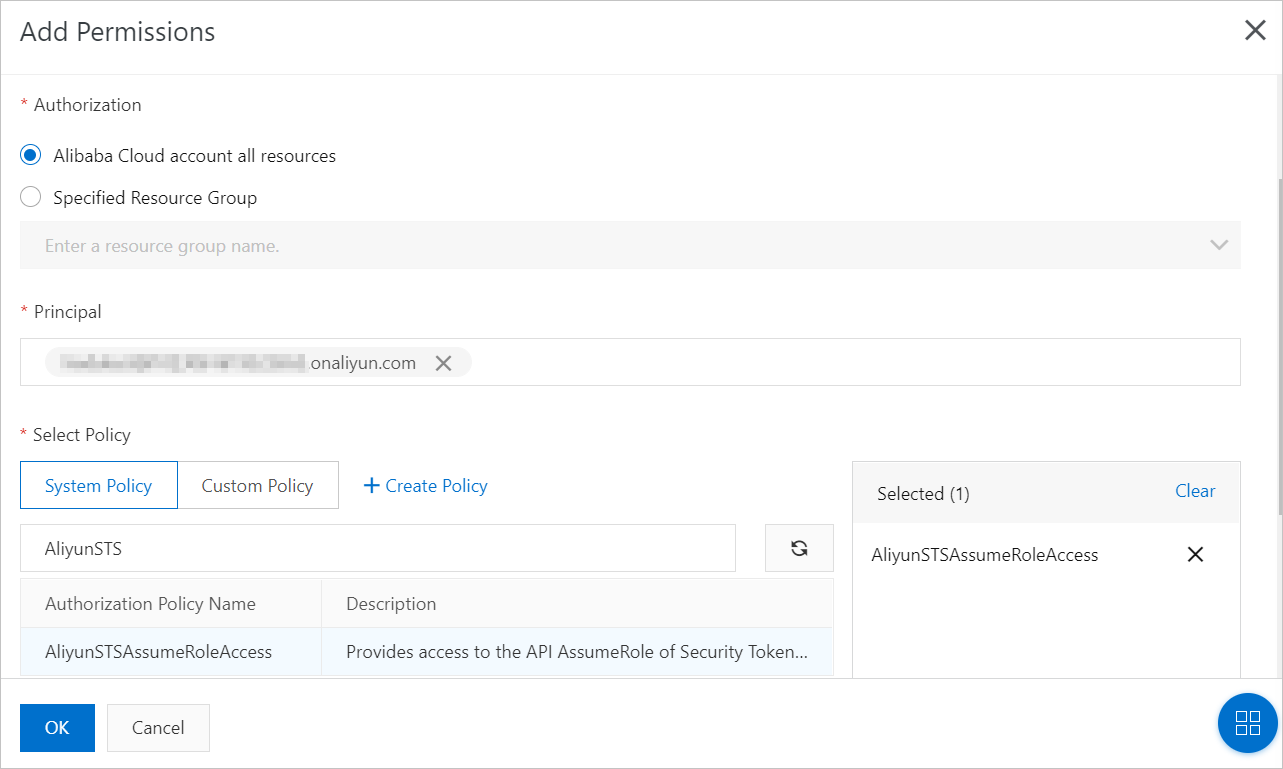
Step 2: Create a RAM role and grant ARMS permissions
Create a RAM role and attach an ARMS access policy. The RAM user assumes this role to access the ARMS console.
Create a RAM role for a trusted Alibaba Cloud account. For details, see Create a RAM role for a trusted Alibaba Cloud account.
Attach one of the following policies to the RAM role. For details, see Grant permissions to a RAM role.
Policy Access level AliyunARMSFullAccess Full access to all ARMS features AliyunARMSReadOnlyAccess Read-only access to all ARMS features
To grant read-only access to a specific resource group, attach both the AliyunARMSReadOnlyAccess policy and the ReadTraceApp permission to the resource group. Without ReadTraceApp, ARMS cannot display the application list for that resource group.
Step 3: Get temporary credentials
Call the STS AssumeRole operation to get a temporary AccessKey pair and STS token. These temporary credentials are used for federation sign-in.
Call AssumeRole through either:
Configure the SDK parameters
Replace the following placeholders with your actual values:
| Parameter | Description | Where to find it |
|---|---|---|
<accessKeyId> | AccessKey ID of the RAM user | Provided when the RAM user is created. See Create an AccessKey pair. |
<accessKeySecret> | AccessKey secret of the RAM user | Provided when the RAM user is created |
<roleArn> | Alibaba Cloud Resource Name (ARN) of the RAM role | RAM console > Identities > Roles > select the role > Basic Information > ARN |
String accessKey = "<accessKeyId>";
String accessSecret = "<accessKeySecret>";
String roleArn = "<roleArn>";
Step 4: Get the logon token
Exchange the temporary credentials from Step 3 for a logon token by calling the GetSigninToken operation.
The STS token may contain special characters. URL-encode the token before sending the request.
https://signin.alibabacloud.com/federation?Action=GetSigninToken
    &AccessKeyId=<temporary-accesskey-id>
    &AccessKeySecret=<temporary-accesskey-secret>
    &SecurityToken=<sts-token>
    &TicketType=mini
Step 5: Build the logon-free URL
Combine the logon token from Step 4 with the ARMS console page URL to produce a logon-free URL.
A logon token expires after 3 hours. Generate a new token on each request to avoid expired sessions.
Get the ARMS console page URL
Copy the URL of the ARMS page you want to embed. The URL must be a console address that belongs to Application Monitoring or Browser Monitoring. Use the correct endpoint for your region:
| Region | Endpoint |
|---|---|
| China (legacy console) | arms4servims.console.alibabacloud.com |
| China (new console) | armsnext4servims.console.alibabacloud.com |
| Japan | arms-jp4servims.console.alibabacloud.com |
| Southeast Asia | arms-sg4servims.console.alibabacloud.com |
| United States | arms-us4servims.console.alibabacloud.com |
| Europe | arms-eu4servims.console.alibabacloud.com |
Example URL for the China (Hangzhou) region:
https://arms4servims.console.alibabacloud.com/apm?iframeMode=true&pid=<your-pid>®ionId=<your-region-id>#/<your-pid>/homeGet the pid and regionId values from the actual ARMS console URL when browsing Application Monitoring or Browser Monitoring pages.
Control the console layout
Use URL parameters to hide navigation elements when embedding:
| Parameter | Effect |
|---|---|
iframeMode=true | Hides both the top navigation bar and the left-side navigation pane |
hideTopbar=true | Hides only the top navigation bar |
hideSidebar=true | Hides only the left-side navigation pane |
Setting both hideTopbar=true and hideSidebar=true is equivalent to iframeMode=true.
If the URL contains a hash (#), place these parameters before the #. Example:
https://trace4servims.console.alibabacloud.com/?hideTopbar=true&hideSidebar=true/#/tracing/<region-id>/list?from=now-3h&to=now&refresh=offConstruct the logon-free URL
https://signin.alibabacloud.com/federation?Action=Login
    &LoginUrl=<your-error-redirect-url>
    &SigninToken=<logon-token>
&Destination=<arms-console-page-url>| Parameter | Description |
|---|---|
LoginUrl | The URL to redirect to when logon fails and a 302 status code is returned |
SigninToken | The logon token from Step 4 |
Destination | The ARMS console page URL (with layout parameters applied) |
Embed the URL in an iframe
Load the logon-free URL in an iframe to display the ARMS console page in your web application:
<iframe
  src="https://signin.alibabacloud.com/federation?Action=Login&LoginUrl=<your-error-redirect-url>&SigninToken=<logon-token>&Destination=<arms-console-page-url>"
  width="100%"
  height="800"
  frameborder="0"
></iframe>
FAQ
What does the "frame-ancestors 'self' *.aliyun.com" error mean?
This Content Security Policy (CSP) error occurs when you use an iframe to embed ARMS console pages into an application deployed by a virtual network operator. To resolve it: