If you want to write Kafka data to AnalyticDB for PostgreSQL and do not want to use other data integration tools, you can use the real-time data consumption feature to directly consume Kafka data. This reduces dependencies on real-time processing components and improves the write throughput.
Apache Kafka is a distributed publish-subscribe messaging system that features fault tolerance and low latency. The Streaming Server allows you to load Kafka data from Apache Kafka and Confluent Kafka. You can use readable foreign tables of AnalyticDB for PostgreSQL to convert and write the data to the destination tables of AnalyticDB for PostgreSQL.
Prerequisites
A Kafka instance and an AnalyticDB for PostgreSQL instance are created in the same virtual private cloud (VPC).
ImportantIf the Kafka instance and the AnalyticDB for PostgreSQL instance are deployed in the same VPC, but are not connected to the same vSwitch, you must perform the following operations:
Add the IPv4 CIDR block of the vSwitch of the Kafka instance to a whitelist of the AnalyticDB for PostgreSQL instance. For more information, see Configure an IP address whitelist.
Add the IPv4 CIDR block of the vSwitch of the AnalyticDB for PostgreSQL instance to a whitelist of the Kafka instance. For more information, see Configure whitelists.
A large amount of sample data is generated for the Kafka instance. In this example, an ApsaraMQ for Kafka instance that has the following basic information is used:
Endpoints: alikafka-post-cn-wwo3hflb****-1-vpc.alikafka.aliyuncs.com:9092,alikafka-post-cn-wwo3hflb****-2-vpc.alikafka.aliyuncs.com:9092,alikafka-post-cn-wwo3hflb****-3-vpc.alikafka.aliyuncs.com:9092
Topic: test_topic
Consumer group: test_consumer_group
A user and a table are created for the AnalyticDB for PostgreSQL instance. The user must have the following permissions:
Permissions to use the gpfdist protocol to create read-only foreign tables.
USAGE and CREATE permissions on the involved schema.
SELECT and INSERT permissions on the involved destination table.
In this example, a user named
liss_testand a table namedliss_test.liss_test_plaintextare created.CREATE role liss_test with login; ALTER role liss_test with password 'lissTest****'; ALTER role liss_test CREATEEXTTABLE(type = 'readable', protocol = 'gpfdist'); \c - liss_test CREATE DATABASE liss_test; \c liss_test CREATE SCHEMA liss_test; CREATE TABLE liss_test.liss_test_plaintext ( column_1 varchar(32), column_2 bigint, column_3 numeric, column_4 varchar(32), column_5 varchar(32) ) distributed by (column_1, column_2);
Limits
To use the high-speed data import API, the minor version of an AnalyticDB for PostgreSQL V6.0 instance must be 6.6.0 or later, and the minor version of an AnalyticDB for PostgreSQL V7.0 instance must be 7.0.3 or later. AnalyticDB for PostgreSQL in Serverless mode does not support the high-speed data import API.
The real-time data consumption feature supports only the INSERT, MERGE (UPSERT), and UPDATE statements. The DELETE and READ statements are not supported.
If you use the MERGE (UPSERT) or UPDATE statement, the involved AnalyticDB for PostgreSQL table must have a primary key index.
When you use the real-time data consumption feature, you must use the primary key as the partition key to prevent global deadlocks and data update failures.
The real-time data consumption feature supports only Kafka data. Change data capture (CDC) data sources are not supported.
The wizard mode supports the CSV and Delimited formats, and the professional mode supports the CSV, Delimited, and protobuf formats.
Procedure
Step 1: Enable the real-time data service feature
Log on to the AnalyticDB for PostgreSQL console.
In the upper-left corner of the console, select a region.
Find the instance that you want to manage and click the instance ID.
In the left-side navigation pane, click Real-time Data Consumption. In the upper-left corner of the page, click Enable Real-time Data Service.
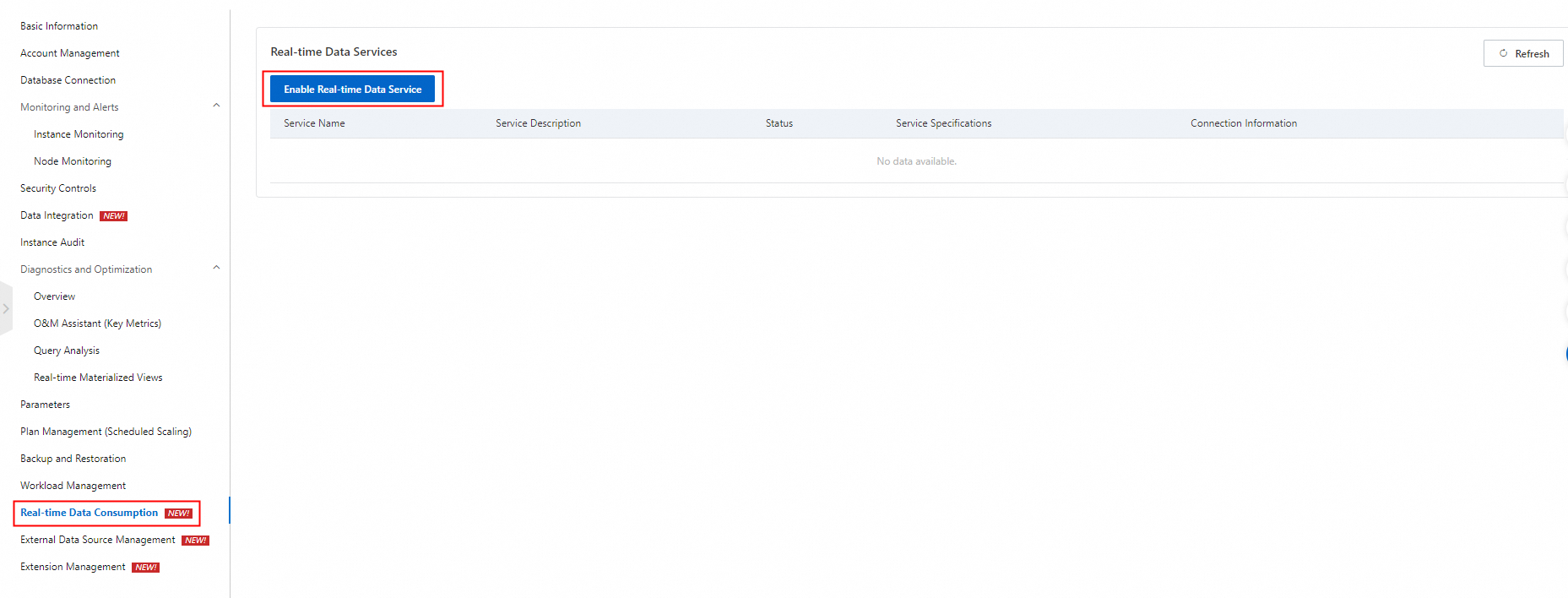
In the panel that appears, configure the Name and Service Description parameters and click OK. After you enable the real-time data service feature, you can view the status and connection information of the real-time data service.
NoteThe default service specifications are 8 compute units (CUs) and cannot be edited.
Step 2: Add a real-time data source
- Log on to the AnalyticDB for PostgreSQL console.
- In the upper-left corner of the console, select a region.
- Find the instance that you want to manage and click the instance ID.
In the left-side navigation pane, click Real-time Data Consumption.
In the Real-time Data Sources section, click Add Data Source. In the panel that appears, configure the parameters that are described in the following table.
Parameter
Description
Associated Data Service
The real-time data service.
Data Source Name
The name of the data source.
Data Source Description
The description of the data source.
Data Source Type
The type of the data source. Select Kafka.
Brokers
The Kafka endpoint.
If you use an ApsaraMQ for Kafka instance, log on to the ApsaraMQ for Kafka console to obtain the default endpoint. For more information, see View endpoints.
If you use a self-managed Kafka instance, specify the endpoint in the
Hostname:Port numberorBroker IP address:Port numberformat.
Topic
The name of the Kafka topic.
Format
The format of the data source. The wizard mode supports the CSV and Delimited formats, and the professional mode supports the CSV, Delimited, and protobuf formats.
Column Delimiter
The column delimiter that contains a single character.
Click OK.
Step 3: Create a real-time job
In the Real-time Jobs section, click Create Real-time Job. In the panel that appears, configure the parameters that are described in the following table.
Select Wizard Mode or Professional Mode for the Configuration Mode parameter based on your business requirements.
Wizard Mode: creates a real-time job based on the wizard guide on the Real-time Analysis page.
Professional Mode: submits a real-time job to the Streaming Server by using YAML. The professional mode provides more features than the wizard mode.
Wizard mode
Parameter
Description
Basic Information
Job Name
The name of the job. You must set this parameter to a unique value.
Job Description
The description of the job. You can leave this parameter empty.
Configuration Mode
The configuration mode of the job. Select Wizard Mode.
Source Configuration
Data Source
The added real-time data source. Only Kafka data sources are supported.
Group Name
The name of the Kafka consumer group.
Fallback Offset
The consumer offset. Valid values:
Earliest: Consumption starts from the earliest available offset.
Latest: Consumption starts from the latest offset.
Delivery Guarantee
The exactly-once semantics for stream computing. Valid values:
ATLEAST: Kafka data is written to AnalyticDB for PostgreSQL at least once.
EXACTLY: Kafka data is written to AnalyticDB for PostgreSQL only once.
Destination Configuration
Destination Database
The name of the AnalyticDB for PostgreSQL database to which you want to write data.
Schema
The name of the AnalyticDB for PostgreSQL schema.
Destination Table
The name of the AnalyticDB for PostgreSQL table to which you want to write data.
Account
The name of the AnalyticDB for PostgreSQL database account that is used by the job.
Password
The password of the database account.
Write Mode
The write mode of data. Valid values:
INSERT: Data is directly written to the destination table.
UPDATE: If the source column of the MatchColumns type matches the destination column, the destination columns of the UpdateColumns type are updated.
MERGE: If the value of the source column is the same as the value of the destination column, the destination table columns are updated with the source data. If the value of the source column is different from the value of the destination column, the source data is directly written to the destination table. The MERGE mode is similar to the UPSERT statement (UPDATE and INSERT). For information about the write mode of the UPSERT statement, see Use INSERT ON CONFLICT to overwrite data.
NoteFor information about the MatchColumns and UpdateColumns types, see the description of the Field Type parameter.
Error Limit Count
The tolerance threshold for data errors. If the number of written data errors reaches the value of this parameter, the Streaming Server stops writing data to AnalyticDB for PostgreSQL. A value of 0 specifies that the Streaming Server stops writing data upon the first data error. This parameter does not take effect. Set the value to 0.
Field Mapping
Source Field
The name of the Value field in the Kafka message. Specify all source fields based on the order in which the source fields are displayed in the Value field.
Destination Field
The name of the field in the destination AnalyticDB for PostgreSQL table.
Field Type
The field type. Valid values:
MatchColumns: specifies the update condition columns that are used to join the source data and the destination table.
UpdateColumns: determines the columns to be updated if a row of data meets the update condition.
Empty: does not update the fields if a row of data meets the update condition.
If you set the write mode to UPDATE or MERGE, the Streaming Server writes data to a temporary table and then uses columns of the MatchColumns type as conditions to join the source data and the destination table.
If data is matched, data in columns of the UpdateColumns type is updated.
If no data is matched, the following write rules apply:
In UPDATE mode, no data is written.
In MERGE mode, data is written.
Professional mode
Parameter
Description
Basic Information
Job Name
The name of the job. You must set this parameter to a unique value.
Job Description
The description of the job. You can leave this parameter empty.
Configuration Mode
The configuration mode of the job. Select Professional Mode.
Data Source
The added real-time data source. Only Kafka data sources are supported.
YAML
The YAML code that allows you to configure complex write logic. In this example, the following YAML code is used. For more information, see the "Appendix: YAML configuration" section of this topic.
DATABASE: liss_test
USER: liss_test
PASSWORD: lissTest****
HOST: gp-2ze517f9l7****-master.gpdb.rds-aliyun-pre.rds.aliyuncs.com
PORT: 5432
KAFKA:
  INPUT:
    SOURCE:
      BROKERS: alikafka-post-cn-wwo3hflbo002-1-vpc.alikafka.aliyuncs.com:9092,alikafka-post-cn-wwo3hflbo002-2-vpc.alikafka.aliyuncs.com:9092,alikafka-post-cn-wwo3hflbo002-3-vpc.alikafka.aliyuncs.com:9092
      TOPIC: test_topic
      FALLBACK_OFFSET: EARLIEST
    VALUE:
      COLUMNS:
      - NAME: column_1
        TYPE: varchar(32)
      - NAME: column_2
        TYPE: bigint
      - NAME: column_3
        TYPE: numeric
      - NAME: column_4
        TYPE: varchar(32)
      - NAME: column_5
        TYPE: varchar(32)
      FORMAT: delimited
      DELIMITED_OPTION:
        DELIMITER: "|"
    ERROR_LIMIT: 20
  OUTPUT:
    SCHEMA: liss_test
    TABLE: liss_test_plaintext
    MODE: MERGE
    MATCH_COLUMNS:
    - column_1
    - column_2
    UPDATE_COLUMNS:
    - column_3
    - column_4
    - column_5
    MAPPING:
    - NAME: column_1
      EXPRESSION: column_1
    - NAME: column_2
      EXPRESSION: column_2
    - NAME: column_3
      EXPRESSION: column_3
    - NAME: column_4
      EXPRESSION: column_4
    - NAME: column_5
      EXPRESSION: column_5
  COMMIT:
    MAX_ROW: 1000
    MINIMAL_INTERVAL: 1000
    CONSISTENCY: ATLEAST
  POLL:
    BATCHSIZE: 1000
    TIMEOUT: 1000
  PROPERTIES:
    group.id: test_consumer_group
Click OK. When the status of the real-time job changes to Running, data is written from the data source to AnalyticDB for PostgreSQL.
After the real-time job is started, the following types of auxiliary tables are generated in the destination schema. In professional mode, the METADATA.SCHEMA parameter specifies the destination schema.
lissext_$UID: the gpfdist foreign table that is defined by the job, which is used to write data to AnalyticDB for PostgreSQL.lisskafka_mission_info_$UID: the table that is used to store the current offset progress of the job to ensure data consistency. To ensure high availability of write jobs, four tasks are generated for each write job. Four tables are generated when each write job is started.UID is the unique ID of each write job.
Appendix: YAML configuration
The following code shows the syntax of a YAML configuration file:
DATABASE: <db_name>
USER: <user_name>
PASSWORD: <password>
HOST: <host>
PORT: <adbpg_port>
VERSION: 2
KAFKA:
   INPUT:
      SOURCE:
        BROKERS: <kafka_broker_host:broker_port> [, ... ]
        TOPIC: <kafka_topic>
        [PARTITIONS: (<partition_numbers>)]
        [FALLBACK_OFFSET: { earliest | latest }]
      [VALUE:
        COLUMNS:
           - NAME: { <column_name> }
             TYPE: <column_data_type>
           [ ... ]
         FORMAT: <value_data_format>
         [[DELIMITED_OPTION:
            DELIMITER: <delimiter_string>
            [QUOTE: <quote_char>]
            [ESCAPE: <escape_char>] ] |
         [CSV_OPTION:
            [DELIMITER: <delim_char>]
            [QUOTE: <quote_char>]
            [NULL_STRING: <nullstr_val>]
            [ESCAPE: <escape_char>]
      [KEY:
        COLUMNS:
           - NAME: { <column_name> }
             TYPE: <column_data_type>
           [ ... ]
         FORMAT: <key_data_format>
         [[DELIMITED_OPTION:
            DELIMITER: <delimiter_string> |
            [QUOTE: <quote_char>]
            [ESCAPE: <escape_char>] ] |
         [CSV_OPTION:
            [DELIMITER: <delim_char>]
            [QUOTE: <quote_char>]
            [NULL_STRING: <nullstr_val>]
            [ESCAPE: <escape_char>]
      [META:
         COLUMNS:
            - NAME: <meta_column_name>
              TYPE: { json | jsonb }
         FORMAT: json]
      [ERROR_LIMIT: { <num_errors> | <percentage_errors> }]
   { OUTPUT:
      [SCHEMA: <output_schema_name>]
      TABLE: <table_name>
      [MODE: <mode>]
      [MATCH_COLUMNS:
         - <match_column_name>
         [ ... ]]
      [ORDER_COLUMNS:
         - <order_column_name>
         [ ... ]]
      [UPDATE_COLUMNS:
         - <update_column_name>
         [ ... ]]
      [MAPPING:
         - NAME: <target_column_name>
           EXPRESSION: { <source_column_name> | <expression> }
         [ ... ]
           |
         <target_column_name> : { <source_column_name> | <expression> }
         [ ... ] ] }
   [METADATA:
      [SCHEMA: <metadata_schema_name>]]
   COMMIT:
      MAX_ROW: <num_rows>
      MINIMAL_INTERVAL: <wait_time>
      CONSISTENCY: { strong | at-least | at-most | none }
   [POLL:
      BATCHSIZE: <num_records>
      TIMEOUT: <poll_time>]
   [PROPERTIES:
      <kafka_property_name>: <kafka_property_value>
      [ ... ]]
[SCHEDULE:
   RETRY_INTERVAL: <retry_time>
   MAX_RETRIES: <num_retries> ]
Database-related parameters
Parameter | Description | Required |
DATABASE | The name of the database in the AnalyticDB for PostgreSQL instance. | Yes |
USER | The database account of the AnalyticDB for PostgreSQL instance. | Yes |
PASSWORD | The password of the database account of the AnalyticDB for PostgreSQL instance. | Yes |
HOST | The internal endpoint of the AnalyticDB for PostgreSQL instance. | Yes |
PORT | The port number of the AnalyticDB for PostgreSQL instance. | Yes |
VERSION | The version of the YAML configuration file. This is a reserved parameter, and no limit applies. | No |
KAFKA:INPUT configuration
KAFKA:INPUT:SOURCE
Parameter | Description | Required | Limits |
BROKERS | The Kafka endpoint.
Separate multiple endpoints with commas ( | Yes | This parameter is equivalent to the bootstrap.server parameter for Kafka consumers. Specify valid broker IP addresses. Otherwise, an error message is returned. |
TOPIC | The name of the Kafka topic. | Yes | Only a single topic is supported. |
PARTITIONS | The partition ID. Separate multiple partition IDs with commas ( | No | Example: 1,2,3,4,5. |
FALLBACK_OFFSET | The consumer offset. Valid values:
| Yes | None |
KAFKA:INPUT:KEY and KAFKA:INPUT:VALUE
KAFKA:INPUT:KEY specifies the names, data types, and data format of the Key field in the Kafka message.
KAFKA:INPUT:VALUE specifies the names, data types, and data format of the Value field in the Kafka message.
Specify all Kafka data elements based on the order of the elements in the Key and Value fields.
Specify at least one of KAFKA:INPUT:KEY and KAFKA:INPUT:VALUE. Otherwise, an error message is returned.
Parameter | Description | Required | Limits |
COLUMNS | If you specify If you specify | Yes | None |
NAME | The name of the column in the Kafka message. This parameter is used to specify the column in the Kafka message for | Yes | None |
TYPE | The data type of the column in the Kafka message. The value of this parameter must be the same as the data type of the column in the destination database. The data types of the Key and Value fields in the Kafka message are not transparent. By default, the Streaming Server obtains Kafka messages of the text type. | Yes | For information about the data types that are supported by AnalyticDB for PostgreSQL, see Data types. If a column in the Kafka message uses a data type that is different from the data type of the destination column, use the EXPRESSION parameter in MAPPING to convert the data type. |
FORMAT | The data format of the Kafka message. Valid values: CSV, Delimited, and protobuf. | Yes | None |
KAFKA:INPUT:META
KAFKA:INPUT:META is optional. You can configure the META settings to display the message metadata.
Parameter | Description | Required | Limits |
COLUMNS | The columns of the metadata. This parameter consists of the NAME and TYPE parameters. | Yes | None |
NAME | The name of the metadata. You can set this parameter to a custom value. Default value: | Yes | None |
TYPE | The data type of the metadata. | Yes | Set this parameter to Text. |
FORMAT | The data format of the metadata. | Yes | Set this parameter to Text. |
KAFKA:INPUT:ERROR_LIMIT
The tolerance threshold for data errors. If the number of written data errors reaches the value of the ERROR_LIMIT parameter, the Streaming Server quits the current job and stops writing data to AnalyticDB for PostgreSQL. The default value is 0, which specifies that the Streaming Server quits the current job and stops writing data upon the first data error. The value of the ERROR_LIMIT parameter must be greater than 1.
This parameter does not take effect. Ignore this parameter or set the value to 0.
KAFKA:OUTPUT configuration
Database-related parameters
The following table describes the parameters related to the destination AnalyticDB for PostgreSQL database, including the column updates and write modes.
Parameter | Description | Required |
SCHEMA | The schema of the destination AnalyticDB for PostgreSQL table. | Yes |
TABLE | The name of the destination table. | Yes |
MODE | The write mode. Valid values: INSERT, UPDATE, and MERGE. | Yes |
MATCH_COLUMNS | This parameter takes effect only when you set the write mode to UPDATE or MERGE. If the data that you want to write matches the destination table data based on the value of the MATCH_COLUMNS parameter, the matched data in the destination table is updated based on the UPDATE or MERGE mode. We recommend that you set the MATCH_COLUMNS parameter to the primary key columns or unique index columns of the destination table. | No |
ORDER_COLUMNS | This parameter takes effect only when you set the write mode to MERGE. If multiple rows of data that you want to write match the destination table data based on the value of the MATCH_COLUMNS parameter, the rows of data are sorted based on the value of the ORDER_COLUMNS parameter. The Streaming Server uses the row that has the maximum value to update the destination table. | No |
UPDATE_COLUMNS | This parameter takes effect only when you set the write mode to UPDATE or MERGE. If the data that you want to write matches the destination table data based on the value of the MATCH_COLUMNS parameter, the columns that are specified by the UPDATE_COLUMNS parameter in the destination table are updated. | No |
If you do not specify the ORDER_COLUMNS parameter in MERGE or UPDATE mode and multiple rows of data that you want to write match the destination table data based on the value of the MATCH_COLUMNS parameter, a random row of data is written.
If you specify the ORDER_COLUMNS parameter, the columns are sorted in the
a desc,b desc,c descformat.
KAFKA:OUTPUT:MAPPING
Parameter | Description | Required |
NAME | The name of the destination column. | Yes |
EXPRESSION | The name of the column that is specified in | Yes |
KAFKA:METADATA configuration
Parameter | Description | Required | Limits |
schema | The schema of the foreign table and other auxiliary tables that are created by the Streaming Server. | No | By default, this parameter is set to the value of the Schema parameter in |
KAFKA:COMMIT configuration
KAFKA:COMMIT is used to manage the behavior of committing data to databases.
Parameter | Description | Required | Limits |
MAX_ROW | The maximum batch size of data for a single write to the destination database. | No | Unit: rows. Default value: 500. |
MINIMAL_INTERVAL | The interval between two batches of data writes. If this period of time elapses, the next batch of data is written. | No | Unit: milliseconds. Default value: 1000. |
CONSISTENCY | The exactly-once semantics that is used to ensure data consistency. | No | Only ATLEAST is supported. Kafka data is written to the destination database at least once. |
KAFKA:POLL configuration
KAFKA:POLL is used to manage the data consumption behavior of Kafka consumers.
Parameter | Description | Required | Limits |
BATCHSIZE | The batch size of event data that is consumed from the Kafka topic. This is a reserved parameter and does not take effect. | No | Unit: rows. Default value: 64. |
TIMEOUT | The timeout period for a Kafka consumer to obtain event data from Kafka. | No | Unit: milliseconds. Default value: 5000. |
KAFKA:PROPERTIES configuration
KAFKA:PROPERTIES is used to configure Kafka Connect. You can configure whitelists for the group.id, auto.offset.reset, and isolation.level parameters. For more information, see Kafka Connect Configs.