All Products
Search
Document Center

Alibaba Cloud Linux:Use livepatch-mgr to manage kernel hotfixes

Last Updated:May 29, 2024

livepatch-mgr is a tool provided by Alibaba Cloud Linux that is used to manage kernel hotfixes. For example, you can use livepatch-mgr to install, query, load, or unload kernel hotfixes to apply security updates or fix vulnerabilities in running kernel applications without the need to restart Alibaba Cloud Linux operating systems. This topic describes how to use livepatch-mgr to query, install, load, and unload kernel hotfixes.

Background information

To ensure system stability and security, Alibaba Cloud Linux operating systems stay up-to-date on common vulnerabilities and exposures (CVEs) discovered by the Linux community and the industry and are updated with the latest versions of software packages (including kernels), bug fixes, and CVE fixes. You can use hotfixes or patches based on the security updates for Alibaba Cloud Linux to update your kernel software packages. This topic describes how to use livepatch-mgr.

For information about security updates for Alibaba Cloud Linux, see the following documents:

Install livepatch-mgr

Perform the following operations to install livepatch-mgr and view the features supported by livepatch-mgr to manage hotfixes:

  1. Connect to an Elastic Compute Service (ECS) instance that runs Alibaba Cloud Linux and requires hotfixes.

  2. Run the following command to install livepatch-mgr:

    sudo yum install livepatch-mgr -y
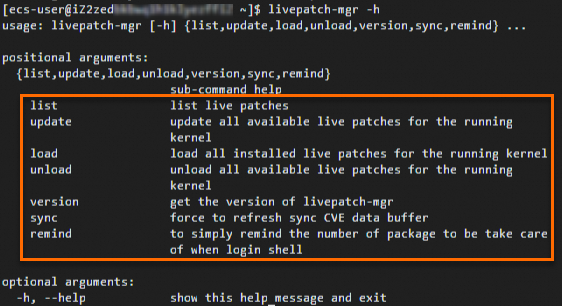
  3. Run the following command to view the features supported by livepatch-mgr:

    livepatch-mgr -h

    The following command output is returned.
    image

    livepatch-mgr provides the following commands:

    • list: queries hotfixes for the instance. For more information about the command, see the Query hotfixes section of this topic.

    • update: installs and loads applicable hotfixes on the instance. For more information about the command, see the Install hotfixes section of this topic.

    • load or unload: loads hotfixes on or unloads hotfixes from the instance. For more information about the commands, see the Load or unload hotfixes section of this topic.

    • version: queries the version of livepatch-mgr.

    • sync: updates the cache data of livepatch-mgr to obtain the updates for security software packages. For more information about the command, see the Update livepatch-mgr cache data section of this topic.

    • remind: queries the status of hotfixes, enables the alerting feature that allows Livepatch-mgr Security Reminder to send hotfix status notifications on your logons to Shell, or disables the alerting feature. For more information about the command, see the Query and receive alerts on the status of hotfixes section of this topic.

Install hotfixes

You can run the update command of livepatch-mgr on an instance to install and load hotfixes.

livepatch-mgr provides the --bugfix, --security, and -cves <CVEs> parameters that you can append to the update command for different scenarios.

Scenario

Command

Installs and loads all applicable hotfixes on the instance.

sudo livepatch-mgr update

Installs and loads applicable bug hotfixes on the instance.

sudo livepatch-mgr update --bugfix

Installs and loads applicable CVE hotfixes on the instance.

sudo livepatch-mgr update --security

Installs and loads hotfixes for specific CVEs on the instance.

sudo livepatch-mgr update --cves <CVEs>

The <CVEs> variable specifies CVE IDs. CVE IDs are case-sensitive. If you specify multiple CVE IDs, separate the IDs with commas (,). Example:

sudo livepatch-mgr update --cves CVE-2021-33909,CVE-2021-22555

Installs and loads hotfixes documented in specific advisories.

sudo livepatch-mgr update --ids=<Advisory IDs>

The <Advisory IDs> variable specifies advisory IDs. Advisory IDs are case-sensitive. If you specify multiple advisory IDs, separate the IDs with commas (,).

Example:

sudo livepatch-mgr update --ids=ALINUX3-SA-2023:0042.ALINUX3-SA-2023:0017

For example, after you run the sudo livepatch-mgr update command on an instance to install and load all applicable hotfixes, the following command output is returned:

Command output

Last metadata expiration check: 3:12:09 ago on Wed 08 May 2024 11:54:18 AM CST.
Dependencies resolved.
================================================================================
 Package                       Arch   Version                Repository    Size
================================================================================
Installing:
 kernel-hotfix-11169823-11.1.al8
                               x86_64 1.0-20221221203219.al8 alinux3-plus 225 k

Transaction Summary
================================================================================
Install  1 Package

Total download size: 225 k
Installed size: 875 k
Downloading Packages:
kernel-hotfix-11169823-11.1.al8-1.0-20221221203 567 kB/s | 225 kB     00:00    
--------------------------------------------------------------------------------
Total                                           567 kB/s | 225 kB     00:00     
Running transaction check
Transaction check succeeded.
Running transaction test
Transaction test succeeded.
Running transaction
  Preparing        :                                                        1/1 
  Running scriptlet: kernel-hotfix-11169823-11.1.al8-1.0-20221221203219.a   1/1 
  Installing       : kernel-hotfix-11169823-11.1.al8-1.0-20221221203219.a   1/1 
  Running scriptlet: kernel-hotfix-11169823-11.1.al8-1.0-20221221203219.a   1/1 
Created symlink /etc/systemd/system/multi-user.target.wants/kpatch.service → /usr/lib/systemd/system/kpatch.service.
installing /var/khotfix/5.10.112-11.1.al8.x86_64/11169823/kpatch-11169823.ko (5.10.112-11.1.al8.x86_64)
loading patch module: /var/khotfix/5.10.112-11.1.al8.x86_64/11169823/kpatch-11169823.ko

  Verifying        : kernel-hotfix-11169823-11.1.al8-1.0-20221221203219.a   1/1 

Installed:
  kernel-hotfix-11169823-11.1.al8-1.0-20221221203219.al8.x86_64                 

Complete!

Last metadata expiration check: 3:12:11 ago on Wed 08 May 2024 11:54:18 AM CST.
Dependencies resolved.
==========================================================================================
 Package                                Arch    Version                Repository     Size
==========================================================================================
Installing:
 kernel-hotfix-11463591-5.10.112-11.1   x86_64  1.0-20230118200906.al8 alinux3-plus  209 k

Transaction Summary
==========================================================================================
Install  1 Package

Total download size: 209 k
Installed size: 760 k
Downloading Packages:
kernel-hotfix-11463591-5.10.112-11.1-1.0-202301 763 kB/s | 209 kB     00:00    
--------------------------------------------------------------------------------
Total                                           762 kB/s | 209 kB     00:00     
Running transaction check
Transaction check succeeded.
Running transaction test
Transaction test succeeded.
Running transaction
  Preparing        :                                                        1/1 
  Running scriptlet: kernel-hotfix-11463591-5.10.112-11.1-1.0-20230118200   1/1 
  Installing       : kernel-hotfix-11463591-5.10.112-11.1-1.0-20230118200   1/1 
  Running scriptlet: kernel-hotfix-11463591-5.10.112-11.1-1.0-20230118200   1/1 
installing /var/khotfix/5.10.112-11.1.al8.x86_64/11463591/kpatch-11463591.ko (5.10.112-11.1.al8.x86_64)
loading patch module: /var/khotfix/5.10.112-11.1.al8.x86_64/11463591/kpatch-11463591.ko

  Verifying        : kernel-hotfix-11463591-5.10.112-11.1-1.0-20230118200   1/1 

Installed:
  kernel-hotfix-11463591-5.10.112-11.1-1.0-20230118200906.al8.x86_64            

Complete!

Last metadata expiration check: 3:12:13 ago on Wed 08 May 2024 11:54:18 AM CST.
Dependencies resolved.
===============================================================================================
 Package                                     Arch    Version                Repository     Size
===============================================================================================
Installing:
 kernel-hotfix-CVE-2023-0461-5.10.112-11.1   x86_64  1.0-20230316125119.al8 alinux3-plus  232 k

Transaction Summary
===============================================================================================
Install  1 Package

Total download size: 232 k
Installed size: 924 k
Downloading Packages:
kernel-hotfix-CVE-2023-0461-5.10.112-11.1-1.0-2 997 kB/s | 232 kB     00:00    
--------------------------------------------------------------------------------
Total                                           995 kB/s | 232 kB     00:00     
Running transaction check
Transaction check succeeded.
Running transaction test
Transaction test succeeded.
Running transaction
  Preparing        :                                                        1/1 
  Running scriptlet: kernel-hotfix-CVE-2023-0461-5.10.112-11.1-1.0-202303   1/1 
  Installing       : kernel-hotfix-CVE-2023-0461-5.10.112-11.1-1.0-202303   1/1 
  Running scriptlet: kernel-hotfix-CVE-2023-0461-5.10.112-11.1-1.0-202303   1/1 
installing /var/khotfix/5.10.112-11.1.al8.x86_64/CVE-2023-0461/kpatch-CVE-2023-0461.ko (5.10.112-11.1.al8.x86_64)
loading patch module: /var/khotfix/5.10.112-11.1.al8.x86_64/CVE-2023-0461/kpatch-CVE-2023-0461.ko

  Verifying        : kernel-hotfix-CVE-2023-0461-5.10.112-11.1-1.0-202303   1/1 

Installed:
  kernel-hotfix-CVE-2023-0461-5.10.112-11.1-1.0-20230316125119.al8.x86_64       

Complete!

Last metadata expiration check: 3:12:15 ago on Wed 08 May 2024 11:54:18 AM CST.
Dependencies resolved.
===============================================================================================
 Package                                     Arch    Version                Repository     Size
===============================================================================================
Installing:
 kernel-hotfix-CVE-2023-0386-5.10.112-11.1   x86_64  1.0-20230512161247.al8 alinux3-plus  120 k

Transaction Summary
===============================================================================================
Install  1 Package

Total download size: 120 k
Installed size: 482 k
Downloading Packages:
kernel-hotfix-CVE-2023-0386-5.10.112-11.1-1.0-2 587 kB/s | 120 kB     00:00    
--------------------------------------------------------------------------------
Total                                           585 kB/s | 120 kB     00:00     
Running transaction check
Transaction check succeeded.
Running transaction test
Transaction test succeeded.
Running transaction
  Preparing        :                                                        1/1 
  Running scriptlet: kernel-hotfix-CVE-2023-0386-5.10.112-11.1-1.0-202305   1/1 
  Installing       : kernel-hotfix-CVE-2023-0386-5.10.112-11.1-1.0-202305   1/1 
  Running scriptlet: kernel-hotfix-CVE-2023-0386-5.10.112-11.1-1.0-202305   1/1 
installing /var/khotfix/5.10.112-11.1.al8.x86_64/CVE-2023-0386/kpatch-CVE-2023-0386.ko (5.10.112-11.1.al8.x86_64)
loading patch module: /var/khotfix/5.10.112-11.1.al8.x86_64/CVE-2023-0386/kpatch-CVE-2023-0386.ko

  Verifying        : kernel-hotfix-CVE-2023-0386-5.10.112-11.1-1.0-202305   1/1 

Installed:
  kernel-hotfix-CVE-2023-0386-5.10.112-11.1-1.0-20230512161247.al8.x86_64       

Complete!

Query hotfixes

You can run the list command of livepatch-mgr on an instance to query the kernel hotfixes that are installed on the instance.

livepatch-mgr provides the --installed, --bugfix, --security, --running, and --available parameters that you can append to the list command for different scenarios.

Scenario

Command

Queries all applicable hotfixes for the instance.

sudo livepatch-mgr list

Queries hotfixes that are installed on the instance.

sudo livepatch-mgr list --installed

Queries bug hotfixes that are installed on the instance.

sudo livepatch-mgr list --installed --bugfix

Queries CVE hotfixes that are installed on the instance.

sudo livepatch-mgr list --installed --security

Queries all hotfixes that are in effect on the instance.

sudo livepatch-mgr list --running

Queries bug hotfixes that are in effect on the instance.

sudo livepatch-mgr list --running --bugfix

Queries CVE hotfixes that are in effect on the instance.

sudo livepatch-mgr list --running --security

Queries all hotfixes that are available but not installed on the instance.

sudo livepatch-mgr list --available

Queries bug hotfixes that are available but not installed on the instance.

sudo livepatch-mgr list --available --bugfix

Queries CVE hotfixes that are available but not installed on the instance.

sudo livepatch-mgr list --available --security

For example, after you run the sudo livepatch-mgr list command on an instance to query all applicable hotfixes, the following command output is returned:

Loaded patch modules:
Update ID            CVE ID(s)       Hotfix ID       Description
HOTFIX-SA-2023:0001  CVE-2022-4378   11169823        Package updates are available for Alibaba Cloud Li...(more)
HOTFIX-SA-2023:0002  CVE-2023-0179   11463591        Package updates are available for Alibaba Cloud Li...(more)
HOTFIX-SA-2023:0004  CVE-2023-0386   CVE-2023-0386   Package updates are available for Alibaba Cloud Li...(more)
HOTFIX-SA-2023:0003  CVE-2023-0461   CVE-2023-0461   Package updates are available for Alibaba Cloud Li...(more)


Installed patch modules:
HOTFIX-SA-2023:0001  CVE-2022-4378   11169823        Package updates are available for Alibaba Cloud Li...(more)
HOTFIX-SA-2023:0002  CVE-2023-0179   11463591        Package updates are available for Alibaba Cloud Li...(more)
HOTFIX-SA-2023:0004  CVE-2023-0386   CVE-2023-0386   Package updates are available for Alibaba Cloud Li...(more)
HOTFIX-SA-2023:0003  CVE-2023-0461   CVE-2023-0461   Package updates are available for Alibaba Cloud Li...(more)


Available and not installed patch modules:

The queried hotfixes can be classified into the following categories:

  • Loaded patch modules: hotfixes that are loaded

  • Installed patch modules: hotfixes that are installed but not loaded

  • Available and not installed patch modules: hotfixes that are available but not installed

Load or unload hotfixes

When you run the update command on an instance to install hotfixes, the system automatically loads the hotfixes. You can run the unload command to unload hotfixes or the load command to load hotfixes on an instance for O&M purposes based on your business requirements.

livepatch-mgr provides the --security, --bugfix, and unload <Hotfix identifier> parameters that you can append to the unload and load commands for different scenarios.

Scenario

Command

Loads or unloads all hotfixes that are installed on the instance.

  • Load command: sudo livepatch-mgr load

  • Unload command: sudo livepatch-mgr unload

Loads or unloads CVE hotfixes that are installed on the instance.

  • Load command: sudo livepatch-mgr load --security

  • Unload command: sudo livepatch-mgr unload --security

Loads or unloads bug hotfixes that are installed on the instance.

  • Load command: sudo livepatch-mgr load --bugfix

  • Unload command: sudo livepatch-mgr unload --bugfix

Loads or unloads a specific hotfix that is installed on the instance.

  • Load command: sudo livepatch-mgr load <Hotfix identifier>

  • Unload command: sudo livepatch-mgr unload <Hotfix identifier>

The <Hotfix identifier> variable specifies a hotfix. You can set the variable to the absolute path or name of the kernel module (.ko file) in a hotfix. Examples:

  • Set the <Hotfix identifier> variable to the absolute path of the kernel module (.ko file) in a hotfix and run the following command to load the hotfix:

    sudo livepatch-mgr load /var/khotfix/5.10.112-11.1.al8.x86_64/11169823/kpatch-11169823.ko
  • Set the <Hotfix identifier> variable to the name of the kernel module in a hotfix without the .ko suffix and run the following command to load the hotfix:

    sudo livepatch-mgr load kpatch-11463591
  • Set the <Hotfix identifier> variable to the name of the kernel module in a hotfix with the .ko suffix and run the following command to load the hotfix:

    sudo livepatch-mgr load kpatch-4121479.ko

For example, after you run the sudo livepatch-mgr load command on an instance to load all hotfixes that are installed on the instance, the following command output is returned:

loading kernel-hotfix-11169823-11.1.x86_64
loading patch module: /var/khotfix/5.10.112-11.1.al8.x86_64/11169823/kpatch-11169823.ko

loading kernel-hotfix-11463591-11.1.x86_64
loading patch module: /var/khotfix/5.10.112-11.1.al8.x86_64/11463591/kpatch-11463591.ko

loading kernel-hotfix-CVE-2023-0386-11.1.x86_64
loading patch module: /var/khotfix/5.10.112-11.1.al8.x86_64/CVE-2023-0386/kpatch-CVE-2023-0386.ko

loading kernel-hotfix-CVE-2023-0461-11.1.x86_64
loading patch module: /var/khotfix/5.10.112-11.1.al8.x86_64/CVE-2023-0461/kpatch-CVE-2023-0461.ko

Update livepatch-mgr cache data

You can run the sync command to update the cache data of livepatch-mgr and obtain the updates for security software packages.

sudo livepatch-mgr sync

Query and receive alerts on the status of hotfixes

You can run the remind command of livepatch-mgr to query and receive alerts on the status of hotfixes.

  • Query the status of hotfixes

    Run the following remind command to query the status of hotfixes:

    sudo livepatch-mgr remind
  • Enable the alerting feature

    After you install livepatch-mgr, you can run the sudo livepatch-mgr remind --enable command to enable the alerting feature. After you enable the alerting feature, Livepatch-mgr Security Reminder sends a hotfix status notification every time you log on to Shell. The hotfix status notification indicates how many hotfixes you need to install and how many installed hotfixes you need to load.

    Example notification:

    ****************** Livepatch-mgr Security Reminder ******************
    Your system have [0] security packages available to install
    Your system have [0] security packages installed but not loaded
    Conclusion :  Safe 
    *********************************************************************
  • Disable the alerting feature

    After you disable the alerting feature, Livepatch-mgr Security Reminder no longer sends a hotfix status notification when you log on to Shell.

    sudo livepatch-mgr remind --disable