I. Scenarios
I. Start an instance with your own MaxCompute historical data
Log on to the Artificial Intelligence Recommendation (AIRec) console.
2. When you create an instance, select the option to start it with historical data. For more information about how to configure the startup, real-time, and offline data sources, see Start an instance with historical data.
1. Before you configure the startup data source, you must grant read permission to the AIRec openias account in MaxCompute. For more information, see the MaxCompute authorization flow section.
2. Before you configure the offline data source, you must grant read and write permissions to the AIRec openias account in MaxCompute. For more information, see the MaxCompute authorization flow section.
II. Self-definition recall and sorting services
The self-definition recall and sorting services use custom features, behaviors, and sample data. Before you can use these services, you must grant read permission to the openias account in MaxCompute.
II. MaxCompute authorization flow
I. Grant permissions in the MaxCompute console
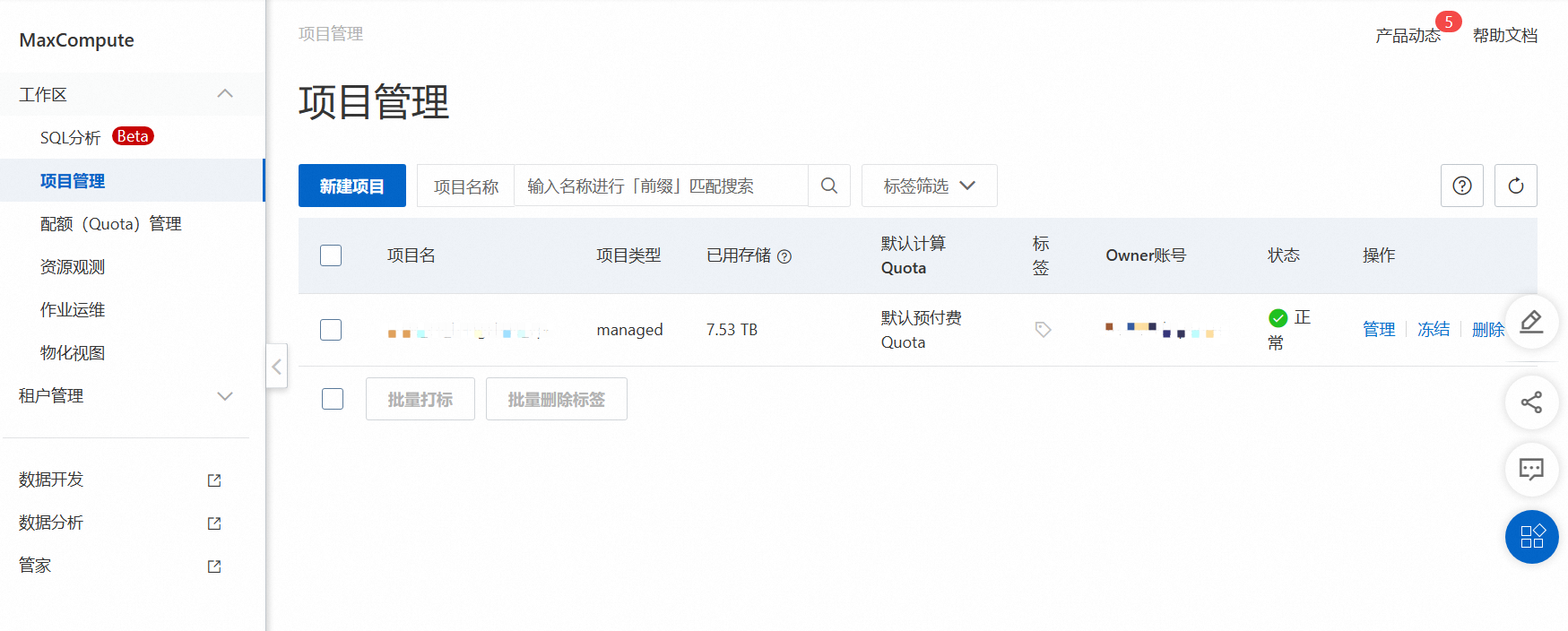
1.
Create a new ODPS_SQL window.
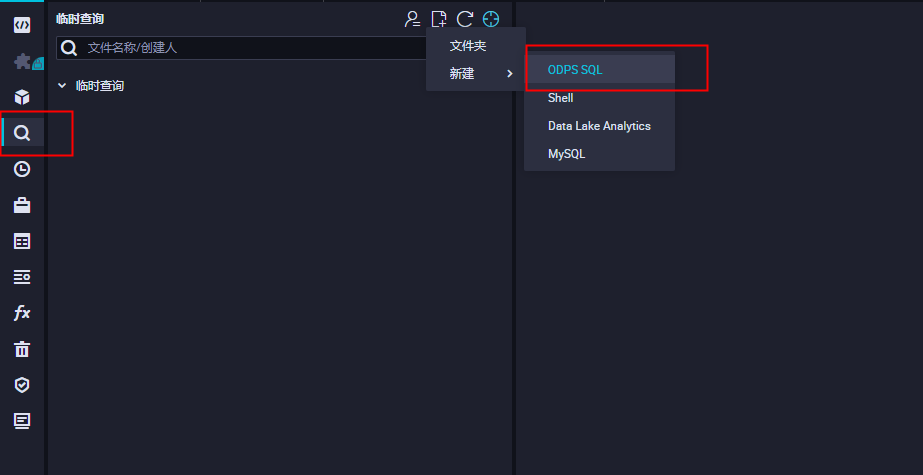
2. Enter the following commands to grant permissions:
If your workspace is in standard mode, it is divided by default into a development environment and a production environment. In this case, if you want to grant permissions to AIRec in the production environment, add the following command before the authorization statements. Then, select and run the command and the statements together.
use [project]; // Specify the production project for the authorization command.
a. Add a role
// Add the openias account.
add user `ALIYUN$openias`;
// Run list users; to confirm that the account was added.
list users;
b. Grant read permissions
// Grant permissions.
// Replace [project] with your actual project name.
// Replace [table] with your actual table name.
grant Read ON PROJECT [project] to user `ALIYUN$openias`;
grant List ON PROJECT [project] to user `ALIYUN$openias`;
grant Describe ON TABLE [table] to user `ALIYUN$openias`;
grant Select ON TABLE [table] to user `ALIYUN$openias`;
c. Grant write permissions
Write permissions are required only when you modify the offline data source.
// Grant permissions.
// Replace [project] with your actual project name.
// Replace [user] with the user that you added.
// Replace [table] with your actual table name.
grant Read ON PROJECT [project] to user `ALIYUN$openias`;
grant List ON PROJECT [project] to user `ALIYUN$openias`;
grant CreateTable ON PROJECT [project] to user `ALIYUN$openias`;
grant CreateInstance ON PROJECT [project] to user `ALIYUN$openias`;
II. Grant permissions using the MaxCompute client
Download and configure the MaxCompute client.
Run ./bin/odpscmd to enter the MaxCompute environment.
Enter the following commands to grant permissions to the account.
Permissions required for Artificial Intelligence Recommendation:
Object | Action | Description |
Project | Read | View information about the project, such as CreateTime. This permission does not apply to any objects in the project. |
Project | List | View the list of all types of objects in the project. |
Project | CreateInstance | Create instances in the project. |
Project | CreateTable | Create tables in the project. |
Table | Describe | Read the metadata of a table. |
Table | Select | Read data from a table. |
Table | Alter | Modify the metadata of a table, or add or delete partitions. |
Table | Update | Overwrite or add data to a table. |
For more information, see the MaxCompute permissions document.
a. Add a role
// Add the openias account.
add user `ALIYUN$openias`;
// Run list users; to confirm that the account was added.
list users;
b. Grant read permissions
// Grant permissions.
// Replace [project] with your actual project name.
// Replace [table] with your actual table name.
grant Read ON PROJECT [project] to user `ALIYUN$openias`;
grant List ON PROJECT [project] to user `ALIYUN$openias`;
grant Describe ON TABLE [table] to user `ALIYUN$openias`;
grant Select ON TABLE [table] to user `ALIYUN$openias`;
c. Grant write permissions
Write permissions are required only when you modify the offline data source.
// Grant permissions.
// Replace [project] with your actual project name.
// Replace [user] with the user that you added.
// Replace [table] with your actual table name.
grant Read ON PROJECT [project] to user `ALIYUN$openias`;
grant List ON PROJECT [project] to user `ALIYUN$openias`;
grant CreateTable ON PROJECT [project] to user `ALIYUN$openias`;
grant CreateInstance ON PROJECT [project] to user `ALIYUN$openias`;