When you create a Container Service for Kubernetes (ACK) cluster, a private Classic Load Balancer (CLB) instance is automatically created for the API server as the internal endpoint. Associating an elastic IP address (EIP) with this CLB instance exposes a public endpoint. To restrict which IP addresses can reach the API server, configure an access control list (ACL) — either a whitelist or a blacklist — on port 6443 of the CLB instance. You can configure access control when you create a listener or modify access control settings for an existing listener. For more information, see Access control.
The public endpoint and the internal endpoint share the same CLB instance. Any ACL policy you configure applies to both endpoints simultaneously — there is no way to set different policies for public and internal access.
Prerequisites
Before you begin, ensure that you have:
-
An ACK cluster with a private CLB instance created for the API server
-
Created an ACL in the Server Load Balancer (SLB) console
-
Added the required IP entries to the ACL
Required CIDR blocks for whitelists
If you configure a whitelist, the following CIDR blocks must be included. These ranges cover the cluster control plane, node-to-API-server communication, and console services. Blocking them will disrupt cluster operations and management.
| CIDR block | Why it's required |
|---|---|
100.104.0.0/16 |
ACK-managed range for control plane components — control plane traffic originates from this range |
| Primary CIDR block of the cluster virtual private cloud (VPC), and any additional CIDR block, or the vSwitch CIDR block where the cluster nodes are located | Cluster nodes communicate with the API server over the VPC network; blocking this severs node-to-control-plane connectivity |
| Egress CIDR block of any client that needs to access the API server | Allows your workstation, CI/CD system, or other external tools to reach the endpoint |
| (ACK Edge clusters only) Egress CIDR blocks of edge nodes | Edge nodes access the API server through these ranges |
| (ACK Lingjun clusters only) CIDR block of the Lingjun Virtual Private Datacenter (VPD) | Lingjun cluster nodes communicate through the VPD network |
Never add these CIDR blocks to a blacklist. Blacklisting them will cut off control plane communication and break cluster management operations.
Configure access control for the API server
-
Log on to the ACK console. In the left-side navigation pane, click Clusters.
-
On the Clusters page, find the cluster you want to manage and click its name. In the left-side pane, click Cluster Information.
-
On the Cluster Information page, click the Basic Information tab. In the Network section, click Set access control to the right of API server Internal Endpoint. Read the notes, then click Confirm.

-
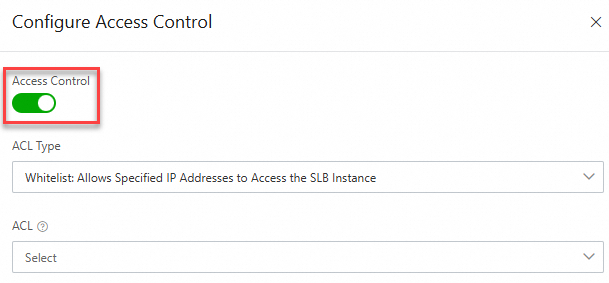
In the Configure Access Control panel of the SLB console, turn on the Access Control switch, set the ACL Type and ACL parameters, then click OK. For details on CLB access control, see Enable access control.
Related topics
-
Access control — full reference for CLB access control configuration