Updating a Lingjun node pool includes a precheck to identify potential risks. After the precheck passes, you can update the kubelet and container runtime.
Limitations
-
You can update a Lingjun node pool only if it contains one or more nodes.
-
Updating the operating system of a Lingjun node pool is not currently supported.
-
Updating a Lingjun node pool by replacing its system disks is not currently supported. Creating a node snapshot before an update is also not supported.
Features
You can update the following components of a node pool.
|
Component |
Description |
Actions |
Considerations |
|
kubelet |
You can update the kubelet in the node pool to match the version of the cluster's control plane. The control plane version determines the available update versions. |
The kubelet is updated using an in-place update. |
For more information about updating the kubelet, see Update a cluster. |
|
container runtime |
If a new version of the container runtime is released, you can update the container runtime on the nodes in the node pool to the new version. |
Note
Updating from Docker to a new Docker version is not supported. |
During a runtime update, pod probes and lifecycle hooks may fail. Pods may also restart in place. |
Procedure
Log on to the ACK console. In the left navigation pane, click Clusters.
On the Clusters page, click the name of your cluster. In the left navigation pane, click .
-
On the Node Pools page, find the target Lingjun node pool and choose More > Upgrade.
-
Select the components to update and click Precheck.
NoteIf the precheck fails or a warning is reported, see Fix check failures or click View Details to go to the Precheck Details page for troubleshooting.
-
Select the components to update and click Start Update. In the Batch Update Policy section, set the maximum number of nodes to update concurrently per batch.
More operations
During the update, you can perform the following operations in the Event Rotation area:
-
To pause or resume the update, click Pause or Continue.
-
A paused update is an intermediate state. We recommend avoiding other cluster operations and completing the update promptly. If an update is paused for more than seven days, the system automatically terminates the process and deletes all related events and logs.
-
After you click Pause, you cannot roll back the kubelet and container runtime versions on updated nodes.
-
-
Cancel: During the update, if you need to cancel the process, click Cancel.
After you click Cancel, you cannot roll back the versions of the kubelet and container runtime for nodes that are already updated.
In-place update
In-place update process
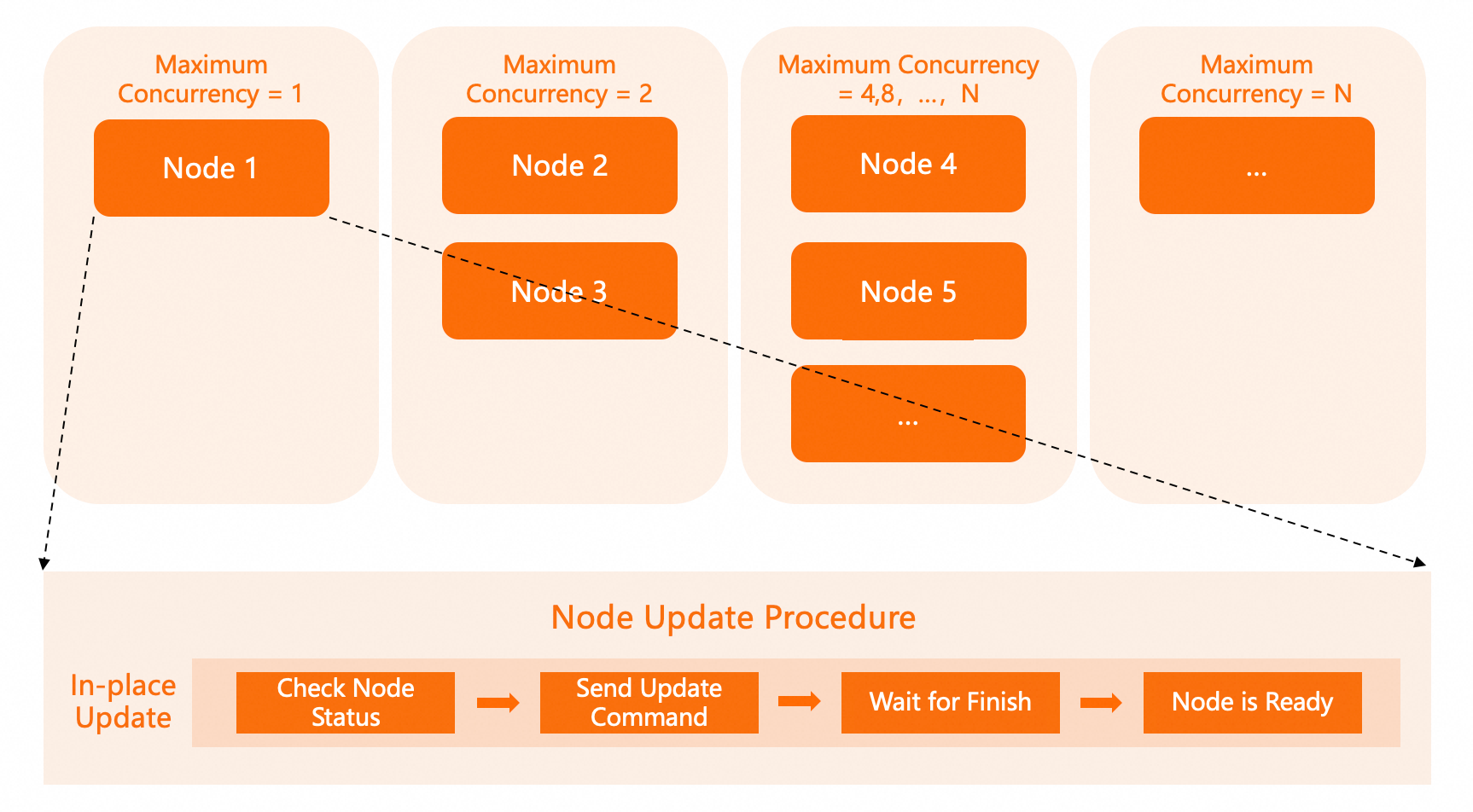
During a node pool update, the system updates nodes in batches according to the specified maximum concurrency. The maximum concurrency cannot exceed 10% of the total number of nodes. The number of nodes in each batch increases exponentially (1, 2, 4, 8, and so on) until the maximum concurrency is reached. After the maximum concurrency is reached, each subsequent batch updates that number of nodes. For example, if the maximum concurrency is 4, the first batch updates 1 node, the second batch updates 2 nodes, and the third and all subsequent batches update 4 nodes.
FAQ
Duration of a batch update
An in-place update for each batch takes about 5 minutes.
Will workloads be affected during the update?
This depends on the component being updated. An in-place kubelet update does not affect workloads. However, a container runtime update may cause pod probes and lifecycle hooks to fail, and pods may restart.
Version rollback after update
No. Kubelet and the container runtime do not currently support version rollback after an update.
Update unmanaged nodes
Clusters created before the node pool feature was released may contain unmanaged nodes that do not belong to any node pool. To update these nodes, you must first migrate them to a node pool. For more information about how to migrate unmanaged nodes to a node pool, see Migrate unmanaged nodes to a node pool.