1. How do I view a tracking solution?
Before embedding points, it is necessary to determine where to bury points and which points to bury, that is, it is necessary to sort out the clear requirements for embedding points. In the QuickTracking platform, the explicit requirements of the tracking point are called the tracking point scheme, and a specification template is designed for the tracking point scheme. as follows:
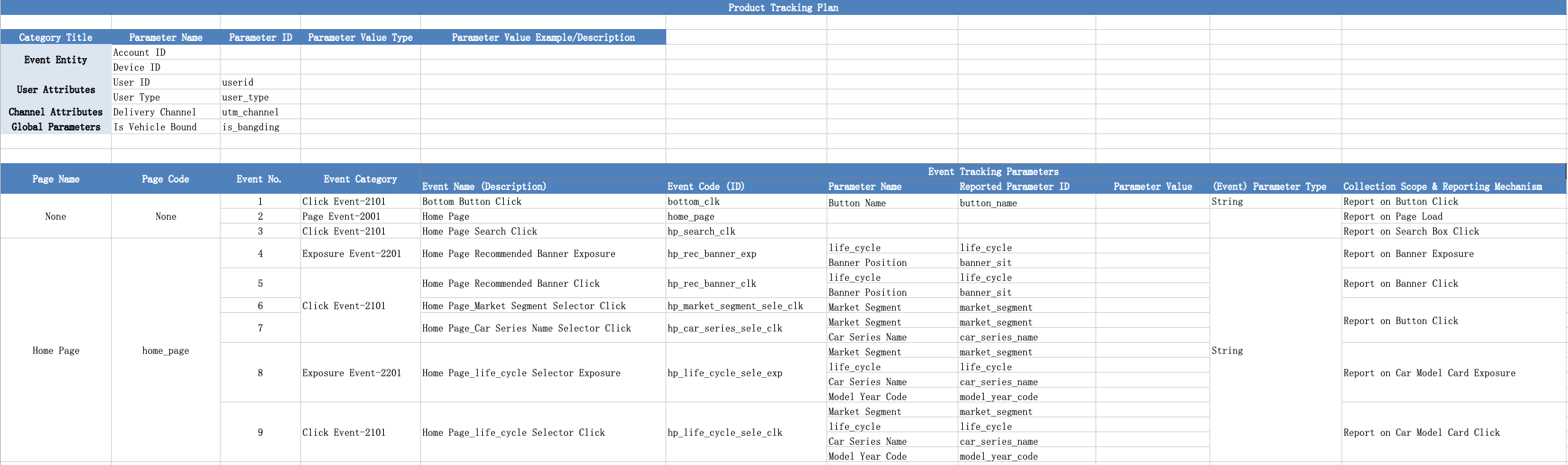
In the burial point scheme, the required burial points are as follows:
1. Event subject: the "who" triggered the event. The event can be divided into device ID and account ID. The event must have one of them.
Device ID: Default device IDs of Android and iOS devices are app-level unique device IDs, which are automatically generated by Quicktracking.
Devices that use Android 9 or the following devices: The SDK automatically collects imei, wifimac, androidid, and serial number to generate device IDs. After the device IDs are generated, the device IDs are stored locally. The device IDs are generated again only after the application is uninstalled or the application data is deleted.
Devices above the Android level 10 level: The SDK automatically collects the oaid, gaid, androidid, and serial number to generate device IDs. After the device IDs are generated, the device IDs are stored locally. The device IDs are generated again only after the application is uninstalled or the application data is deleted.
iOS devices: The SDK automatically collects openudid to generate a device ID. After the device ID is generated, it is placed in the keychain. The device ID is generated again only after factory settings are restored or application data is deleted.
The Quick Tracking SDK collects IDFAs and OAIDs only if the C- terminal users of the application agree to collect IDFAs and OAIDs. Only QuickTracking app SDK can collect OAID, GAID, Imei, WiFIMAC, AndroIID, SN, IDFV.
Account ID: the account ID of the client user after logging in. When a user logs in from different devices, the device ID changes, but the account ID does not change. For example, a user uses a mobile phone and a pad to log in separately.
2. User attribute: for the attribute of account ID, for example, the user with account ID of "testdemo@111", "birthday" of "1999-02-13", "member level" of "platinum", etc. The "birthday" and "membership" ratings are user attributes.
3. Channel attributes: attributes of advertisement delivery, such as delivery channel, delivery method, and delivery content.
4. Global attribute: the attribute carried by each event after global setting once
5. Page browsing events: events reported during page loading (events with equal page code and event code in the tracking scheme are also events marked in blue)
6. Click, exposure, and custom events: events reported when the client user interacts with the client.
2. Set the device ID and account ID
2.1 Device ID Settings
The SDK collects the following parameters by default.
Device ID or device information | Collection Method | Remarks |
idfa | [ASIdentifierManager advertisingIdentifier].UUIDString | Apple Advertising Logo |
idfv | [[UIDevice currentDevice].identifierForVendor UUIDString] | Application-level identification |
openudid | [UIPasteboardpasteboardWithName:slotPBid create:NO] | openUdid (three-party) |
taobao utdid | [UTDevice utdid] | If you integrate the Taobao utdid SDK,QuickTracking collects |
mcc | [UMUtils mccString] | Mobile Signal Country Code |
mnc | [UMUtils mncString] | cellular data network number |
If the developer wants to control the collection of certain device identifiers in the preceding table, for example, the developer does not collect the device identifiers or implements the collection method by itself. You can implement the corresponding block callback, as shown in the following example:
[QTConfigure customSetIdfaBlock:^NSString *{
  return @"";
}];
[QTConfigure customSetIdfvBlock:^NSString *{
  return @"";
}];
[QTConfigure customSetOpenUdidBlock:^NSString *{
  return @"custom-openudid";
}];
[QTConfigure customSetUtdidBlock:^NSString *{
  return @"custom-utdid";
}];
[QTConfigure customSetMccBlock:^NSString *{
  return @"custom-mcc";
}];
[QTConfigure customSetMncBlock:^NSString *{
  return @"custom-mnc";
}];Note: Exercise caution when you decide whether to implement the corresponding method. Once you choose to implement the method, you are in charge of collecting the device identifier. The SDK will not attempt to collect the device identifier. The fewer device identifiers that can be collected by the SDK, the greater the negative impact on the accuracy and stability of statistical data.
// Before you set the collection domain name and call the SDK pre-initialization function, call the collection tool class registration function.
// If you do not need to control the device identity collection behavior, you do not need to implement a custom utility class and register it.
[QTConfigure customSetIdfvBlock:^NSString *{
    return [[UIDevice currentDevice].identifierForVendor UUIDString];
}];
[QTConfigure setCustomDomain:@"Your receipt domain name" standbyDomain:nil];
[QTConfigure initWithAppKey:@"Your appkey" channel:@"App Store"];
The SDK supports custom device IDs. If you want to use custom device IDs, you must set setCustomDeviceId to a valid value (not empty) before initialization (that is, before init).
+ (void)setCustomDeviceId:(NSString *)devID;Usage example:
[QTConfigure setCustomDeviceId:@"xxxxxx"];Note: This function takes effect when no device ID is obtained. If a device ID already exists in the local device, the setting is invalid. If the device ID is obtained locally, you can uninstall and reinstall the device.
2.2 Account ID Settings
1. QT takes the device as the standard when counting users. If you need to count the account of the application itself, please use the following interface:
Interface functions:
+ (void)profileSignInWithPUID:(NSString *)puid;Parameters:
Parameters | Type | Description | Remarks |
puid | NSString | User account ID | Less than 64 bytes in length |
Note: After the account ID is set, it will be stored in the local storage. The account ID will become invalid only when the app is uninstalled, the application data is cleared, or the following logout interface is called. Otherwise, each event will carry the account ID.
Sample code:
[QTMobClick profileSignInWithPUID:@"UserID"];If you no longer need to bind a user account, you can call the logout interface. After you call the logout interface, the account-related content is no longer sent.
+ (void)profileSignOff;Sample code:
[QTMobClick profileSignOff];2.3 device ID acquisition
Interface functions:
+ (NSString *)umidString;Sample code:
NSString *deviceID = [QTConfigure umidString];3 Upload user attributes
1. Upload a custom event whose event code is fixed as "$$_user_profile". The event attributes carried by the event are placed in the user table as user attributes.
NSDictionary *dict = @{@"sex" : @"girl", @"age" : @"8"};
[QTMobClick event:@"$$_user_profile" attributes:dict];
Note: User attributes must be uploaded after the account statistics call
4 Channel attributes
After the channel attributes take effect, all subsequent events will automatically include these attributes, and these attributes and attribute values will be stored in the cache and cleared after the APP process ends. When analyzing data, you can view and filter based on this property.
4.1 H5 Link Evokes App
The URL scheme of the app contains these channel attributes, and the attribute key must start with "utm_" because the keyword recognized by the SDK is "utm_". For example: <URL scheme>? utm_channel=gzh
Add your URL Scheme to the project. The URL Scheme is located in the project settings target -> tab Info ->URL Types. The filled scheme. Call function [MobClick handleUrl:url] in AppDelegate to receive URL
AppDelegate calls:
- (BOOL)application:(UIApplication *)application openURL:(nonnull NSURL *)url options:(nonnull NSDictionary<UIApplicationOpenURLOptionsKey,id> *)options
{
 if ([QTMobClick handleUrl:url]) {
 return YES;
 }

 return YES;
}
SceneDelegate calls:
- (void)scene:(UIScene *)scene willConnectToSession:(UISceneSession *)session options:(UISceneConnectionOptions *)connectionOptions {

 for (UIOpenURLContext *context in connectionOptions.URLContexts) {
 [QTMobClick handleUrl:context.URL];
 }
}

- (void)scene:(UIScene *)scene openURLContexts:(NSSet<UIOpenURLContext *> *)URLContexts {

 [QTMobClick handleUrl:URLContexts.allObjects.firstObject.URL];
}
PS: If you have cooperated with a channel delivery company on the market and cannot start with utm_, you can use the Global Attributes API to report the channel attributes. The attribute key must start with utm_.
4.2 The H5 link arouses the application market to download and launch the application
In this scenario, if only the utm_parameter is included in the H5 URL, the utm_parameter cannot be included in the startup event after the app is downloaded. Therefore, it is necessary to perform fuzzy matching between "H5 arousal event" and "application activation event" on "IP address and browser UserAgent ".
When a user clicks the "Call /Download App" button in H5, an "app call event ($$_app_link)" is reported. In the event, the appkey and channel attribute of the call app must be included.
// Example
aplus_queue.push({
  action:'aplus.recordAppLink',
  arguments:[{
    targetAppKey: 'Application appKey', // Required. The appKey of the application to be evoked.
    custom1: 'custom1', // Optional. The custom parameter.
    ...
  }]
})
The app activation event ($$_app_install) is automatically collected and reported by the QT App SDK.
The QuickTracking system performs fuzzy matching between an application evocation event ($$_app_link) and an application activation event ($$_app_install) with respect to the IP address and browser UserAgent. When you use it, you can directly analyze the channel properties of "application activation (preset)" in the app application.
4.3 Active Data Statistics of App Market
The second input parameter in the initialization function is the Marketplace of the application: [QTConfigure initWithAppkey:@"Your appkey" channel:@"App Store"];. You can view the update channel in the System Properties section.
5 Global attributes
After global attributes are registered, all subsequent events will automatically include these attributes, and these attributes and attribute values are saved in memory and cleared after the APP process ends. When analyzing data, you can view and filter based on this property.
5.1 Register Global Attributes
/**
 * Set global property key-value pairs.
 * If the key of an existing global attribute is the same as the key of the existing global attribute, the existing value is updated.
 * If the key of an existing global attribute is inconsistent with the key of an existing global attribute, a new global attribute is inserted.
 */
+(void) registerGlobalProperty:(NSDictionary *)property;
Parameters | Type | Description | Remarks |
property | NSDictionary | Attribute names and attribute values for global attributes | - |
Example:
NSDictionary *firstPropertyDict = @{
     @"a" : @"1",
     @"b" : @"2"
};
[QTMobClick registerGlobalProperty:firstPropertyDict];// The current globalproperty is a:1 and b:2

NSDictionary *secondPropertyDict = @{
     @"b" : @"3",
     @"c" : @"4"
};
[QTMobClick registerGlobalProperty:secondPropertyDict];// The current globalproperty is a:1, b:3, and c:4
5.2 Get a Global Property
/**
 * Get a global property; if it does not exist, return empty.
 */
+(NSString *) getGlobalProperty:(NSString *)propertyName;
Parameters | Type | Description | Remarks |
propertyName | NSString | Property name, only supports uppercase and lowercase letters, numbers and underscores! | - |
Return Value | NSString | - |
5.3 delete a global attribute
Deletes a specific global property. After the property is deleted, all subsequent events that are triggered no longer carry the property.
/**
 *
 * Delete a specified global attribute.
 @param key
 */
+(void) unregisterGlobalProperty:(NSString *)propertyName;
Parameters | Type | Description | Remarks |
propertyName | NSString | The name of the property. Only letters, digits, and underscores are supported. | - |
5.4 Get All Global Properties
/**
 * Get all global properties; if they do not exist, return empty.
 */
+(NSDictionary *)getGlobalProperties;
Parameters | Type | Description | Remarks |
Return Value | NSDictionary | The value of the returned global property is of the character type and must be the same as the value of the parameter type that was passed in when the global property was registered. | - |
5.5 Clear All Global Attributes
/**
 * Clear all global attributes.
 */
+(void)clearGlobalProperties;
6 Page Browsing Event API
The SDK provides two methods to report page browsing events: automatic page collection and manual page collection. The two methods can also be used together.
6.1 page automatic collection
The automatic collection of pages is implemented by hook system viewWillAppear and viewWillDisappear and get className. By default, automatic page collection is disabled for the SDK. If you want to enable this, we recommend that you call this operation before initialization.
Interface functions:
+ (void)setAutoPageEnabled:(BOOL)value;Parameters | Type | Description | Remarks |
value | BOOL | Whether to enable automatic page collection |
|
Sample code:
// Enable automatic page collection.
[QTMobClick setAutoPageEnabled:YES];
6.1.1 Disable automatic reporting of a single page
If you enable automatic page collection globally, you can call this operation to skip automatic page collection. We recommend that you call this operation at the beginning of the viewWillAppear operation. If you do not collect statistics on the current automatic page collection, you can set the pageName parameter to nil.
Interface functions:
+ (void)skipMe:(id)PageObject pageName:(NSString *)pageName;Example:
#import <QTCommon/UMSpmHybrid.h>

- (void)viewWillAppear:(BOOL)animated
{

    [super viewWillAppear:animated];

    // Automatic page collection of the current class is not counted.
    [UMSpmHybrid skipMe:[self class] pageName:nil];
}
Manual collection of 6.2 pages
Interface functions:
/**Automatic page duration statistics to record the display duration of a page.
 Usage: You must call the beginLogPageView: and endLogPageView: two functions to complete automatic statistics. If only one function is called, valid data will not be generated.
 Call beginLogPageView: when the page is displayed, and endLogPageView when exiting the page:
 @ param pageName The name of the page on which statistics are collected.
 @return void.
 */
+ (void)beginLogPageView:(NSString *)pageName;

/**Automate page duration statistics to record the display duration of a page.
 Usage: You must call the beginLogPageView: and endLogPageView: two functions to complete automatic statistics. If only one function is called, valid data will not be generated.
 Call beginLogPageView: when the page is displayed, and endLogPageView when exiting the page:
 @ param pageName The name of the page on which statistics are collected.
 @return void.
 */
+ (void)endLogPageView:(NSString *)pageName;
Parameters:
Parameters | Type | Description | Remarks |
pageName | NSString | Page encoding for statistics | The values in the beginLogPageView and endLogPageView must be the same |
Note:
You must pair call beginLogPageView: and endLogPageView: two functions to complete automatic statistics. If only one function is called, valid data will not be generated;
Call beginLogPageView: when the page is displayed, and call endLogPageView: when the page is exited.
Sample code:
In the ViewController class, call the following methods in pairs in viewWillAppear: and viewWillDisappear::
- (void)viewWillAppear:(BOOL)animated
{
 [super viewWillAppear:animated];
 [QTMobClick beginLogPageView:@"Pagename"]; //("Pagename" is the page name, which can be customized)
}

- (void)viewWillDisappear:(BOOL)animated
{
 [super viewWillDisappear:animated];
 [QTMobClick endLogPageView:@"Pagename"];
}
You can also call the beginLogPageView: and endLogPageView: functions in the viewDidAppear: and viewDidDisappear: methods to complete automatic statistics based on your business scenario.
6.2.1 Page property settings
The iOS page property setting interface updatePageProperties allows you to attach custom properties to the current page. Interface:
/**
 * @brief Updates the business parameters on the page.
 *
 * @param pageName The name of the page, such as Page_Detail.
 * @param pProperties The business parameters, which are kv pairs.
 *
 * @warning Call description: must be called before the viewWillDisappear
 *
 * Best location: call before viewWillDisappear
 */
+(void) updatePageProperties:(NSString *)pageName properties:(NSDictionary *) pProperties;
Parameters:
Parameters | Type | Description | Remarks |
pageName | NSString | Page encoding, such as Page_Detail | |
pProperties | NSDictionary | Business parameters, kv pair |
Note: Please call beginLogPageView after setting page properties.
Introduce header files:
#import <QTCommon/UMSpm.h>Example:
[UMSpm updatePageProperties:@"page_home" properties: @{@"page_home_key":@"page_home_val"}];Note: You can configure only manual tracking for a page.
6.2.2 Pass through page properties
In addition, the Quick Tracking SDK also provides the pass-through page property tracking interface updateNextPageProperties, which allows you to attach custom properties to the next page.
/**
 * @brief Updates the business parameters on the next page.
 *
 * @param properties Pass the business parameters to the next page. The KV pair
 *
 * @warning Call description: The call must be made before pageAppear on the next page. Otherwise, an error is carried.
 *
 * Best location: must be called before pageAppear on the next page
 */
+(void) updateNextPageProperties:(NSDictionary *) properties;
Parameters:
Parameters | Type | Description | Remarks |
properties | NSDictionary | Pass the business parameters to the next page. kv pair |
Example:
Must be called before the next page beginLogPageView.
[UMSpm updateNextPageProperties:@{@"news_next_key":@"news_next_val"}];Note: You can use only manual tracking for page attributes.
7 Event Burial Point
Custom events can be used to track user behavior and record the specific details of behavior occurrence.
7.1 event tracking point
Interface:
+ (void)event:(NSString *)eventCode;

+ (void)event:(NSString *)eventCode attributes:(NSDictionary *)attributes;

+ (void)event:(NSString *)eventId pageName:(NSString *)pageName attributes:(NSDictionary *)attributes;
Parameter description:
Parameters | Type | Description | Remarks |
eventCode | NSString | Event encoding | Event codes of click, exposure, and custom events in the tracking scheme |
attributes | NSDictionary | Custom Properties | -The value of the key in the attribute cannot be empty. -value can only be of type String, Long, Integer, Float, Double, Short, or Array (elements in an array must be String). |
pageName | NSString | Page encoding | The page where the event is located, and the page code of the click, exposure, and custom event in the tracking scheme. |
Event upload quantity limit:
Maximum length of custom property key string: 1024
Maximum length of the custom attribute value string: 1024*4
Custom attribute map length (number of parameters):100 key-value pairs
When the custom property value is an array element, the maximum array length of the property value is 100.
The total length of a single log message is limited to 2MB.
Example 1:
Count the number of times the "forward" event occurs in the application, then call in the forwarding function:
[QTMobClick event:@"Forward"];Example 2:
To count the number of times the "purchase" event occurs in the application, as well as the type and quantity of purchased goods, then call in the purchase function:
NSDictionary *dict = @{@"type" : @"book", @"quantity" : @"3"};
[QTMobClick event:@"purchase" attributes:dict];
Example 3:
NSDictionary *dict = @{@"type" : @"book", @"quantity" : @"3"};
[QTMobClick event:@"purchase" pageName:@"ViewController" attributes:dict];
8 Full embedding point (automatic embedding point)
8.1 full buried point applicable scope
The SDK is applicable to iOS 8.0 and later.
8.2 Full Buried Point Interface Description
8.2.1 Automatic page collection interface
The automatic collection page is hook system viewWillAppear and viewWillDisappear, get className implementation, it is recommended to call before initialization, the default is disabled
/**Set whether to automatically collect data. The default value is NO.
 @ param value is set to YES, the QT SDK automatically collects page information
 */
+ (void)setAutoPageEnabled:(BOOL)value;
Example:
 [QTMobClick setAutoPageEnabled:YES];
 // Set the domain name.
 [QTConfigure setCustomDomain:@"Your receipt domain name" standbyDomain:nil];
 // Initialize the appkey.
 [QTConfigure initWithAppkey:@"AppKey of your application" channel:@"App Store"];
Disable automatic page collection for a page
/**
 * @brief Skips the statistics on the current page.
 *
 * @param PageObject The object of the container. This parameter is used to automatically obtain the page. By default, this parameter can be set to nil.
 * @param pageName The name of the page. This parameter is used when you manually configure the page. You can enter nil when you configure automatic page retrieval.
 * @warning We recommend that you call this operation before you set the page. After you call this operation, the native page does not send data.
 *
 */
+ (void)skipMe:(id)PageObject pageName:(NSString *)pageName;
Example:
[UMSpmHybrid skipMe:self pageName:nil];8.2.2 Open the control and click the data tracking point
The automatic collection events are:
hook system sendAction:to:from:forEvent: implements control execution method monitoring
Listening addGestureRecognizer: Implement all click behavior
hook tableView:didSelectRowAtIndexPath: supports the click behavior of tableView
hook collectionView:didSelectItemAtIndexPath: supports the click behavior of collectionView
It is recommended to call before initialization, which is closed by default.
/**Set whether to automatically collect click events. The default value is NO.
 @ param value is set to YES, the QT SDK automatically collects click events
 */
+ (void)setAutoEventEnabled:(BOOL)value;
Example:
 [QTMobClick setAutoEventEnabled:YES];
 // Set the domain name.
 [QTConfigure setCustomDomain:@"Your receipt domain name" standbyDomain:nil];
 // Initialize the appkey.
 [QTConfigure initWithAppkey:@"AppKey of your application" channel:@"App Store"];
Supported controls:
Control Name | Remarks |
UITableView | |
UICollectionView | |
UIImageView | There is UITapGestureRecognizer behavior can be |
UILabel | There is UITapGestureRecognizer behavior can be |
UIButton | |
UISwitch | |
UIStepper | |
UISegmentedControl | |
UISlider | |
UIPageControl | |
UITabBarItem | |
UIBarButtonItem |
Ignore the click event of a container
/**
 * @abstract
 * Ignore clicks on a page
 *
 * @param PageObject The container.
 */
+(void)ignorePageView:(id)PageObject;
Example:
// This method supports multiple calls and ignores the collection.
[QTAutoTrack ignorePageView:self];
Ignore automatic collection of click events of specific types of controls
Automatic collection of click events for controls of a specific type is ignored by using the ignoreViewType method.
/**
 * @abstract
 * Ignore a certain type of click
 *
 * @param aClass View the corresponding Class
 */
+(void)ignoreViewType:(Class)aclass;
Example:
// This method supports multiple calls and ignores the collection.
[QTAutoTrack ignoreViewType:[UIButton class]];
[QTAutoTrack ignoreViewType:[UISwitch class]];
Ignore automatic collection of click events of specific controls
Automatic collection of click events for a specific control is ignored by the UMAnalyticsIgnoreView method.
button.UMAnalyticsIgnoreView=YES;8.2.3 Page Setup Custom Information
Custom Encoding for Page Settings
By implementing the-(NSString *)getUMPageName method, a custom encoding is returned
-(NSString *)getUMPageName
{
   return @"testPageCode";
}
Custom Properties
Set custom properties on the page by implementing the-(NSDictionary *)getUMPageProperties method
-(NSDictionary *)getUMPageProperties
{
   return @{@"key1":@"val1",@"key2":@"val2"};
}
Page setting source (page_referrer) information
You can use the-(NSString *) getUMScreenUrl method to return information about a custom source.
- (NSString *)getUMScreenUrl {
    return @"um//um/page";
}
8.2.4 Setting Custom Properties for Control Click Events
This method allows you to set custom properties for a specific control. You can set multiple key-value pairs for custom properties. Both Key and Value need to be of the string type. The custom properties and values are included in this control's full-click event data.
button.UMAnalyticsViewProperties=@{@"key11":@"val11"};Set Event Code for Control
This method allows you to set the event encoding for a specific control.
button.UMAnalyticsEventCode=@"abcd123";8.3 exposure buried point
This feature is supported in SDK 1.7.0.PX and later. For more information, see iOS SDK update logs.
When using the automatic exposure tracking function, the user needs to manually turn on the automatic exposure function in the configuration items (the default is off)
// Enable exposure statistics.
[QTConfigure setAutoExposureEnabled:YES showMonitorVerboseLog:NO];
Of course, you can also turn off the automatic exposure function when needed.
// Disable exposure statistics.
[QTConfigure setAutoExposureEnabled:NO showMonitorVerboseLog:NO];
Parameter description:
Parameters | Type | Remarks |
exposureEnabled | BOOL | Whether to enable automatic exposure acquisition. The default value is NO, that is, the element exposure monitoring is disabled. |
showMonitorVerboseLog | BOOL | The redundant log switch of the element exposure listener. The default value is NO. This switch is used to view the change of the listener exposure timing. |
8.4.1 Exposure configuration items
#import <QTCommon/QTCommon.h>

// General exposure settings
QTExposureConfig *config = [[QTExposureConfig alloc] initWithVisibleAreaThreshold:0 exposureDurationThreshold:0 allowRepeatExposure:YES];
[QTConfigure setExposureConfig:config];
The following table describes the parameters that are QTExposureConfig to configure properties for exposure:
Parameters | Type | Description |
visibleAreaThreshold | CGFloat | The minimum exposure ratio. The default value is 0.5f. The exposure range is 0~1f.
|
exposureDurationThreshold | NSTimeInterval | The effective exposure duration, which is the minimum supported 0.3. The default value is 0.3, that is, the display triggers an exposure after the specified time. |
allowRepeatExposure | BOOL | Whether to repeat exposure. Default value: YES.
|
8.4.1 Configure global exposure
You can use the setExposureConfig method to set the global exposure attribute. We recommend that you call the
#import <QTCommon/QTCommon.h>

[QTConfigure setExposureConfig:config];
8.4.2 Marking Exposure Elements
To use the exposure function, you need to manually bind the exposure element, you can call the addViewForExposure method to implement the binding of the exposure element.
// Add an exposure view.
+ (void)addViewForExposure:(UIView *_Nullable)view withData:(QTExposureData *_Nullable)data;
Parameter description:
Parameters | Type | Remarks |
view | UIView | View object whose exposure needs statistics |
data | QTExposureData | The following table describes the exposure data in detail. |
QTExposureData API:
/// Encapsulate the data of an exposure event, including the event name, custom attributes, exposure identifier, and exposure configuration
@interface QTExposureData : NSObject

// The exposure configuration.
@property (nonatomic, copy) QTExposureConfig *exposureConfig;

// Customize event properties.
@property (nonatomic, strong) NSDictionary<NSString *, id> *properties;

// The name of the event.
@property (nonatomic, copy) NSString *event;

// The unique flag of the view.
@property (nonatomic, copy, readonly) NSString *exposureIdentifier;

@property (nonatomic, weak) id<QTExposureListener> exposureListener;

// The initialization method.
- (instancetype)initWithEvent:(NSString *)event properties:(NSDictionary<NSString *, id> *)properties exposureConfig:(QTExposureConfig *)exposureConfig exposureIdentifier:(NSString *)exposureIdentifier;

@end
Parameter description:
Parameters | Type | Description |
event | NSString | Event Name (Required) |
properties | NSDictionary<NSString *, id> | Exposure event attributes (optional) |
exposureConfig | QTExposureConfig | Exposure configuration (optional. Global configuration is used by default) |
exposureIdentifier | NSString | Unique identifier of the element |
General element tag
Sample code:
#import <QTCommon/QTCommon.h>

// Construct exposure data.
QTExposureData *data = [[QTExposureData alloc] initWithEvent:@"test_item_exp" properties:nil exposureConfig:nil exposureIdentifier:nil];
[QTMobClick addViewForExposure:view withData:data];
List Class Element Tag
Mark all elements
#import <QTCommon/QTCommon.h>

QTExposureConfig *config = [[QTExposureConfig alloc] initWithVisibleAreaThreshold:0 exposureDurationThreshold:0 allowRepeatExposure:YES];
QTExposureData *data = [[QTExposureData alloc] initWithEvent:@"test_whole_tableview_exp" properties:@{
    @"tableviewName":@"xxxx"
} exposureConfig:config exposureIdentifier:nil];
[QTMobClick addViewForExposure:self.tableView withData:data];
Mark a single element:
A single element in the list is often reused and the element position is changed (refreshed, deleted, added, etc.). We recommend that you add a exposureIdentifier field to the exposure data and ensure the uniqueness of the ID.
- (UITableViewCell *)tableView:(UITableView *)tableView cellForRowAtIndexPath:(NSIndexPath *)indexPath {

    UITableViewCell *cell = [[UITableViewCell alloc] initWithStyle:UITableViewCellStyleDefault reuseIdentifier:@"exposureCell"];

    UILabel *label = [[UILabel alloc] initWithFrame:CGRectMake(0, 0, 100, 20)];
    label.text = [NSString stringWithFormat:@"session:%ld", (long)indexPath.section];
    [cell addSubview:label];

    UILabel *label2 = [[UILabel alloc] initWithFrame:CGRectMake(160, 0, 100, 20)];
    label2.text = [NSString stringWithFormat:@"row:%ld", (long)indexPath.row];
    [cell addSubview:label2];

    QTExposureData *data;
    // Define the event code of the exposure event.
    NSString *cell_exp_eventcode = [NSString stringWithFormat:@"exposure_cell_%ld_%ld", indexPath.section, (long)indexPath.row];
    // Define the attribute dictionary to be exposed for the element.
    NSDictionary *properties = @{ @"cell_image_name": @"xxxx" };
    // Define the unique identifier of the exposed element.
    NSString* uniqueExpItemId = @"xxxx";
    // Define the exposure timing of a single element in the list.
    // If the default element exceeds 50% in the viewport area, the element appears for 300ms.
    // Specify whether to repeatedly expose data. You can specify a value based on your business requirements.
    QTExposureConfig* expItemConfig = [[QTExposureConfig alloc] initWithVisibleRadio:0.5 exposureMinDuration:0.3 allowRepeatExposure:YES];
    // Assemble the exposure data.
    data = [[QTExposureData alloc] initWithEvent:cell_exp_eventcode
                                      properties:properties
                                  exposureConfig:expItemConfig
                              exposureIdentifier:uniqueExpItemId];
    /* Other optional exposure data configuration APIs

    data = [[QTExposureData alloc] initWithEvent:cell_exp_eventcode
                                      properties:properties];

    data = [[QTExposureData alloc] initWithEvent:cell_exp_eventcode
                                  exposureConfig:expItemConfig
                              exposureIdentifier:uniqueExpItemId];

    data = [[QTExposureData alloc] initWithEvent:cell_exp_eventcode
                                      properties:properties
                              exposureIdentifier:uniqueExpItemId];

    data = [[QTExposureData alloc] initWithEvent:cell_exp_eventcode
                                      properties:properties
                                  exposureConfig:expItemConfig];

    */

    [QTMobClick addViewForExposure:cell withData:data];

    return cell;
}
8.4.3 Remove Exposure Elements
If the element itself is removed, the corresponding tracking point monitoring will be removed (such as deleting a list)
Of course you can use removeViewForExposure to remove elements that do not require exposure capture
[QTMobClick removeViewForExposure:view withExposureIdentifier:nil];9 share fission
Sharing fission is a key concept of the growth hacking strategy. It relies on the social connection between users to realize the mutual transmission of information, so as to promote the acquisition of new users.
After completing the integration of the SDK function of sharing fission, you will be able to use the QuickTracking platform to share trend models and measure the pull-up benefits of marketing activities by sharing return-related indicators.
Supports viewing the reflow effect metrics of the top sharing users and different sharing reflow levels.
Supports flexible combination and configuration of backflow indicators, views top users with the most fission pull-up capability and sharing backflow conversion capability, tracks the relationship between users sharing fission links and sharing backflow, and quickly locates key opinion consumers.
9.1 source sharing parameters
/*
 * Source sharing parameter acquisition API
 * return @{ @"$$_ref_share_id": @"xxxxx", @"$$_ref_share_url": @"xxxxx"}
 **/

+(nullable NSDictionary *)getRefShareParams;
Version requirements
iOS SDK V1.5.0.PX and later
Features
API used to obtain the source share id and source share URL when the shared person opens the app
request parameters
None
Return parameters
By default, an empty dictionary is returned. If {} has a value, the following function is returned:
Parameters | Type | Default Value | Meaning | Remarks |
$$_ref_share_url | String | "" | The source share URL that does not contain the share ID. | None |
$$_ref_share_id | String | "" | source sharing id | None |
Call example
-(void)onShare {
    __weak typeof(self) weakSelf = self;
    NSDictionary* refShareParams = [QTMobClick getRefShareParams];
    NSString* $$_ref_share_id = [refShareParams objectForKey:@"$sid"];

    [QTMobClick requestShareParams:@"https://www.lydaas.com/?utm_source=share" params:@{
        @"title": @"This is a shared title",
        @"campaign":@"This is a sharing activity",
        @"shareId": $$_ref_share_id
    } timeout:0 shareResultHandler:^(id  _Nullable result, NSError * _Nullable error) {
        NSLog(@"result === %@", result);
        if (error) {
            NSLog(@"error === %@", error);
        }
        __block NSString *shareId = [(NSDictionary*)result objectForKey:@"$sid"];

        NSDictionary *dict = @{
            @"$$_share_id": shareId,
            @"$$_share_url" : @"https://www.lydaas.com/?utm_source=share",
            @"$$_share_title" : @"Share activity A",
            @"$_share_campaign_id" : @"This is a custom sharing activity",
            @"$$_share_type" : @"User-defined sharing platform"
        };
        [QTMobClick event:@"$$_share" attributes:dict];
        dispatch_async(dispatch_get_main_queue(), ^{
            UIAlertController *alertController = [UIAlertController
                alertControllerWithTitle:@"Share parameters" message:[NSString
                stringWithFormat:@"The request sharing parameter results are as follows:\n\n {\n $sid:%@ \n} \n", shareId]
                preferredStyle:UIAlertControllerStyleAlert];
            // Create a UIAlertAction.
            UIAlertAction * firmAction = [UIAlertAction actionWithTitle:@"I got it"
                style:UIAlertActionStyleDefault handler:^(UIAlertAction * _Nonnull action) {
                // Processing after the OK button is clicked
                NSLog(@"The user has been copied");
                UIPasteboard *pasteboard = [UIPasteboard generalPasteboard];
                pasteboard.string = shareId;
            }];
            [alertController addAction:confirmAction];
            [weakSelf presentViewController:alertController animated:YES completion:nil];
        });
    }];
}
9.2 request sharing parameters
#import <QTCommon/MobClick.h>

/*
 * Share the parameter acquisition API.
 * @param url: the URL of the shared page. You must specify this parameter.
 * @param params The possible sharing parameters, which can be null.
 * {
 * @"title": share title, // can be null, maximum length 4*1024
 * @"shareId": The ID of the source share. // The value can be null.
 * @"campaign": sharing activity, // can be null, the maximum length is 4*1024
 * ... to be expanded
 * }
 * @param timeout The request timeout period, in seconds. Valid values: 0 to 10. If you specify 0, the SDK uses the default value of 3 seconds.
 * @param The callback object for the shareResultHandler result. This parameter must be specified and cannot be null.
 */

+(void)requestShareParams:(nonnull NSString *)url
                   params:(nonnull NSDictionary *)params
                  timeout:(int)timeout
       shareResultHandler:(nonnull QTShareResultHandler)shareResultHandler;
Version requirements
iOS SDK v1.5.0.PX and later
Features
request is used to build the share ID required for the sharing chain
request parameters
Parameters | Type | Default Value | Meaning | Remarks |
url | NSString | nil | Share the URL of the page | Must be specified, cannot be nil |
params | NSDictionary | nil | Share parameters to obtain API request parameters |
campaign: shared activity identifier. String type, the default value is "", the maximum length is 4*1024 characters title: Share the title. String type, the default value is "", the maximum length is 4*1024 length shareId: the ID of the source share. String type, default value is "" |
timeout | int | 0 | Interface Timeout Period | Valid values: 1 to 10. Unit: seconds. The default timeout period of the SDK is 3 seconds. |
shareResultHandler | QTShareResultHandler | nil | Result callback object | Must be specified, cannot be nil Note: The callback context is the SDK internal network request background worker thread. If you need to perform operations on UI controls in the callback method, use the UI thread handler to perform related operations. |
Return parameters
Parameters | Type | Default Value | Meaning | Remarks |
result | NSDictionary | nil | Share Parameter API Request Results | Contains a property $sid, NSString type, share ID |
error | NSError | nil | An error is reported for a shared parameter API request. | None |
Call example
-(void)onShare {
  __weak typeof(self) * weakSelf = self;
 	[QTMobClick requestShareParams:@"https://www.lydaas.com/?utm_source=share"
   	params:@{
     @"title": @"This is a shared title",
     @"campaign":@"This is a sharing activity",
     @"shareId": @"This is a shared ID"
     }
   timeout:0
   shareResultHandler:^(id  _Nullable result, NSError * _Nullable error) {
     NSLog(@"result === %@", result);
     if (error) {
       NSLog(@"error === %@", error);
     }
     __block NSString *shareId = [(NSDictionary*)result objectForKey:@"$sid"];
     NSDictionary *dict = @{
       @"$$_share_id": shareId,
       @"$$_share_url" : @"https://www.lydaas.com/?utm_source=share",
       @"$$_share_title" : @"Share activity A",
       @"$_share_campaign_id" : @"This is a custom sharing activity",
       @"$$_share_type" : @"User-defined sharing platform"
     };
     [QTMobClick event:@"$$_share" attributes:dict];
     dispatch_async(dispatch_get_main_queue(), ^{
       UIAlertController *alertController = [UIAlertController alertControllerWithTitle:@"Share parameters"
                                             message:[NSString stringWithFormat:
                                             @ "The request sharing parameter results are as follows:\n\n {\n $sid:%@ \n} \n", shareId]
                                             preferredStyle:UIAlertControllerStyleAlert];
       // Create a UIAlertAction.
       UIAlertAction * firmAction = [UIAlertAction actionWithTitle:@"I got it"
                                       style:UIAlertActionStyleDefault
                                       handler:^(UIAlertAction * _Nonnull action) {
                                         // Processing after the OK button is clicked
                                         NSLog(@"The user has been copied");
                                         UIPasteboard *pasteboard = [UIPasteboard generalPasteboard];
                                         pasteboard.string = shareId;
                                       }];
       [alertController addAction:confirmAction];
       [weakSelf presentViewController:alertController animated:YES completion:nil];
     });
   }];
}
9.3 reporting and sharing events
Report sharing events by using the preset event coding $$_share
Example:
[QTMobClick requestShareParams:@"https://www.lydaas.com/?utm_source=share"
                        params:@{
    @"title": @"This is a shared title",
    @"campaign":@"This is a sharing activity",
    @"shareId": @"This is a shared ID"
}
                        timeout:0
            shareResultHandler:^(id  _Nullable result, NSError * _Nullable error) {
    NSLog(@"result === %@", result);
    if (error) {
        NSLog(@"error === %@", error);
    }
    __block NSString *shareId = [(NSDictionary*)result objectForKey:@"$sid"];
    NSDictionary *dict = @{
        @"$$_share_id": shareId,
        @"$$_share_url" : @"https://www.lydaas.com/?utm_source=share",
        @"$$_share_title" : @"Share activity A",
        @"$_share_campaign_id" : @"This is a custom sharing activity",
        @"$$_share_type" : @"User-defined sharing platform"
    };
    [QTMobClick event:@"$$_share" attributes:dict];
}];
Please note that the evoked link needs to carry the key "$sid" and the value is the sharing Id parameter, such as https://example.aliyun.com/path/to/content?$sid=123456"