A collection stores vectors of the same dimension and metric type. Before you insert or query vectors in DashVector, create a collection in a cluster.
For the full parameter list, see Parameter reference. For SDK-specific details, see Create a collection with an SDK.
Prerequisites
Before you begin, make sure that you have:
Collection naming rules
Collection names must meet the following requirements:
3 to 32 characters in length
Can contain letters, digits, underscores (\_), commas (,), and hyphens (-)
Must start with a letter
Must be unique within the cluster
A paid cluster supports up to 32 collections. A free trial cluster supports up to 2 collections.
Choose a distance metric
The distance metric determines how DashVector measures similarity between vectors. Choose a metric based on how your embedding model was trained.
| Metric | API value | Notes |
|---|---|---|
| Cosine similarity | Cosine | Requires Float data type |
| Dot product | DotProduct | |
| Euclidean distance | Euclidean |
For more information about vectors and distance metrics, see What is a vector?
Parameter reference
The following table describes the parameters for creating a collection. These parameters apply to the console, SDKs, and HTTP API.
| Parameter | API name | Required | Description |
|---|---|---|---|
| Cluster | ClusterName | Yes | The cluster in which to create the collection. |
| Collection Name | Name | Yes | The collection name. See Collection naming rules. |
| Region | / | Yes | Only the China (Hangzhou) region is supported. |
| Endpoint | Endpoint | Yes | The cluster endpoint, in the format vrs-cn-xxxxxxx.dashvector.cn-hangzhou.aliyuncs.com. |
| Vector Dimension | dimension | Yes | The number of dimensions. Valid values: 2 to 20000. Set this to match your embedding model output dimension. |
| Vector Data Type | dtype | Yes | The element data type. Valid values: Float (default) and INT8. For example, [1.1, 2.2, 3.3] is Float and [11, 22, 33] is INT8. |
| Distance Measurement Method | metric | Yes | The distance metric. Valid values: Cosine, DotProduct, and Euclidean. If set to Cosine, the data type is fixed to Float. |
| Schema | fields_schema | No | Optional field schema. For more information, see Schema-Free. |
Create a collection in the console
Log on to the DashVector console.
In the left-side navigation pane, click Clusters.
Find your target cluster and click Create a Collection in the Operation column.

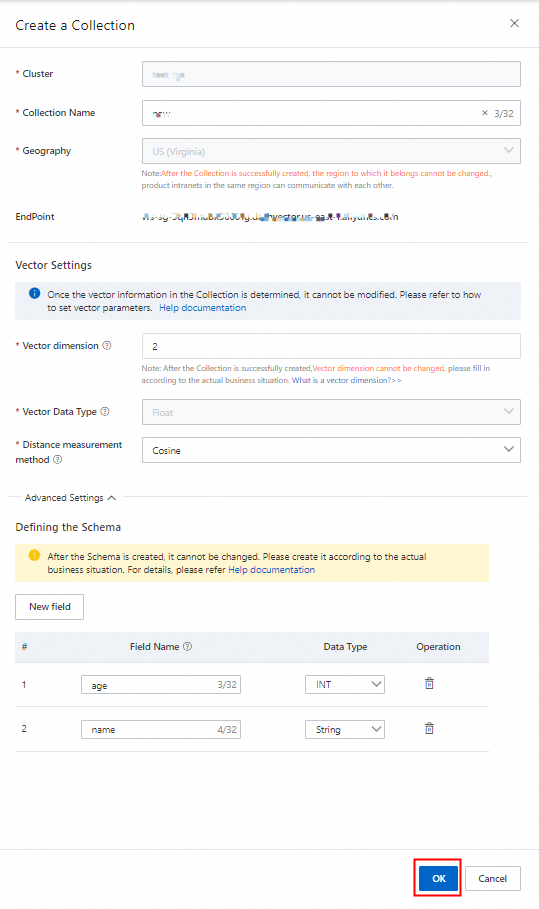
In the Create a Collection panel, configure the parameters described in Parameter reference, and then click OK.
Create a collection with an SDK
For more information about how to create a collection by using the SDK for Python, see Create a collection (Python).
For more information about how to create a collection by using the SDK for Java, see Create a collection (Java).
Create a collection with the HTTP API
For the complete API reference, see Create a collection (HTTP API).
What to do next
After you create a collection, you can:
Insert vectors into the collection
Query vectors by similarity search
Manage collection settings and schema