You can publish one or more versions for a service. A version is a snapshot of the service. When you publish a version, Function Compute creates a snapshot and assigns it a version number. You can also create an alias that points to a specific version. Service versions and aliases let you publish, roll back, and perform canary releases. This topic describes how to use versions and aliases to implement canary releases in the Function Compute console.
Canary release workflow

Prerequisites
Step 1: Prepare and test the function
When you create a service and its function, the service version is LATEST. Debug the function in the LATEST version until it is stable. You can execute the function of the LATEST version in the console.
Log on to the Function Compute console. In the left-side navigation pane, click Services & Functions.
In the top navigation bar, select a region. On the Services page, click the desired service.
On the Functions page, click the name of the desired function. On the Function Details page that appears, click the Code tab.
In the code editor, modify the code to view the function version. Click Deploy Code, and then click Test Function.
The following code provides an example of how to view the function version.
module.exports.handler = function(eventBuf, context, callback) { var qualifier = context['service']['qualifier'] var versionId = context['service']['versionId'] console.log('Qualifier from context:', qualifier); console.log('VersionId from context: ', versionId); callback(null, qualifier); };# -*- coding: utf-8 -*- def handler(event, context): qualifier = context.service.qualifier versionId = context.service.version_id print('Qualifier from context:' + qualifier) print('VersionId from context:' + versionId) return 'hello world'<?php function handler($event, $context) { $qualifier = $context["service"]["qualifier"]; $versionId = $context["service"]["versionId"]; print($qualifier); print($versionId); return "hello world"; }using System; using System.IO; using Aliyun.Serverless.Core; using Microsoft.Extensions.Logging; namespace Desktop { class Program { static void Main(string[] args) { Console.WriteLine("Hello World!"); } } class App { public string Handler(Stream input, IFcContext context) { ILogger logger = context.Logger; var qualifier = context.ServiceMeta.Qualifier; var versionId = context.ServiceMeta.VersionId; logger.LogInformation("Qualifier from context: {0}", qualifier); logger.LogInformation("versionId from context: {0}", versionId); return "hello world"; } } }After execution completes, view the log output. The log output shows that the value of the qualifier field, which indicates the version, is LATEST. This means the executed function belongs to the LATEST version.
Step 2: Publish and test a version
When the LATEST version of the service is stable, publish it. Use the stable version to serve online requests. For more information, see Publish a version.
After the new version is published, execute the function of the new version in the console.
Log on to the Function Compute console. In the left-side navigation pane, click Services & Functions.
In the top navigation bar, select a region. On the Services page, click the desired service.
On the Functions page, from the Version drop-down list, select the version number of the new version.

Click the name of the target function, click the Function Code tab, and then click Test Function.
After execution completes, view the execution log. The log output shows that the qualifier is 1 and the parsed versionId is 1. This means the executed function belongs to version 1.
Step 3: Use an alias to switch traffic
After the new version is online, create an alias that points to this version. When the version is updated, you can change the version to which the alias points. Callers do not need to know the specific service version and only need to use the correct alias. For more information about how to create an alias, see Create an alias.
After the alias is created, verify in the console whether the correct version of the function is executed.
This topic uses an alias named alias1 that points to version 1 as an example.
Log on to the Function Compute console. In the left-side navigation pane, click Services & Functions.
In the top navigation bar, select a region. On the Services page, click the desired service.
On the Functions page, click the name of the desired function.
On the function details page, from the Version or Alias drop-down list in the upper-right corner, select the newly created alias alias1.

Click the Function Code tab, and then click Test Function.
After execution completes, view the log output. The log output shows that the qualifier is alias1 and the parsed versionId is 1. This means the executed function belongs to the alias alias1, which points to version 1.
After the new version is developed, use a canary release version to ensure a stable release of the new version.
Publish a new version 2. For more information, see Publish a version.
After the version is published, you can view the new version in the version list.
In the navigation pane on the left, click Alias Management.
In the alias list, find the alias alias1 that points to version 1. In the Actions column, click Edit.
In the Edit Service Alias panel, set the new version 2 as the Canary Release Version, specify the canary release type, and then click OK.
Random Grayscale (Percentage)
Specify Canary Release Version Weight, as shown in the following figure.
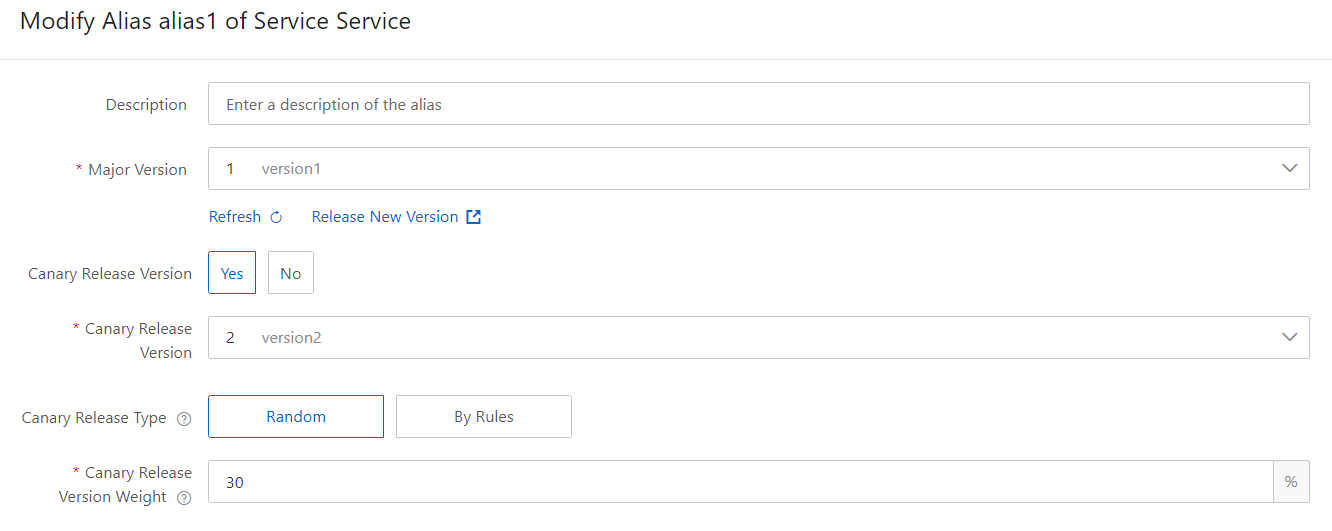
After the settings are complete, call the alias alias1 to verify whether some online traffic is switched to the new version 2. In this example, if you call the alias alias1 to execute the function 10 times, version 2 is called 3 times and version 1 is called 7 times.
Perform a canary release based on a specified rule
NoteCanary releases based on specified rules are supported only for HTTP functions.
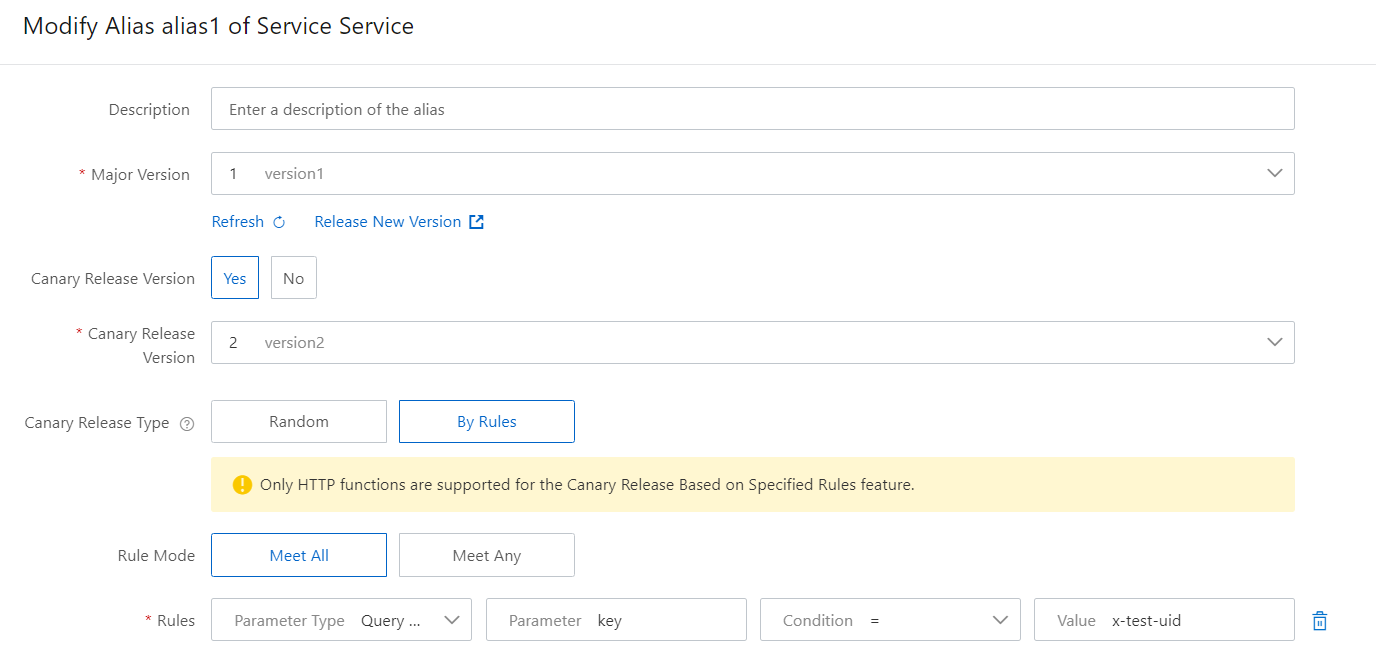
In this example, the request message is routed to the canary release version only when the key parameter is set to
x-test-uid.
The following table describes the parameters for creating a canary release rule.
Parameter name
Description
Name
The name of the alias to create.
Primary Version
The primary version of the alias.
Enable Canary Release Version
Specifies whether to enable a canary release version.
Canary Release Version
The canary release version of the alias.
Canary Release Type
Grayscale strategies fall into two categories: random grayscale by percentage and grayscale by specified rules.
Perform a canary release based on a random percentage: Switches traffic to the canary release version based on a specified weight.
Perform a canary release based on a specified rule: Performs a canary release based on specified rules.
Canary Release Version Weight
This parameter is required when Grayscale Type is set to Random grayscale by percentage.
This parameter specifies the percentage of traffic to be switched to the canary release version. For example, if you set this parameter to 5, Function Compute allocates 5% of the traffic to the canary release version and 95% of the traffic to the primary version.
Rule Pattern
This parameter is required when Grayscale Type is set to Canary Rule.
This parameter specifies the rule selection mode. Valid values:
Meet all of the following rules
Meet any of the following rules
Rule List
This parameter is required when Canary Release Type is set to Perform a canary release based on a specified rule.
This parameter specifies the rule content, which includes the following parts:
Parameter Type: Valid values include Header, Cookie, and Query.
Parameter: The name of the parameter that controls the canary release.
Condition: The condition for calculation. Function Compute calculates the actual value of the Parameter against the parameter value that you specify based on the condition. If the condition is met, the request is routed to the canary release version. Valid values include the following:
=, !=, >, <, >=, <=: Operator comparison conditions. For example, if you set Condition to=, the request is routed to the canary release version only when the actual value of the request parameter is equal to the specified parameter Value.in: A string match condition. The request is routed to the canary release version only when the actual value of the request parameter is included in the specified parameter Value.Value distribution percentage: Performs a canary release based on a specific percentage of parameter values. For example, if you set Parameter Type to Header, Parameter touser-id, and Value to20, requests that correspond to 20% of the distribution values of theuser-idHTTP request header are routed to the canary release version.
Value: The value of the parameter that controls the canary release.
Click +Add Rule below to add more rules.
Advanced Options
Canary Release Ratio for Provisioned Instances
Controls the ratio of canary instances in provisioned mode. If the number of provisioned instances is greater than 1, the number of instances in provisioned mode is generated based on the ratio that you specify for this parameter. Otherwise, the number of instances in provisioned mode is generated based on the default ratio of 1%.
ImportantThis parameter is valid only if you have more than one provisioned instance.
After the canary release version runs stably, you can switch all online traffic to the new version 2.
FAQ
How do I determine the version of the invoked service?
When you use the canary release feature, Function Compute allocates traffic based on the weight that you specify. You can determine the version of the invoked service in the following ways:
This is specified in the context request parameter.
For each function invocation, the context input parameter's service parameter contains the qualifier and versionId fields.
qualifier: The version information passed during the function invocation. The value can be a version number or an alias.
versionId: The specific version number parsed from the qualifier during function execution.
Determine the version from the response of a synchronous function invocation
The response of a synchronous function invocation contains the x-fc-invocation-service-version header, which indicates the version of the invoked service.