Call the Fraud Detection server-side API to detect device risks such as emulators, root access, and multi-instance environments during critical business operations. This topic covers the request parameters, response parameters, error codes, and SDK integration for the device risk identification service (Basic Edition and Enhanced Edition). Applicable scenarios include campaign anti-fraud, account security protection during registration and logon, and coupon collection.
Editions
Device risk identification is available in two editions to meet the risk control requirements of different industries and business stages. The following table compares the Basic Edition and Enhanced Edition.
|
Feature |
Basic Edition |
Enhanced Edition |
|
Real-time computing |
Supported |
Supported |
|
Service response |
Risk tags |
Risk tags and unique device ID |
|
Simple Log Service (SLS) delivery |
Not supported |
Supported. You can authorize log delivery with free storage for one year. |
Select an edition
-
Basic Edition: Suitable for scenarios that require only risk tag determination, such as identifying whether a device is an emulator, rooted, or running in a multi-instance environment.
-
Enhanced Edition: Suitable for scenarios that require a unique device ID for cross-session tracking, or log delivery to SLS for in-depth analysis.
Prerequisites
Before you begin, ensure that the following prerequisites are met:
-
Service registration for Fraud Detection is complete in the Alibaba Cloud Management Console.
-
An AccessKey ID and an AccessKey secret are obtained. Use a RAM user for API access instead of the AccessKey pair of your Alibaba Cloud account.
-
The AccessKey ID is authorized with the
AliyunYundunSAFFullAccesspolicy. For more information, see System policies for SAF. -
The client software development kit (SDK) is integrated. For more information, see SDK for Android.
Technical workflow
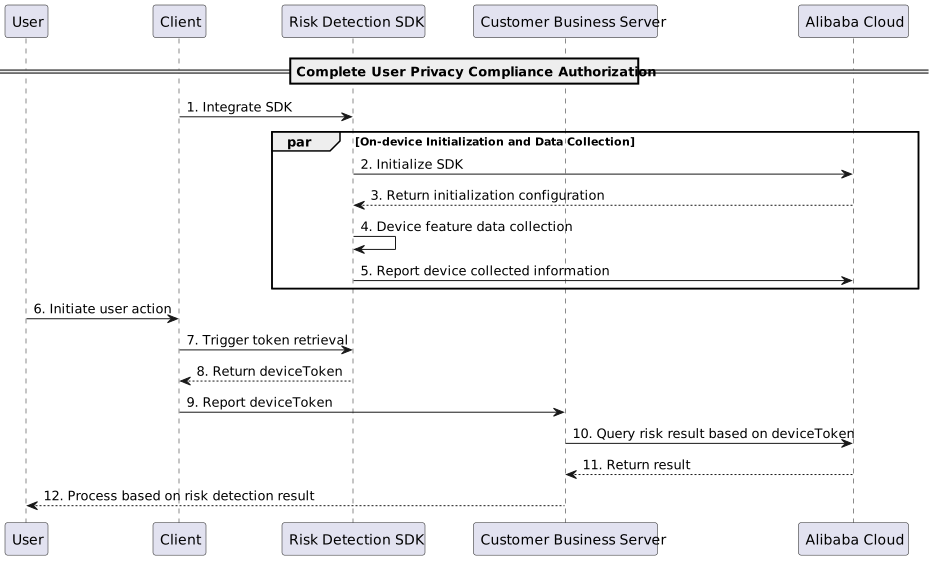
After integrating the device SDK, call the server-side API of the Fraud Detection device risk identification service during critical business operations to obtain risk detection results. A single risk detection workflow consists of the following steps:
-
Initialize the SDK: Call the initialization method when the app starts. During initialization, the SDK asynchronously collects and reports basic device fields to the server. Depending on the system and device model, this process typically takes 1 to 2 seconds.
-
Obtain the device token: After initialization is complete, call the SDK local method to obtain the deviceToken.
-
Call the server-side API: Pass the deviceToken and other business fields (refer to the specific event definition). The cloud detection model computes and returns the detection result in real time.
Input parameters
Service parameter
The Service parameter specifies the service edition. Different editions use the following Service parameter values.
|
Edition |
Service parameter value |
Functions and features |
|
Basic Edition |
|
Supports risk tags |
|
Enhanced Edition |
|
Supports unique device ID, risk tags, and log delivery |
ServiceParameters
ServiceParameters contains the business request parameters in JSON format, corresponding to the ServiceParameters field in Common parameters.
|
Field |
Description |
Data Type |
Example |
Required |
Remarks |
|
deviceToken |
The deviceToken obtained from SDK for Android |
String |
Tk9SSUQuMS*********************ZDNmNWY5NzQxOW1oLTE2MjI2NDIyNjc4MzAtZGZWFhdDgzMTBLUlVSU0VoWWVNcW82ZkZlZWmp3PT0= |
Yes |
Under normal conditions, the token length is approximately 600 bytes. In poor network conditions, the token length exceeds 2.5 KB. If a large number of long tokens are generated, first check whether the client network is stable, then make sure that the interval between the SDK |
|
deviceTokenBizId |
The business-specific unique ID. |
String |
aes9ad0356da4df8c1f18bc349296d60 |
No |
Pass this bizId when obtaining the deviceToken from the client SDK to bind the deviceToken to the business-specific unique ID. When querying results on the server side, pass both values together. Ensure that the bizId from the client matches the ID from the server to prevent deviceToken replacement. |
Response parameters
The response parameters of the device risk identification service include the device ID and device risk tags.
{
  "code": 200,
  "message": "OK",
  "data": {
    "extend": "71d4ac517192c5309400548bf0d5357b", // Unique device ID
    "tags": "is_rooted,is_emulator"  // Device risk tags
  },
  "requestId": "AF17EC99-22AB-311E-1397-BCF37EC78C81"
}
Device ID
The extend field in the Data object contains the unique device ID. Only the Enhanced Edition returns this field.
Device risk tags
The tags field in the Data object contains the risk detection results. If multiple tags are returned, they are separated by commas. The following table lists some common tags.
|
Risk tag |
Description |
|
is_emulator |
The device is suspected to be an emulator. |
|
is_rooted |
The device is suspected to be rooted. |
|
is_virtual |
The device is suspected to be running in a multi-instance environment. |
|
... |
Log on to the Fraud Detection console and view more device tag descriptions under Risk tag descriptions. |
For more information, see Common response parameters.
Error codes
|
Code |
Description |
|
200 |
The request is successful. |
|
400 |
The ServiceParameters (event parameters) value is invalid. |
|
402 |
The QPS exceeds the purchased quota. The request is throttled. |
|
403 |
Insufficient permissions. The service is not activated or has expired. |
|
404 |
The Service (service parameter) value is invalid. |
|
500 |
An internal server error occurred. |
SDK integration
The following example uses the Java SDK. For other programming languages, see Make API requests by using an SDK.
Maven dependencies
Add the following Java Maven dependency:
<dependency>
    <groupId>com.aliyun</groupId>
    <artifactId>aliyun-java-sdk-saf</artifactId>
    <version>3.0.1</version>
</dependency>
Recommended dependency arbitration:
<dependency>
    <groupId>com.aliyun</groupId>
    <artifactId>aliyun-java-sdk-core</artifactId>
    <optional>true</optional>
    <version>4.5.25</version>
</dependency>
<dependency>
    <groupId>com.alibaba</groupId>
    <artifactId>fastjson</artifactId>
    <version>1.2.68.noneautotype</version>
</dependency>
<dependency>
    <groupId>org.apache.httpcomponents</groupId>
    <artifactId>httpclient</artifactId>
    <version>4.5.3</version>
</dependency>
<dependency>
    <groupId>io.opentracing</groupId>
    <artifactId>opentracing-util</artifactId>
    <version>0.31.0</version>
</dependency>
Java SDK source code
// The AccessKey pair of an Alibaba Cloud account has permissions on all API operations.
// Use a RAM user for API access and daily O&M.
// Do not save the AccessKey ID and AccessKey secret in your project code to prevent AccessKey leakage,
// which may compromise the security of all resources under your account.
// This example uses environment variables to read the RAM user AccessKey for API authentication.
// Before running this code, make sure the following environment variables are configured:
// ALIBABA_CLOUD_ACCESS_KEY_ID, ALIBABA_CLOUD_ACCESS_KEY_SECRET.
// Create and initialize a DefaultAcsClient instance. Initialize only once.
DefaultProfile profile = DefaultProfile.getProfile(
    "<REGION-ID>", // Region ID. ap-southeast-1 is recommended outside China. Must match the client SDK reporting domain.
    System.getenv("ALIBABA_CLOUD_ACCESS_KEY_ID"),     // RAM user AccessKey ID
    System.getenv("ALIBABA_CLOUD_ACCESS_KEY_SECRET")  // RAM user AccessKey secret
);
// HTTP connection pool configuration
HttpClientConfig clientConfig = HttpClientConfig.getDefault();
clientConfig.setMaxRequestsPerHost(6);
clientConfig.setMaxIdleConnections(20);
// HTTP timeout configuration
clientConfig.setReadTimeoutMillis(3000);
profile.setHttpClientConfig(clientConfig);
IAcsClient client = new DefaultAcsClient(profile);

// Send the request
ExecuteRequestSGRequest executeRequestRequest = new ExecuteRequestSGRequest();
// To specify a custom version number, modify it here. Default: 2019-05-21
executeRequestRequest.setVersion("2019-05-21");
// Specify the request method
executeRequestRequest.setSysMethod(MethodType.POST);
// Specify the protocol. Currently, only HTTPS is supported.
executeRequestRequest.setSysProtocol(ProtocolType.HTTPS);

// Product code of the device risk service: device_risk_intl or device_risk_pro_intl
String service = "device_risk_pro_intl";
executeRequestRequest.setService(service);
// Business parameters. Set only the parameters you need.
Map<String, Object> serviceParams = new HashMap<String, Object>();
// deviceToken is required.
serviceParams.put("deviceToken", "U0******************");
executeRequestRequest.setServiceParameters(JSONObject.toJSONString(serviceParams));
executeRequestRequest.setAcceptFormat(FormatType.JSON);

try {
    ExecuteRequestSGResponse httpResponse = client.getAcsResponse(executeRequestRequest);
    System.out.println("httpResponse:" + JSONObject.toJSONString(httpResponse));
} catch (Exception e) {
    e.printStackTrace();
}
Verify the call result
After sending a request through the SDK, verify the integration by checking the following:
-
A response with
Code=200indicates that the request is successful. -
The
Dataobject contains thetagsfield, which confirms that the device risk detection result is returned.
Supported regions
The REGION-ID parameter must match the device risk SDK reporting domain. ap-southeast-1 is recommended.
|
Region |
Description |
|
ap-southeast-1 |
Singapore. Recommended. |
|
cn-hongkong |
China (Hong Kong) |
|
us-west-1 |
US (Silicon Valley) |
|
eu-central-1 |
Germany (Frankfurt) |
FAQ
For common questions about integrating the device risk service, see FAQ about Device Fraud Detection SDK integration.