Jaeger provides distributed tracing for Java applications running across multiple services. After you instrument your application and report trace data to Managed Service for OpenTelemetry, the console displays application topology, traces, abnormal and slow transactions, and SQL analysis.
This guide covers three instrumentation approaches:
Manual instrumentation -- Full control over span creation and context propagation
Spring Cloud auto-instrumentation -- Automatic tracing for Spring-based components
gRPC auto-instrumentation -- Automatic tracing for gRPC server and client calls
We recommend that you connect your application to Managed Service for OpenTelemetry by using OpenTelemetry Protocol (OTLP), which provides more features, more advanced tracing capabilities, and the best user experience. For more information, see Preparations.
Jaeger and supported frameworks
Jaeger is a CNCF-hosted, open source distributed tracing system compatible with the OpenTracing API. It collects real-time monitoring data from heterogeneous systems.
The OpenTracing community provides instrumentation components for these Java frameworks:
| Category | Frameworks |
|---|---|
| HTTP clients | Apache HttpClient, OkHttp |
| Data | Elasticsearch, JDBC, Mongo, Redis |
| Messaging | Kafka, Memcached |
| Spring | Spring Boot, Spring Cloud |
Data reporting architecture
Jaeger supports two reporting modes:
Direct reporting -- The application sends trace data straight to the Managed Service for OpenTelemetry backend, without a local agent.

Agent-based reporting -- The application sends trace data to a local Jaeger agent, which forwards it to the backend.

Get a reporting endpoint
Before you begin, obtain a reporting endpoint from the Managed Service for OpenTelemetry console. Choose the tab that matches your console version.
New console
Log on to the Managed Service for OpenTelemetry console. In the left-side navigation pane, click Integration Center.
On the Integration Center page, click the Jaeger card in the Open Source Frameworks section.
In the Jaeger panel, click the Start Integration tab and select the region where you want to report data.
NoteResources are automatically initialized the first time you access a region.
Set Connection Type and Export Protocol, then copy the endpoint.
Parameter Recommended value When to use Connection Type Alibaba Cloud VPC Network Your service runs on Alibaba Cloud in the selected region Connection Type Public Network Your service runs outside Alibaba Cloud or in a different region Export Protocol gRPC All Jaeger integrations 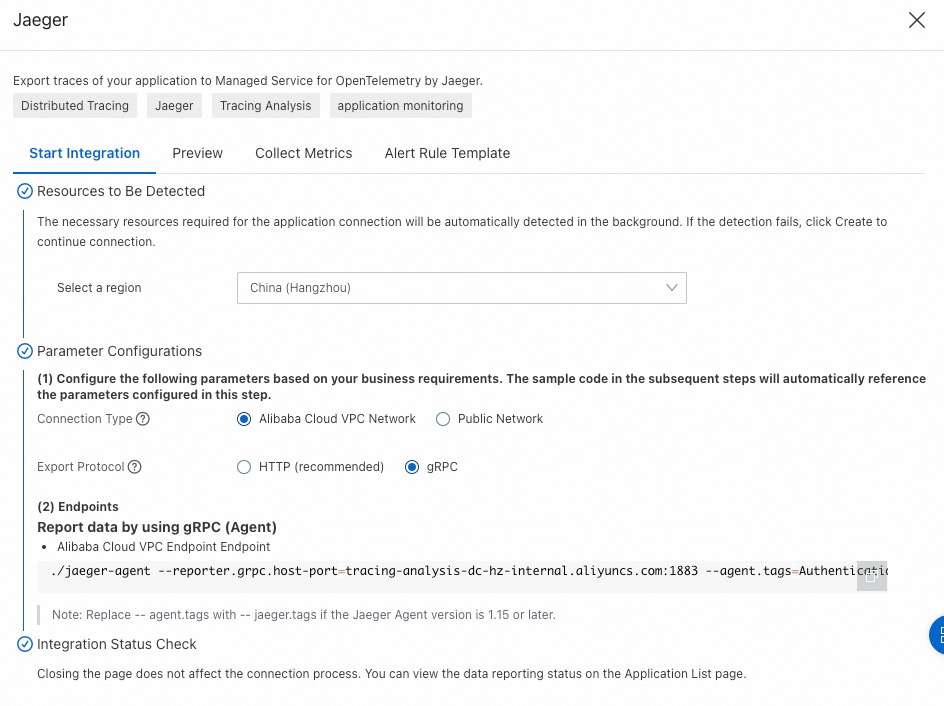
Old console
Log on to the Managed Service for OpenTelemetry console.
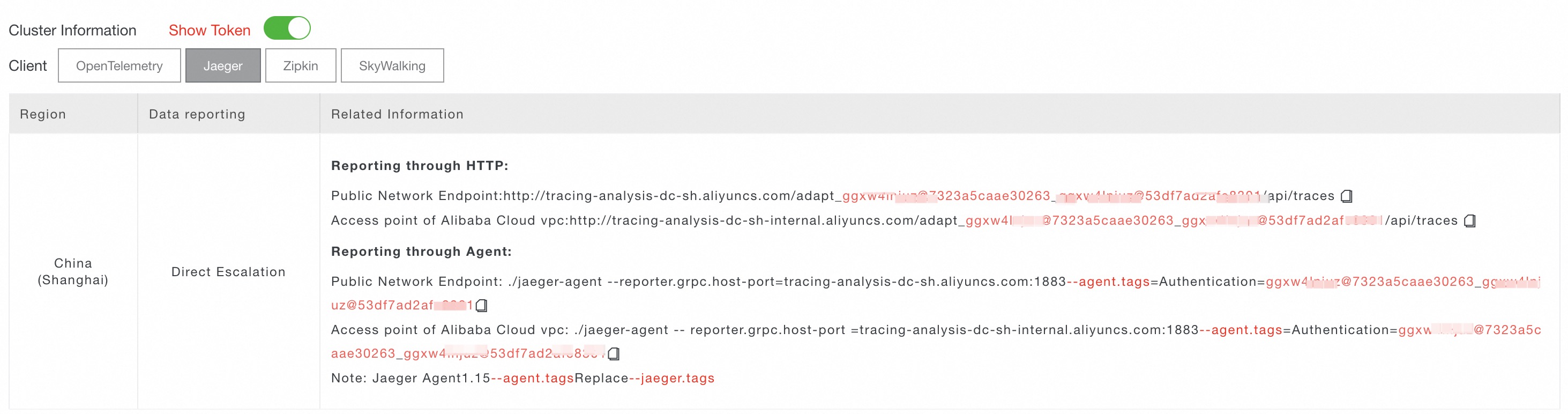
In the left-side navigation pane, click Cluster Configurations. On the page that appears, click the Access point information tab.
In the top navigation bar, select a region. In the Cluster Information section, turn on Show Token.
Set Client to Jaeger and copy the endpoint from the Related Information column.
NoteUse a VPC endpoint if your application runs in an Alibaba Cloud production environment. Otherwise, use a public endpoint.
Instrument a Java application manually
Use the Jaeger client library to create spans and propagate trace context manually. This approach gives you full control over what gets traced.
A complete working example is available in the demo project under the manualDemo directory. Follow README.md to run it.
Step 1: Add the Jaeger client dependency
Add the following dependency to your pom.xml:
<dependency>
    <groupId>io.jaegertracing</groupId>
    <artifactId>jaeger-client</artifactId>
    <version>0.31.0</version>
</dependency>
Step 2: Initialize the tracer
Create a tracer that manages span lifecycle and context propagation. The configuration specifies the reporting endpoint, sampling rate, and service identity.
Replace <endpoint> with the endpoint obtained in the "Get a reporting endpoint" section.
// Replace manualDemo with your application name.
io.jaegertracing.Configuration config = new io.jaegertracing.Configuration("manualDemo");
io.jaegertracing.Configuration.SenderConfiguration sender = new io.jaegertracing.Configuration.SenderConfiguration();
// Replace <endpoint> with the endpoint obtained in "Get a reporting endpoint".
sender.withEndpoint("<endpoint>");
config.withSampler(new io.jaegertracing.Configuration.SamplerConfiguration().withType("const").withParam(1));
config.withReporter(new io.jaegertracing.Configuration.ReporterConfiguration().withSender(sender).withMaxQueueSize(10000));
// Set resource tags such as the application version and deployment environment.
Map<String, String> map = new HashMap<>();
map.put("service.version", "1.0.0");
map.put("deployment.environment", "test");
config.withTracerTags(map);
GlobalTracer.register(config.getTracer());| Placeholder | Description | Example |
|---|---|---|
<endpoint> | Reporting endpoint from the console | http://tracing-analysis-dc-hz.aliyuncs.com/... |
manualDemo | Your application name | order-service |
Sampling configuration:
| Sampler type | Param | Behavior |
|---|---|---|
const | 1 | Sample all traces (development, debugging) |
const | 0 | Sample no traces |
probabilistic | 0.1 | Sample 10% of traces (production) |
Step 3: Record requests with spans
Create a span to trace a request. Each span captures the operation name, timing, and custom tags:
Tracer tracer = GlobalTracer.get();
// Create a span.
Span span = tracer.buildSpan("parentSpan").withTag("myTag", "spanFirst").start();
tracer.scopeManager().activate(span, false);
tracer.activeSpan().setTag("methodName", "testTracing");
// Business logic
secondBiz();
span.finish();
Step 4 (optional): Create child spans
To trace sub-operations within a request, create child spans that reference the parent span:
Tracer tracer = GlobalTracer.get();
Span parentspan = tracer.activeSpan();
Tracer.SpanBuilder spanBuilder = tracer.buildSpan("childSpan").withTag("myTag", "spanSecond");
if (parentspan != null) {
    spanBuilder.asChildOf(parentspan).start();
}
Span childSpan = spanBuilder.start();
Scope scope = tracer.scopeManager().activate(childSpan); // Activate at request start.
// Business logic. Call buildSpan multiple times as needed.
childSpan.finish();
tracer.activeSpan().setTag("methodName", "testCall");

// Close the scope at request end.
scope.close();
Step 5 (optional): Add custom tags
Add custom tags to spans for easier troubleshooting. For example, record error states or return values:
tracer.activeSpan().setTag("methodName", "testCall");Step 6: Propagate trace context across services
In a distributed system, Remote Procedure Call (RPC) requests carry trace context -- including TraceId, ParentSpanId, SpanId, and Sampled -- in HTTP headers. Use the Inject and Extract methods to pass this context between services.
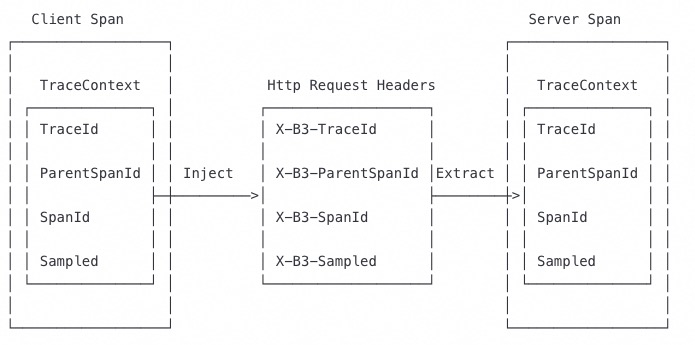
On the client, inject the span context into the outgoing request:
private void attachTraceInfo(Tracer tracer, Span span, final Request request) {
    tracer.inject(span.context(), Format.Builtin.TEXT_MAP, new TextMap() {
        @Override
        public void put(String key, String value) {
            request.setHeader(key, value);
        }
        @Override
        public Iterator<Map.Entry<String, String>> iterator() {
            throw new UnsupportedOperationException("TextMapInjectAdapter should only be used with Tracer.inject()");
        }
    });
}
On the server, extract the span context from the incoming request:
protected Span extractTraceInfo(Request request, Tracer tracer) {
    Tracer.SpanBuilder spanBuilder = tracer.buildSpan("/api/xtrace/test03");
    try {
        SpanContext spanContext = tracer.extract(Format.Builtin.TEXT_MAP, new TextMapExtractAdapter(request.getAttachments()));
        if (spanContext != null) {
            spanBuilder.asChildOf(spanContext);
        }
    } catch (Exception e) {
        spanBuilder.withTag("Error", "extract from request fail, error msg:" + e.getMessage());
    }
    return spanBuilder.start();
}
Instrument with Spring Cloud
Spring Cloud auto-instrumentation traces a wide range of components without manual span creation.
A complete working example is available in the demo project under the springMvcDemo/webmvc4-boot directory. Follow README.md to run it.
Supported components:
| Category | Components |
|---|---|
| Async | @Async, @Scheduled, Executors |
| HTTP clients | Feign, HystrixFeign, Spring Web (RestControllers, RestTemplates, WebAsyncTask) |
| Resilience | Hystrix |
| Data | JDBC, Mongo, Redis |
| Messaging | JMS, RabbitMQ, Spring Messaging, WebSocket STOMP |
| Reactive | RxJava |
| Logging | Standard Logging (adds logs to the current span) |
| Gateway | Zuul |
Step 1: Add dependencies
Add the following dependencies to your pom.xml:
<dependency>
   <groupId>io.opentracing.contrib</groupId>
  <artifactId>opentracing-spring-cloud-starter</artifactId>
  <version>0.5.8</version>
</dependency>
<dependency>
  <groupId>io.jaegertracing</groupId>
  <artifactId>jaeger-client</artifactId>
  <version>1.4.0</version>
</dependency>
Step 2: Register the tracer bean
Register an OpenTracing Tracer bean in your Spring configuration. After registration, Spring Cloud auto-instrumentation handles span creation and context propagation for all supported components.
Replace <endpoint> with the endpoint obtained in the "Get a reporting endpoint" section.
@Bean
public io.opentracing.Tracer tracer() {
    io.jaegertracing.Configuration config = new io.jaegertracing.Configuration("springFrontend");
    io.jaegertracing.Configuration.SenderConfiguration sender = new io.jaegertracing.Configuration.SenderConfiguration();
    sender.withEndpoint("<endpoint>");
    config.withSampler(new io.jaegertracing.Configuration.SamplerConfiguration().withType("const").withParam(1));
    config.withReporter(new io.jaegertracing.Configuration.ReporterConfiguration().withSender(sender).withMaxQueueSize(10000));
    return config.getTracer();
}
Instrument with gRPC
gRPC instrumentation uses interceptors to trace server and client calls automatically.
A complete working example is available in the demo project under the grpcDemo directory. Follow README.md to run it.
Step 1: Add the gRPC tracing dependency
Add the following dependency to your pom.xml:
<dependency>
    <groupId>io.opentracing.contrib</groupId>
    <artifactId>opentracing-grpc</artifactId>
    <version>0.2.3</version>
</dependency>
Step 2: Add a tracing interceptor to the server
Initialize the tracer, create a ServerTracingInterceptor, and attach it to the gRPC server:
import io.opentracing.Tracer;

public class YourServer {

    private int port;
    private Server server;
    private final Tracer tracer;

    private void start() throws IOException {
        ServerTracingInterceptor tracingInterceptor = new ServerTracingInterceptor(this.tracer);

        // If GlobalTracer is used:
        // ServerTracingInterceptor tracingInterceptor = new ServerTracingInterceptor();

        server = ServerBuilder.forPort(port)
            .addService(tracingInterceptor.intercept(someServiceDef))
            .build()
            .start();
    }
}
Step 3: Add a tracing interceptor to the client
Initialize the tracer, create a ClientTracingInterceptor, and attach it to the gRPC channel:
import io.opentracing.Tracer;

public class YourClient {

    private final ManagedChannel channel;
    private final GreeterGrpc.GreeterBlockingStub blockingStub;
    private final Tracer tracer;

    public YourClient(String host, int port) {

        channel = ManagedChannelBuilder.forAddress(host, port)
            .usePlaintext(true)
            .build();

        ClientTracingInterceptor tracingInterceptor = new ClientTracingInterceptor(this.tracer);

        // If GlobalTracer is used:
        // ClientTracingInterceptor tracingInterceptor = new ClientTracingInterceptor();

        blockingStub = GreeterGrpc.newBlockingStub(tracingInterceptor.intercept(channel));
    }
}
Verify the integration
After starting the instrumented application:
Send a few requests to your application endpoints.
Log on to the Managed Service for OpenTelemetry console.
Open the Applications page and confirm your application appears in the list.
Click your application name, then go to the Traces page to view reported trace data.
If your application appears and traces are visible, the integration is working correctly.
Troubleshooting
No data appears in the console
Debug the io.jaegertracing.thrift.internal.senders.HttpSender.send(Process process, List<Span> spans) method and check the return value.
| Symptom | Cause | Solution |
|---|---|---|
| HTTP 403 response | Invalid endpoint | Copy the correct endpoint from the console. Make sure you selected the right region and client type (Jaeger). |
| Connection timeout | Endpoint does not match your network environment | Use a VPC endpoint if your application runs on Alibaba Cloud. Use a public endpoint if your application runs outside Alibaba Cloud. |
| No spans generated | Sampler is misconfigured | Set the sampler type to const with param 1 to sample all traces during debugging. |
| Application does not appear on the Applications page | Tracer not registered or endpoint unreachable | Verify that GlobalTracer.register() is called and the endpoint URL is reachable from your application host. |
Enable debug logging
To see whether spans are generated and sent, enable Jaeger client debug logging by adding the following JVM argument:
-Dorg.slf4j.simpleLogger.log.io.jaegertracing=debugCheck the application logs for span submission results. If spans appear in logs but not in the console, the endpoint URL or network configuration is likely incorrect.