To keep your ApsaraDB for MongoDB database secure and stable, access to your instance is blocked by default. The default whitelist contains only the IP address 127.0.0.1. Before using an ApsaraDB for MongoDB instance, configure a whitelist to allow external devices to access it. Correctly configured whitelists provide a higher level of security. Maintain your whitelists regularly.
Background information
Before you use the destination instance for the first time, add a whitelist group.
After you add a whitelist, the connection address of the instance appears on the Basic Information and Database Connections pages.
Procedure
Log on to the ApsaraDB for MongoDB console.
In the navigation pane on the left, click Replica Set Instances or Sharded Cluster Instances based on the instance type.
In the upper-left corner of the page, select the resource group and region where the instance is located.
Click the ID of the target instance, or click Actions in the Manage column of the target instance.
In the navigation pane on the left of the instance details page, click .
In the Whitelist Settings section, modify the whitelist of the instance using one of the following methods.
Manual modification
In the Actions column of the target group, click Modify.
In the Manually Modify panel, enter IP addresses or CIDR blocks in the IP Whitelist text box.
The following formats are supported for IP addresses and CIDR blocks.
A single IP address, such as 10.23.12.24.
0.0.0.0/0
WarningSetting the whitelist to 0.0.0.0/0 allows access from any IP address. This exposes your ApsaraDB for MongoDB database to high security risks. Use this value with caution.
CIDR notation, which stands for Classless Inter-Domain Routing. For example, 10.23.12.24/24. The /24 indicates that the prefix is 24 bits in length. The valid range for the prefix length is 1 to 32.
Separate multiple IP addresses or CIDR blocks with a comma (,).
Click OK.
Load private IP addresses of ECS instances
In the Actions column of the target group, click Load ECS Private IP.
In the Add ECS Private IP panel, select the private IP addresses of the ECS instances that you want to add from the IP Whitelist list.
Click
 .
.Click OK.
FAQ
If you are unable to connect to MongoDB, you may be using an incorrect public IP address. Follow these steps to find the public IP address of your on-premises device:
Temporarily add the IP address
0.0.0.0/0to the whitelist of the MongoDB instance.WarningThe IP address
0.0.0.0/0allows access from any IP address and poses a security risk. Use this IP address with caution. If you use it, remove it from the whitelist promptly.Log on to the MongoDB instance using Mongo Shell.
If you still cannot connect to the MongoDB instance after you add the IP address
0.0.0.0/0to the whitelist, try to connect to the MongoDB instance using DMS. Check whether the account, password, and authentication database are correct.Run the following command to query information about the Mongo Shell client.
db.currentOp({"appName" : "MongoDB Shell","active" : true})Example:
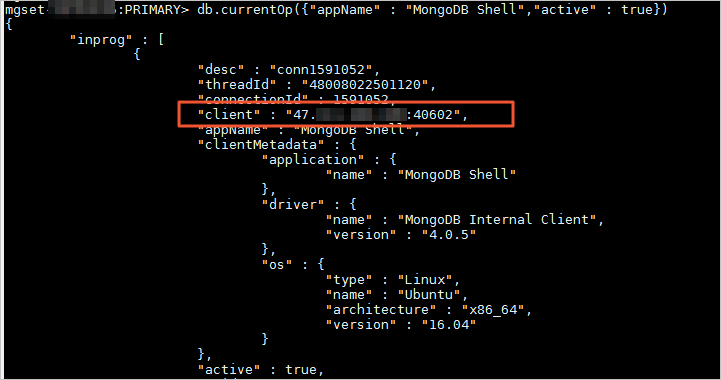 Note
NoteIf you log on to the MongoDB instance using other methods, you can run the following command to query information about all clients.
db.runCommand({currentOp: 1, "active" : true})Add the obtained IP address to the whitelist of the MongoDB instance, and then delete the IP address
0.0.0.0/0from the whitelist.