This use case shows how Application Real-Time Monitoring Service (ARMS) solves the common challenges of monitoring distributed Java applications.
The rapid growth of internet services has led to increased traffic loads and more complex business logic. Traditional, single-server applications can no longer meet these demands. As a result, more websites are adopting distributed architectures. With the maturation of development frameworks like Spring Cloud and Dubbo, many companies are splitting their application architectures into vertical, business-oriented modules. This shift leads to a microservice architecture that better supports team collaboration and rapid iteration.
While a distributed microservice architecture improves development efficiency, it also introduces significant challenges to monitoring, operations, and diagnostics. For example, here are some of the main challenges encountered when implementing this architecture at Taobao (www.taobao.com):
-
Difficulty locating issues
When a customer reports an issue, such as a problem with a purchase, the issue is escalated to the technical team for investigation. In a distributed microservice architecture, a single user request often travels through multiple services and nodes before returning a response. If an error occurs during this process, engineers may have to manually sift through logs on several machines just to make an initial diagnosis. Even simple problems can require coordination across multiple teams.
-
Difficulty identifying bottlenecks
When users report that the website is slow or unresponsive, it is difficult to quickly identify the performance bottleneck. Is it a network issue between the user and the server? Is the server overloaded, causing slow responses? Or is the database under too much pressure? Even after isolating the component causing the slowdown, pinpointing the root cause in the code remains a challenge.
-
Difficulty understanding the architecture
As business logic grows more complex, it becomes hard to determine an application's dependencies simply by reviewing the code. You cannot easily see which downstream service (like databases, HTTP APIs, or caches) it relies on, or which external services depend on it. This makes it challenging to map out business logic, govern the architecture, and plan for capacity. For example, during preparations for a major sales event like the Double 11 Global Shopping Festival, it is difficult to predict how many servers each application will require.
Application monitoring with ARMS
The Application Monitoring feature of ARMS, which originated from Alibaba's internal distributed tracing and monitoring system (known as "EagleEye"), helps developers and operations teams solve these problems without requiring any changes to the application code.
Call topology
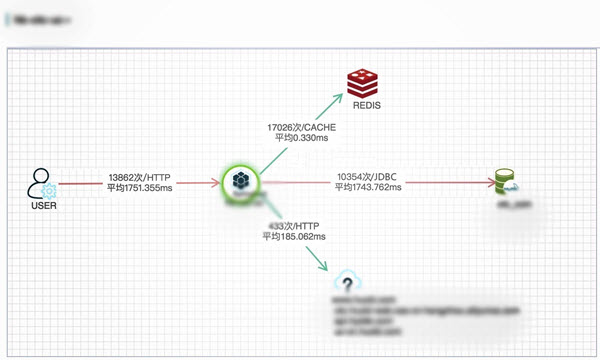
Slow service/SQL report
Distributed trace query
MetricDataHandler.getData method accounts for 68,604 ms, which is over 99% of the total time, making it the bottleneck method that requires optimization.Whether you need a high-level overview or a detailed, single-request perspective, ARMS provides a comprehensive solution to the challenges of monitoring distributed Java applications. You can use application monitoring together with browser monitoring to gain full-stack visibility. From key business metrics and user experience to application performance, ARMS delivers end-to-end protection for your site.