Column-oriented storage for JSONB lets Hologres store and compress semi-structured data with the same efficiency as structured data — cutting storage costs and significantly speeding up field-level queries. Hologres V1.3 and later support this feature for column-oriented tables.
How it works
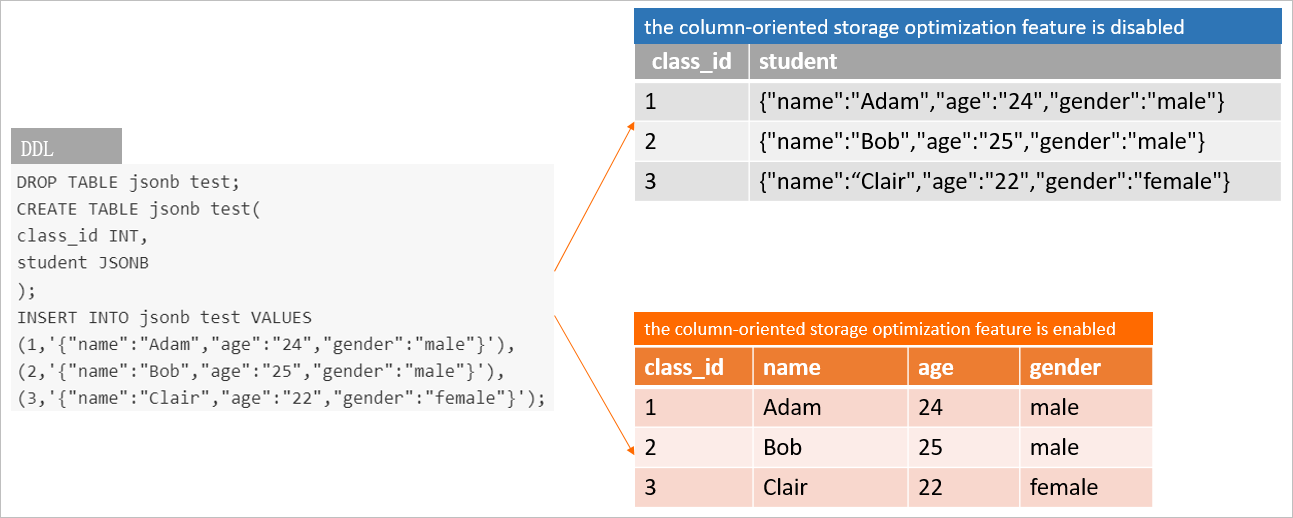
When you enable column-oriented storage on a JSONB column, Hologres converts the column into multiple strongly typed sub-columns at the storage layer, one per JSON key. Queries that target a specific key scan only that sub-column instead of deserializing the entire JSONB value — the same efficiency gain you get from columnar storage on structured data.
Column-oriented storage applies to JSONB only. Do not enable it for JSON columns.
Prerequisites
Before you begin, make sure that:
Your Hologres instance is V1.3 or later. For best performance, upgrade to V1.3.37 or later. To upgrade manually, see Instance upgrades. To request an upgrade through the support team, see Obtain online support for Hologres.
The target column is in a column-oriented table. Column-oriented storage for JSONB is not supported on row-oriented tables.
The table contains at least 1,000 rows. Column-oriented storage is triggered only at that threshold.
When column-oriented storage underperforms
Column-oriented storage does not improve — and may hurt — performance in these cases:
| Scenario | Why it underperforms | What to do instead |
|---|---|---|
Queries that return the entire JSONB column (SELECT json_data FROM tbl) | Hologres must reconstruct the original JSONB value from sub-columns, generating high I/O | Keep the default storage mode for columns you query wholesale |
| Extremely sparse data (each key appears only once across rows) | All sparse fields land in an internal holo.remaining column; no sub-columns are created | Flatten sparse fields into dedicated relational columns |
| JSONB where the root node is an array containing different structures | Mixed structures cannot be split into consistent sub-columns | Normalize the data structure before ingestion, or store as standard JSONB |
Only the -> and ->> operators trigger column-oriented access. Queries using other operators fall back to full JSONB scans, which may be slower than the original storage mode.
| Operator | Right operand | Description |
|---|---|---|
-> | TEXT | Obtains a JSON object field based on a key |
->> | TEXT | Returns a JSON object field as TEXT |
Enable column-oriented storage
Enable for a JSONB column
-- Enable column-oriented storage for a JSONB column.
ALTER TABLE <table_name> ALTER COLUMN <column_name> SET (enable_columnar_type = ON);After you run this statement, Hologres converts all existing data in the column to column-oriented storage during the next compaction. Compaction consumes memory. Run it during off-peak hours: Newly written data is stored in column-oriented mode immediately after compaction completes.
VACUUM <table_name>;Enable DECIMAL type inference (V2.0.11+)
Hologres V2.0.11 and later support column-oriented storage of data of the DECIMAL type. After you enable DECIMAL type inference for a numeric field such as balance in {"balance": 123.45}, column-oriented storage is supported for that data.
Enable column-oriented storage on the column before enabling DECIMAL type inference.
-- Enable DECIMAL type inference for a JSONB column.
ALTER TABLE <table_name> ALTER COLUMN <column_name> SET (enable_decimal = ON);
Verify the storage mode
Hologres V1.3.37 and later
SELECT * FROM hologres.hg_column_options
WHERE schema_name = '<schema_name>' AND table_name = '<table_name>';In V2.0.17 and earlier, this query works only for tables in the public schema. In V2.0.18 and later, it works for all schemas.
A column with {enable_columnar_type=on} in the options field has column-oriented storage enabled.

Hologres V1.3.10 to V1.3.36
SELECT DISTINCT
    a.attnum as num,
    a.attname as name,
    format_type(a.atttypid, a.atttypmod) as type,
    a.attnotnull as notnull,
    com.description as comment,
    coalesce(i.indisprimary,false) as primary_key,
    def.adsrc as default,
    a.attoptions
FROM pg_attribute a
JOIN pg_class pgc ON pgc.oid = a.attrelid
LEFT JOIN pg_index i ON
    (pgc.oid = i.indrelid AND i.indkey[0] = a.attnum)
LEFT JOIN pg_description com ON
    (pgc.oid = com.objoid AND a.attnum = com.objsubid)
LEFT JOIN pg_attrdef def ON
    (a.attrelid = def.adrelid AND a.attnum = def.adnum)
WHERE a.attnum > 0 AND pgc.oid = a.attrelid
    AND pg_table_is_visible(pgc.oid)
    AND NOT a.attisdropped
    AND pgc.relname = '<table_name>'
ORDER BY a.attnum;
Check the attoptions field. A value of enable_columnar_type = ON confirms column-oriented storage is active.
Disable column-oriented storage
Disable for a JSONB column
-- Disable column-oriented storage for a JSONB column.
ALTER TABLE <table_name> ALTER COLUMN <column_name> SET (enable_columnar_type = OFF);After you run this statement, Hologres converts all data back to standard JSONB storage during the next compaction. Run compaction during off-peak hours with VACUUM <table_name>;.
Disable DECIMAL type inference
-- Disable DECIMAL type inference for a JSONB column.
ALTER TABLE <table_name> ALTER COLUMN <column_name> SET (enable_decimal = OFF);Disabling DECIMAL type inference triggers compaction immediately to convert DECIMAL sub-columns back to the original format.
Add bitmap indexes for point queries (V2.0+)
After column-oriented storage converts JSONB keys into typed sub-columns, you can add bitmap indexes on those sub-columns to accelerate point queries (equality comparisons). Bitmap indexes are most effective when the key appears frequently across rows and you query by exact value.
After column-oriented storage is enabled, Hologres parses these types: INT, INT[], BIGINT, BIGINT[], TEXT, TEXT[], and JSONB. Bitmap indexes are created for INT, INT[], BIGINT, BIGINT[], TEXT, and TEXT[] sub-columns.
call set_table_property('<table_name>', 'bitmap_columns', '[<columnName>{:[on|off]}[,...]]');| Parameter | Description |
|---|---|
table_name | Name of the table |
columnName | Name of the JSONB column |
on | Creates a bitmap index for the column. The column must have column-oriented storage enabled. |
off | Removes the bitmap index for the column |
Example
The following example walks through enabling column-oriented storage, importing data, querying, and verifying the execution plan.
Create the table.
DROP TABLE IF EXISTS user_tags;

BEGIN;
CREATE TABLE IF NOT EXISTS user_tags (
    ds   timestamptz,
    tags jsonb
);
COMMIT;
Enable column-oriented storage on the
tagscolumn.ALTER TABLE user_tags ALTER COLUMN tags SET (enable_columnar_type = ON);Verify that column-oriented storage is enabled.
SELECT * FROM hologres.hg_column_options WHERE table_name = 'user_tags';Expected output — the
optionsfield fortagsshows{enable_columnar_type=on}:schema_name | table_name | column_id | column_name | column_type | notnull | comment | default | options -------------+------------+-----------+-------------+--------------------------+---------+---------+---------+--------------------------- public | user_tags | 1 | ds | timestamp with time zone | f | | | public | user_tags | 2 | tags | jsonb | f | | | {enable_columnar_type=on} (2 rows)Import data.
INSERT INTO user_tags (ds, tags)
SELECT
    '2022-01-01 00:00:00+08',
    ('{"id":' || i || ',"first_name":"Sig","gender":"Male"}')::jsonb
FROM generate_series(1, 10001) i;
(Optional) Flush data to disk to see the column-oriented storage effect immediately.
VACUUM user_tags;Query data by a specific key.
SELECT (tags -> 'first_name')::text AS first_name
FROM user_tags
WHERE (tags -> 'id')::int = 10;
Verify that column-oriented storage is active by checking the execution plan.
-- Enable detailed execution statistics. SET hg_experimental_show_execution_statistics_in_explain = ON; EXPLAIN ANALYZE SELECT (tags -> 'first_name')::text AS first_name FROM user_tags WHERE (tags -> 'id')::int = 10;columnar_access_usedin the output confirms that column-oriented storage is being used.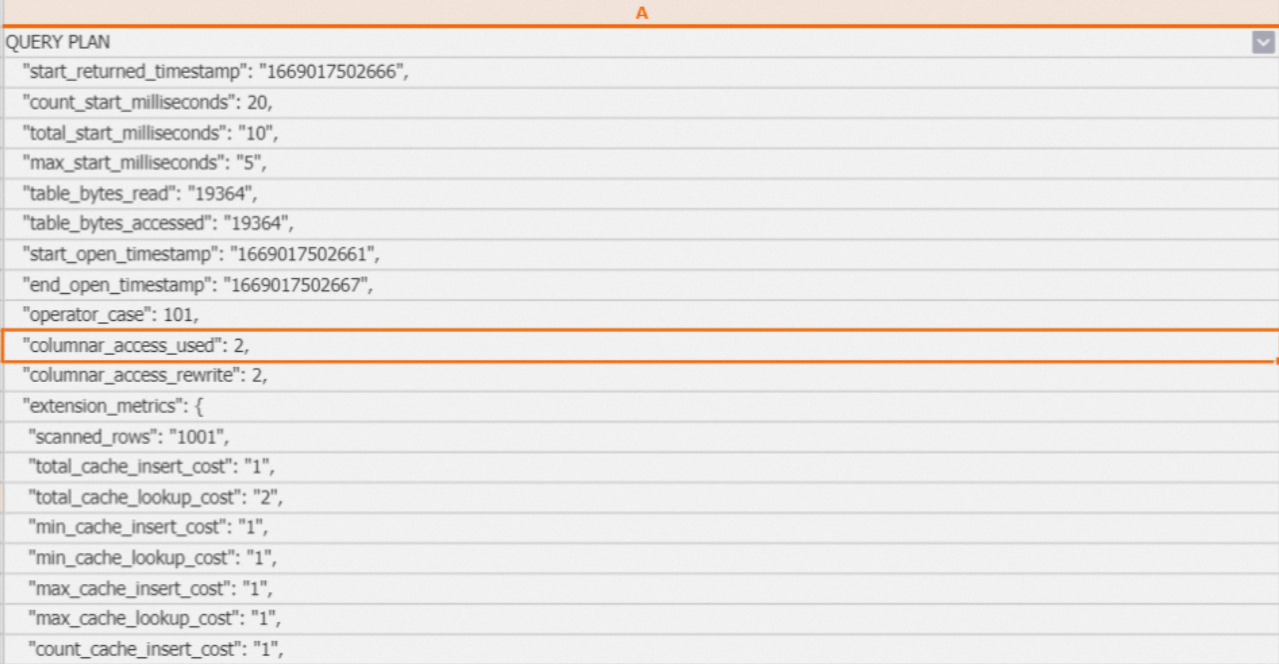
Add a bitmap index on
tagsto speed up the point query in step 6.call set_table_property('user_tags', 'bitmap_columns', 'tags');Verify the bitmap index is used.
EXPLAIN ANALYZE SELECT (tags -> 'first_name')::text AS first_name FROM user_tags WHERE (tags -> 'id')::int = 10;bitmap_usedin the output confirms the bitmap index is active.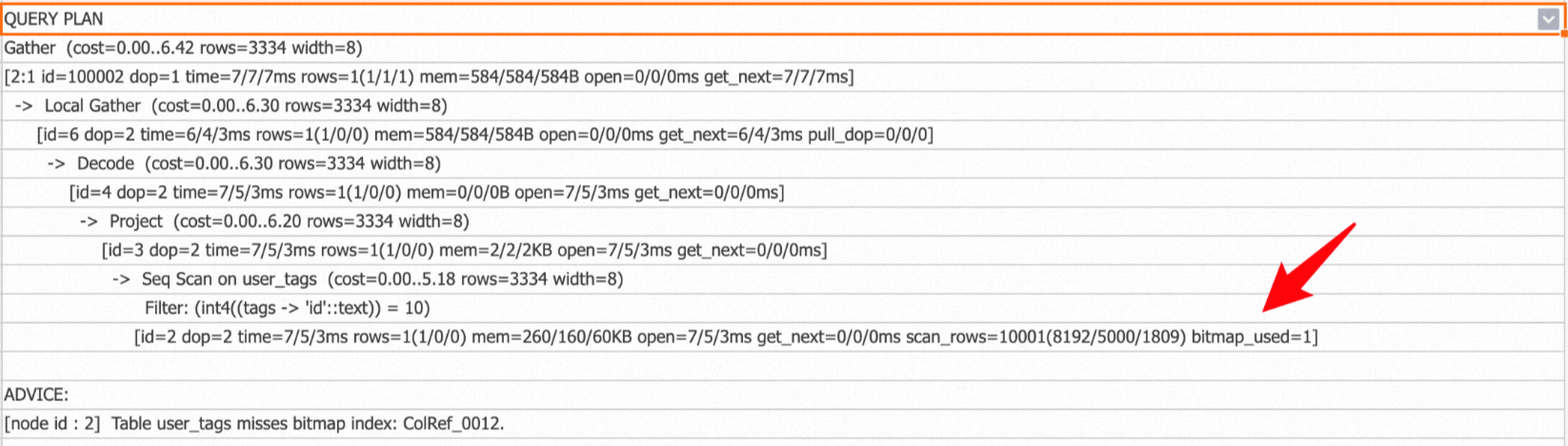
Best practices
Write queries that use supported operators
Column-oriented storage only applies when queries use -> or ->>. For text conversion, ->> is faster than casting with ->:
-- Faster: uses ->> directly
SELECT json_data->>'name' FROM tbl;

-- Slower: converts JSONB field to text via cast
SELECT (json_data->'name')::text FROM tbl;
For checking whether a TEXT array field contains a specific value, use jsonb_to_textarray:
SELECT key FROM tbl WHERE jsonb_to_textarray(json_data->'phones') && ARRAY['123456'];Diagnose queries that slow down after enabling column-oriented storage
If query performance drops after you enable column-oriented storage, check whether the query is scanning the entire JSONB value:
CREATE TABLE tbl (key int, json_data json);
ALTER TABLE tbl ALTER COLUMN json_data SET (enable_columnar_type = on);

EXPLAIN ANALYZE SELECT json_data FROM tbl WHERE key = 123;
If the execution plan output contains the following hint, the query returns the full JSONB column and column-oriented storage is causing overhead:
Column 'json_data' has enabled columnar jsonb, but the query scanned the entire Jsonb valueDisable column-oriented storage for that column, or rewrite the query to select only the specific keys you need.
Run compaction during off-peak hours
Both enabling and disabling column-oriented storage require compaction to convert existing data. Compaction consumes memory. To trigger it manually, run:
VACUUM <table_name>;FAQ
Why did storage usage increase after I enabled column-oriented storage?
Column-oriented storage usually reduces storage by eliminating key names and compressing values by type. However, if the JSONB data is sparse, the number of sub-columns grows significantly — and each column adds overhead for statistics collection and index creation. If most sub-column types are TEXT, compression gains are limited. Whether storage decreases depends on your data's sparsity and type distribution.