Train machine reading comprehension models to extract answers from documents based on questions.
Limitations
Runs only on DLC compute resources.
Parameters
-
Input ports
Input port (from left to right)
Data Type Restrictions
Recommended upstream component
Required
Training data input
OSS
Yes
Validation data input
OSS
Yes
-
Component parameters
Tab
Parameter
Description
Fields setting
Select language
Language of input file. Supported languages:
-
zh (default)
-
en
Input data format
Data format of each column in input file. Use commas (,) to separate columns. Default value: qas_id:str:1,context_text:str:1,question_text:str:1,answer_text:str:1,start_position_character:str:1,title:str:1.
Question column
Column name containing questions in input file. Default value: question_text.
Context column
Column name containing context text in input file. Default value: context_text.
Answer column
Column name containing answers in input file. Default value: answer_text.
ID column
Column name containing IDs in input file. Default value: qas_id.
Start position column
Column name containing start position of answers within context text in input file. Default value: start_position_character.
Model save path
OSS bucket folder path to store model files generated after training or fine-tuning.
Parameters setting
Batch size
Batch size for training. Integer. Default value: 4. For multi-GPU servers, specifies batch size per GPU.
Maximum context length
Maximum length of context for processing. Integer. Default value: 384.
Maximum question length
Maximum length of questions for processing. Integer. Default value: 64.
Sliding window size
Size of the sliding window used to chunk context. Integer. Default value: 128.
Number of epochs
Total number of training epochs. Integer. Default value: 3.
Learning rate
Learning rate for model building. Float. Default value: 3.5e-5.
Save checkpoint steps
Number of training steps after which model is evaluated and best-performing model is saved. Integer. Default value: 600.
Select model
Path of pre-trained model provided by the system. Valid values:
-
Custom
-
hfl/macbert-base-zh (default)
-
hfl/macbert-large-zh
-
bert-base-uncased
-
bert-large-uncased
Custom model path
Available when Select model is set to Custom. To use a custom pre-trained or fine-tuned model, specify its path here. Format:
{A: xxx, B: xxx}. Use colons (:) to separate keys and values. Use commas (,) to separate multiple parameters.Execution tuning
GPU instance type
GPU instance type of compute resource. Default value: gn5-c8g1.2xlarge (8 CPU cores, 80 GB memory, single P100 card).
Number of GPUs per worker
Number of GPUs per worker. Default value: 1.
-
-
Output port
Output port (from left to right)
Data type
Downstream component
Model save path
OSS path. This is the OSS path specified for Model save path parameter on Fields setting tab. Trained model is stored in this path.
Example
Build a workflow using this component: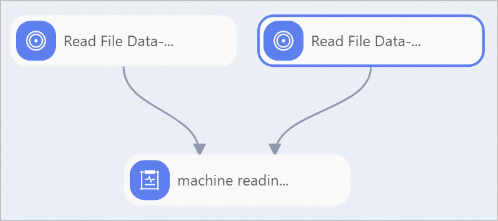
Configure the component:
-
Prepare training dataset and validation dataset, and upload them to an OSS bucket. For more information, see Step 2: Upload a file.
Datasets can be TSV or TXT files and must include the following columns:
-
Training dataset
ID column, context column, question column, answer column, start position column, and title column (optional)
-
Validation dataset
ID column, context column, question column, answer column (optional), start position column (optional), and title column (optional)
This example uses TSV files to demonstrate model training.
-
-
Use Read OSS Data-1 and Read OSS Data-2 components to read training and validation datasets. Set OSS Data Path parameter to the OSS path where datasets are stored.
-
Connect training and validation datasets to Machine Reading Comprehension Training component and configure its parameters. For more information, see Component parameters in this topic.
References
-
Connect Machine Reading Comprehension Prediction component downstream of Machine Reading Comprehension Training component to perform offline prediction on generated model. For more information, see Machine Reading Comprehension Prediction.
-
For more information about Designer components, see Designer overview.
-
Designer provides various algorithm components. Select appropriate components for data processing based on your scenario. For more information, see Designer component overview.