Query ApsaraVideo VOD bills in the User Center to understand your billing details and make informed decisions about cost allocation.
Notes
Real-time data for the current month does not include unsettled pay-as-you-go data. The query results are for reference only and cannot be used for reconciliation. For final usage details, refer to the bill from the following month.
Bill data is generated with a delay after resources are consumed. For the specific delay period, see the prompts in the console.
Procedure
Log on to the ApsaraVideo VOD console.
In the top navigation bar of the ApsaraVideo VOD console, choose Billing > User Center.
In the navigation pane on the left, choose Billing Management > Bill Details.
View the transaction details.
NoteTransaction details are updated with a 5-hour delay after actual resource consumption.
On the Transaction Details tab, set the billing cycle and select ApsaraVideo VOD as the product. Filter the data by the following dimensions to customize the content displayed on your bill.
Filter Dimension
Description
Billing Cycle
The settlement period for the bill (usually monthly).
Account/Owner Account
Bill data for the selected accounts. The filter uses an OR relationship.
Order/Bill No.
Search by order or bill number.
View the bill details.
NoteDetailed bill data is updated with a 24-hour delay. Information related to instance IDs, such as instance configuration, instance type, instance nickname, resource group, public IP, private IP, and zone, is updated with a 48-hour delay.
Click the Billing Details tab. On the Billing Details tab, set the billing cycle and select ApsaraVideo VOD as the product. Configure the Statistic Item and Statistical Period to customize the details displayed in the bill.
Parameter
Description
Statistic Item
The bill is displayed by the specified category.
Billable Item: The bill is categorized by billable item. Costs for the same billable item are merged.
Instance: The bill is categorized by instance. Costs for the same instance are merged.
Product: The bill is categorized by product. Costs for the same product are merged.
Account: The bill is categorized by account. Costs for the same account are merged.
Cost Center: The bill is categorized by cost center. Costs for the same cost center are merged.
Statistical Period
The bill is displayed by the specified period.
Billing Cycle: Displays the bill for the current month based on the selected billing cycle.
By Day: Displays the daily bills for the current month.
Details: Displays the detailed hourly bills for the current month.
Example of a bill query
To view the hourly cost details for ApsaraVideo VOD in December 2023, use the following configuration on the Bill Details page:
Billing Cycle: 2023-12
Product: ApsaraVideo VOD
Statistic Item: Billable Item
Statistical Period: Details
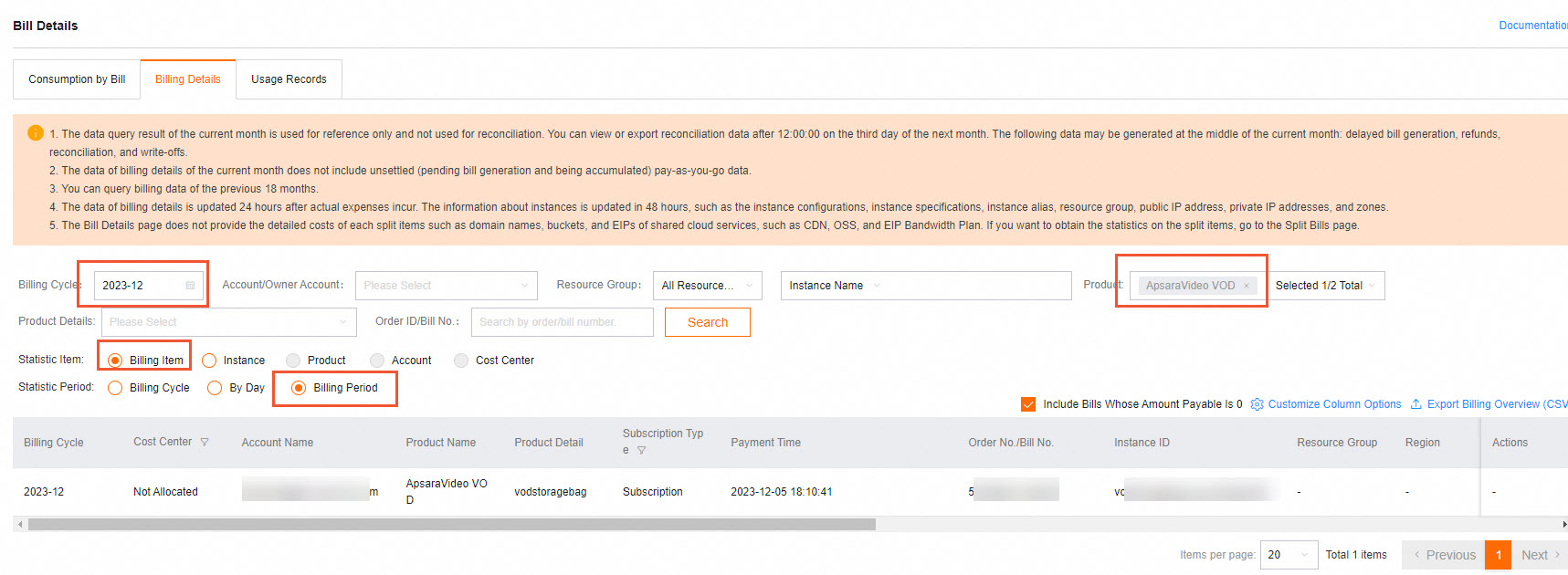
Click Customize Columns in the upper-right corner of the page to customize the displayed content.
To analyze your bill more easily, click Export Bill CSV to export the current bill to your local computer.
References
To query the usage details of ApsaraVideo VOD resource plans, see View resource plan usage details.
For more information about ApsaraVideo VOD billing, such as questions about billable items or abnormal charges, see Billing FAQ.