You can deploy SSL certificates that are purchased in the Certificate Management Service console to specific Alibaba Cloud services with a few clicks. This topic provides answers to some frequently asked questions about certificate deployment to Alibaba Cloud services.
Can I deploy an SSL certificate to an Alibaba Cloud service across Alibaba Cloud accounts?
No, you cannot directly deploy a certificate to an Alibaba Cloud service across Alibaba Cloud accounts.
Certificate Management Service allows you to share a certificate among multiple Alibaba Cloud accounts. The accounts must belong to the same individual or enterprise user who passed real-name verification. After you share a certificate among multiple accounts, you can use one of the accounts to deploy the certificate to an Alibaba Cloud service free of charge. For more information, see Upload and share an SSL certificate.
If the Alibaba Cloud account to which the required service belongs and the Alibaba Cloud account that is used to purchase the required certificate belong to different individuals or enterprise users who passed real-name verification, you can use the account to which the certificate belongs to download the issued certificate, log on to the account to which the service belongs, and then deploy the certificate in the console of the service.
Is HTTPS enabled for an Alibaba Cloud service after a certificate is deployed to the service?
After you deploy a certificate to an Alibaba Cloud service in the Certificate Management Service console, the certificate is synchronized to the service. You must complete verification in the console of the service.
Why is the number of Alibaba Cloud service resources 0 when I deploy a certificate?
When you deploy a certificate, the system automatically identifies and synchronizes the resources of all Alibaba Cloud services. If you cannot find the required resources, perform the following operations:
In the Total Resources section, check whether the resources are synchronized. If the resources are being synchronized, the Synchronize Cloud Resources button is grayed out, as shown in the following figure. Wait until the resources are synchronized. The time required for resource synchronization varies based on the number of resources within your Alibaba Cloud service.
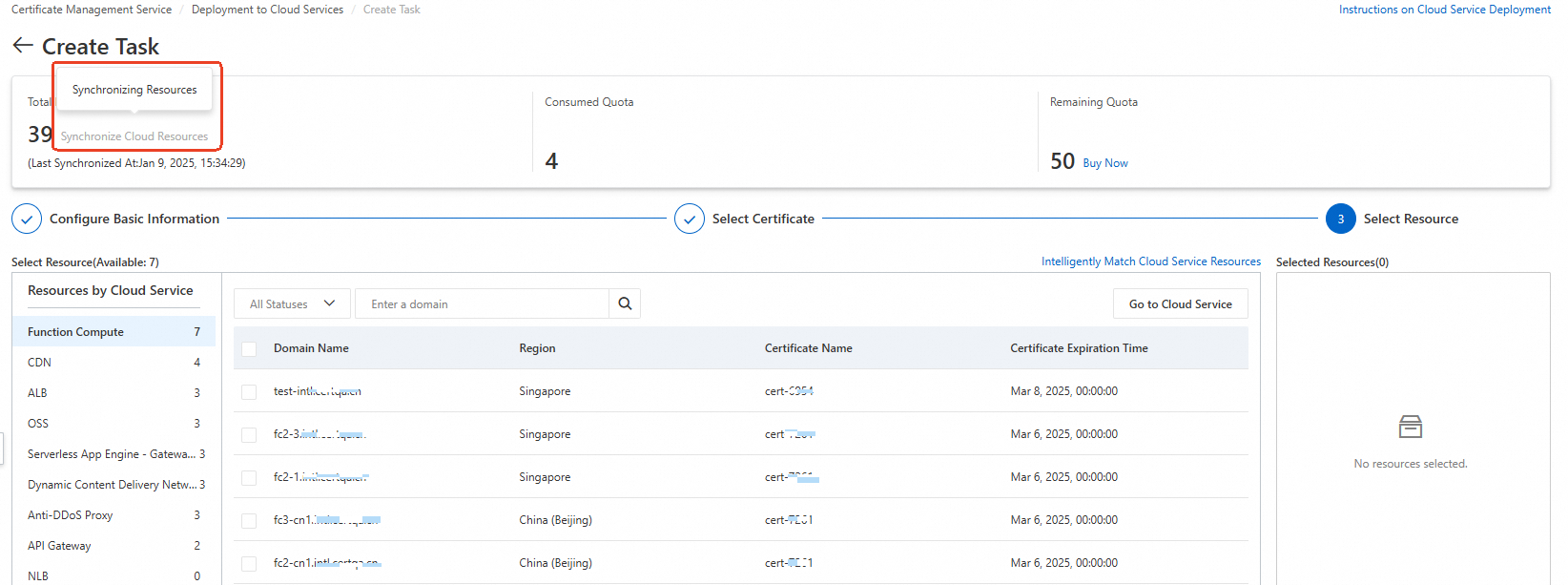
If you cannot find the required resources after the synchronization is complete, check whether the prerequisites for the first deployment are met. For more information, see First-time deployment. If the prerequisites are not met, deploy the certificate in the console of your Alibaba Cloud service.
What do I do if deployment tasks fail when I deploy multiple domain names to an SLB instance fails?
Problem description: Server Load Balancer (SLB) locks resources when certificates are replaced. If multiple server certificates are bound to a single SLB listener and you create multiple deployment tasks in the Certificate Management Service console to replace the certificates at the same time, some tasks may fail.
Solution: Specify one SLB resource in each deployment task to deploy only one certificate.