Common questions about navigating, configuring, and managing Bastionhost instances.
Instance navigation
How do I open the management page of a bastion host?
Log on to the Bastionhost console.
In the top navigation bar, select the region where your bastion host resides.
In the left-side navigation pane, click Basic Edition & Enterprise Edition.
On the Instances page, find your bastion host and click Manage.
Why can't I see my bastion host after purchase?
Your selected region probably doesn't match where the bastion host was created. In the top navigation bar of the Bastionhost console, select the correct region.

Does Bastionhost support access by domain name only?
It depends on the version. Bastionhost V3.2.X supports only domain name access. Bastionhost V3.1 and V2 support only IP address access.
Network and security configuration
How do I restrict a host or database to accept connections only from a bastion host?
The method depends on where the target resource is hosted:
ECS instances: Create a security group rule that allows inbound traffic only from the egress IP addresses of your bastion host. Alternatively, use Cloud Firewall to restrict access.
ApsaraDB RDS instances: Configure an IP address whitelist to allow only the egress IP addresses of your bastion host. Alternatively, use Cloud Firewall.
Hosts on third-party clouds or in data centers: Configure your firewall or other access control devices to allow traffic only from the egress IP addresses of your bastion host.
For instructions on creating a security group rule, see Add a security group rule. For instructions on configuring a whitelist for ApsaraDB RDS, see Configure an IP address whitelist.
The following screenshot shows where to find the egress IP addresses in the Bastionhost console.

How do I add the egress IP addresses of a bastion host to an ECS security group?
Create a security group rule for the ECS instance to allow traffic from the bastion host's egress IP addresses on ports 22 (SSH) and 3389 (RDP).
Log on to the Bastionhost console.
In the top navigation bar, select the region where your bastion host resides.
In the left-side navigation pane, click Basic Edition & Enterprise Edition.
On the Instances page, find your bastion host and move the pointer over Egress IP.
If the bastion host accesses a server's public IP address, the source IP is the bastion host's egress public IP address. If it accesses a server's private IP address, the source IP is the bastion host's egress private IP address.
Copy and save both the public and private IP addresses.
Create a security group rule for the ECS instance to allow inbound traffic from those IP addresses on ports 22 (SSH) and 3389 (RDP). For detailed steps, see Add a security group rule.
How do I disable public operations and maintenance (O&M) for a bastion host?
Log on to the Bastionhost console.
In the top navigation bar, select the region where your bastion host resides.
In the left-side navigation pane, click Basic Edition & Enterprise Edition.
On the Instances page, find your bastion host and click the
 icon.
icon.
Can I connect directly to an ECS instance's IP address after importing it into Bastionhost?
Yes. By default, Bastionhost does not apply any IP address access control to imported ECS instances, so direct connections remain possible.
To enforce O&M compliance and auditability, create a security group rule that allows inbound access to the ECS instance only from the egress IP addresses of your bastion host. For detailed steps, see Add a security group rule.
How do I access an ECS instance from my bastion host using a private IP address?
Use either of these methods:
Method 1: Import the ECS instance using the console. The default access IP type is private. For details, see Import ECS instances within the current account.
Method 2: Change an existing host's O&M IP address type to private:
In the left-side navigation pane of your bastion host console, choose Assets > Hosts. Select the host and choose Batch > Modify O&M IP Address.
In the Modify O&M IP Address dialog box, set Host IP Address Type to Private IP Address and click OK.
Ports
What ports does a bastion host use, and can I change them?
A bastion host has the following ports enabled by default:
| Port | Purpose |
|---|---|
| 443 (HTTPS) | Web-based O&M pages |
| 60022 | SSH O&M |
| 63389 | RDP O&M |
| 9443 | Auditing |
Ports 1 to 1024 are reserved for Bastionhost. Do not change the default ports to reserved ports.
Bastionhost V2 and V3.1: Port changes are not supported.
Bastionhost V3.2: Port changes are supported.
How do I configure Bastionhost to access an ECS instance on a non-standard port?
Bastionhost supports custom O&M ports. To change the port for a host:
In the left-side navigation pane of your bastion host console, choose Assets > Hosts. Select the host and choose Batch > Modify O&M Port.
In the Modify O&M Port dialog box, set the Protocol and Port parameters and click OK.
Configuration backups
Why does uploading a configuration backup fail?
Check these three conditions — any one of them will cause the import to fail:
Cause A — Version mismatch: The source and target bastion hosts must be on the exact same version. For example, a backup from V3.2.37 cannot be imported to V3.2.38.
Cause B — Specification upgrade: Backups from a lower-specification bastion host cannot be imported to a higher-specification one.
Cause C — Edition downgrade: Backups from an Enterprise Edition bastion host cannot be imported to a Basic Edition one.
Configuration backups do not include password change task configurations. If the source bastion host had a password change task configured, set it up manually on the target after importing. If the target already has a password change task configured, that configuration is cleared when you sync the backup.
User management
Why does an AD or LDAP user show "The source from which the user is imported is deleted"?
Bastionhost periodically syncs user status from Active Directory (AD) and Lightweight Directory Access Protocol (LDAP) servers. This status appears when either of these conditions is true:
The user was deleted from the AD or LDAP server.
The user's base distinguished name (DN) doesn't match the base DN configured on the bastion host.
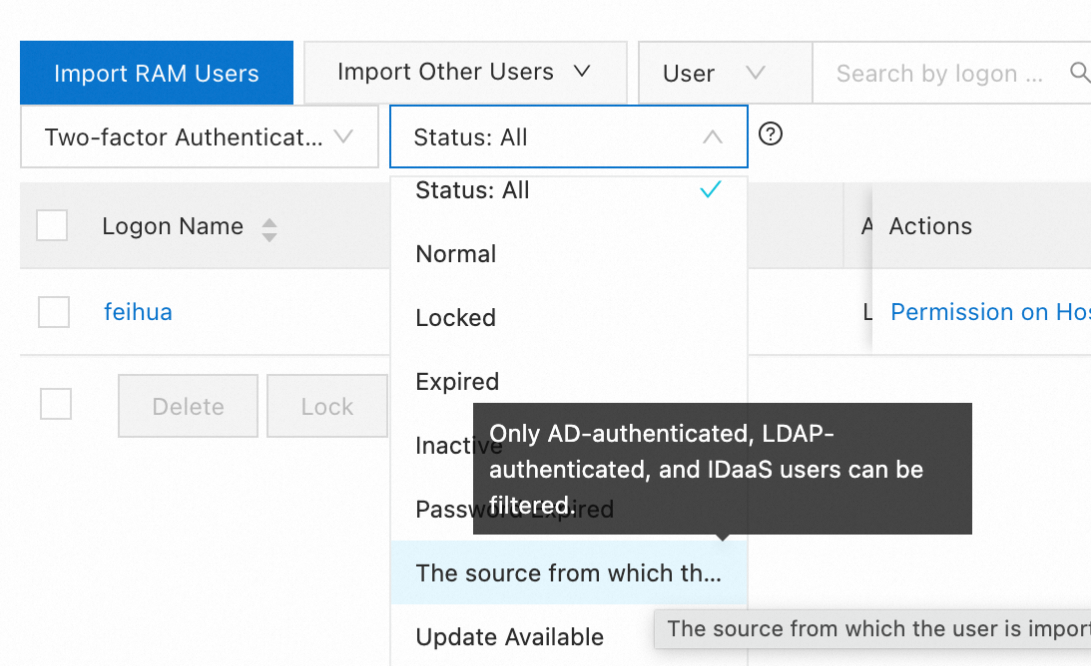
When an AD or LDAP user logs on to a bastion host, authentication is performed by the corresponding AD or LDAP server.
Asset management
Why are passwords missing from the exported asset file?
If an asset password contains only digits, the password column appears blank in the exported file. Change the cell format to fraction format to display the password correctly.