Overview
Solution description
If a service is deployed in multiple data centers across regions and the data centers in a region are down, you can use Global Traffic Manager (GTM) to switch traffic to a data center in another region. This ensures business continuity.
This topic describes how to build a geo-disaster recovery architecture where three data centers are deployed across two regions. In such an architecture, in addition to the two data centers that are deployed in the same region, a backup data center is deployed in the other region. If the two data centers are down due to natural disasters or other reasons, the backup data center can resume business by using its backup data.
Intended audience
This topic is intended for personnel who are responsible for network or business O&M.
Scenarios
The geo-disaster recovery feature is applied when a service is deployed in multiple data centers across regions.
Terms
Term | Description |
GTM | GTM supports intelligent Domain Name System (DNS) resolution, health check, fault isolation, and failover. GTM can help enterprises establish a disaster recovery architecture where two data centers are deployed in the same region or three data centers are deployed across two regions. |
intelligent DNS resolution | GTM allows a visitor to access the nearest server by returning the IP address of the server based on the DNS request source of the visitor, such as an Internet service provider (ISP) or a specific region. |
health check | GTM performs Layer 3 to Layer 7 health checks on servers to identify exceptions in a timely manner. |
primary and secondary address pools | Primary and secondary address pools are configured to achieve fault isolation and failover among different data centers. |
Architecture
Architecture diagram
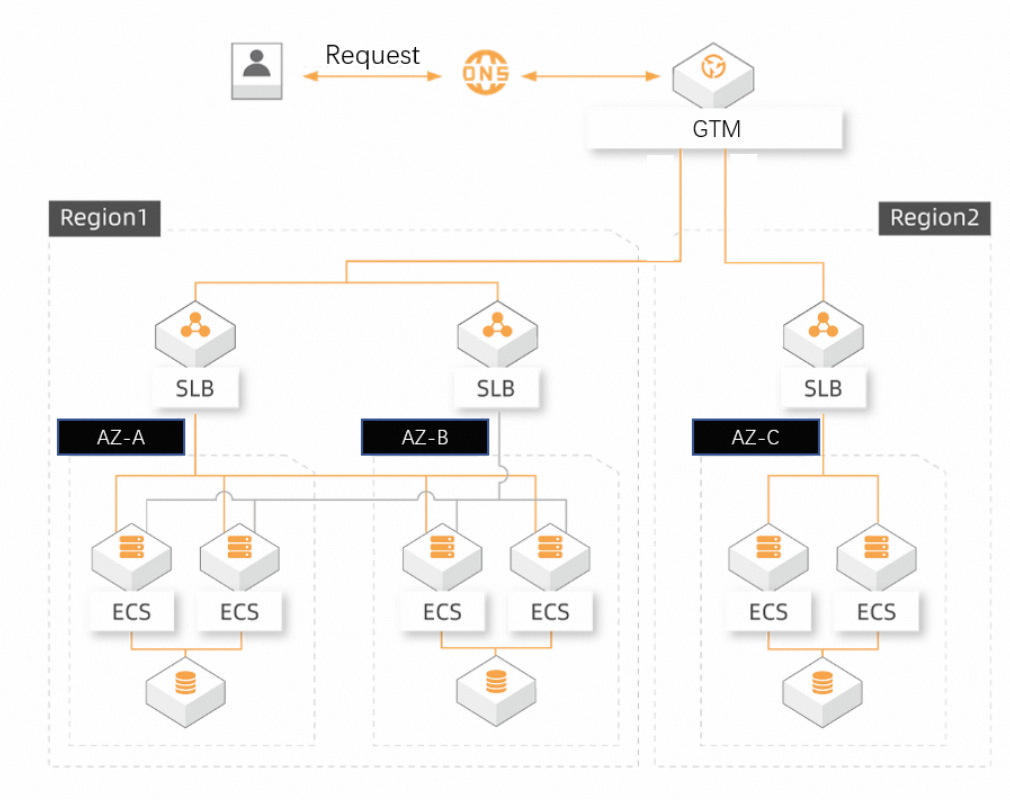
Benefits
Health check: The health check feature supports real-time exception detection, automatic failover, and manual switchover. This ensures business continuity.
Centralized management: The IP addresses and traffic of data centers hosted by different Internet service providers, regions, and vendors are managed in a centralized manner.
Ease of use: GTM allows enterprises to quickly build an architecture of active zone-redundancy and geo-disaster recovery without the need to renovate the existing architecture.
Solution implementation
Prerequisites
A GTM instance is created. You can click here to purchase one.
NoteTo identify a fault and perform a failover, a GTM instance of Ultimate Edition requires about 1 minute and a GTM instance of Standard Edition requires about 3 minutes. If you require high service availability, we recommend that you purchase a GTM instance of Ultimate Edition.
The following three IP addresses are prepared: 192.0.2.0 in the China (Beijing) region, 192.0.2.1 in the China (Beijing) region, and 192.0.2.2 in the China (Hangzhou) region.
Procedure
Log on to the Alibaba Cloud DNS console and click Global Traffic Manager in the left-side navigation pane. On the page that appears, find the desired instance and click Settings in the Actions column.
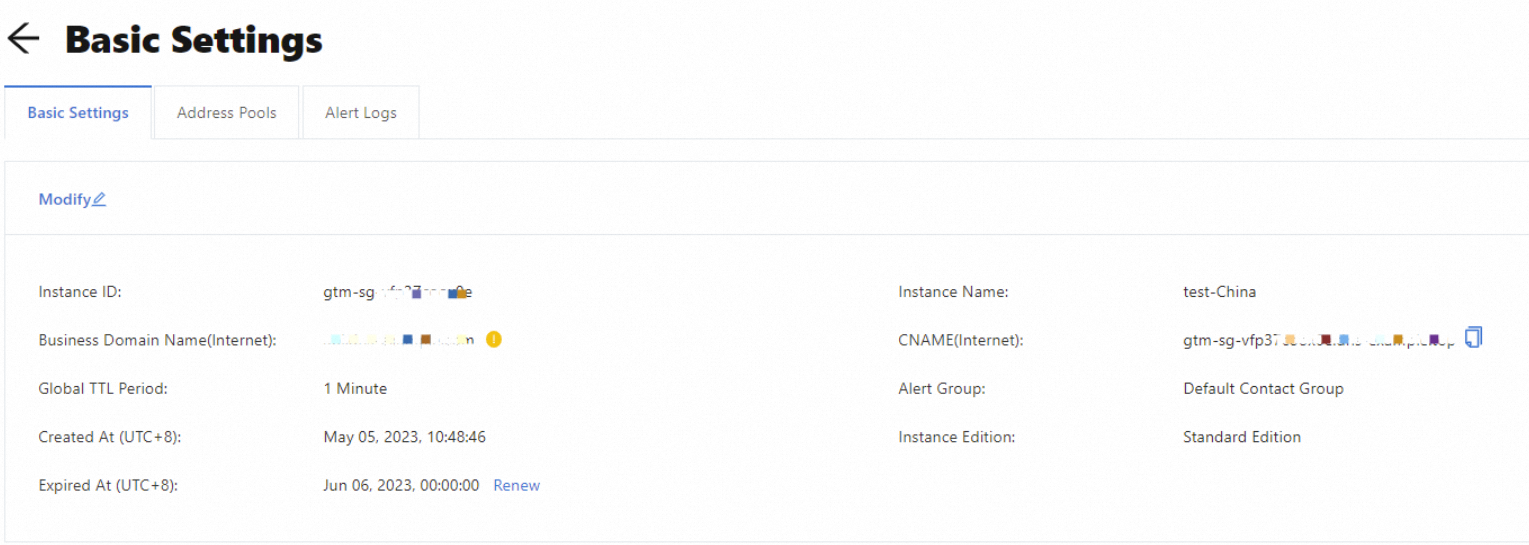
Click Advanced Settings. On the page that appears, click the Basic Settings tab and click Modify. In the Modify Basic Settings panel, specify the parameters based on your business requirements. We recommend that you set the Global TTL Period parameter to 10 Minutes.
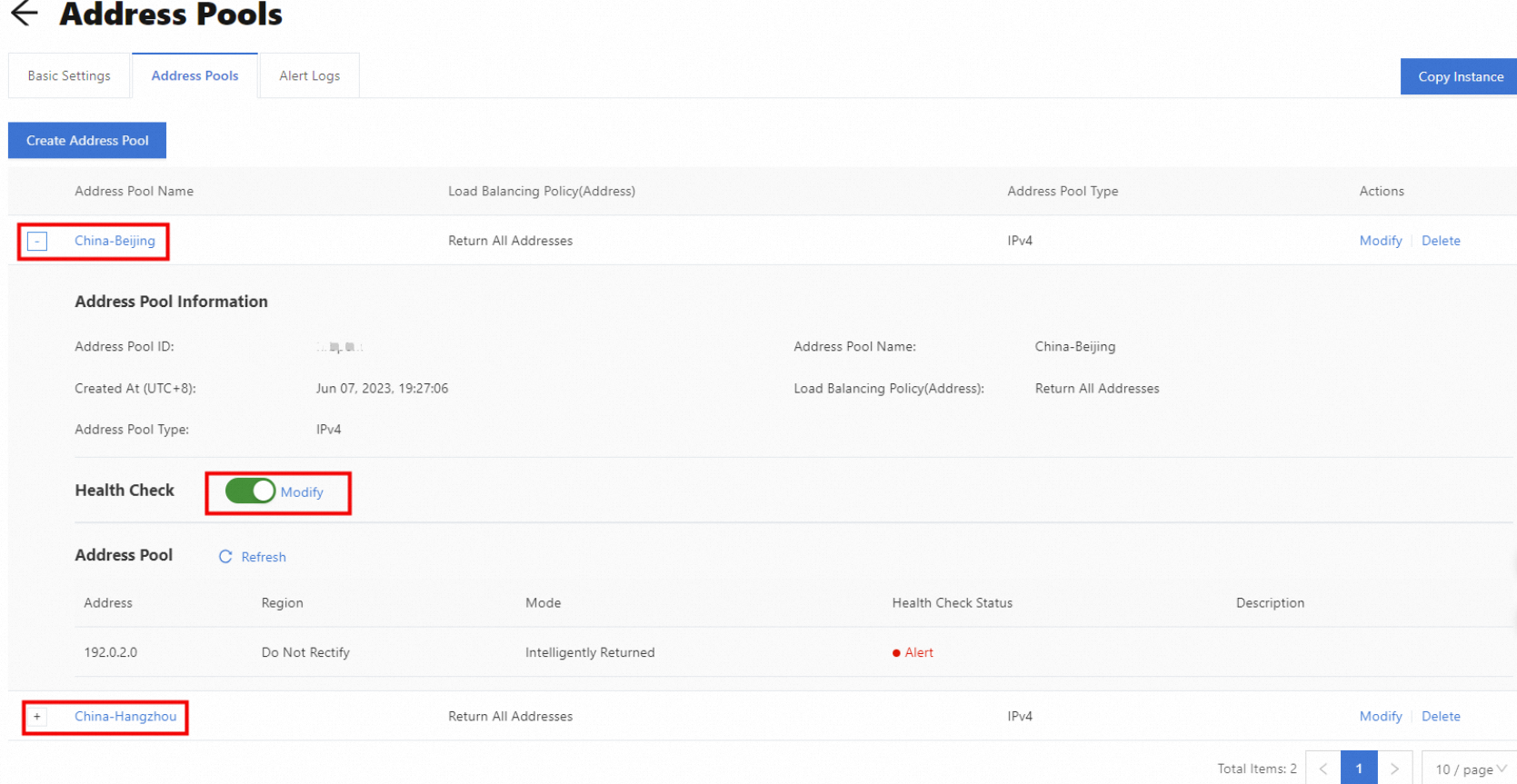
On the Address Pools tab, click Create Address Pool and create two address pools: China (Beijing) and China (Hangzhou). Then, enable the health check feature for these address pools.
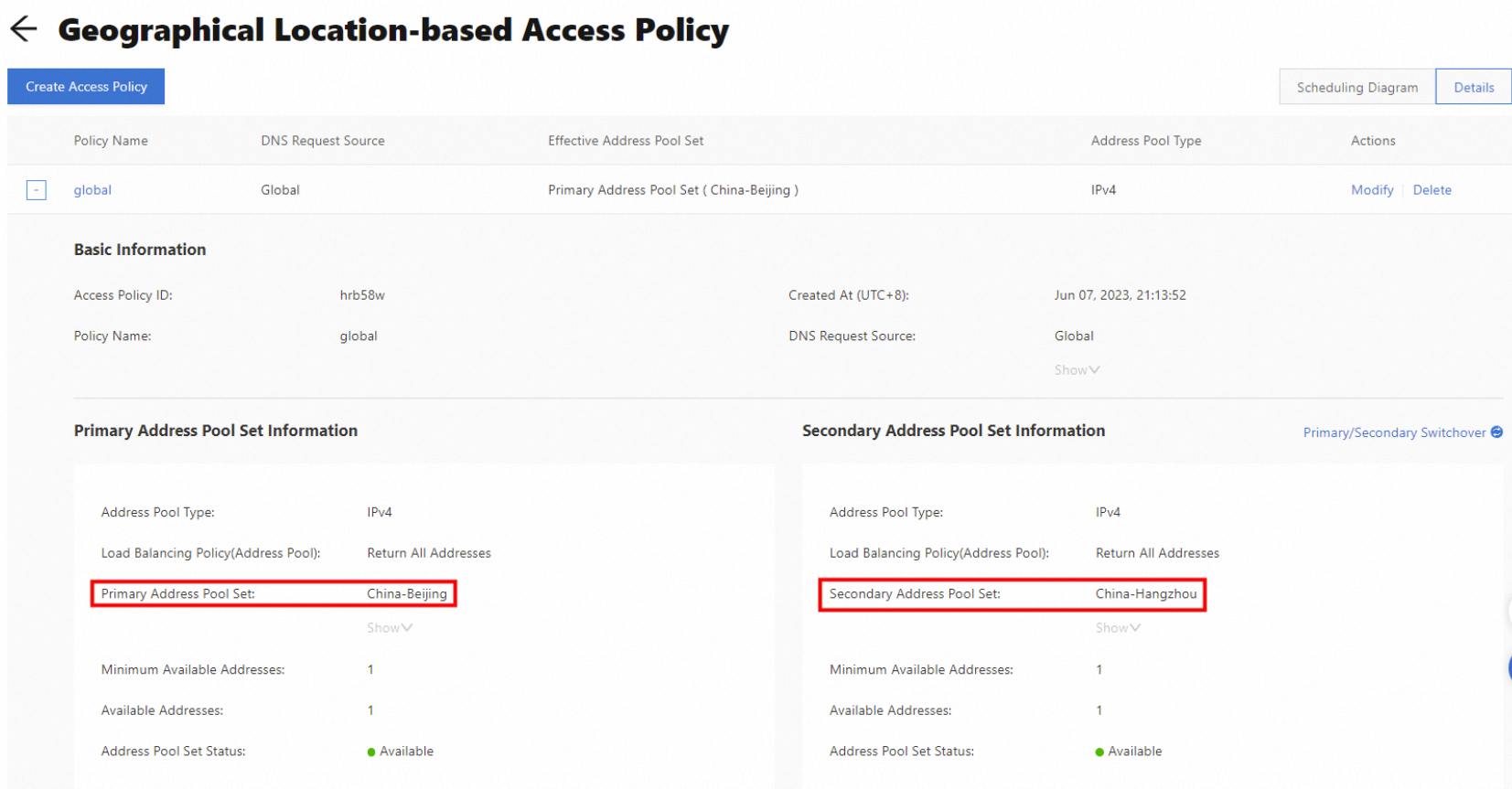
Click Settings in the Geographical Location-based Access Policy section on the Basic Settings tab. On the page that appears, click Create Access Policy. In the Create Access Policy panel, select Global > Global for the DNS Request Source parameter and select the China (Beijing) address pool as the primary address pool set and China (Hangzhou) address pool as the secondary address pool set.
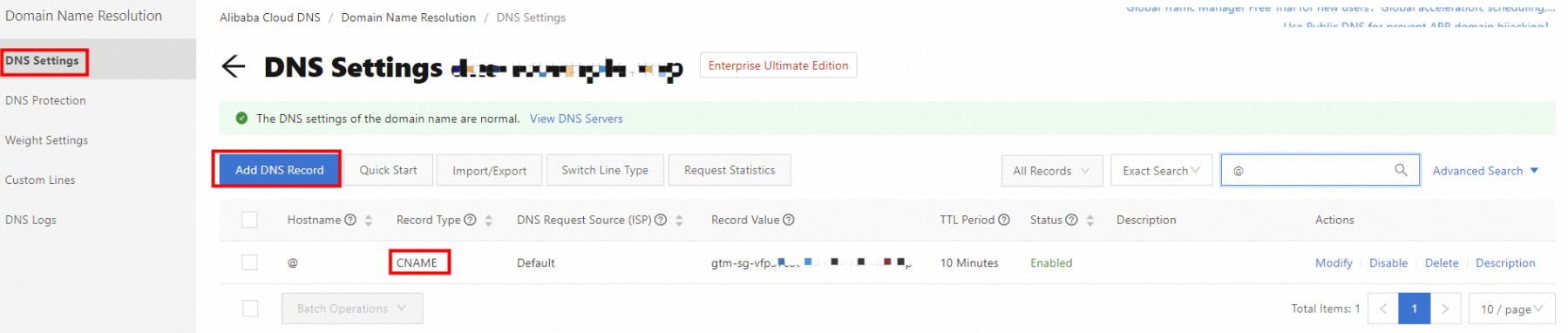
Click Domain Name Resolution in the left-side navigation pane, and click the Authoritative Domain Names tab. Find the desired domain name and click DNS Settings in the Actions column. On the page that appears, click Add DNS Record. Add a canonical name (CNAME) record to point the domain name to the CNAME provided by GTM. This way, the traffic from the clients of visitors can be switched.
Verify results
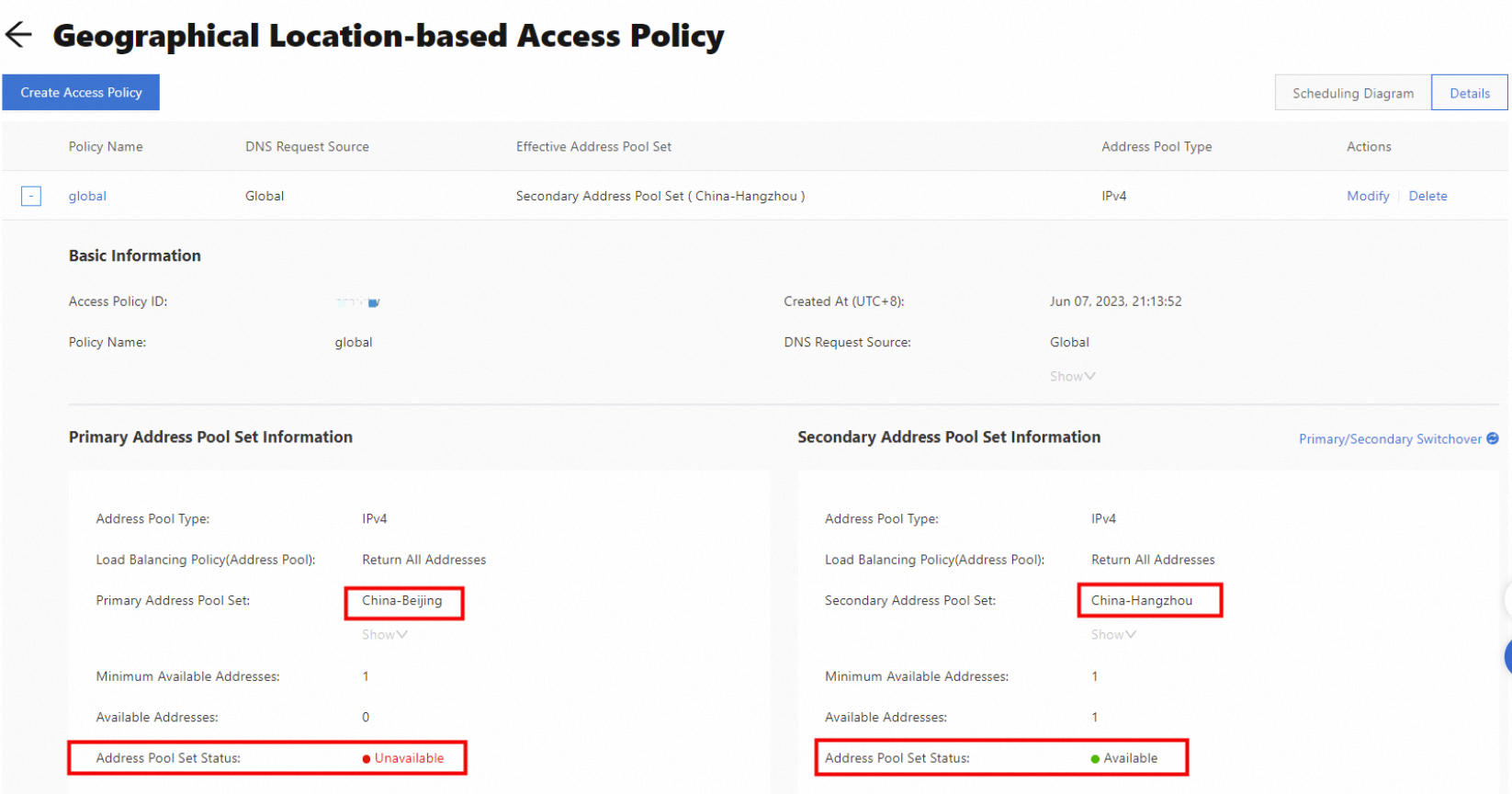
Disconnect or stop services of the IP addresses (192.0.2.0 and 192.0.2.1) in the China (Beijing) region. The primary address pool set becomes unavailable.
In this case, the traffic is switched to the secondary address pool set in the China (Hangzhou) region to ensure business continuity.
FAQ
How long does it take to complete a failover? Assume that the health check interval is set to 15 seconds, the global time-to-live (TTL) period is set to 10 seconds, and the number of consecutive failures is set to 3. GTM can identify a failure and perform a failover within about 1 minute. Theoretically, the failover takes effect across the network within about 10 seconds. The actual failover period depends on the caching time that is specified by ISPs.
Can I use GTM if I do not use Alibaba Cloud DNS? Yes, GTM can provide a CNAME to allow you to create a CNAME record for your domain name on the management platform of your DNS service provider.