The policy governance feature in Container Service for Kubernetes (ACK) lets you enforce security rules on Pod deployment and updates. Built on Open Policy Agent (OPA) and its Gatekeeper admission controller, it replaces the deprecated PodSecurityPolicy (PSP) with a console-driven workflow. It provides four policy categories:
| Policy type | Description |
|---|---|
| Infra | Security controls for infrastructure resources |
| Compliance | Policies based on Kubernetes compliance standards, such as Alibaba Cloud Kubernetes Security Hardening |
| PSP | Drop-in replacements for deprecated Kubernetes PodSecurityPolicy resources |
| K8s-general | General Kubernetes best practices based on Alibaba Cloud security standards |
Usage notes
-
Policy governance applies to Linux nodes only.
-
Custom policies are not supported. All policies come from the built-in policy libraries of ACK.
Prerequisites
Before you begin, make sure that:
-
The cluster runs Kubernetes 1.16 or later. To update a cluster, see Manually update ACK clusters.
-
If you manage security policies as a Resource Access Management (RAM) user, the RAM user has the following permissions: For instructions on granting these permissions, see Create a custom RAM policy.
Permission Description cs:DescribePoliciesList policies cs:DescribePoliceDetailsView policy details cs:DescribePolicyGovernanceInClusterView cluster policy information cs:DescribePolicyInstancesView policy instances in a cluster cs:DescribePolicyInstancesStatusView policy instance status cs:DeployPolicyInstanceDeploy a policy instance cs:DeletePolicyInstanceDelete a policy instance cs:ModifyPolicyInstanceModify a policy instance
Step 1: Install or update the policy governance components
-
Log on to the ACK console. In the left navigation pane, click Clusters.
-
On the Clusters page, click the name of the target cluster. In the left-side pane, choose Security > Policy Governance.
-
On the Policy Governance page, follow the on-screen instructions to install or update the required components. The following three components are required. They are free of charge but consume Pod resources in your cluster.
Component Role gatekeeper OPA-based Kubernetes admission controller. Enforces security policies and manages namespace labels. You must use the ACK-provided version. If a third-party gatekeeper is already installed, uninstall it before installing the ACK version. For release notes, see gatekeeper. alibaba-log-controller Collects and retrieves blocking and alerting events generated by policy violations. policy-template-controller Manages the status of ACK clusters and policy instances across different policy templates.
Step 2: Create a policy instance
-
Log on to the ACK console. In the left navigation pane, click Clusters.
-
On the Clusters page, click the name of the target cluster. In the left-side pane, choose Security > Policy Governance.
-
On the Policy Governance page, click the My Policies tab.
-
Click Create Policy Instance and configure the following parameters.
Parameter Description Policy Type The category of the policy. Valid values: Infra, Compliance, PSP, K8s-general. For descriptions of each type, see Predefined security policies of ACK. Policy Name Select a policy from the drop-down list. Action Block: rejects resource deployments that violate the policy. Alert: logs a violation event but allows the deployment to proceed. Applicable Scope The namespaces to which the policy instance applies. Parameters Policy-specific configuration. If the editor is blank, no parameters are required. Otherwise, set values based on the displayed descriptions. -
Click OK to deploy the policy instance.
View and manage policy instances
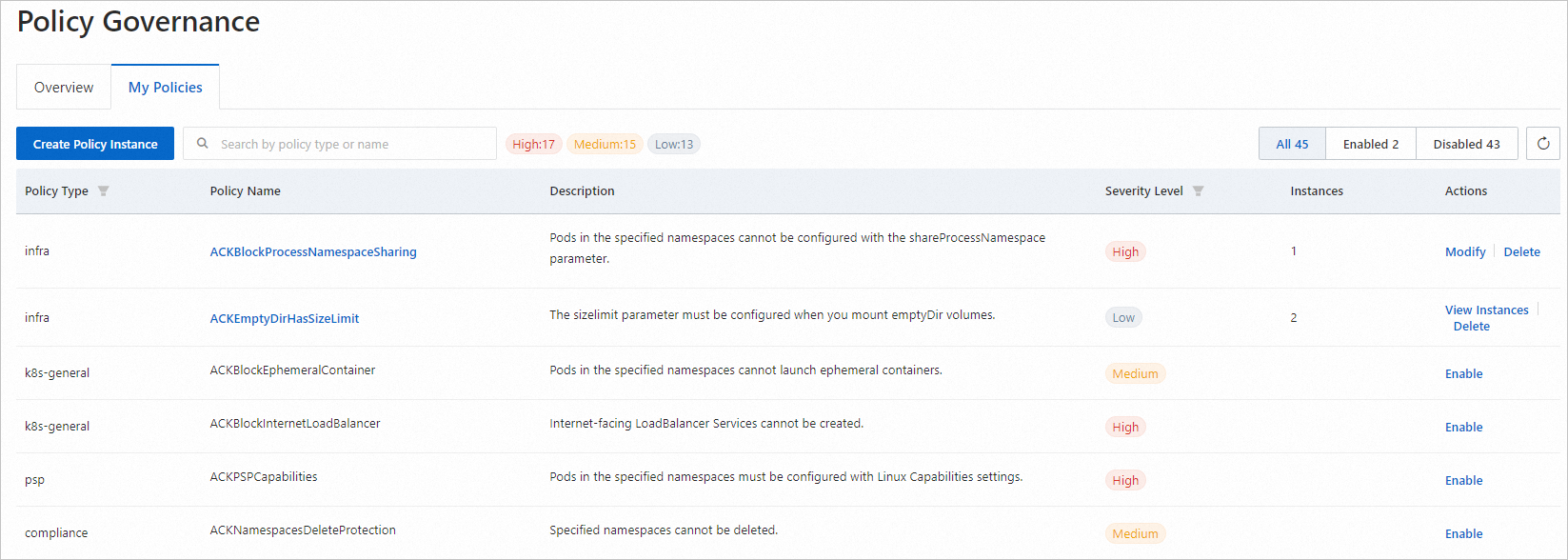
On the My Policies tab, you can review all policies and their instances in the current cluster.
-
Enabled policies appear at the top of the list.
-
The Instances column shows how many instances are deployed for each policy.
-
If a policy has zero instances, it is not active. Click Enable in the Actions column to configure and deploy it.
-
To update a single-instance policy, click Modify in the Actions column. For policies with multiple instances, click View Instances, then Modify the target instance.
-
To remove all instances for a policy, click Delete in the Actions column.
For descriptions of all available policies and their templates, see Predefined security policies of ACK.
Monitor policy events
Click the Overview tab to monitor policy activity across the cluster. The tab shows:
-
Counts of high-risk and medium-risk policies, including how many of each are enabled, and policies that the system recommends enabling.
-
Total blocking and alerting events over the past 7 days.
-
The latest 100 events from the past 7 days.
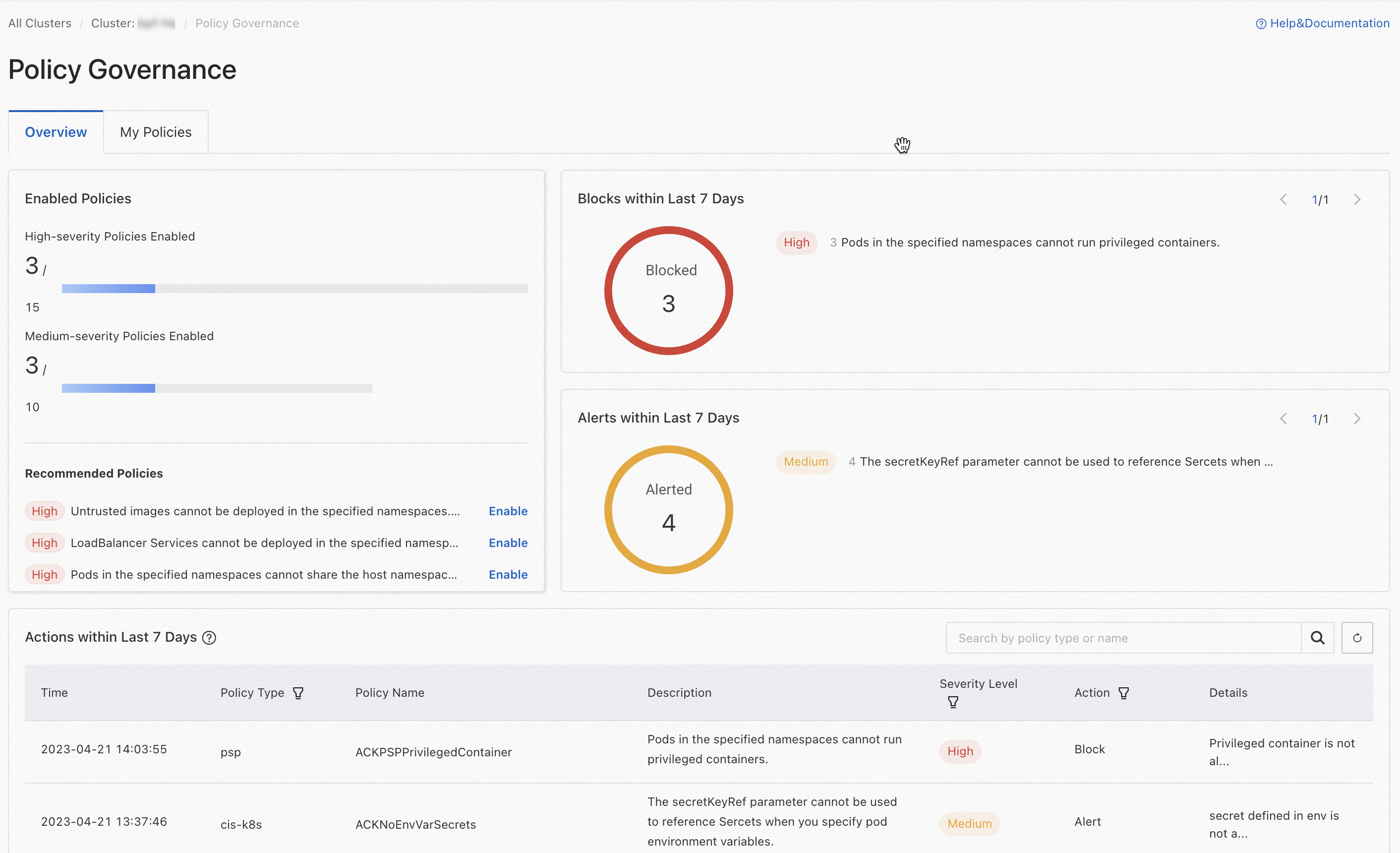
To view the full audit log, click the  icon next to Actions within Last 7 Days to open the Logstore details page in the Log Service console.
Enable deletion protection for namespaces and Services
After installing the policy governance components, you can protect business-critical namespaces and Services from accidental deletion by enabling deletion protection. Resources with deletion protection enabled can only be deleted after you manually disable it.
Enable deletion protection for a namespace
-
Log on to the ACK console. In the left navigation pane, click Clusters.
-
Click the name of the target cluster. In the left-side pane, click Namespaces and Quotas.
-
Find the target namespace and click Edit in the Actions column. In the dialog box, enable deletion protection.
Enable deletion protection for a Service
-
Log on to the ACK console. In the left navigation pane, click Clusters.
-
Click the name of the target cluster. In the left-side pane, choose Network > Services.
-
Find the target Service and choose Enable Deletion Protection in the Actions column. Follow the on-screen prompts to complete the operation.
What's next
-
Review the full list of built-in policies: Predefined security policies of ACK.
-
Identify security risks in workload configurations: Use the inspection feature to detect security risks in the workloads of an ACK cluster.