AgentSight is an eBPF-based observability tool for AI agents. It provides fine-grained data collection and association analysis for the entire agent lifecycle without modifying your business logic.
How to use AgentSight
Product introduction
AgentSight is an eBPF-based observability tool for AI agents. It provides fine-grained data collection and association analysis for the entire agent lifecycle without modifying your business logic.
Core features
AgentSight includes the following features:
Token consumption analysis: Measure and attribute token consumption during agent operations. You can flexibly query data by time range or within the last N hours, with automatic period-over-period comparisons. You can break down consumption sources by dimensions such as agent, task, and role. The analysis granularity extends down to a single LLM call.
Behavior auditing: Record and trace the entire chain of an agent's LLM calls and process executions. During data collection, AgentSight retains key metadata for each LLM call, such as the provider and model version, and captures the command-line parameters of the process. The system also supports flexible, multi-dimensional filtering by time, process identity, and event type. It also provides visual summary statistics for analysis.
Dashboard visualization: The web-based visualization interface provides an intuitive display of token consumption, agent status monitoring, and session details. You can view real-time data updates in your browser. You can deploy the Dashboard on a remote server and access it directly from your local browser without logging on to the server. You can use the Dashboard to view token consumption trends over time, monitor agent process status in real time, and restart abnormal processes. You can also drill down into the complete trace of each session, including user input, model prompts, inference processes, and the token consumption distribution at each step. This helps you accurately analyze model call efficiency and optimize cost control.
Scope of use
This tool is suitable for OpenClaw and Copilot Shell in scenarios that do not use AK/SK authentication.
Installation
For more information, see Quick Start.
Conversational interaction
AgentSight provides a conversational interaction Skill that can be installed and used in various AI agents. You can perform operations using natural language, which eliminates the need to remember command-line interface (CLI) commands:
View token consumption: For example, "How many tokens were used today?"
Query audit logs: For example, "Help me find today's LLM call records."
If you use Copilot Shell (cosh), this Skill is built-in. You can use the natural language instructions above directly. The system automatically calls AgentSight to run the query and return the analysis.
CLI command details
agentsight trace — Start eBPF tracing
Note: This service starts by default and does not need to be run manually.
This command starts eBPF-based tracing of AI agent activity.
agentsight trace # Requires root permissions to runagentsight serve — Start the API and Dashboard
Note: This service starts by default, binds to 0.0.0.0:7396, and does not need to be run manually.
This command starts the HTTP API server, which provides an embedded Dashboard UI.
agentsight serve --host 0.0.0.0 --port 7396 # Requires root permissions to runThis command binds to all network interfaces. You can access it using the server's public network IP address: http://<server_public_IP>:7396
Ensure that your server's firewall or security group allows traffic on port 7396.
agentsight token — Query token usage
This command queries token usage data.
# View today's usage
agentsight token
agentsight audit — Query audit events
This command queries audit events, such as LLM calls and process operations.
# View recent events
agentsight audit

# Filter by PID and type
agentsight audit --pid 12345 --type llm

# Get a summary
agentsight audit --summary
agentsight serve — Start the API and Dashboard
This command starts the HTTP API server, which provides an embedded Dashboard UI.
# Start with default settings (binds to 127.0.0.1:7396)
agentsight serve

# Use a custom host and port
agentsight serve --host 0.0.0.0 --port 8080
agentsight discover — Scan for agents
This command discovers AI agents that are running on the system.
# Scan for agents
agentsight discover

# List known types
agentsight discover --list-known
Dashboard visualization interface
The Dashboard is the web-based visualization interface for AgentSight. You can use it to view conversation history, trace details, and token statistics.
Dashboard features
The Dashboard provides the following core features:
Token consumption overview: View the token consumption on the current machine for the selected time period.
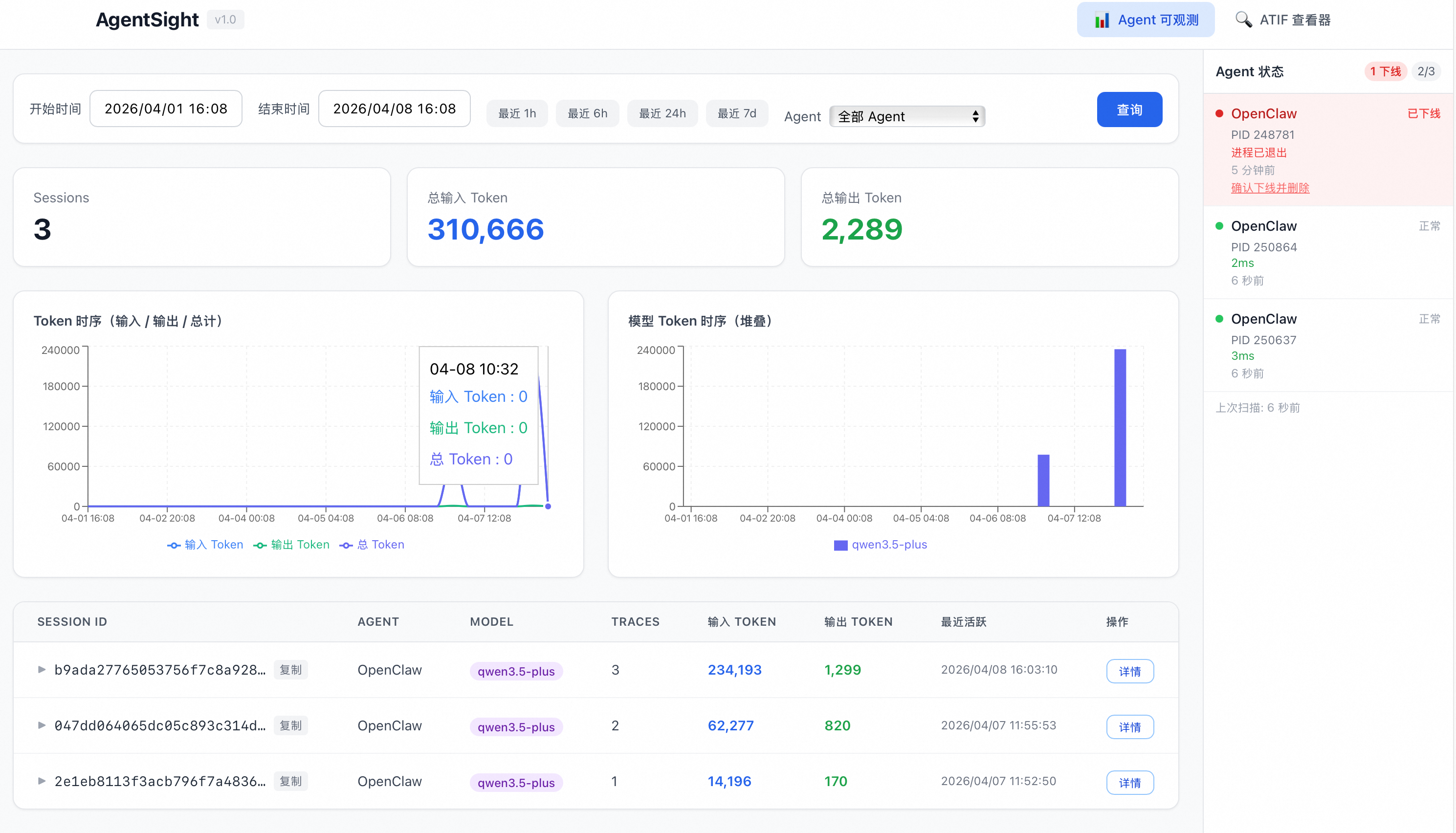
Agent status: You can check the current agent process status in the status bar on the right. This feature lets you restart an agent process if it hangs.
Session details: Click "Details" to view the detailed token usage for each session and trace.
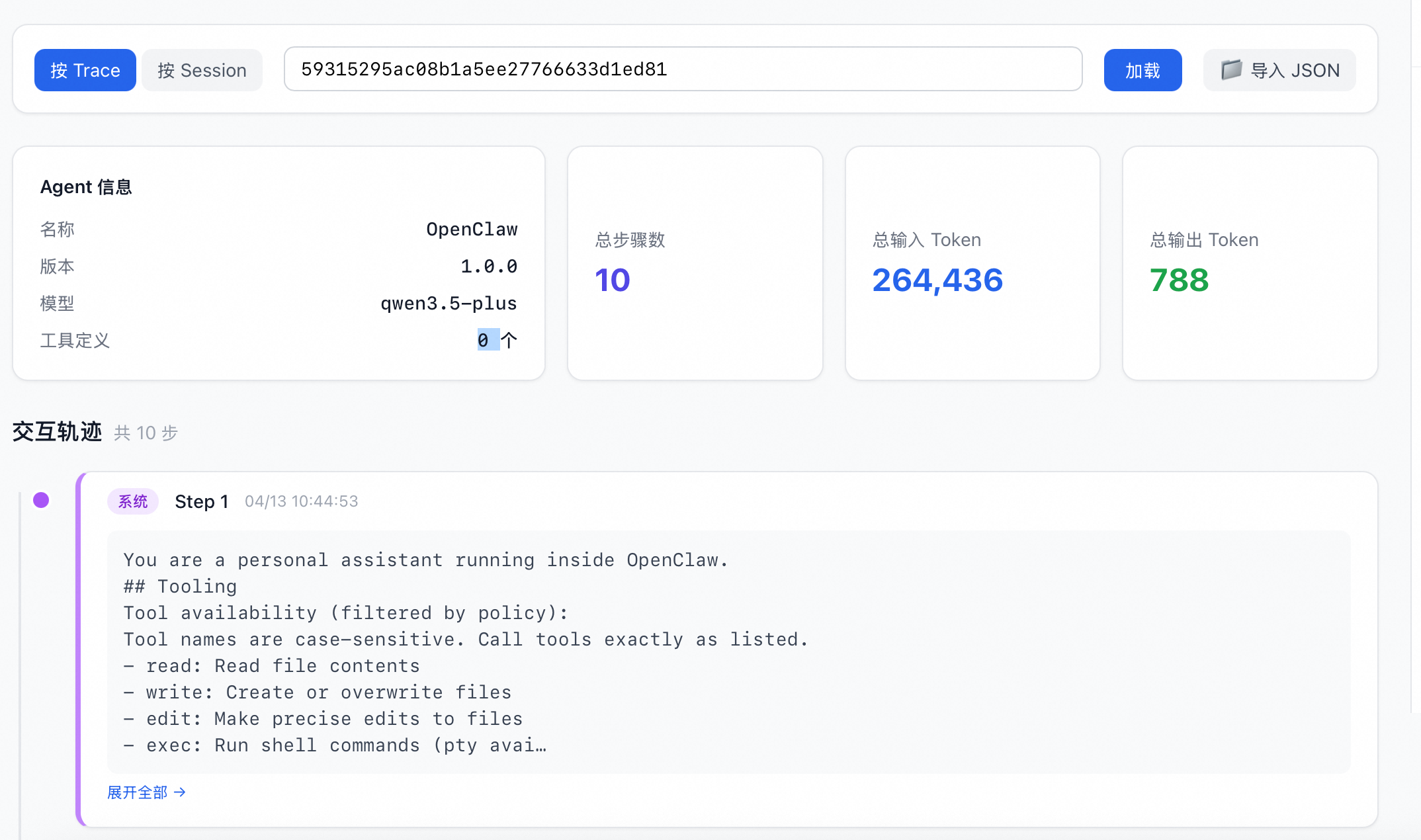
Model analysis: You can view the model prompts and thought processes after user input to identify the main sources of token consumption.
Data management
Clear historical data
To clear historical data, run the following command:
rm -rf /var/log/sysak/.agentsightThen, restart AgentSight.