To accelerate large-scale task processing, you can use a fan-out/fan-in pattern in your workflow orchestration. This pattern involves breaking down a large task into smaller subtasks, running them in parallel, and then aggregating the results. An Argo workflow cluster supports orchestrating fan-out/fan-in tasks by using a dynamic DAG. This allows you to schedule cloud computing resources on demand and elastically scale to tens of thousands of CPU cores to reduce runtime. After the tasks complete, resources are released to save costs. This topic describes how to use an Argo workflow cluster to orchestrate dynamic DAG fan-out/fan-in tasks.
Background information
Fan-out/fan-in

Fan-out and fan-in are commonly used to build efficient concurrent processing pipelines. By splitting (fan-out) and aggregating (fan-in) operations, you can fully utilize multi-core and multi-node resources to efficiently process large-scale data.
As shown in the preceding figure, you can use a Directed Acyclic Graph (DAG) to orchestrate fan-out/fan-in tasks. Subtasks can be split in two ways: statically (static DAG) or dynamically (dynamic DAG).
Static DAG: The set of subtasks is fixed. For example, in a data collection scenario, you might simultaneously collect data from Database 1 and Database 2, and then aggregate the results.
Dynamic DAG: The subtasks are generated dynamically and depend on the output of the previous task.
As shown in the preceding figure, in a data processing scenario, Task A can scan a dataset and start a subtask (Bn) for each subset of data, such as a subdirectory. After all subtasks (Bn) are complete, Task C aggregates the results. The number of B subtasks to start depends on the output of Task A. You can customize the subtask splitting rules in Task A based on your business requirements.
Argo workflow cluster
In many business scenarios, a large task often needs to be split into thousands of subtasks to improve execution efficiency. To run these subtasks concurrently, tens of thousands of CPU cores may be required. Traditional on-premises data centers often struggle to meet this level of resource demand, especially when multiple tasks are competing for resources.
For example, in an autonomous driving simulation, a regression test after an algorithm change requires simulating all driving scenarios. Each driving scenario runs as a subtask. To accelerate the iteration speed, development teams often require all scenario tests to run in parallel.
For these scenarios, you can use an Argo workflow cluster to orchestrate your workflows. The workflow cluster provides fully managed Argo Workflow with comprehensive technical support. It allows you to orchestrate fan-out/fan-in tasks by using a dynamic DAG and elastically schedule cloud computing resources, scaling up to tens of thousands of CPU cores to support large-scale parallel subtasks. When tasks complete, resources are released to save costs. Common use cases include data processing, machine learning, simulations, and CI/CD.
Argo Workflow is an open-source, CNCF-graduated project focused on cloud-native workflow orchestration. It uses Kubernetes Custom Resource Definitions (CRDs) to orchestrate offline tasks and DAG workflows, and runs them as Kubernetes pods on the cluster. For more information, see Argo Workflow.
Orchestrate fan-out/fan-in tasks with Argo Workflow
Create an Argo workflow cluster and enable public access for the cluster.
Create an Alibaba Cloud OSS storage volume (see Use an ossfs 1.0 static storage volume), and copy the required test file (log-count-data.txt) to the root directory of the storage volume.
Mount the Alibaba Cloud OSS storage volume to allow the workflow to operate on files in OSS as if they were local files.
For more information, see Use storage volumes.
Create a workflow by using the following YAML content.
For more information, see Create a workflow.
Use a dynamic DAG to implement fan-out/fan-in task orchestration.
After the
splittask splits the large file, it outputs a JSON string to standard output. This string contains thepartIdfor each part. For example:["0", "1", "2", "3", "4"]The map task uses
withParamto reference the output of the split task, parses the JSON string to get all the{{item}}values, and starts multiple map tasks, using each{{item}}as an input parameter.- name: map template: map arguments: parameters: - name: partId value: '{{item}}' depends: "split" withParam: '{{tasks.split.outputs.result}}'
For more information about how to define a workflow, see the open-source Argo Workflow documentation.
After the workflow runs, you can view the task DAG and the results in the Argo workflow cluster console.
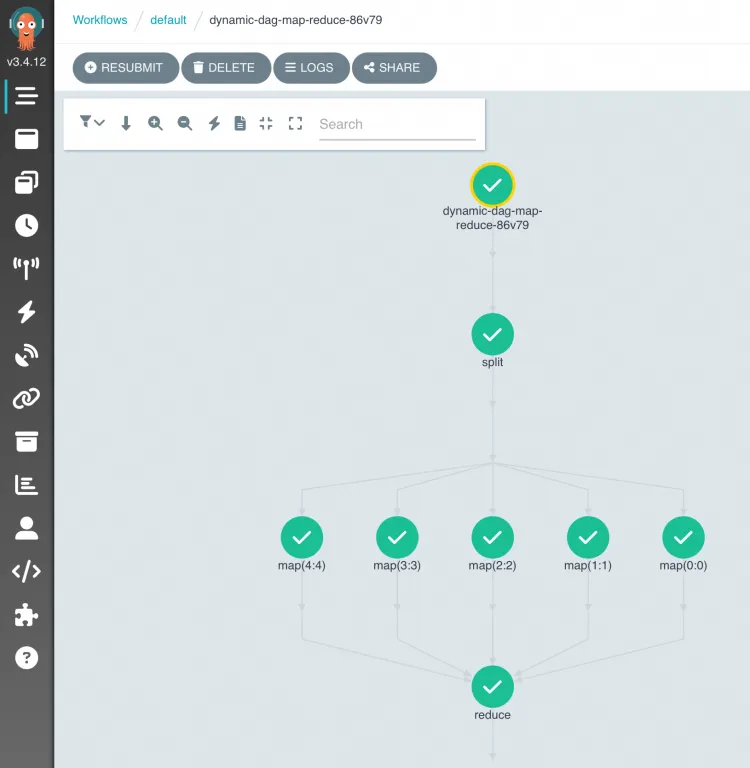
In the Alibaba Cloud OSS file list,
log-count-data.txtis the input log file,split-outputandcount-outputare the intermediate result directories, andresult.jsonis the final result file.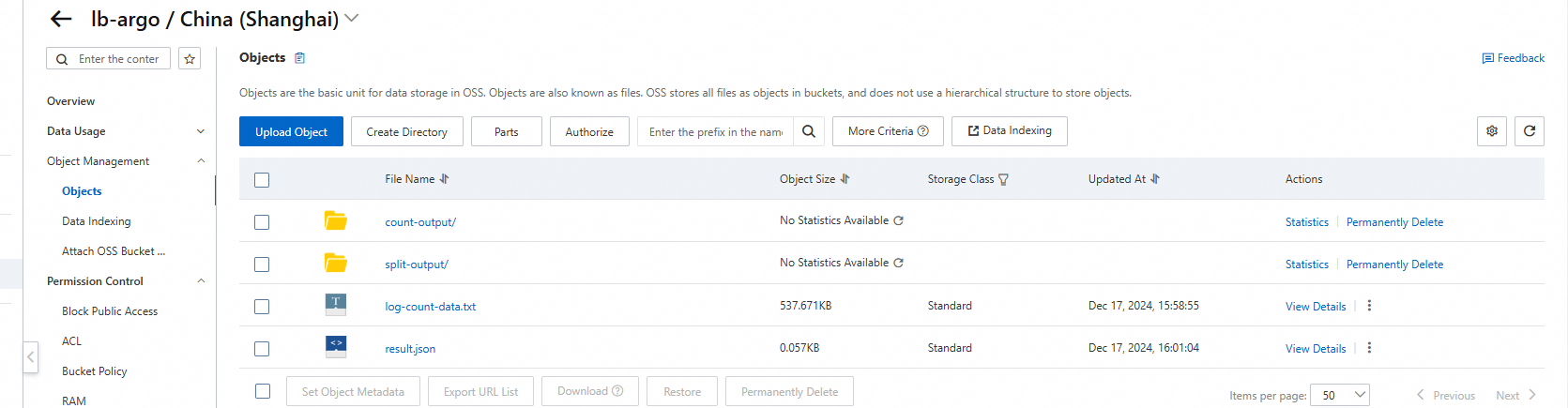
References
To learn more about Argo Workflow, see the open-source Argo Workflow documentation.
For complete Argo Workflow code examples, see argo-workflow-examples.
If you have any questions about ACK One, join the DingTalk group 35688562.