Query billing details, analyze bills, and stop billing.
Query billing details
Coding Plan does not generate pay-as-you-go bills. View your plan usage on the Coding Plan page.
Billing cycle
The system generates a bill only after an actual API call occurs.
Model inference : Bills are generated minute by minute.
Other services (batch inference, model training, knowledge base, etc.) : Bills are generated hourly.
Bill generation may be delayed. For example, model inference bills usually appear 2–10 minutes after a call. During peak traffic periods, use the system’s final bill generation time as the reference.
1. Query inference costs for a specific model
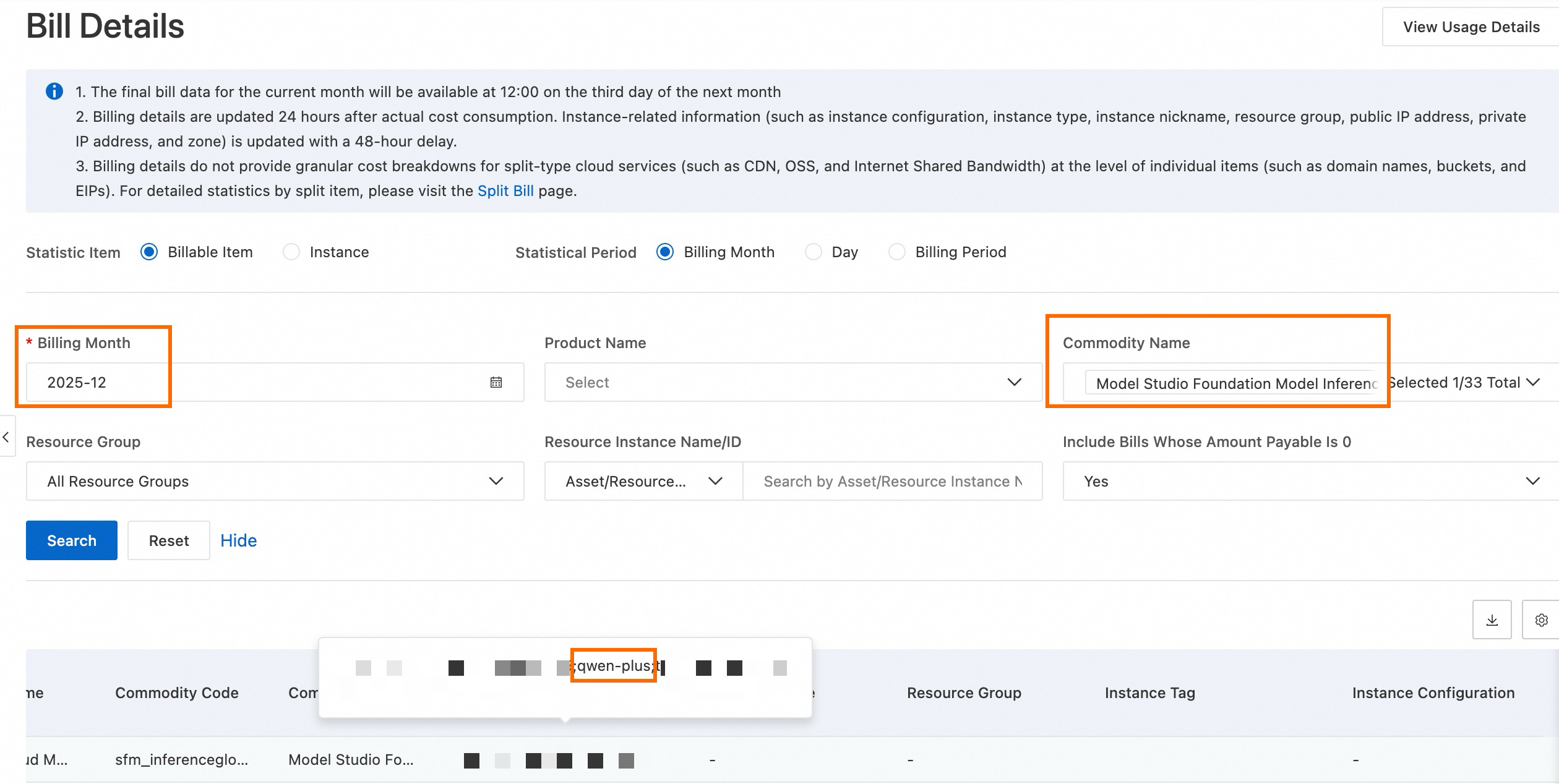
To check inference costs for a specific model (such as qwen-plus):
On the Bill Details page, select a billing cycle.
Select Product Detail as Model Studio Foundation Model Inference , then click Search .
In the Instance ID column, find all instances linked to qwen-plus.
The total inference cost for the model in the selected month is the sum of the payable amounts for these instances.
2. Query the total cost of the Model Studio service
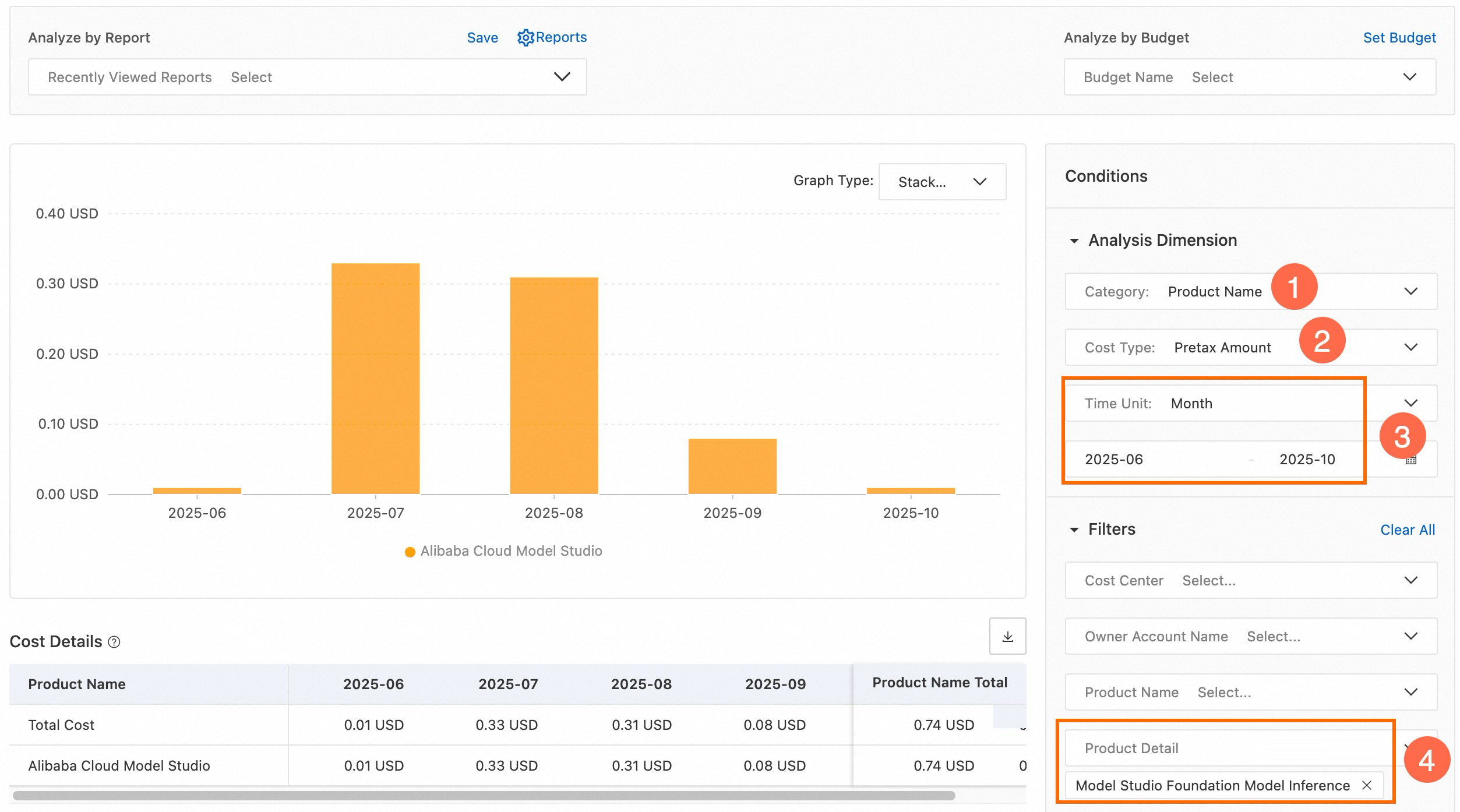
You can use the cost analysis feature to view the overall spending trend for Model Studio or a specific service category.
On the Cost Analysis page, set Cost Type to Pretax Amount .
Set Time Unit to Month. Select a date range, such as May 2025 to October 2025.
Set Product Detail to Model Studio Foundation Model Inference. The total model inference cost for the selected period appears.
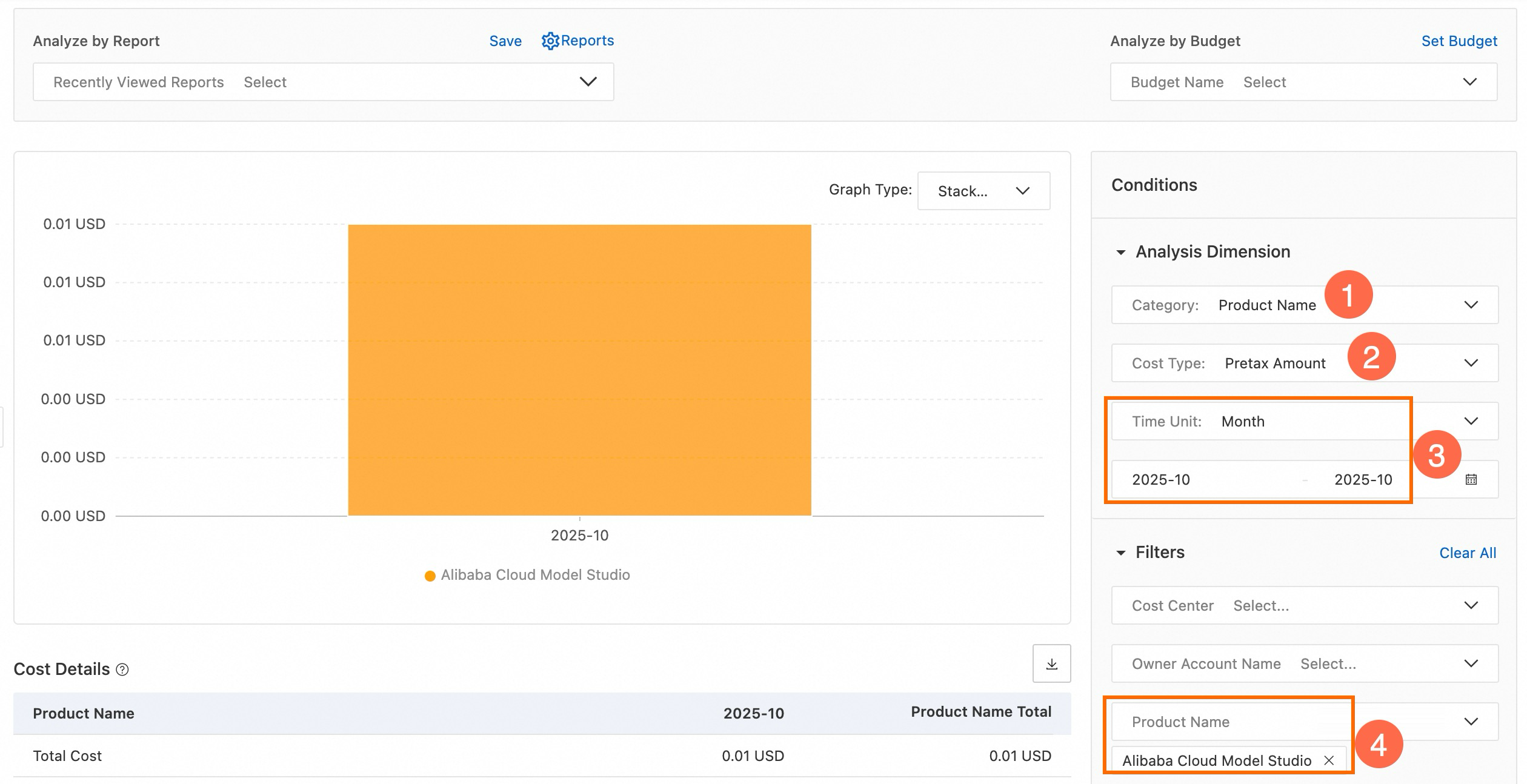
On the Cost Analysis page, set Cost Type to Pretax Amount .
Set Time Unit to Month. Select a date range, such as October 2025.
Set Product to Alibaba Cloud Model Studio . The total Model Studio cost for the selected period appears.
3. Query token usage in detailed bills
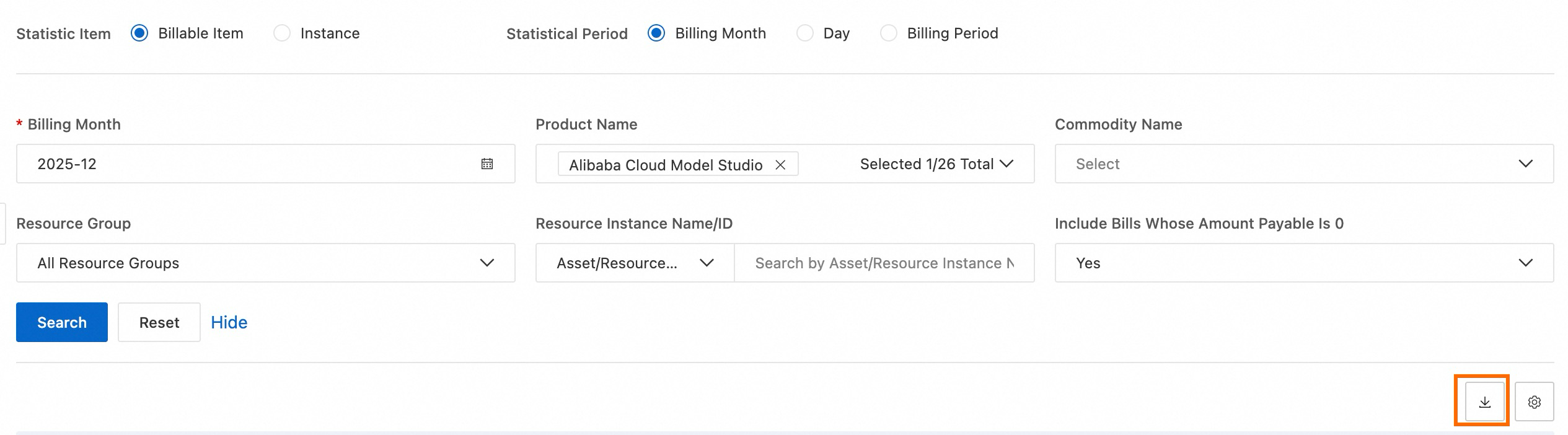
On the Bill Details page, under the Bill Details tab, set Statistic Item to Billable Item , then export the bill. Token usage appears in the exported file.
Analyze billing details
Since September 7, 2024, Model Studio supports granular verification for model inference, deployment, and training bills. You can view costs by API Key ID, workspace ID, model name, input/output type, and invocation channel .
1. Download the bill
On the Bill Details page, select a billing cycle.
Select Product as Alibaba Cloud Model Studio , then click Search .
In the top-right corner of the bill list, click the Export Bill (CSV) to download the bill to your local device.
Open the file and locate the Instance ID column. Verify entries using the rules below.
2. Interpret key fields
Instance ID field: This field contains multiple pieces of information, typically separated by a semicolon.
Example:
text_token;llm-xxx;qwen-max;output_token;appThis represents
billing type;workspace ID;model name;input/output type;invocation channel.
3. Data traceability and terms
Query an API Key: Copy the
API Key IDfrom the bill. Go to the Model Studio API Key Management page to find the matching key name.Query a workspace: Copy the
workspace IDfrom the bill. Go to the Workspaces page to confirm the ID.Invocation channel definitions:
app: Model called from an application (code).bmp: Model called from the console Playground.assistant-api: Model called via the Assistant API.
Stop Billing (Shut Down Service)
If you no longer need Model Studio services, stop billing to avoid extra charges.
1. Cancel Coding Plan subscription
Coding Plan is a monthly subscription product. It stops automatically at expiration. No manual cancellation is needed. To disable auto-renewal, go to the Coding Plan page and turn off auto-renewal.
2. Stop model inference
Action: You will no longer incur charges after you stop using the related features, such as stopping use of the Alibaba Cloud Model Studio console for Playground or stopping all API calls in your code.
Recommendation: To prevent accidental calls, go to the Model Studio console. In the top-right corner, select a region. Then go to the API Key page and delete your API keys.

3. Stop model training
No charges occur if no training jobs are running.
FAQ
Q: Why can’t I see a bill right after calling a model?
A: Possible reasons:
Billing delay : Model inference bills are generated minute by minute . They usually appear 2–10 minutes after a call. Other services (batch inference, model training, knowledge base, etc.) generate bills hourly . During peak traffic, delays may occur. Use the system’s actual bill generation time as the reference.
You used a non-commercial model (public preview or invitational preview) : These models do not generate bills.
Q: Why does the same model appear in multiple bill lines?
A: Charges for the same model are split by billing type (input tokens, output tokens, cache hits, etc.) and invocation channel (API calls, console Playground, etc.).
For example, one conversation using the qwen3.5-plus model creates two bill lines: one for input tokens and one for output tokens. Use the Instance ID field in Analyze billing details to distinguish each line.
Q: My bill shows many lines labeled “Large Language Model Text Consumption”. How do I know which model each line belongs to?
A: Check the Instance ID (billing granularity) column on the Bill Details page.
Fields are separated by semicolons. In most cases, the field that follows the workspace ID (for example, llm-xxx) is the name of the model that is invoked.
Example:
12xxx;llm-xxx; qwen3.5-plus ;context_0-128k_input_token;bmp;0. This line is for theqwen3.5-plusmodel.
Q: Where can I view model invocation counts and statistics?
A: Go to the Model Studio console. In the top-right corner, select a region. Then go to the Monitoring page to view model invocation statistics.
Q: Is pay-as-you-go billing real-time?
A: No. Alibaba Cloud pay-as-you-go uses a “pre-reserve + monthly settlement” model. The system first freezes part of your balance. At the end of each billing cycle (early next month), it generates the final bill and deducts the amount.