RAM Roles for Service Accounts (RRSA) eliminates static AccessKey pairs from your ACK pods. Each pod assumes an independent RAM role through an OpenID Connect (OIDC) token, gets short-lived credentials from Security Token Service (STS), and authenticates with ApsaraMQ for RabbitMQ. This enforces least-privilege access at the pod level and reduces the risk of leaked long-lived credentials.
How it works
RRSA authentication follows a four-step flow:
Deploy the pod -- Deploy a pod with service account token volume projection enabled.
Auto-mount the OIDC token -- The ACK cluster creates and mounts a signed OIDC token file inside the pod.
Assume a RAM role -- The application reads the OIDC token and calls the STS
AssumeRoleWithOIDCAPI to get temporary credentials (AccessKey ID, AccessKey secret, and security token).Connect to ApsaraMQ for RabbitMQ -- The application generates a dynamic username and password from the temporary credentials, then connects to the broker to send and receive messages and perform metadata operations.
Prerequisites
Before you begin, ensure that you have:
An ACK cluster running version 1.22 or later (ACK Managed Cluster Basic Edition, ACK Managed Cluster Pro Edition, ACK Serverless Cluster Basic Edition, ACK Serverless Cluster Pro Edition, or ACK Edge Cluster Pro Edition)
An ApsaraMQ for RabbitMQ instance with a configured virtual host and queue
A RAM role with the required permissions to access ApsaraMQ for RabbitMQ
Step 1: Enable RRSA and configure pod identity
Enable RRSA for your ACK cluster and bind a RAM role to the target service account. For detailed instructions, see Pod permission isolation based on RRSA.
After you complete the setup, ACK injects the following environment variables into each pod that uses the configured service account:
| Environment variable | Description |
|---|---|
ALIBABA_CLOUD_ROLE_ARN | ARN of the RAM role to assume |
ALIBABA_CLOUD_OIDC_PROVIDER_ARN | ARN of the OIDC identity provider |
ALIBABA_CLOUD_OIDC_TOKEN_FILE | Path to the mounted OIDC token file |
Verify that these variables are set before you proceed. Run the following command inside your pod:
echo $ALIBABA_CLOUD_ROLE_ARN
echo $ALIBABA_CLOUD_OIDC_PROVIDER_ARN
echo $ALIBABA_CLOUD_OIDC_TOKEN_FILE
Step 2: Get temporary credentials from STS
Read the OIDC token from the mounted file and call the STS AssumeRoleWithOIDC API to get an AccessKeyId, AccessKeySecret, and SecurityToken. These credentials expire after a limited time.
import os
from alibabacloud_tea_openapi.client import Client as OpenApiClient
from alibabacloud_tea_openapi import models as open_api_models
from alibabacloud_tea_util import models as util_models
from alibabacloud_openapi_util.client import Client as OpenApiUtilClient


def get_sts_credentials(region_id):
    """Request temporary STS credentials through OIDC token exchange."""

    # Read RRSA environment variables injected by ACK
    oidc_provider_arn = os.getenv('ALIBABA_CLOUD_OIDC_PROVIDER_ARN')
    role_arn = os.getenv('ALIBABA_CLOUD_ROLE_ARN')
    token_file_path = os.getenv('ALIBABA_CLOUD_OIDC_TOKEN_FILE')

    if not oidc_provider_arn:
        raise ValueError("ALIBABA_CLOUD_OIDC_PROVIDER_ARN is not set")
    if not role_arn:
        raise ValueError("ALIBABA_CLOUD_ROLE_ARN is not set")
    if not token_file_path:
        raise ValueError("ALIBABA_CLOUD_OIDC_TOKEN_FILE is not set")

    # Read the OIDC token from the file mounted by ACK
    try:
        with open(token_file_path, 'r') as f:
            oidc_token = f.read().strip()
    except Exception as e:
        raise RuntimeError(f"Failed to read OIDC token file: {e}")

    # Call the AssumeRoleWithOIDC API
    # STS endpoint format: sts.<region-id>.aliyuncs.com
    config = open_api_models.Config(signature_algorithm='v2')
    config.endpoint = 'sts.' + region_id + '.aliyuncs.com'
    client = OpenApiClient(config)

    params = open_api_models.Params(
        action='AssumeRoleWithOIDC',
        version='2015-04-01',
        protocol='HTTPS',
        method='POST',
        auth_type='AK',
        style='RPC',
        pathname='/',
        req_body_type='json',
        body_type='json'
    )

    queries = {
        'OIDCProviderArn': oidc_provider_arn,
        'RoleArn': role_arn,
        'OIDCToken': oidc_token,
        'RoleSessionName': 'test'
    }

    request = open_api_models.OpenApiRequest(
        query=OpenApiUtilClient.query(queries)
    )
    runtime = util_models.RuntimeOptions()

    response = client.call_api(params, request, runtime)

    body = response.get('body')
    if not body:
        raise RuntimeError("Response body is empty")

    credentials = body.get('Credentials')
    if not credentials:
        raise RuntimeError("Credentials not found in response")

    security_token = credentials.get('SecurityToken')
    access_key_id = credentials.get('AccessKeyId')
    access_key_secret = credentials.get('AccessKeySecret')

    return access_key_id, access_key_secret, security_token
Step 3: Generate the RabbitMQ username and password
ApsaraMQ for RabbitMQ uses a custom authentication scheme. Generate the username by Base64-encoding a concatenation of the instance ID, AccessKey ID, and security token. Generate the password by signing the current timestamp with the AccessKey secret using HMAC-SHA1, then Base64-encoding the result.
import base64
import hmac
import hashlib
import time


def get_user_name(ak, instance_id, sts_token):
    """Build the Base64-encoded username: 0:<instance_id>:<ak>:<sts_token>."""
    buf = f"0:{instance_id}:{ak}:{sts_token}"
    return base64.b64encode(buf.encode('utf-8')).decode('utf-8')


def get_password(sk):
    """Build the Base64-encoded password: HMAC-SHA1(sk, timestamp):<timestamp>."""
    timestamp = int(time.time() * 1000)
    signature = hmac_sha1(sk.encode('utf-8'), str(timestamp).encode('utf-8'))
    result = f"{signature}:{timestamp}"
    return base64.b64encode(result.encode('utf-8')).decode('utf-8')


def hmac_sha1(data, key):
    """Return the uppercase hex HMAC-SHA1 digest."""
    mac = hmac.new(key, data, hashlib.sha1)
return mac.digest().hex().upper()The generated username and password are not displayed in the console. They are temporary and share the same lifecycle as the STS credentials.
Other languages:
For Java, use the
com.alibaba.mq.amqp.utils.UserUtilsclass. For details, see Sample code.For other languages, apply the same encoding and signing logic shown above.
Step 4: Connect to the broker
Pass the generated username and password to the pika client to open an AMQP connection:
import pika


def connect_to_rabbitmq(ak, sk, sts, rabbitmq_host, instance_id, vhost, port):
    """Open a connection to ApsaraMQ for RabbitMQ using STS-derived credentials."""
    username = get_user_name(ak, instance_id, sts)
    password = get_password(sk)

    credentials = pika.PlainCredentials(username, password)
    connection = pika.BlockingConnection(
        pika.ConnectionParameters(
            host=rabbitmq_host,
            port=port,
            virtual_host=vhost,
            credentials=credentials,
            heartbeat=600,
            blocked_connection_timeout=300
        )
    )
    channel = connection.channel()
    return connection, channel
Complete example: send and receive messages with automatic credential rotation
The following script combines all the steps above into a single runnable program. It connects to ApsaraMQ for RabbitMQ, sends and receives one message per second, and refreshes STS credentials every 15 seconds to demonstrate automatic rotation.
Replace the placeholder values in the configuration section before running:
| Placeholder | Description | Example |
|---|---|---|
<region-id> | Alibaba Cloud region ID | cn-hangzhou |
<rabbitmq-host> | ApsaraMQ for RabbitMQ endpoint | xxx.net.mq.amqp.aliyuncs.com |
<instance-id> | ApsaraMQ for RabbitMQ instance ID | rabbitmq-xxx-xxxx |
<vhost-name> | Virtual host name | test |
# -*- coding: utf-8 -*-
import os
import sys
import base64
import hmac
import hashlib
import time
import pika
from datetime import datetime

from alibabacloud_tea_openapi.client import Client as OpenApiClient
from alibabacloud_tea_openapi import models as open_api_models
from alibabacloud_tea_util import models as util_models
from alibabacloud_openapi_util.client import Client as OpenApiUtilClient


# ==================== Configuration ====================
# Replace the following values with your environment settings

REGION_ID = "<region-id>"                        # Alibaba Cloud region ID
RABBITMQ_HOST = "<rabbitmq-host>"                # ApsaraMQ for RabbitMQ endpoint
INSTANCE_ID = "<instance-id>"                    # ApsaraMQ for RabbitMQ instance ID
VHOST = "<vhost-name>"                           # Virtual host name
PORT = 5672                                      # AMQP port (default: 5672)

QUEUE_NAME = "test_queue"                        # Target queue
EXCHANGE_NAME = ''                               # Default exchange

TOTAL_DURATION = 300                             # Total run time in seconds (5 min)
REFRESH_INTERVAL = 15                            # Credential refresh interval in seconds
MESSAGE_INTERVAL = 1                             # Message send interval in seconds
# ========================================================


def get_sts_credentials(region_id):
    """Request temporary STS credentials through OIDC token exchange."""
    oidc_provider_arn = os.getenv('ALIBABA_CLOUD_OIDC_PROVIDER_ARN')
    role_arn = os.getenv('ALIBABA_CLOUD_ROLE_ARN')
    token_file_path = os.getenv('ALIBABA_CLOUD_OIDC_TOKEN_FILE')

    if not oidc_provider_arn:
        raise ValueError("ALIBABA_CLOUD_OIDC_PROVIDER_ARN is not set")
    if not role_arn:
        raise ValueError("ALIBABA_CLOUD_ROLE_ARN is not set")
    if not token_file_path:
        raise ValueError("ALIBABA_CLOUD_OIDC_TOKEN_FILE is not set")

    try:
        with open(token_file_path, 'r') as f:
            oidc_token = f.read().strip()
    except Exception as e:
        raise RuntimeError(f"Failed to read OIDC token file: {e}")

    config = open_api_models.Config(signature_algorithm='v2')
    config.endpoint = 'sts.' + region_id + '.aliyuncs.com'
    client = OpenApiClient(config)

    params = open_api_models.Params(
        action='AssumeRoleWithOIDC',
        version='2015-04-01',
        protocol='HTTPS',
        method='POST',
        auth_type='AK',
        style='RPC',
        pathname='/',
        req_body_type='json',
        body_type='json'
    )

    queries = {
        'OIDCProviderArn': oidc_provider_arn,
        'RoleArn': role_arn,
        'OIDCToken': oidc_token,
        'RoleSessionName': 'test'
    }

    request = open_api_models.OpenApiRequest(
        query=OpenApiUtilClient.query(queries)
    )
    runtime = util_models.RuntimeOptions()
    response = client.call_api(params, request, runtime)

    body = response.get('body')
    if not body:
        raise RuntimeError("Response body is empty")

    credentials = body.get('Credentials')
    if not credentials:
        raise RuntimeError("Credentials not found in response")

    security_token = credentials.get('SecurityToken')
    access_key_id = credentials.get('AccessKeyId')
    access_key_secret = credentials.get('AccessKeySecret')

    print(f"[{datetime.now().strftime('%Y-%m-%d %H:%M:%S')}] STS Credentials refreshed")
    print(f"  AccessKeyId: {access_key_id[:10]}...")
    print(f"  SecurityToken: {security_token[:20]}...")

    return access_key_id, access_key_secret, security_token


def get_user_name(ak, instance_id, sts_token):
    """Build the Base64-encoded username."""
    buf = f"0:{instance_id}:{ak}:{sts_token}"
    return base64.b64encode(buf.encode('utf-8')).decode('utf-8')


def get_password(sk):
    """Build the Base64-encoded password."""
    timestamp = int(time.time() * 1000)
    signature = hmac_sha1(sk.encode('utf-8'), str(timestamp).encode('utf-8'))
    result = f"{signature}:{timestamp}"
    return base64.b64encode(result.encode('utf-8')).decode('utf-8')


def hmac_sha1(data, key):
    """Return the uppercase hex HMAC-SHA1 digest."""
    mac = hmac.new(key, data, hashlib.sha1)
    return mac.digest().hex().upper()


def connect_to_rabbitmq(ak, sk, sts, rabbitmq_host, instance_id, vhost, port):
    """Open a connection to ApsaraMQ for RabbitMQ."""
    username = get_user_name(ak, instance_id, sts)
    password = get_password(sk)

    credentials = pika.PlainCredentials(username, password)
    connection = pika.BlockingConnection(
        pika.ConnectionParameters(
            host=rabbitmq_host,
            port=port,
            virtual_host=vhost,
            credentials=credentials,
            heartbeat=600,
            blocked_connection_timeout=300
        )
    )
    channel = connection.channel()

    print(f"[{datetime.now().strftime('%Y-%m-%d %H:%M:%S')}] Connected to RabbitMQ successfully")
    print(f"  Host: {rabbitmq_host}:{port}")
    print(f"  Instance: {instance_id}")
    print(f"  VHost: {vhost}")

    return connection, channel


def close_connection_safely(connection):
    """Close the RabbitMQ connection without raising exceptions."""
    try:
        if connection and connection.is_open:
            connection.close()
            print(f"[{datetime.now().strftime('%Y-%m-%d %H:%M:%S')}] Connection closed")
    except Exception as e:
        print(f"[{datetime.now().strftime('%Y-%m-%d %H:%M:%S')}] Error closing connection: {e}")


def send_receive_messages(connection, channel, queue_name, exchange_name=''):
    """Send one message and attempt to consume one message."""
    try:
        channel.queue_declare(queue=queue_name, durable=True)

        # Publish a test message
        message = f"Test message at {datetime.now().strftime('%Y-%m-%d %H:%M:%S')}"
        channel.basic_publish(
            exchange=exchange_name,
            routing_key=queue_name,
            body=message,
            properties=pika.BasicProperties(
                delivery_mode=2,  # Persistent
            )
        )

        # Consume one message
        method_frame, header_frame, body = channel.basic_get(queue=queue_name, auto_ack=True)

        if method_frame:
            print(f"[{datetime.now().strftime('%Y-%m-%d %H:%M:%S')}] Sent and received: {body.decode()[:50]}...")
            return True
        else:
            print(f"[{datetime.now().strftime('%Y-%m-%d %H:%M:%S')}] Sent message (no message in queue to receive)")
            return True

    except Exception as e:
        print(f"[{datetime.now().strftime('%Y-%m-%d %H:%M:%S')}] Error in send/receive: {e}")
        return False


def main():
    """Run the RRSA connection test with periodic credential rotation."""

    print("=== Starting RabbitMQ RRSA connection test ===\n")
    print(f"Region: {REGION_ID}")
    print(f"RabbitMQ Host: {RABBITMQ_HOST}:{PORT}")
    print(f"Instance ID: {INSTANCE_ID}")
    print(f"VHost: {VHOST}")
    print(f"Queue: {QUEUE_NAME}")
    print(f"Exchange: {EXCHANGE_NAME if EXCHANGE_NAME else '(default)'}")
    print(f"Total duration: {TOTAL_DURATION} seconds")
    print(f"STS refresh interval: {REFRESH_INTERVAL} seconds")
    print(f"Message interval: {MESSAGE_INTERVAL} second(s)")
    print()

    start_time = time.time()
    last_refresh_time = 0
    connection = None
    channel = None
    message_count = 0
    error_count = 0

    try:
        # Get initial credentials and connect
        print("=== Initial STS credentials and connection ===")
        ak, sk, sts = get_sts_credentials(REGION_ID)
        connection, channel = connect_to_rabbitmq(
            ak, sk, sts, RABBITMQ_HOST, INSTANCE_ID, VHOST, PORT
        )
        last_refresh_time = time.time()

        while True:
            current_time = time.time()
            elapsed_time = current_time - start_time

            if elapsed_time >= TOTAL_DURATION:
                print(f"\n=== Test completed ===")
                total = message_count + error_count
                success_rate = (message_count / total * 100) if total > 0 else 0
                print(f"Total messages: {message_count}")
                print(f"Total errors: {error_count}")
                print(f"Success rate: {success_rate:.2f}%")
                break

            # Refresh credentials when the interval expires
            if current_time - last_refresh_time >= REFRESH_INTERVAL:
                print(f"\n=== Refreshing STS credentials (elapsed: {int(elapsed_time)}s) ===")
                close_connection_safely(connection)

                try:
                    ak, sk, sts = get_sts_credentials(REGION_ID)
                    connection, channel = connect_to_rabbitmq(
                        ak, sk, sts, RABBITMQ_HOST, INSTANCE_ID, VHOST, PORT
                    )
                    last_refresh_time = current_time
                except Exception as e:
                    print(f"[{datetime.now().strftime('%Y-%m-%d %H:%M:%S')}] Failed to refresh credentials/connection: {e}")
                    error_count += 1
                    time.sleep(1)
                    continue

            # Send and receive
            try:
                if send_receive_messages(connection, channel, QUEUE_NAME, EXCHANGE_NAME):
                    message_count += 1
                else:
                    error_count += 1
            except Exception as e:
                print(f"[{datetime.now().strftime('%Y-%m-%d %H:%M:%S')}] Message operation failed: {e}")
                error_count += 1

            time.sleep(MESSAGE_INTERVAL)

    except KeyboardInterrupt:
        print(f"\n=== Test interrupted by user ===")
        total = message_count + error_count
        success_rate = (message_count / total * 100) if total > 0 else 0
        print(f"Total messages: {message_count}")
        print(f"Total errors: {error_count}")
        print(f"Success rate: {success_rate:.2f}%")
    except Exception as e:
        print(f"\n=== Fatal error: {e} ===")
        import traceback
        traceback.print_exc()
        sys.exit(1)
    finally:
        close_connection_safely(connection)
        print(f"\n=== Resources cleaned up ===")


if __name__ == '__main__':
    main()
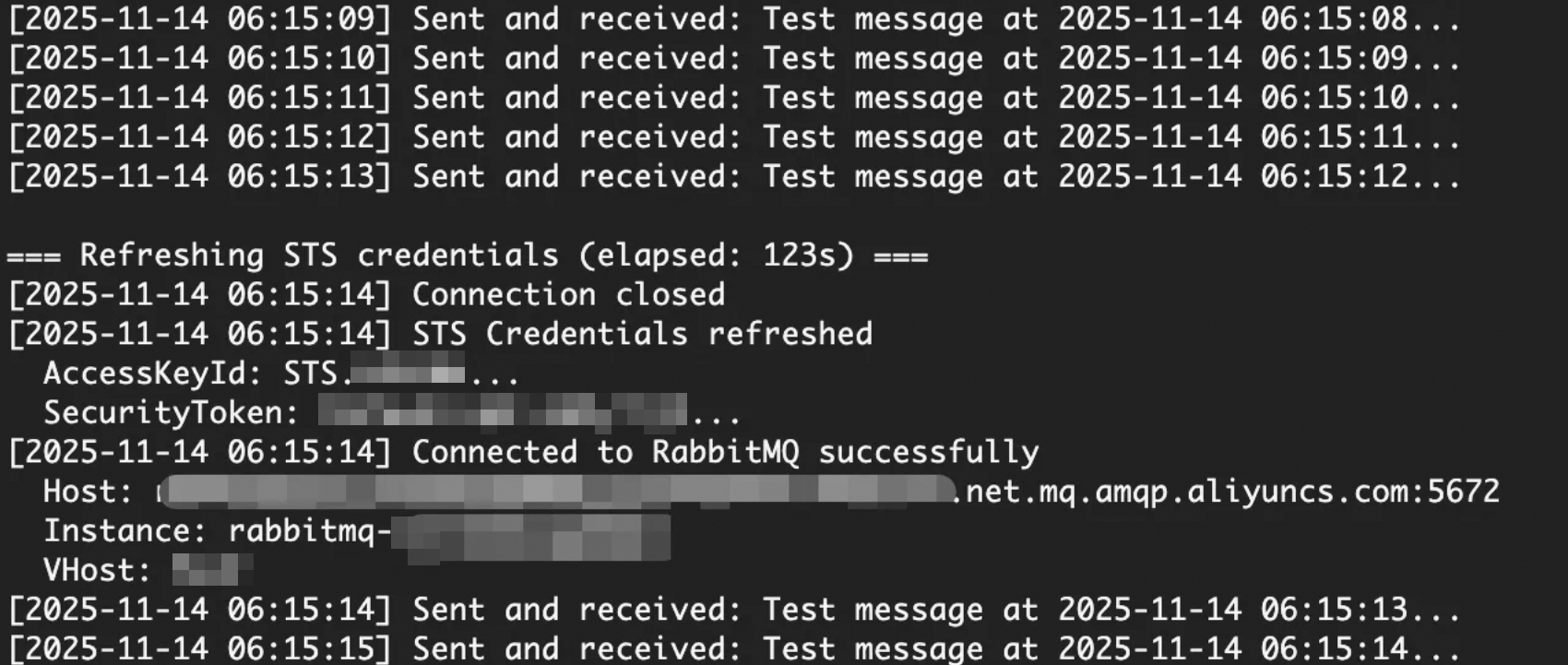
Expected output:
What to do next
To use RRSA with Java, see Sample code for cross-account authorization by using a RAM role.
To learn more about RRSA configuration in ACK, see Pod permission isolation based on RRSA.