Use Logstash to sync data from Elasticsearch or OpenSearch into PolarSearch. The pipeline reads documents from the source cluster, preserves index names and document IDs, and writes them to PolarSearch in a single pass.
Prerequisites
Before you begin, ensure that you have:
A server that can reach both the source cluster and the PolarSearch cluster over the network
Source cluster: an account with
readandread_metadatapermissions on the indexes to syncPolarSearch cluster: an account with
writeandcreate_indexpermissions
Step 1: Prepare the Logstash environment
This guide uses Logstash 8.8.2 on Linux x86_64, with Elasticsearch 7.10 or OpenSearch as the source and PolarSearch as the destination.
Download and decompress Logstash. Select the package that matches your environment.
Different Logstash versions have minor differences, but the core configuration is the same. For other versions, see the Logstash version list.
Install the required plugins. For the full plugin catalog, see the plugin repository. Source plugin — install based on your source cluster type:
Elasticsearch source — the
logstash-input-elasticsearchplugin is pre-installed. Verify with:# Go to the Logstash root directory cd /path/to/logstash-8.8.2 # List installed plugins ./bin/logstash-plugin list # If not listed, install it ./bin/logstash-plugin install logstash-input-elasticsearchOpenSearch source — install
logstash-input-opensearch:cd /path/to/logstash-8.8.2 ./bin/logstash-plugin install logstash-input-opensearch
Destination plugin — PolarSearch is compatible with OpenSearch APIs, so install
logstash-output-opensearchregardless of the source type:cd /path/to/logstash-8.8.2 ./bin/logstash-plugin install logstash-output-opensearch
Step 2: Create the configuration file
In the Logstash root directory, create a file named synchronization.conf. The pipeline reads all matching documents from the source cluster and writes them to PolarSearch, keeping the original index name and document ID intact.
For reference, see Ship Logstash events to OpenSearch.
Key parameters
| Parameter | Description |
|---|---|
index | Indexes to sync. Supports wildcards (*). Avoid using bare * — it copies internal indexes such as .kibana. |
docinfo | Set to true to capture the original index name and document ID from the source. |
slices | Number of concurrent read slices. Set to the number of primary shards in the source index. Do not exceed the shard count — more slices than shards degrades query and cluster performance. |
size | Number of documents fetched per batch. |
scroll | Time-to-live for the scroll query. Increase this for large datasets to avoid timeout interruptions. |
manage_template | Set to false in the output block to prevent Logstash from overwriting any index template you created in PolarSearch. |
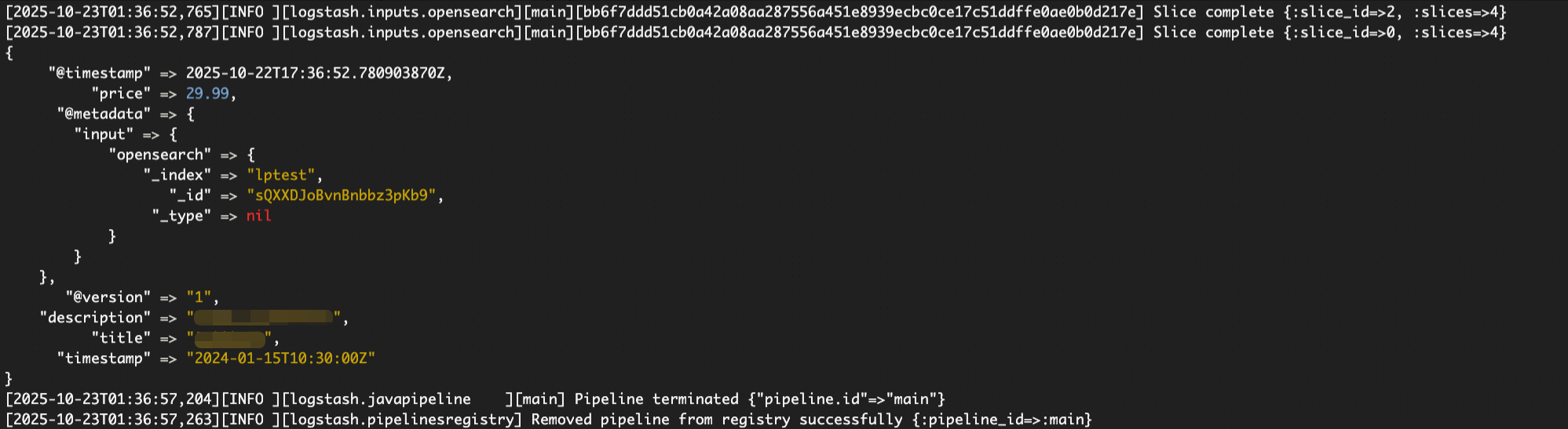
Eachinputplugin uses its own@metadatapath structure. Enable thestdoutdebug output during testing to confirm the exact path before settingindexanddocument_idin theoutputblock.
Configuration file example
# synchronization.conf
# Syncs data from Elasticsearch or OpenSearch to PolarSearch.

input {
  # Use 'elasticsearch' instead of 'opensearch' if the source cluster is Elasticsearch.
  # Both plugins share the same parameters, but their @metadata paths differ.
  opensearch {
    # [Required] Source cluster endpoint. HTTPS is recommended.
    hosts => ["https://source-cluster-endpoint:9200"]
    # [Required] Source cluster credentials.
    user => "your_source_user"
    password => "your_source_password"

    # [Required] Indexes to sync. Wildcards are supported.
    # Avoid using "*" or ".*" to prevent copying internal indexes (such as .kibana).
    index => "your-business-logs-*"

    # SSL/TLS
    ssl => true
    # If the source cluster uses a self-signed certificate, specify the CA path.
    # cacert => "/path/to/source_ca.crt"

    # Capture the original index name and document ID.
    docinfo => true
    # Set to the number of primary shards in the source index.
    # Do not exceed the shard count — over-slicing degrades performance.
    slices => 4
    # Documents per batch.
    size => 1000
    # Scroll query time-to-live. Increase for large datasets.
    scroll => "5m"
  }
}

output {
  opensearch {
    # [Required] PolarSearch cluster endpoint.
    hosts => ["https://polarsearch-cluster-endpoint:9200"]
    # [Required] PolarSearch credentials.
    user => "your_target_user"
    password => "your_target_password"

    # SSL/TLS
    ssl => true
    # If PolarSearch uses a self-signed certificate, specify the CA path.
    # cacert => "/path/to/polarsearch_ca.crt"

    # Read the index name from source metadata to keep it consistent with the source.
    # Confirm this path from debug output — it varies by input plugin.
    index => "%{[@metadata][input][opensearch][_index]}"
    # Preserve the original document ID.
    document_id => "%{[@metadata][input][opensearch][_id]}"

    # Prevent Logstash from overwriting a custom index template in PolarSearch.
    # manage_template => false
  }

  # Debug output — uncomment during testing, comment out for production.
  # stdout {
  #   codec => rubydebug {
  #     metadata => true
  #   }
  # }
}
Step 3: Run the sync task and verify the result
Start the task from the Logstash root directory:
./bin/logstash -f synchronization.confFor large-scale syncs, run Logstash as a background process:
nohup ./bin/logstash -f synchronization.conf &After the task completes, log in to the PolarSearch cluster and verify that the indexes and data were created and written successfully.
FAQ
How do I find the correct `@metadata` path for the index name?
Enable debug output in the configuration: uncomment the stdout block with codec => rubydebug { metadata => true }. Start Logstash, then check the console — each document prints its full @metadata structure. Find the _index and _id fields and copy the exact path into the output block.
For the logstash-input-opensearch plugin, the path is [@metadata][input][opensearch][_index]. For logstash-input-elasticsearch, confirm the path from the debug output, as it differs.
The sync is slow. How can I speed it up?
Try these options in order:
Tune `slices`: Set it to match the number of primary shards in the source index. Do not go higher — more slices than shards hurts performance rather than improving it.
Add pipeline workers: Pass
--pipeline.workerswhen starting Logstash. Set it to the number of CPU cores on the server, for example:./bin/logstash -f synchronization.conf --pipeline.workers 8.Increase Java Virtual Machine (JVM) heap: Edit
config/jvm.optionsand raise-Xmsand-Xmx, for example,-Xms4g -Xmx4g.
How do I preserve index settings like tokenizers and field types?
Export the index mapping and settings from the source cluster, then manually create a matching index template in PolarSearch before running the sync. In the output block, set manage_template => false to prevent Logstash from overwriting the template.