You can subscribe to MongoDB change streams to respond to data changes in your database in real time. This topic describes MongoDB change streams, explains how to use them, and provides best practices.
What is a change stream?
A change stream provides a real-time stream of change events from a database. Clients can subscribe to this stream to receive immediate notifications when data is inserted, updated, or deleted. Common scenarios include the following:
Cross-cluster data synchronization: Replicate incremental data between MongoDB clusters.
Auditing: Track high-risk operations, such as deleting a database or collection.
Event-driven architecture: Push changes to downstream systems for real-time analysis, cache updates, or notifications.
Limits
The instance must be a replica set instance or a sharded cluster instance.
Configure a change stream
Listen for more DDL events
Prerequisites
MongoDB 6.0 or later (Upgrade guide).
Procedure
Connect to the database using mongosh.
Run the
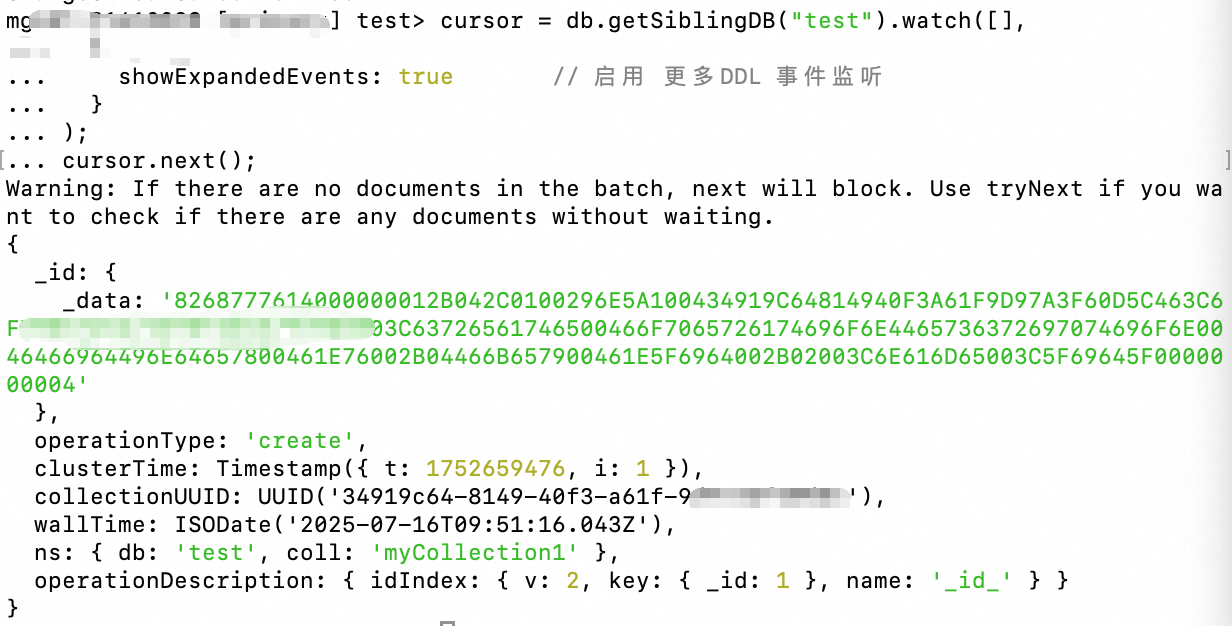
watchcommand and setshowExpandedEvents: true:// mongo shell or mongosh v1.x cursor = db.getSiblingDB("test").watch([], { showExpandedEvents: true // Enable listening for more DDL events } ); cursor.next();
Verify the result
In a new mongosh window, run a change command, such as
db.createCollection("myCollection1").You can view the SQL execution details in the Outputs of the original SQL window.
Enable pre-images
A MongoDB pre-image is a complete snapshot of a document before it is modified or deleted. It records the original value of the data before the change.
Prerequisites
MongoDB 6.0 or later (Upgrade guide).
Procedure
Enable pre-images at the database level:
db.adminCommand({
  setClusterParameter: {
    changeStreamOptions: {
      preAndPostImages: { expireAfterSeconds: "off" } // "off" indicates that the oplog retention period is used
    }
  }
})
Enable pre-images at the collection level:
NoteTo enable pre-images for all collections in a database, you must first enable them at the database level. Then, you must enable the feature for each collection individually.
Modify an existing collection
db.runCommand({
  collMod: "myCollection",
  changeStreamPreAndPostImages: { enabled: true }
})
Specify when creating a new collection
db.createCollection("myCollection", { changeStreamPreAndPostImages: { enabled: true }})Create a change stream listener and specify the pre-image option:
// Create a listener on the target collection cursor = db.getCollection("myCollection").watch([], { fullDocument: 'required', // or 'whenAvailable' fullDocumentBeforeChange: 'required' // or 'whenAvailable' } ) cursor.next();required: The server must return a pre-image or post-image. Otherwise, an error is reported.whenAvailable: The server attempts to return the image, but it is not guaranteed.
Verify the result
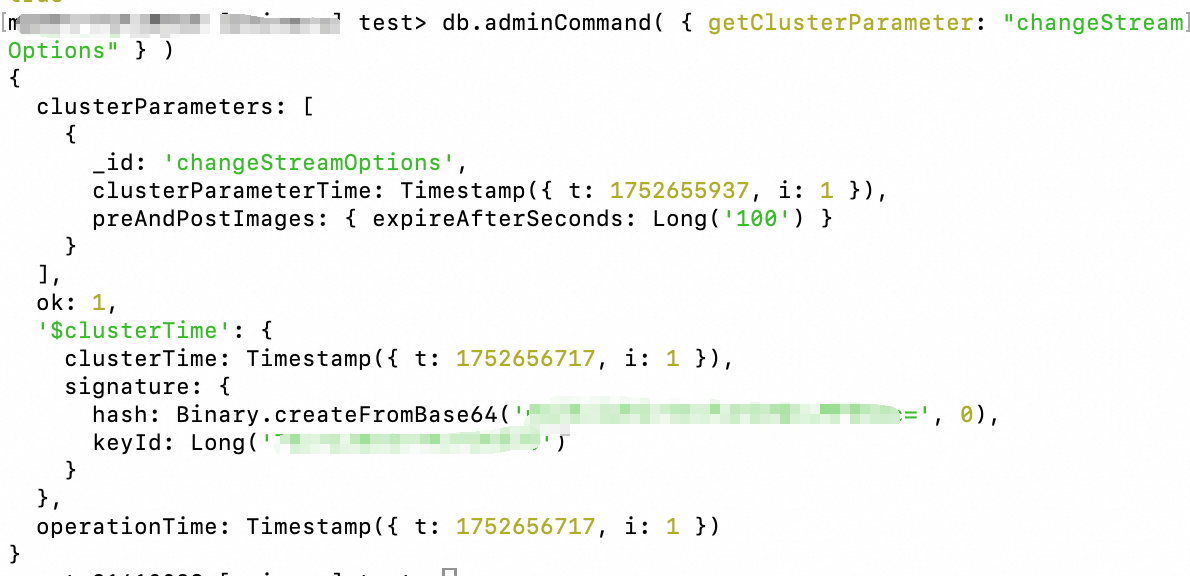
Check whether pre-images are enabled at the database level:
db.adminCommand( { getClusterParameter: "changeStreamOptions" } )If enabled, the following output is returned:
Check the collection configuration:
db.getCollectionInfos({name: "myCollection"}) // or db.runCommand({listCollections: 1})Expected output: In the returned document, look for a field similar to
"options" : { "changeStreamPreAndPostImages" : { "enabled" : true } }.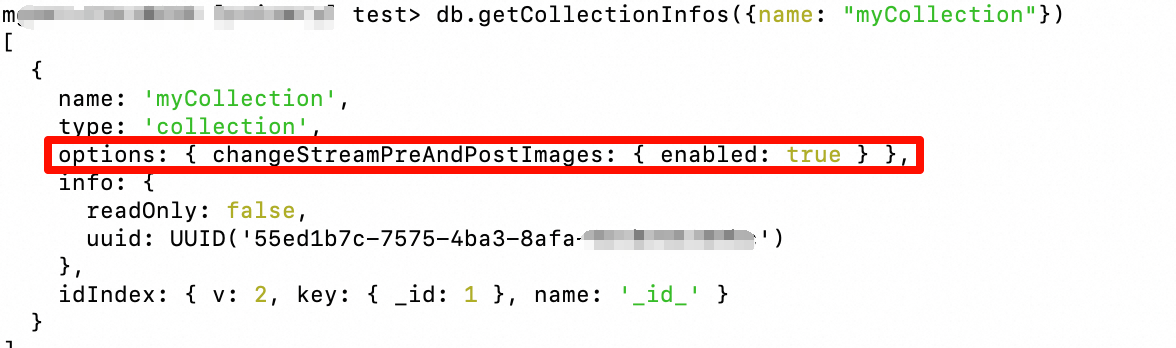
In another mongosh window, update a document in
myCollection.Observe the event returned by the
cursor. It should contain thefullDocumentBeforeChangefield, which is the pre-image.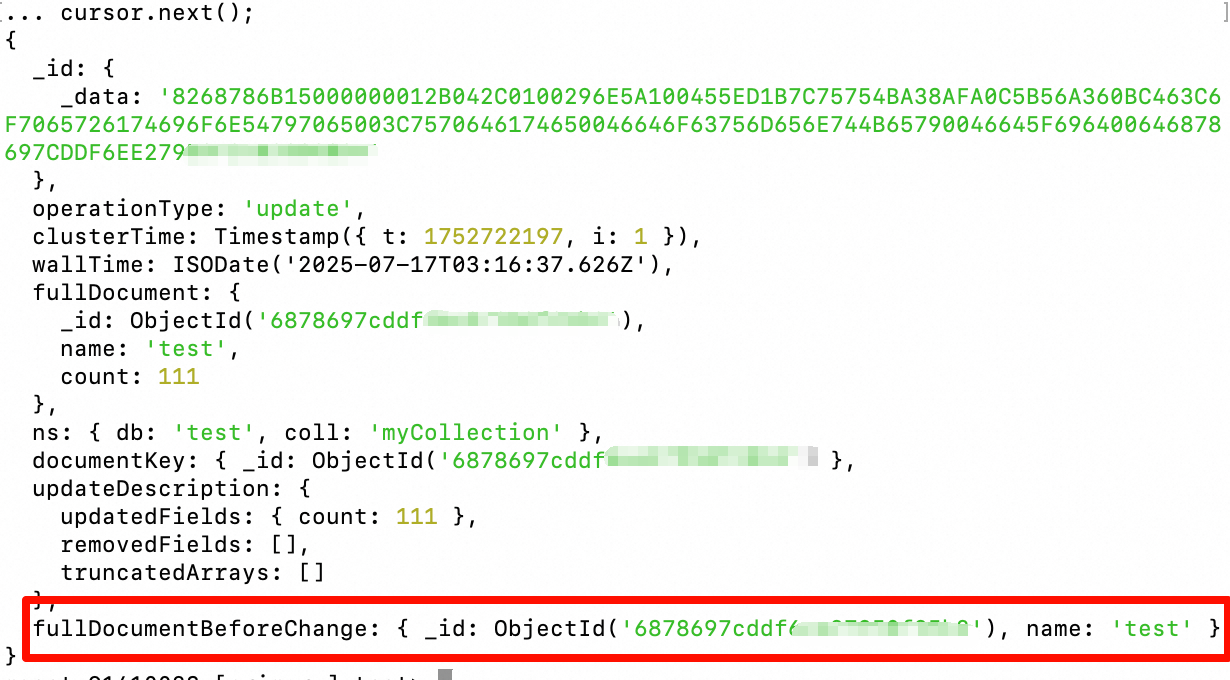
For more information, see Change Streams with Document Pre- and Post-Images.
Enable post-images
A MongoDB post-image is a complete snapshot of a document after a change occurs. It records the full content of the document after the change.
Prerequisites
MongoDB 3.6 or later (Upgrade guide).
Procedure
When you run the watch command, set fullDocument: 'updateLookup'.
cursor = db.getSiblingDB("test").myCollection.watch([],
  {
    fullDocument: 'updateLookup'
  }
);
cursor.next();
Verify the result
In another mongosh window, add or update a document in
myCollection.Observe the event returned by the
cursor. It should contain thefullDocumentfield, which is the post-image.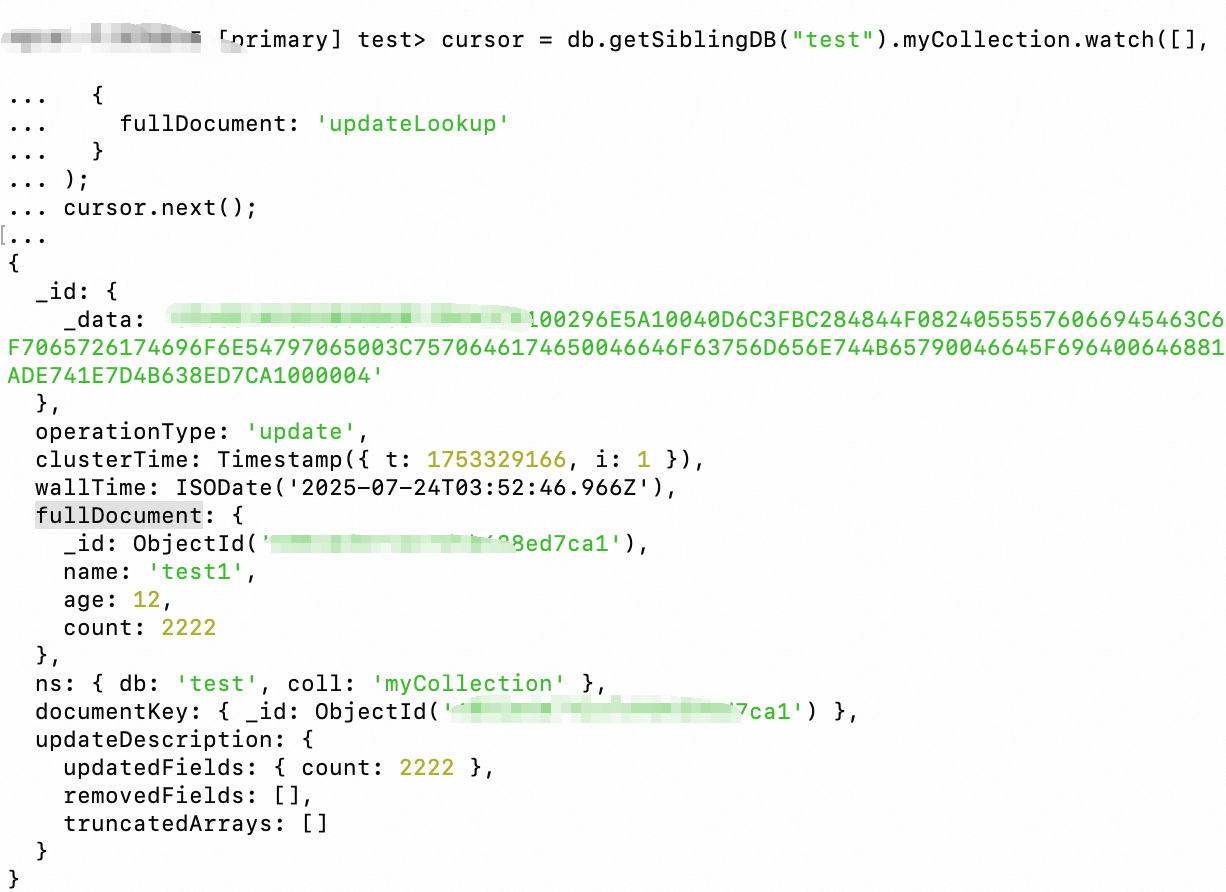
The returned full document might be empty or not a point-in-time snapshot. For example:
If you update the same document multiple times in quick succession, the change event for the first update might return the document's content after the final update is complete.
If a document is deleted immediately after an update, the corresponding change event has an empty `fullDocument` field because the document no longer exists.
For more information, see Lookup Full Document for Update Operations.
Handle large change events (> 16 MB)
Prerequisites
MongoDB 7.0 or later (Upgrade guide).
Procedure
You can include the $changeStreamSplitLargeEvent stage in the watch() pipeline:
myChangeStreamCursor = db.myCollection.watch(
  [ { $changeStreamSplitLargeEvent: {} } ], // Add the splitting stage
  {
    fullDocument: "required",
    fullDocumentBeforeChange: "required"
  }
)
Verify the result
Run an operation that causes a change event larger than 16 MB, such as updating a document that contains a very large array.
Observe the returned event stream. It is split into multiple consecutive
fragmentevents, ending with a finalfragmentevent.
Reduce pre-image storage overhead
By default, pre-images expire with the oplog. You can set a shorter expiration time to save storage space:
If you set expireAfterSeconds to a very short duration and downstream consumption is slow, a ChangeStreamHistoryLost error may occur because the pre-image expires too early. For more information, see Change Streams with Document Pre- and Post-Images.
db.adminCommand({
  setClusterParameter: {
    changeStreamOptions: {
      preAndPostImages: { expireAfterSeconds: 100 } // Unit: seconds
    }
  }
})
Change stream best practices
Use pre-images and post-images with caution:
Enabling
fullDocumentBeforeChange(pre-image) andfullDocument(post-image) increases storage overhead (in theconfig.system.preimagescollection) and request latency.Enable these options only when your service requires the full document content before and after a change.
Key points for sharded cluster deployments:
Always create change stream listeners on a
mongosinstance to ensure the global order of events.Under high write loads, the change stream can become a bottleneck because the
mongosinstance needs to sort and merge events from different shards.Unbalanced writes across shards, for example, due to a poorly designed sharding key, can significantly increase change stream latency.
Avoid
updateLookup:The
updateLookupoption executes a separatefindOnequery for each update event, which is inefficient.In a sharded cluster, the
moveChunkoperation can exacerbate the latency issues caused byupdateLookup.
Prevent change stream interruptions:
⚠️ The following scenarios can cause the change stream cursor to become invalid (
operationType: "invalidate") or throw an error.Slow downstream consumption: The consumption speed is slower than the event generation speed, causing the
resumeTokento fall outside the oplog window.Invalid
resumeToken: Attempting to resume with an oldresumeTokenwhose corresponding timestamp is no longer in the oplog.Failover impact: After a failover, the oplog of the new primary node might not contain the original
resumeToken.Metadata changes: Operations such as
drop,rename, anddropDatabasecan trigger aninvalidateevent.Pre-image expiration: A short
expireAfterSecondssetting combined with slow consumption can cause pre-images to be lost.
Solutions:
Monitor change stream latency.
Ensure the oplog window is large enough.
Design robust error handling and recovery logic. This includes catching
invalidateevents, recording the last validresumeToken, and recreating the listener.Set a reasonable value for
expireAfterSeconds.
Scope selection strategy:
Single change stream vs. multiple collection-level change streams:
Single stream (database or instance level): This approach has lower resource overhead because it uses a single thread to pull from the oplog. However, the downstream system must filter and distribute events itself. Under high event volumes, the
mongosinstance can become a bottleneck.Multiple collection-level streams: This approach uses server-side filtering to reduce network traffic and provides better concurrency. However, too many streams increase
oplogread contention and resource consumption.
Recommendation: Test and choose the optimal solution based on your service workload, including event volume and the number of collections. Typically, use separate streams for a few highly active collections. For many less active collections, use a database-level or instance-level stream combined with downstream filtering.