A materialized view stores pre-computed query results as a physical copy of data. Instead of re-running expensive joins, aggregations, or scans on every request, queries read directly from this cached result — trading storage space for faster response times.
PolarDB for MySQL supports full refresh of materialized views through scheduled or manual refresh. The refresh query can be offloaded to a read-only node with In-Memory Column Index (IMCI), which accelerates the refresh and reduces load on the primary node. This improves the analytical processing (AP) capabilities of the PolarDB hybrid transactional and analytical processing (HTAP) architecture.
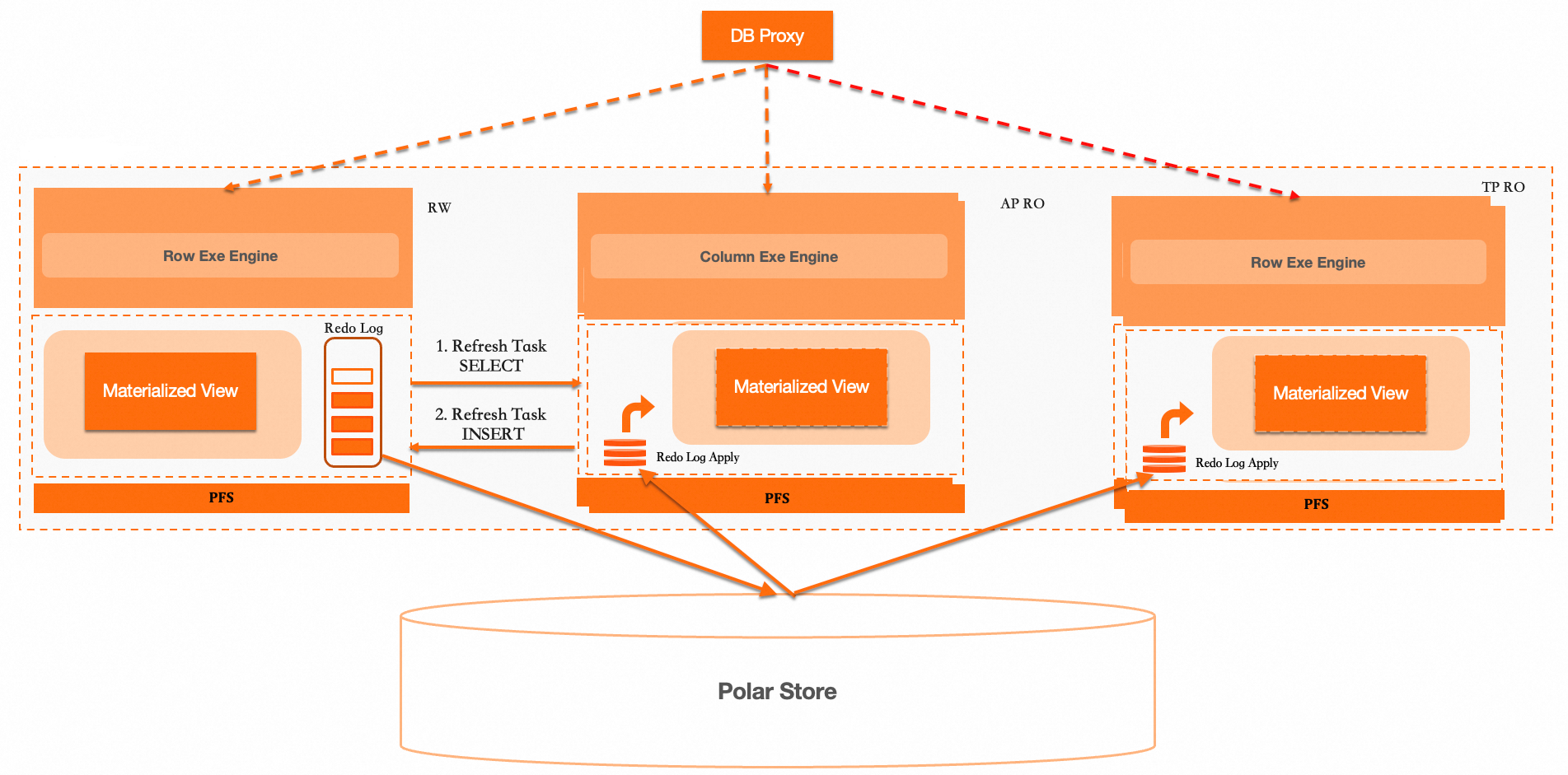
How it works
A materialized view consists of a view definition and a physical base table that stores the actual data.
-
Create: Table creation and materialization are two separate steps. Materialization runs as an asynchronous background task that creates the physical base table, then associates the table name with the view.
-
Query: Queries combine the view definition and the physical base table to read data directly from the physical base table.
-
Refresh (full): A full refresh creates a hidden physical base table, executes the refresh statement on it, then swaps the original and hidden base tables. This updates the metadata table and synchronizes the in-memory structure for queries. Full refresh requires extra storage space but supports any SQL query.
-
Monitor and manage: Query the background refresh task queue and pause or restart scheduled refresh tasks at the table, database, or global level.
When to use materialized views
Materialized views are a good fit when all of the following are true:
-
The query is resource-intensive (large aggregations, multi-table joins, or full scans of large datasets)
-
The query runs frequently — much more often than the underlying data changes
-
A slight data staleness between refreshes is acceptable for your use case
Common use cases:
-
Repeated aggregations: Pre-compute daily, weekly, or monthly roll-ups (sales totals, user activity metrics) so reports read from stored results rather than re-aggregating raw data.
-
Big data queries: Reduce full scans of large tables by materializing a filtered or summarized subset of the data.
-
Multidimensional analysis: Pre-aggregate data across dimension combinations to support Online Analytical Processing (OLAP) workloads.
When a regular view is a better choice:
-
The underlying data changes frequently and fresh results are required on every query
-
The query is lightweight and does not have a significant performance cost
A full refresh creates an additional hidden physical base table during the refresh process. Make sure your cluster has enough storage to accommodate this temporary overhead before creating materialized views on large datasets.
Limitations
The following limitations apply to materialized views in PolarDB for MySQL:
-
Only full refresh is supported. Incremental (fast) refresh is not currently supported.
-
Only asynchronous materialization (ON DEMAND) is supported. Real-time materialization (ON COMMIT) is not currently supported.
-
Query rewrite is not supported. Queries against base tables are not automatically redirected to use the materialized view.
Prerequisites
Your PolarDB for MySQL cluster must meet one of the following version requirements:
-
MySQL 8.0.1 with minor engine version 8.0.1.1.51 or later
-
MySQL 8.0.2 with minor engine version 8.0.2.2.31 or later
Parameters
The following cluster parameters control materialized view behavior. How you reference these parameters depends on where you configure them:
-
In the [PolarDB console](https://polardb.console.alibabacloud.com/overview): Use the parameter name with the
loose_prefix (for example,loose_materialized_view_enabled). -
In a database session (CLI or client): Remove the
loose_prefix and use theSETcommand with the original parameter name (for example,SET materialized_view_enabled = ON).
| Parameter | Default | Description |
|---|---|---|
loose_materialized_view_enabled |
ON | Enables or disables materialized views. Valid values: ON (enabled), OFF (disabled). |
loose_enable_materialized_view_parallel |
OFF | Enables or disables parallel query for materialized views. Valid values: ON (enabled), OFF (disabled). |
Create a materialized view
Syntax
CREATE
  MATERIALIZED VIEW view_name [(column_list)]
  [REFRESH [COMPLETE|FAST]]
  [ON [COMMIT|DEMAND]]
  [START WITH now()] [NEXT now() + interval 1 hour]
  [[DISABLE|ENABLE] QUERY REWRITE]
  AS select_statement
Permissions
-
CREATEpermission on the database where the materialized view will reside -
SELECTpermission on all base table columns or tables referenced by the materialized view
Parameters
| Parameter | Required | Description |
|---|---|---|
view_name |
Yes | The name of the materialized view. |
column_list |
No | Column names for the view, separated by commas. |
REFRESH |
No | Refresh policy. COMPLETE (default) performs a full refresh. FAST performs an incremental refresh. Currently, only COMPLETE is supported. |
ON |
No | Materialization type. DEMAND (default) uses asynchronous materialization. COMMIT uses real-time materialization. Currently, only DEMAND is supported. |
START WITH |
No | Start time for scheduled auto-refresh. |
NEXT |
No | Refresh interval for scheduled auto-refresh. If not set, the view can only be refreshed manually. |
QUERY REWRITE |
No | Whether the materialized view supports query rewrite. DISABLE (default) or ENABLE. Currently, query rewrite is not supported. |
select_statement |
Yes | The query that defines the view's data. Retrieves data from base tables and stores the result in the materialized view. |
Example
-
Create base tables.
-- Create base tables CREATE TABLE table1 (col1 INT PRIMARY KEY, col2 VARCHAR(20), col3 INT); CREATE TABLE table2 (col1 INT PRIMARY KEY, col2 VARCHAR(20), col3 INT); -- Insert data into the base tables INSERT INTO table1 VALUES (1, 'A', 100), (2, 'B', 200), (3, 'C', 300), (4, 'D', 400); INSERT INTO table2 VALUES (1, 'X', 10), (2, 'Y', 20), (3, 'Z', 30), (5, 'W', 50); -
Create a materialized view with hourly scheduled refresh.
CREATE MATERIALIZED VIEW mv1
REFRESH COMPLETE
ON DEMAND
START WITH now() NEXT now() + INTERVAL 1 hour
AS
SELECT
    SUM(t1.col3) AS sum_value,
    AVG(t1.col3) AS avg_value
FROM table1 t1
JOIN table2 t2 ON t1.col1 = t2.col1;
Query a materialized view
Querying a materialized view requires theSELECTpermission on the view itself. You do not needSELECTpermission on the base tables.
Query the data
SELECT * FROM mv1;Expected result:
+-----------+-----------+
| sum_value | avg_value |
+-----------+-----------+
|       600 |  200.0000 |
+-----------+-----------+
View the definition
SHOW CREATE VIEW mv1;Expected result:
+------+--------------------------------------------------------------------------------------------------------------------------------------------------------------------------------------------------------------------------------------------------------------------------------+----------------------+----------------------+
| View | Create View                                                                                                                                                                                                                                                                    | character_set_client | collation_connection |
+------+--------------------------------------------------------------------------------------------------------------------------------------------------------------------------------------------------------------------------------------------------------------------------------+----------------------+----------------------+
| mv1  | CREATE MATERIALIZED VIEW `mv1` REFRESH COMPLETE ON DEMAND START WITH ('2025-10-15 11:20:15') NEXT (now() + interval 1 hour)  AS select sum(`t1`.`col3`) AS `sum_value`,avg(`t1`.`col3`) AS `avg_value` from (`table1` `t1` join `table2` `t2` on((`t1`.`col1` = `t2`.`col1`))) | utf8mb4              | utf8mb4_0900_ai_ci   |
+------+--------------------------------------------------------------------------------------------------------------------------------------------------------------------------------------------------------------------------------------------------------------------------------+----------------------+----------------------+
Query view metadata
Use the mysql.view_materialized_info system table to retrieve metadata for all materialized views.
SELECT * FROM mysql.view_materialized_info;Field descriptions
| Field | Description |
|---|---|
TABLE_SCHEMA |
The database where the materialized view resides. |
TABLE_NAME |
The name of the materialized view. |
IS_DROPPED |
Whether the view has been dropped. 0: No. 1: Yes. |
FIRST_REFRESH_TIME |
The time of the first scheduled refresh, if auto-refresh is configured. |
TIME_ZONE |
The time zone setting. |
REFRESH_CONDITION |
The refresh trigger mechanism. DEMAND: asynchronous refresh (scheduled or manual). COMMIT: real-time refresh. |
REFRESH_STRATEGY |
The refresh policy. COMPLETE: full refresh. FAST: incremental refresh. |
REFRESH_START_TIME |
The time when the refresh started. |
NEXT_TIME_EXPRESSION |
The expression that defines the next refresh time for asynchronous materialized views. |
LAST_START_TIME |
The time the last refresh actually started. |
LAST_END_TIME |
The time the last refresh actually ended. |
CONTAINER_TABLE_POSTFIX |
The suffix of the physical base table used for data storage. |
EXPIRED_TABLE_POSTFIX |
The suffix of the next expired physical base table. |
IS_STOPPED |
Whether the scheduled refresh is stopped. 0: No. 1: Yes. |
CREATE_TIME |
The time the materialized view metadata was created. |
UPDATE_TIME |
The time the materialized view metadata was last updated. |
Expected result:
+-----+--------------+------------+------------+---------------------+-----------+-------------------+------------------+---------------------+---------------------------+---------------------+---------------------+-------------------------+-----------------------+------------+---------------------+---------------------+
| id  | table_schema | table_name | is_dropped | first_refresh_time  | time_zone | refresh_condition | refresh_strategy | refresh_start_time  | next_time_expression      | last_start_time     | last_end_time       | container_table_postfix | expired_table_postfix | is_stopped | create_time         | update_time         |
+-----+--------------+------------+------------+---------------------+-----------+-------------------+------------------+---------------------+---------------------------+---------------------+---------------------+-------------------------+-----------------------+------------+---------------------+---------------------+
| 471 | testmv       | mv1        |          0 | 2025-10-15 11:20:16 | +08:00    | DEMAND            | COMPLETE         | 2025-10-15 11:20:15 | (now() + interval 1 hour) | 2025-10-15 11:20:15 | 2025-10-15 11:20:16 |           2022929596417 |         2022929596417 |          0 | 2025-10-15 11:20:16 | 2025-10-15 11:20:16 |
+-----+--------------+------------+------------+---------------------+-----------+-------------------+------------------+---------------------+---------------------------+---------------------+---------------------+-------------------------+-----------------------+------------+---------------------+---------------------+
Refresh a materialized view
PolarDB for MySQL supports two refresh methods: manual refresh and scheduled refresh. Both use full refresh (out-of-place), which creates a hidden physical base table, executes the refresh statement on it, then swaps the original and hidden base tables.
Manual refresh
Run REFRESH MATERIALIZED VIEW to trigger a refresh on demand — useful when no scheduled refresh is configured, or when the refresh interval is too long for your current needs.
REFRESH MATERIALIZED VIEW <view_name>;Example
-
Insert new data into the base tables.
INSERT INTO table1 VALUES (5, 'E', 500), (6, 'F', 600); INSERT INTO table2 VALUES (7, 'U', 60), (8, 'V', 70); -
Refresh the materialized view.
REFRESH MATERIALIZED VIEW mv1; -
Query the materialized view to verify the updated results.
SELECT * FROM mv1;Expected result:
+-----------+-----------+
| sum_value | avg_value |
+-----------+-----------+
|      1100 |  275.0000 |
+-----------+-----------+
Scheduled refresh
Set START WITH and NEXT when creating the materialized view to configure auto-refresh. The system schedules and runs the refresh automatically based on the defined interval.
CREATE MATERIALIZED VIEW mv1
REFRESH COMPLETE
ON DEMAND
START WITH now() NEXT now() + INTERVAL 1 hour
AS
SELECT
    SUM(t1.col3) AS sum_value,
    AVG(t1.col3) AS avg_value
FROM table1 t1
JOIN table2 t2 ON t1.col1 = t2.col1;
Drop a materialized view
Dropping a materialized view requires the DROP permission on the database where the view resides.DROP MATERIALIZED VIEW <view_name>;Example
DROP MATERIALIZED VIEW mv1;Monitor and manage refresh tasks
Scheduled refresh relies on the system's automatic scheduling mechanism. If the task queue becomes congested, pause or restart tasks at the table, database, or global level.
View the task queue
SELECT * FROM information_schema.materialized_view_refresh_queue;Pause scheduled refresh
By table
STOP MATERIALIZED VIEW task FOR TABLE mv1;By database
STOP MATERIALIZED VIEW task FOR DATABASE mv1;Globally
STOP MATERIALIZED VIEW task FOR ALL;Restart scheduled refresh
By table
RESTART MATERIALIZED VIEW task FOR TABLE mv1;By database
RESTART MATERIALIZED VIEW task FOR DATABASE mv1;Globally
RESTART MATERIALIZED VIEW task FOR ALL;