This topic describes how to configure and manage health checks using the ICMP (Ping) protocol.
What is a ping health check
A Ping health check is a network monitoring protocol used by Global Traffic Manager (GTM) to verify the availability of destination addresses. By configuring a ping health check within an Address Pool, GTM monitors the reachability of each IP address. When an IP address is detected as unhealthy (abnormal), the system automatically removes it from the resolution pool (blocks it). When the IP address returns to a healthy state, the system automatically restores it to the pool (unblocks it).
Parameters
Health Check Protocol
Ping. Monitors the target IP address for network reachability, packet loss rate, and latency (RTT).
Health Check Interval
Specifies the frequency of the ping probe. Default: 1 minute. Minimum: 15 seconds (Available for Ultimate Edition users).
PING Packets
The number of ICMP packets sent simultaneously during a single probe cycle to calculate the packet loss rate. Value: 20 packets.
Packet Loss Rate
The threshold for packet loss that triggers an alert. Formula: (Lost Packets / Total Packets) × 100% Available Thresholds: 10%, 30%, 50%, 80%, 90%, and 100%.
Timeout Period
The maximum time allowed for a ping response (RTT). Packets not received within this window are marked as timed out. Available Values: 2s, 3s, 5s, and 10s.
Consecutive Failures
The number of consecutive probe failures required to mark an application service as Unhealthy. This mechanism prevents flapping caused by transient network jitter.
1: Mark as abnormal after 1 alert.
2: Mark as abnormal after 2 consecutive alerts.
3: Mark as abnormal after 3 consecutive alerts.
ImportantScenarios such as total network unreachability or receiving "ICMP Destination Unreachable" messages are not included in the packet loss rate calculation and will not trigger an alert based on this metric. To detect these specific network configuration errors, please verify the network path or switch to an HTTP Health Check.
Failure Rate
The percentage of monitoring nodes that must report an anomaly for the service to be considered down. If the ratio of failing nodes to total nodes exceeds this threshold, the application service is marked as Unhealthy. Available Values: 20%, 50%, 80%, and 100%.
Monitored Nodes
The geographic locations of the probe nodes. The system provides the following default nodes:
ImportantIf your address pool consists entirely of Alibaba Cloud IPs and you use Blackhole filtering for fault simulation, you must select Carrier Nodes. Reason: Blackhole filtering is an ACL policy enforced at the internet edge (between Alibaba Cloud and carrier networks). Traffic between Alibaba Cloud IPs typically stays within the internal cloud network, bypassing these filters and rendering the probe ineffective.
Node Type
Geographic Locations
BGP Nodes
Zhangjiakou, Qingdao, Hangzhou, Shanghai, Hohhot, Shenzhen, Beijing
Overseas Nodes
China (Hong Kong), Germany, Singapore, California, Malaysia, Japan
ISP Nodes
China Unicom: Dalian, Nanjing, Tianjin China Telecom: Qingdao, Changsha, Xi'an, Zhengzhou China Mobile: Shenzhen, Dalian, Nanjing
Configuration methods
Log on to Alibaba Cloud DNS-Global Traffic Manager.
Locate the target instance and click Settings in the Actions column.
New Configuration: If the instance is unconfigured, refer to enable health checks.
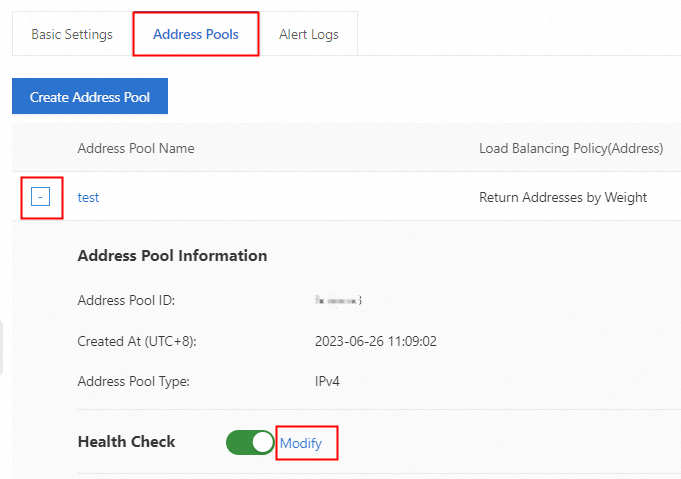
Existing Configuration: Click the Address Pools tab. Then, click the "+" icon next to the target address pool to expand it. Click Modify next to Health Check. Configure the parameters based on the descriptions above to set up the Ping health check.