Terms
Malicious Bot: An automated program designed to attack a target system, steal data, or perform other malicious operations.
Suspected Bot: A bot that exhibits characteristics of a web crawler but lacks direct evidence of malicious intent. Its purpose requires further verification.
Legitimate Bot: A bot that is allowed and encouraged to access a website. It is typically used for beneficial purposes, such as search engine indexing, health checks, and data analytics.
Client ID: An identifier for a client, such as a browser or an application. It uses features such as User-Agent information and traffic fingerprints to identify the source client of an HTTP request.
Web UMID: A unique device identifier for web clients. It helps security teams detect unusual traffic.
App UMID: A unique device identifier for app clients. It helps security teams detect unusual traffic.
JA3 Fingerprint: A string that represents a client's Transport Layer Security (TLS) configuration. The string is generated by applying an MD5 hash to key parameters of the TLS handshake, such as the TLS version, cipher suites, compression algorithms, and TLS extensions. A JA3 fingerprint can identify and distinguish between different types of TLS clients, such as web browsers, mobile applications, and malware.
JA4 Fingerprint: A JA4 fingerprint reduces the risk of duplicate fingerprints that can occur with JA3 using more contextual information and algorithms, such as the browser version and operating system. A JA4 fingerprint more accurately distinguishes between real users and impostors, which reduces the false positive rate.
HTTP/2 Fingerprint: An HTTP/2.0 fingerprint generated by applying the MD5 algorithm to the original fingerprint of the HTTP/2 client. It is used to analyze and identify different clients for more secure and efficient communication.
If an abnormal number of access requests is detected from a specific client ID, Web UMID, App UMID, JA3 fingerprint, JA4 fingerprint, or HTTP/2 fingerprint, you can configure a custom advanced bot rule to block the requests.
View traffic analysis
On the Bot Management - Traffic Analysis console, if you do not have a trial or subscription for bot management, you can use association analysis of abnormal clients to obtain a basic understanding of current bot traffic trends. If you have a trial or a subscription, you can view more detailed bot traffic information.
Set filter conditions
Simple search (default)

Feature | Description |
Date range (Figure ①) | By default, data for Today is displayed. You can query data from the Last 15 Minutes, Last 30 Minutes, Last 1 Hour, Last 24 Hours, Today, Yesterday, Last 7 days, and Last 30 days. |
Custom date and time range (Figure ②) | Select a custom date and time range to view traffic analysis data more accurately. |
Protected object (Figure ③) | By default, All is selected. This queries data for all objects protected by WAF. You can also query data for a specific object. |
Set filter conditions (Figure ④) | Set filter conditions for Referer, Domain Names, URI of the request, source IP, and User-Agent. |
Advanced search

Feature | Description |
Date range (Figure ①) | By default, data for Today is displayed. You can query data from the Last 15 Minutes, Last 30 Minutes, Last 1 Hour, Last 24 Hours, Today, Yesterday, Last 7 days, and Last 30 days. |
Custom date and time range (Figure ②) | Select a custom date and time range to view traffic analysis data more accurately. |
Set filter conditions (Figure ③) | Set up to 10 filter conditions. You can filter by Protected Object, Source IP Address, Request Path, User-Agent, Domain Name, and Referer. A rule is hit only when all defined conditions are met. |
Protection overview
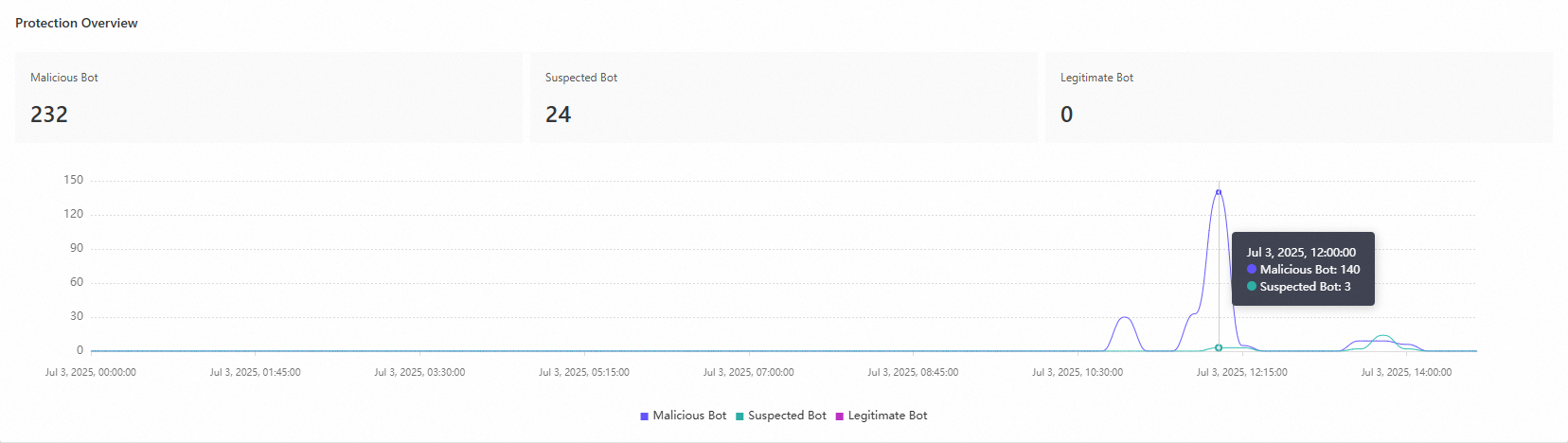
The protection overview trend graph shows the trends for malicious, suspected, and legitimate bots. By default, the graph displays data for all protected objects and dynamically refreshes based on your filter conditions. You can hover over any point in the trend graph to view the number of malicious, suspected, and legitimate bots at that specific time.
Top traffic analysis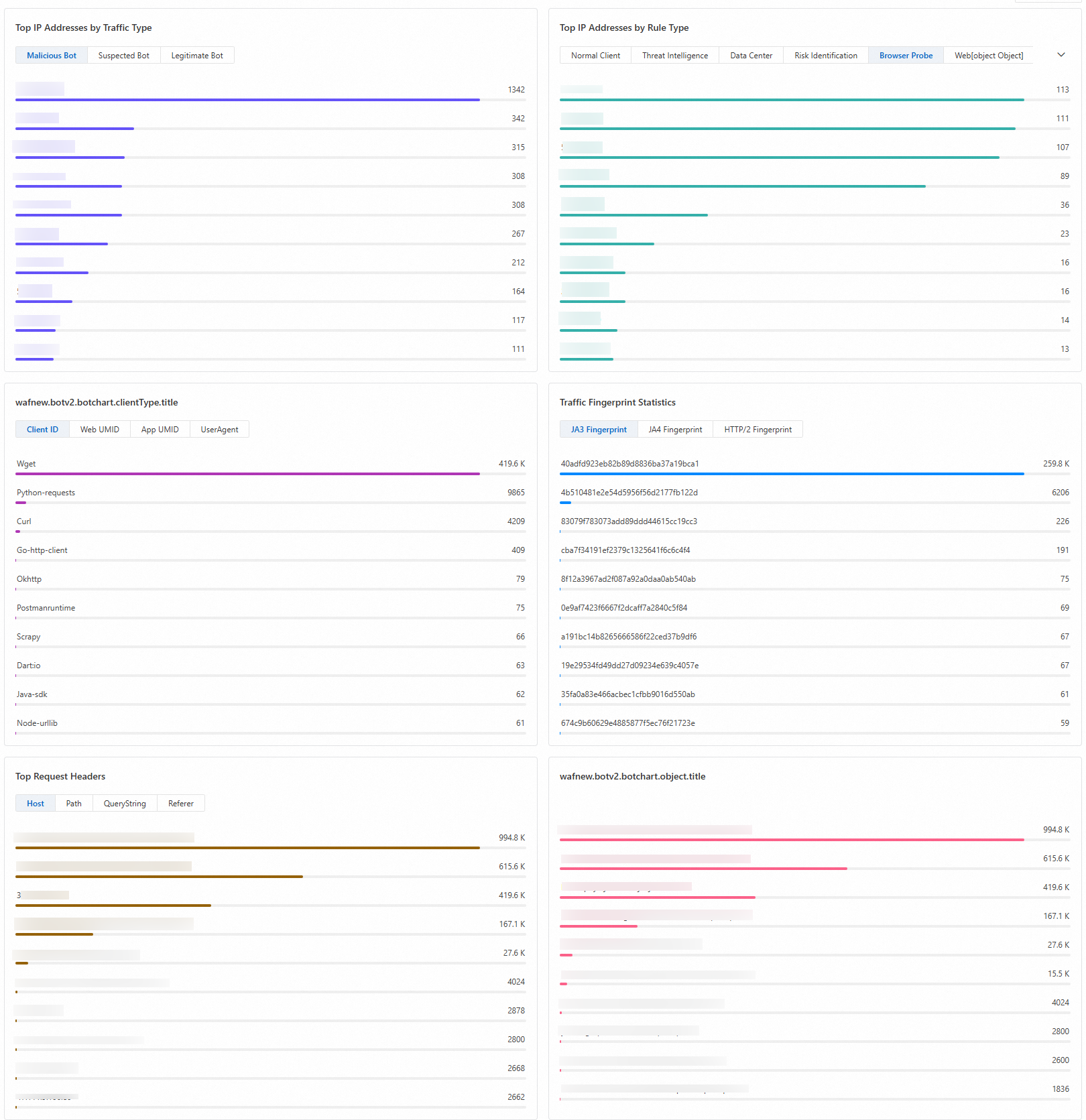
Feature | Description |
Top IP Addresses by Traffic Type | Displays the top 10 IPs that are classified as Malicious Bot, Suspected Bot, and Legitimate Bot. |
Top IP Addresses by Rule Type | Displays the top 10 IPs that hit rules with different labels. |
Top Client Types | Displays statistics for four types of client identifiers: Client ID, Web UMID, App UMID, and User-Agent. |
Traffic Fingerprint Statistics | Displays statistics for three types of traffic fingerprints: JA3 Fingerprint, JA4 Fingerprint, and HTTP/2 Fingerprint. |
Top Request Headers | Displays the top 10 Host, Path, QueryString, and Referer values. |
Top Protected Objects | Displays the top 10 protected objects with the most requests that match the filter conditions. |