ApsaraDB for ClickHouse raises the Too many parts error when the number of unmerged data parts in a table exceeds a configured threshold. This page explains what drives that accumulation, how to check your current part counts, and how to fix each root cause.
How it works
Every INSERT creates at least one new data part — a directory of files sorted by the primary key (the columns in the ORDER BY clause). The background Merge Tree process continuously merges small parts into larger ones, similar to a Log-Structured Merge-tree (LSM). As long as merges keep pace with inserts, part counts stay healthy.
When inserts arrive faster than merges can process them, parts accumulate. Once the count crosses the parts_to_throw_insert or max_parts_in_total threshold, ClickHouse rejects new inserts with the Too many parts error.
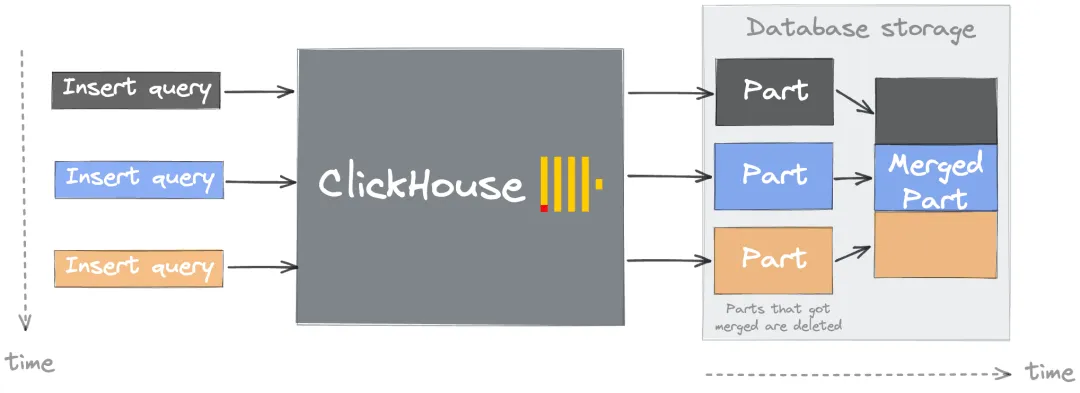
The merge process has three stages:
-
Ordered merge — reads data from multiple small parts and writes it in primary key order into a new part. No additional sorting is needed because each input part is already sorted.
-
Compression — groups similar values together, improving compression ratios and reducing storage.
-
Index merge — primary key indexes from the source parts are merged into the new part's index.
Merges are triggered when a part's size, count, or age meets the conditions defined in MergeTree settings. The system prioritizes older parts to minimize contention with incoming inserts.
Impact of excessive parts
Letting parts accumulate has compounding effects:
-
Slower queries — each query must scan more indexes and files, increasing I/O.
-
Slower startup — metadata for all parts must load at startup. Thousands of parts extend this significantly.
-
ClickHouse Keeper pressure — each part generates metadata entries; too many parts strains the Keeper.
-
Merge overhead — the system must run more merges, consuming CPU and I/O that compete with query and insert workloads.
Diagnose the problem
Before investigating root causes, identify which tables and partitions have the most parts:
SELECT
    database,
    table,
    partition,
    sum(rows) AS rows,
    count() AS part_count
FROM system.parts
WHERE active = 1
GROUP BY database, table, partition
ORDER BY part_count DESC
LIMIT 20
Tables with hundreds or thousands of parts in a single partition are candidates for the root causes below.
Quick reference: safe operating limits
Use these thresholds to quickly determine whether your configuration is within safe bounds:
| Dimension | Safe range | Warning sign |
|---|---|---|
| Parts per partition | Below ~1,000 | Hundreds or thousands of parts in a single partition |
| Partition key cardinality | Below 1,000 distinct values | Partitioning by high-precision timestamp or user ID |
| Insert rate | One bulk INSERT per second per table | Sending hundreds or thousands of inserts per second |
| Rows per insert batch | At least 1,000 rows | Single-row or very small inserts |
| Materialized views per table | As few as needed | Many views on a high-traffic table |
Root causes and solutions
Cause 1: High-cardinality partition key
Each unique value of the PARTITION BY column creates a separate partition, and ClickHouse never merges parts across partitions. Partitioning by a high-cardinality column like a DateTime field means a single day of data can produce thousands of partitions, each holding only a few parts that will never merge into larger ones.
For example, partitioning by date_time_ms (a DateTime column) distributes parts across thousands of partitions. Subsequent inserts then trigger:
Too many inactive parts (N). Parts cleaning are processing significantly slower than inserts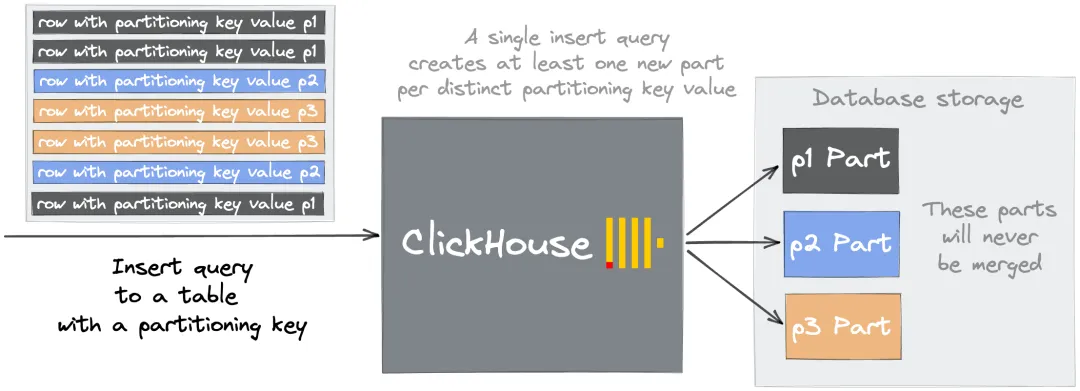
Solution: Choose a partition key with cardinality below 1,000. Partition by day (toDate(timestamp)) or by a low-cardinality categorical column rather than by a high-precision timestamp.
| Partition key | Cardinality | Verdict |
|---|---|---|
toDate(event_time) |
~365/year | Good |
toStartOfMonth(event_time) |
~12/year | Good |
event_time (DateTime) |
Millions | Bad — use a coarser granularity |
user_id (high-cardinality int) |
Millions | Bad — partition by a lower-cardinality attribute |
The DROP PARTITION operation is still available with date-based partitions, so you retain the ability to delete data subsets efficiently.
Cause 2: Too many small inserts
Every INSERT, regardless of size, creates a new part. Sending hundreds of small inserts per second means ClickHouse creates hundreds of new parts per second — far faster than the background merger can process them. This is a design constraint, not a tuning problem: no combination of settings eliminates the issue if the insert rate stays high.
Safe insert rate: one bulk INSERT per second per table, with each batch containing at least 1,000 rows.
The following approaches reduce per-second part creation. Choose based on your setup constraints:
| Characteristic | Option A: Synchronous batch insert (recommended) | Option B: Asynchronous insert | Option C: Buffer table |
|---|---|---|---|
| Setup | Client-side buffering only | One setting change; no DDL required | Requires CREATE TABLE ... ENGINE = Buffer(...) DDL on each node |
| Fault tolerance | Data at risk only during the accumulation window | Default mode waits for acknowledgment; fire-and-forget mode may lose data on crash | Data in the buffer is lost if the node crashes before the flush |
| DDL changes | No impact | No impact — always targets the real table | Buffer table DDL must be updated whenever the target table schema changes |
| Query routing | Inserts go directly to the target table | Inserts still target the real table | Inserts and queries must explicitly target the buffer table |
Option A: Synchronous batch insert (recommended for most cases)
Accumulate rows on the client side and send one large INSERT per second. This is the simplest approach and requires no server-side configuration.
Option B: Asynchronous insert
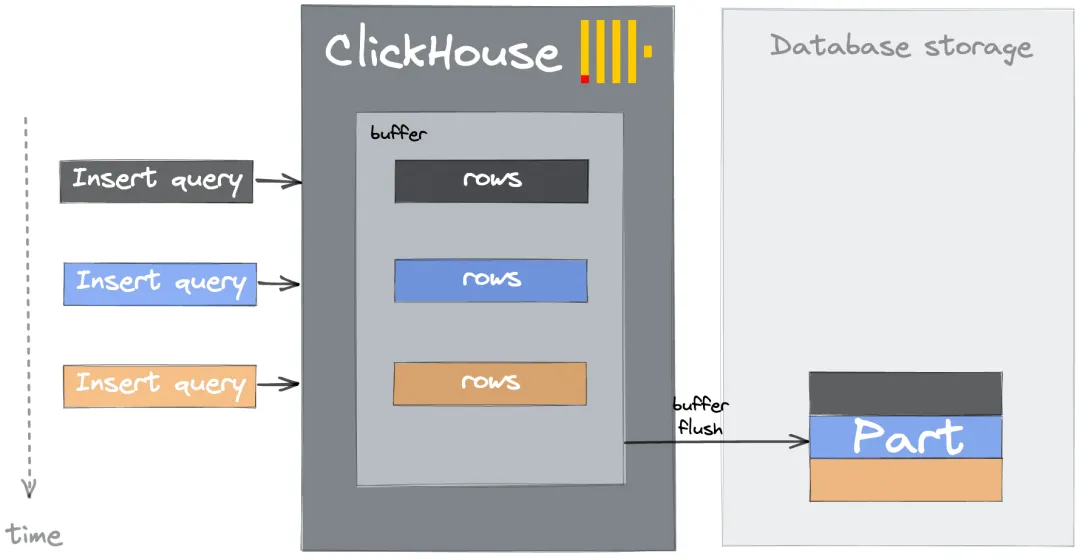
Enable asynchronous inserts so ApsaraDB for ClickHouse buffers incoming data server-side and flushes it to the underlying table in batches. Activate this with the session or query setting async_insert = 1.
Option C: Buffer table
A Buffer table stores incoming rows in memory and flushes to the destination table periodically or when thresholds are reached. Unlike asynchronous inserts, Buffer tables are separate table objects.
Buffer tables support querying data in the buffer and are compatible with materialized view target tables. However, the additional DDL burden and limited fault tolerance make asynchronous inserts a better default choice for most workloads.
Cause 3: Too many materialized views
When a row is inserted into a source table, ClickHouse runs each associated materialized view's SELECT query and writes the result to the view's target table. One source INSERT generates one part in the source table plus one part per materialized view.
For example, if Table T has materialized views MV-1 and MV-2, one insert into Table T creates three parts — one in T, one in MV-1, and one in MV-2.
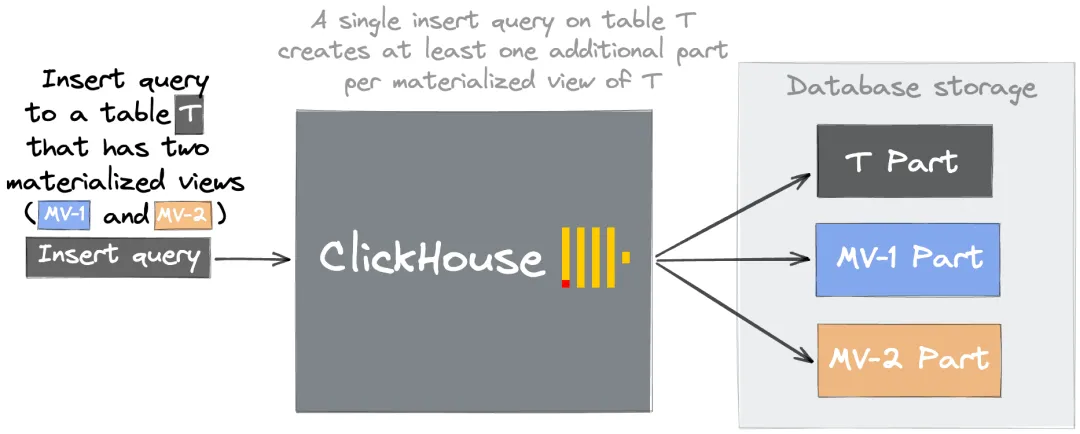
This multiplier effect means even a moderate insert rate can overwhelm the merger when many materialized views are attached to a high-traffic table.
Solutions:
-
Fix partition and sort key design — apply the same cardinality rules from Cause 1 to the
PARTITION BYandORDER BYsettings of each materialized view's target table. Misconfigured keys prevent parts from merging. See Create materialized view for syntax reference. -
Consolidate similar views — if multiple views share similar aggregation logic, merge them into one view with a unified output structure.
-
Remove unused views — drop infrequently queried materialized views, or replace heavy pre-aggregation with lightweight queries run on demand.
Cause 4: Mutation issues
Mutations (ALTER TABLE ... UPDATE and ALTER TABLE ... DELETE) rewrite affected parts rather than modifying them in place. Each mutation that touches a part produces a new version of that part. If mutations run frequently on a large table, the backlog of unrewritten parts can trigger the Too many parts error.
Prevention checklist
Use this checklist when designing tables and insert pipelines to avoid the error from the start:
| Area | Guideline |
|---|---|
| Partition key | Cardinality below 1,000; prefer date-based granularity |
| Insert rate | One bulk INSERT per second per table; at least 1,000 rows per batch |
| Materialized views | Fix PARTITION BY / ORDER BY before attaching views; consolidate or remove redundant views |
| Mutations | Avoid frequent mutations on large tables; batch updates where possible |
What's next
-
MergeTree settings — full reference for merge trigger parameters including
parts_to_throw_insertandmax_parts_in_total -
Create materialized view — syntax and configuration options for materialized views