This topic describes the built-in authoritative module feature and how to configure it.
Overview
The built-in authoritative module feature lets you define private authoritative zones and DNS records in Public DNS. However, this feature is effective only for resolution requests that carry an Account ID, such as through SDK, API, and DoT/DoH.
Non-encrypted accesses are not supported, such as endpoints configured with 223.5.5.5/223.6.6.6, 2400:3200::1
2400:3200:baba::1.
This feature does not support Public DNS access by binding the source IP of resolution requests to the network egress.
Request matching priority: Blacklist/Whitelist >> Built-in authoritative module >> Cache >> Recursion.
Benefits
Faster: When an app or IoT endpoint requests to resolve a domain name defined in the built-in authoritative module, Public DNS returns the resolution result without querying root, top-level domain, or authoritative DNS servers, making resolution faster.
Anti-hijacking: Defining important domain names as built-in authoritative zones provides better anti-hijacking effects. This feature provides shorter resolution paths and does not require recursive iterative resolution, greatly reducing the risk of domain hijacking.
More secure: When an app or IoT endpoint uses private built-in authoritative zones as service endpoints, the public network cannot resolve these private domain names, which prevents DNS-related network attacks from causing service unavailability.
Configuration
Configuration path:

Step 1: Add domain name (Zone)
Log on to the Recursive Resolution (Public DNS) console.
Click the Built-in Authoritative Module tab.
Click the Add New Zone button. In the Add Built-in Authoritative Zone dialog box, enter the domain name (Zone), select whether to enable Recursive Resolution Proxy for Subdomain Names, and click OK.
ImportantIf you do not enable the subdomain recursive resolution proxy, when a request is made for a non-existent subdomain under the built-in authoritative domain name (Zone), the resolution fails directly, and Public DNS does not continue with iterative queries.
The domain name effective scope takes effect immediately after it is set. We recommend that you complete all DNS record configurations before setting the scope to avoid resolution failures caused by empty domains.
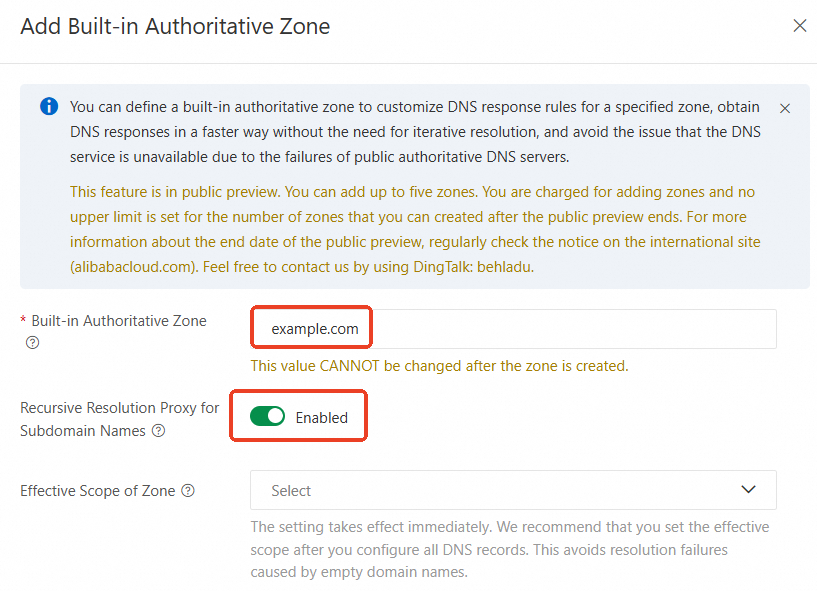
Step 2: Add DNS records
On the Built-in Authoritative Module tab, click the DNS Records button next to the target built-in authoritative domain name (Zone).
On the Resource Record Settings tab, click the Add Record button. In the dialog box, configure Record Type, Hostname, Request LIne, Record Value, Weight, TTL, and click OK.
NoteRecord Type: Currently supports A, CNAME, AAAA, TXT, MX, and SRV record types.
Resolution Line: Supports intelligent resolution lines. For more information, see Resolution line enumeration. You can also use Customize Lines.
Weight: When multiple IP addresses are set, the resolution response returns all IP addresses in polling mode by default. After the weight policy is enabled, you can set different weights for different addresses to route access traffic to the addresses based on weights. When multiple domain addresses are set, the resolution response returns domain addresses only by weight. The weight value range is 0 to 100.
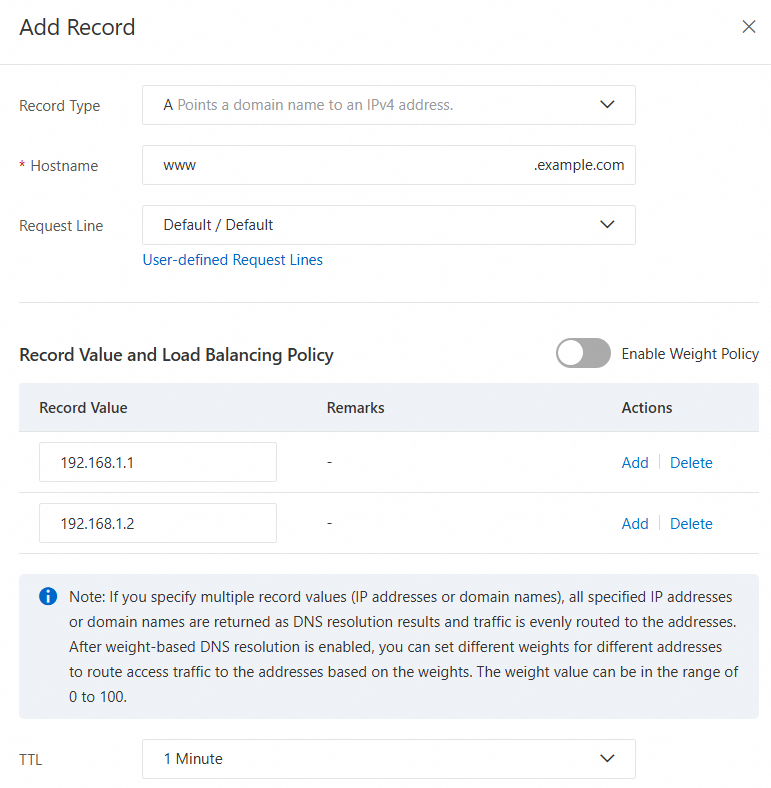
Step 3: Set effective scope
On the Built-in Authoritative Module tab, click the Effective Scope Settings button next to the target built-in authoritative domain name (Zone).
On the Zone Settings tab, select the effective scope, choose the dedicated Account ID under your account, and click OK.
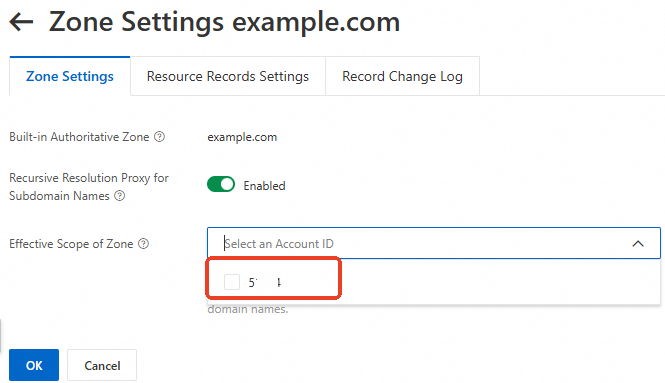 Important
The settings take effect immediately. We recommend that you complete all DNS record configurations before setting the scope to avoid resolution failures caused by empty domains.
Cross-account effective scope settings are not supported.