This topic describes how to configure AK-free access for Machine-to-Machine (M2M) applications and obtain a Security Token Service (STS) token using Alibaba Cloud Resource Access Management (RAM).
Prerequisite
You have configured the M2M application. For more information, see M2M applications (machine-to-machine permission management).
Create an OIDC IdP
Log on to the RAM console as a RAM administrator.
In the navigation pane on the left, choose .
On the Role-based SSO tab, click the OIDC tab, and then click Create IdP.
On the Create IdP page, configure the identity provider information.
Parameter
Description
IdP Name
The name must be unique within the same Alibaba Cloud account. This is independent of IDaaS. Enter the name according to RAM rules.
Issuer URL
The Issuer URL is a unique identifier that an external identity provider (IdP) assigns to an M2M application. It is used to verify the token source in protocols such as OAuth 2.0.
Alibaba Cloud IDaaS uses this URL to verify the validity of tokens that the external IdP issues. This is configured in the Issuer field of the IDaaS M2M application (client).
Fingerprint
After you enter the Issuer URL, click Get Fingerprint. Alibaba Cloud automatically calculates the verification fingerprint. However, you should also calculate it locally and compare it with the fingerprint from Alibaba Cloud. For more information, see Get the fingerprint of an OIDC IdP using OpenSSL.
If they do not match, the issuer URL might be under attack. You must confirm the URL and enter the correct fingerprint. RAM accesses the issuer address that you entered to get the fingerprint.
NoteIf your IdP is scheduled for certificate rotation, generate a fingerprint for the new certificate and add it to the OIDC IdP information before the rotation. Wait at least one day before you rotate the certificate. After you confirm that you can get an STS Token with the new certificate, delete the old fingerprint.
Client ID
The Client ID is a unique identifier generated when your application is registered with an external IdP. When the external IdP issues an OpenID Connect (OIDC) token, this client ID is used, and the `aud` field of the token contains this ID. After you configure this client ID in the Alibaba Cloud OIDC IdP, the system checks whether the client ID in the `aud` field matches when an OIDC token is exchanged for an STS Token. This ensures secure role assumption.
A single OIDC IdP supports up to 50 client IDs. This is suitable for scenarios where multiple applications access Alibaba Cloud.
In M2M application scenarios, the client ID corresponds to the Audience Identifier configured in the IDaaS M2M application. It is used for server-to-server authentication.
Earliest Issuance Time Allowed
OIDC tokens issued before this time cannot be exchanged for STS Tokens. Default value: 12 hours. Value range: 1 to 168 hours.
Description
The description of the identity provider.
Click Create IdP.
Create an OIDC IdP role
Go to the Alibaba Cloud Resource Access Management console and choose .
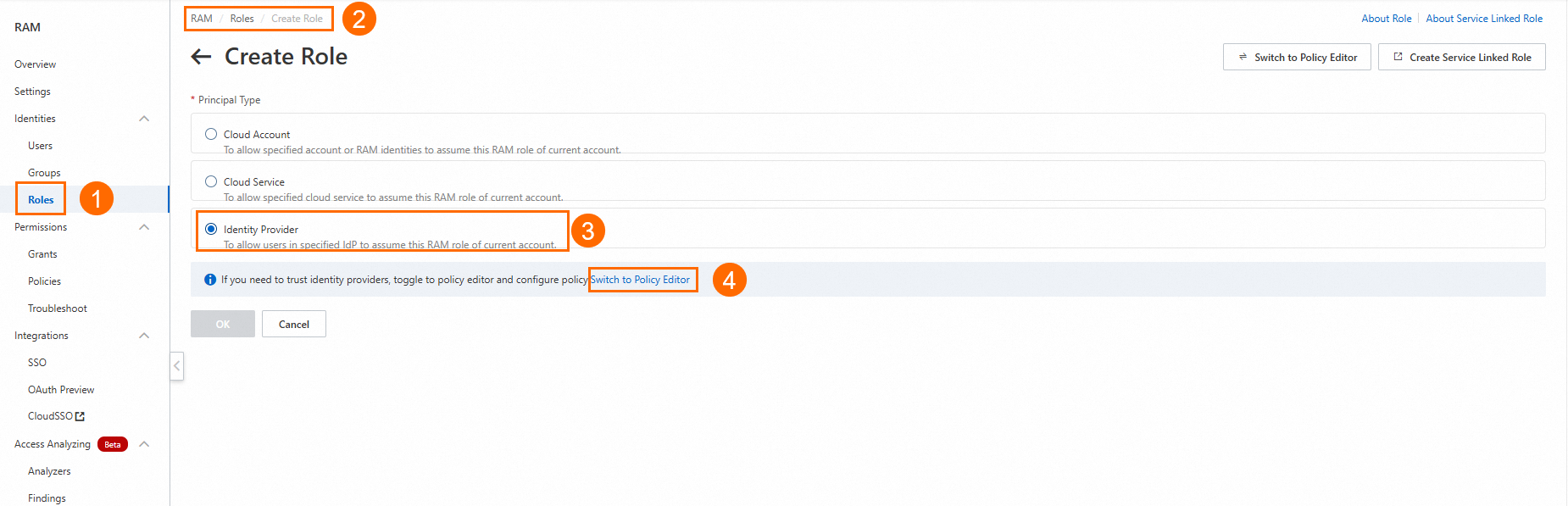
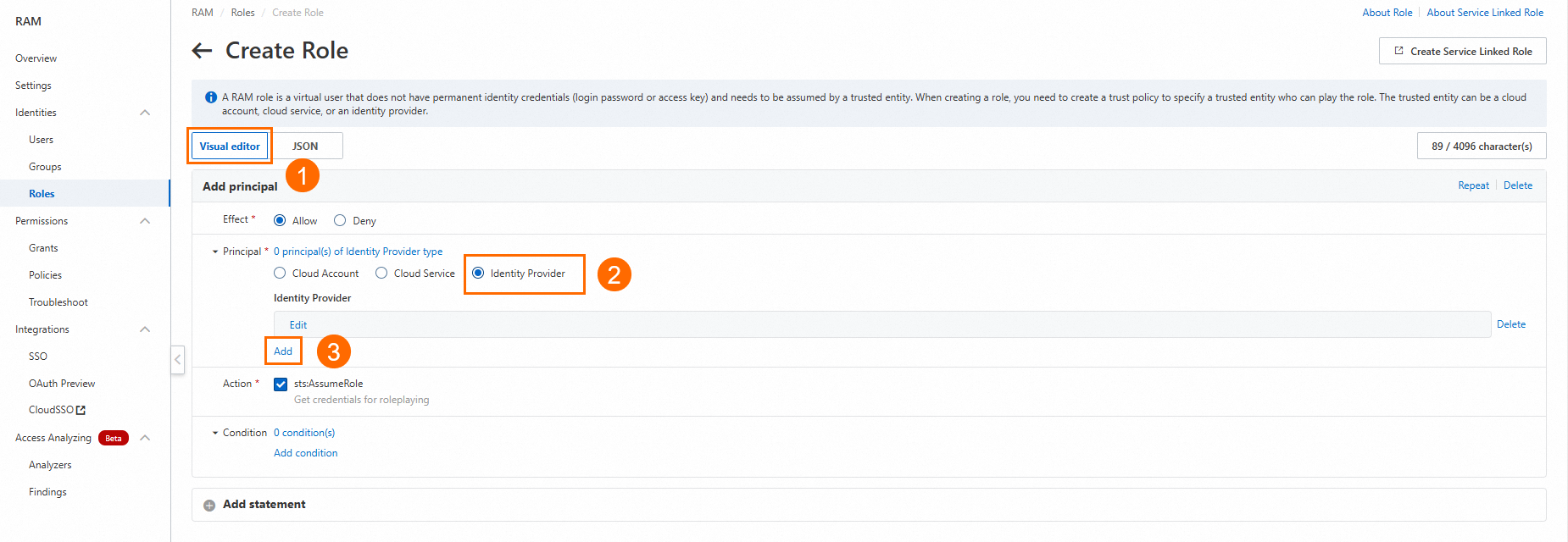
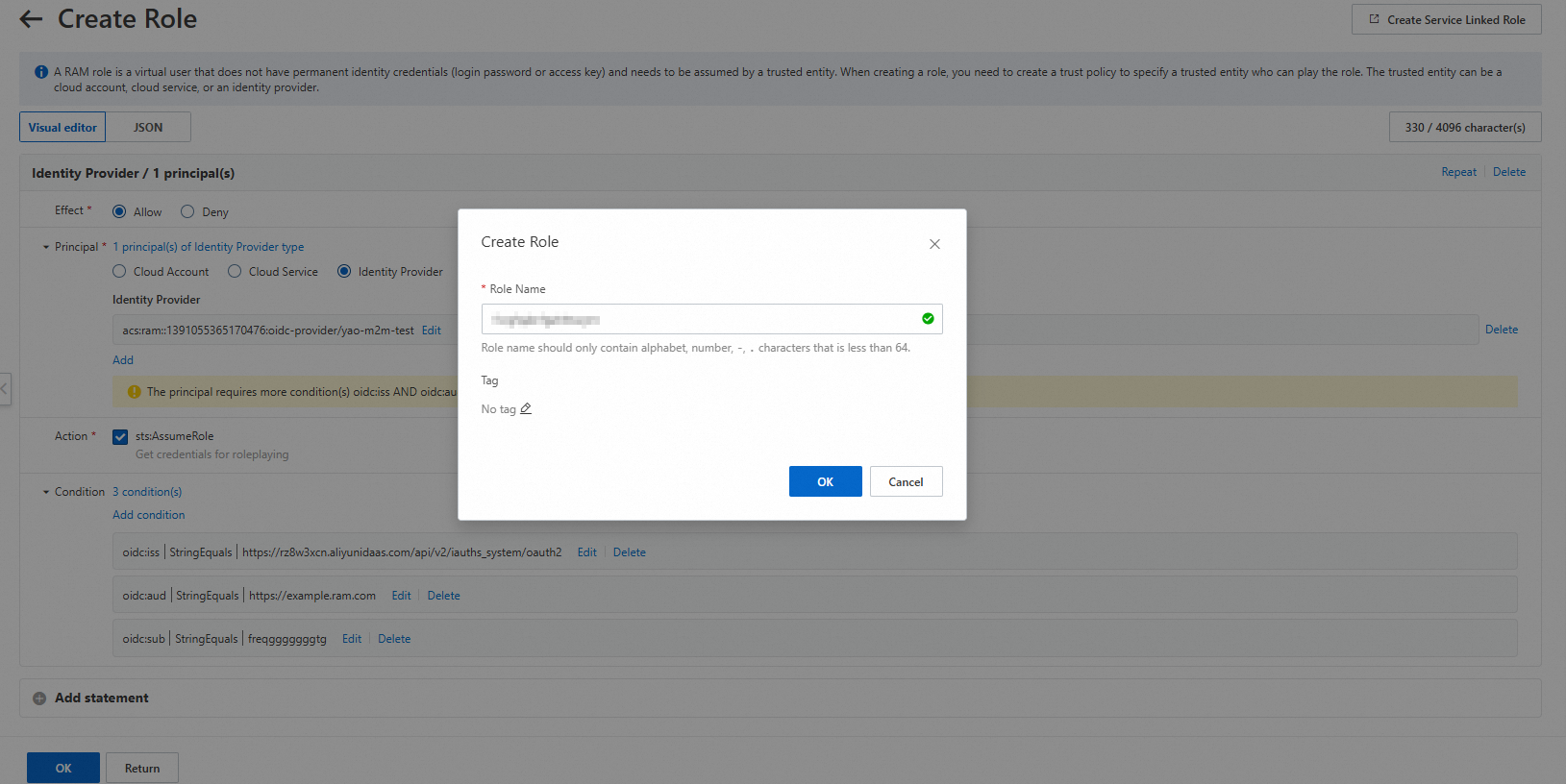
On the editor page, add an Identity Provider as shown in the following figure.
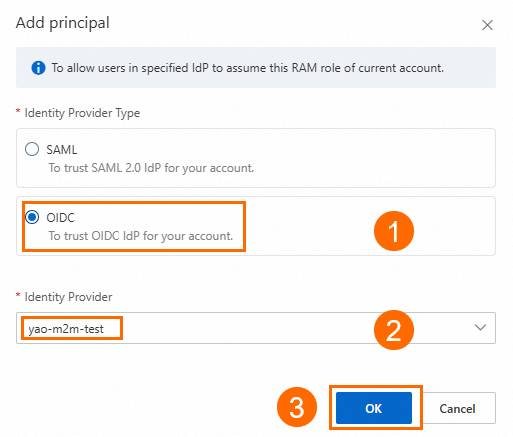
In the Add Entity dialog box, select the Identity Provider that you created, and then click OK.
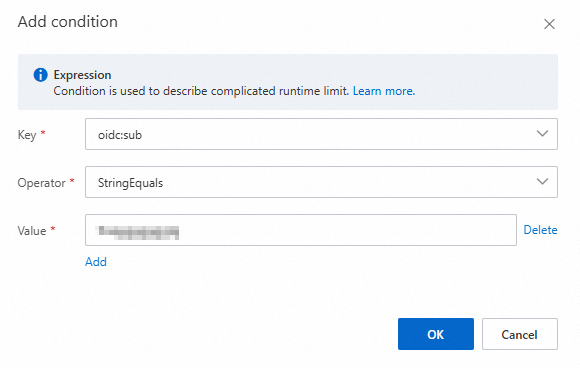
After you add the identity provider, `iss` and `aud` conditions are generated by default. You can edit or delete these conditions, or add new ones.
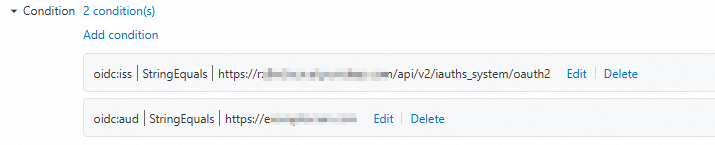
The following example shows how to add a
subconditional expression. After you finish editing, click OK.NoteCondition: Enter the client_id of the M2M application server that you created. For more information about how to add an M2M application and view information, such as the audience identifier, see M2M applications (machine-to-machine permission management).
For more information about conditional expressions, see Basic elements of an access policy.
Currently, RAM OIDC supports only three conditions: oidc:iss, oidc:aud, and oidc:sub.
Click OK at the bottom. In the Create Role dialog box, enter a name for the role and click OK.
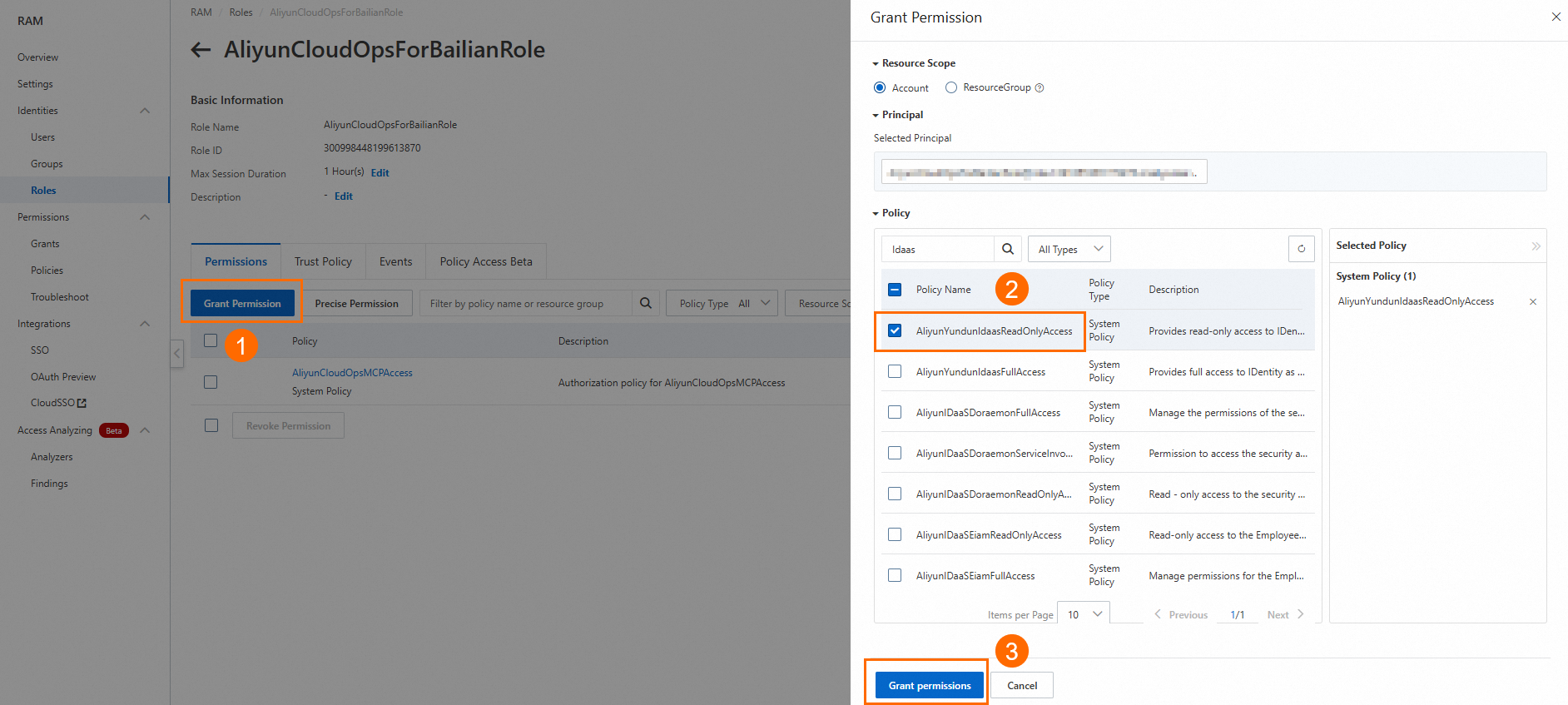
Grant permissions to the role
You can grant permissions to the role by clicking Grant Permission.
Get an M2M token
Use a curl command
Replace the following placeholder parameters with your application's configuration. Then, run the curl command to obtain the token.
# Replace <YOUR_SERVER_ISSUER_ENDPOINT>, <YOUR_APP_CLIENT_ID>, <YOUR_APP_CLIENT_SECRET>, and <YOUR_SERVER_AUD_IDENTIFIER> with the actual configuration values of your M2M application.
#
# <YOUR_SERVER_ISSUER_ENDPOINT>: The issuer. View and replace the Endpoint in "Resources Server application > General Configuration > Issuer".
# <YOUR_APP_CLIENT_ID>: The client ID. View and replace the client_id in "Client application > General Configuration > Credential Management".
# <YOUR_APP_CLIENT_SECRET>: The client secret. View and replace the client_secret in "Client application > General Configuration > Credential Management".
# <YOUR_SERVER_AUD_IDENTIFIER>: The server audience identifier. Find and replace the audience identifier in "Resources Server application > Server-side Permission Grant > Permission Application > Audience Identifier".
#
curl --location --request POST 'https://<YOUR_SERVER_ISSUER_ENDPOINT>.aliyunidaas.com/api/v2/iauths_system/oauth2/token' \
     --header 'Content-Type: application/x-www-form-urlencoded' \
     --data-urlencode 'client_id=<YOUR_APP_CLIENT_ID>' \
     --data-urlencode 'client_secret=<YOUR_APP_CLIENT_SECRET>' \
     --data-urlencode 'grant_type=client_credentials' \
     # .all is a predefined scope identifier in the Alibaba Cloud IDaaS platform. It indicates a request for all available permissions under the specified audience.
     --data-urlencode 'scope=<YOUR_SERVER_AUD_IDENTIFIER>|.all'
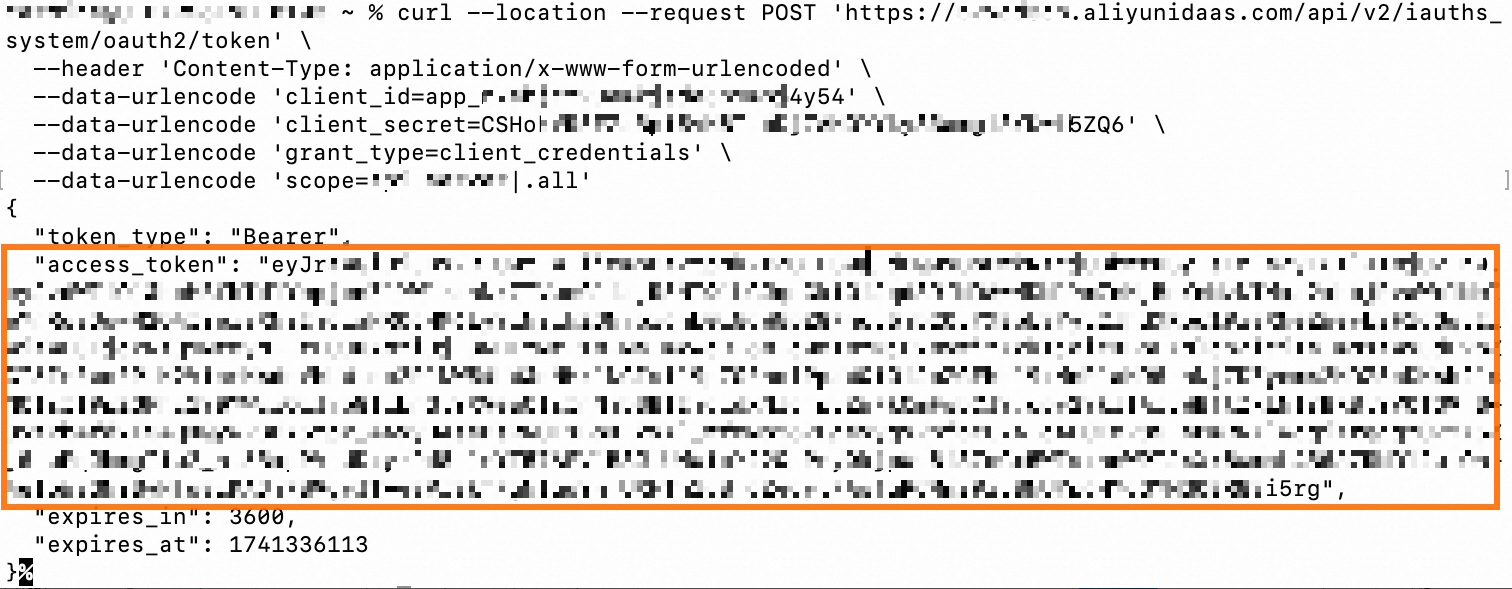
If the token is obtained successfully, the response is similar to the following output.
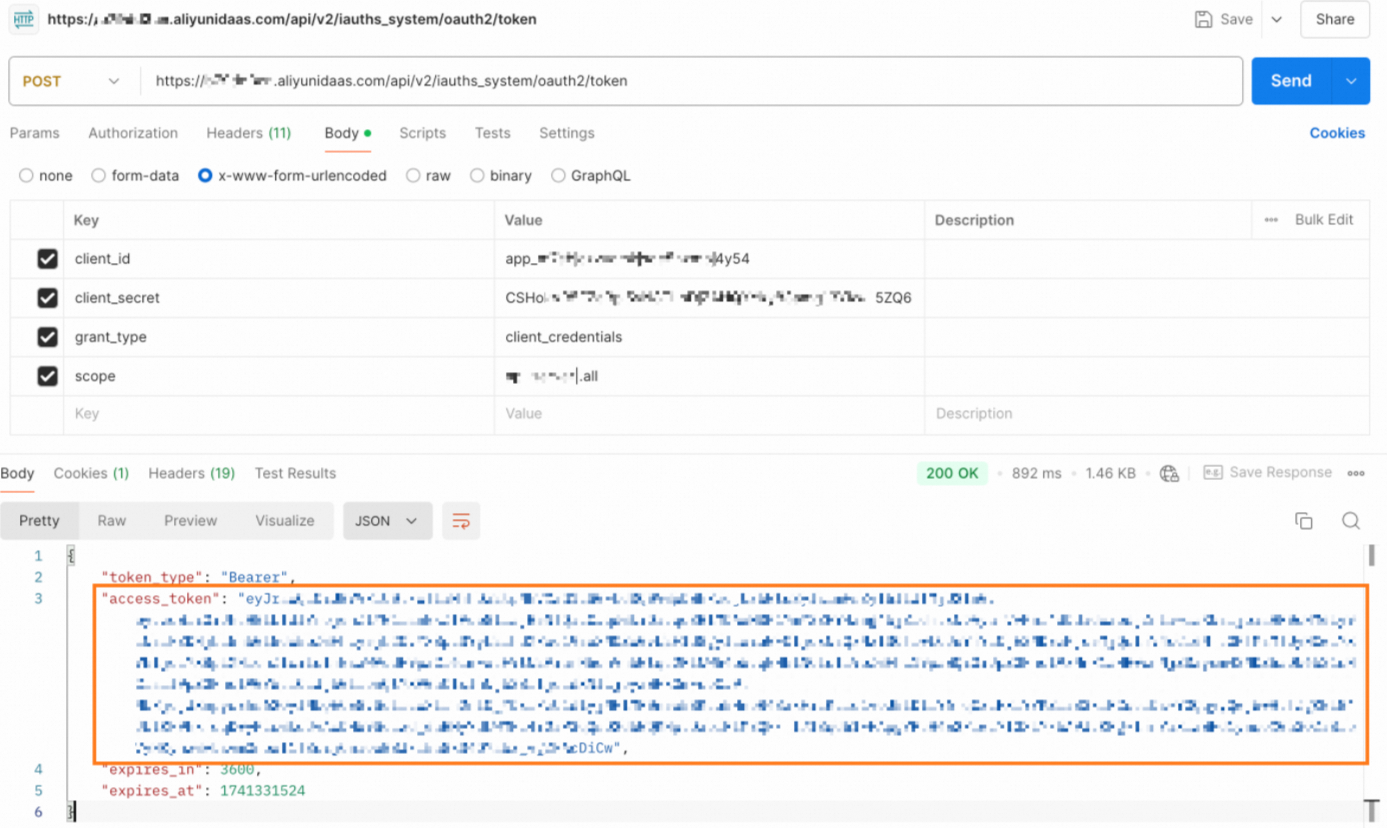
Use Postman
As shown in the following figure, replace the parameters with your application's configuration. Then, send a request from Postman to obtain the token.
Get temporary identity credentials (a Security Token Service token) for a RAM role using an M2M token
If you are not familiar with Alibaba Cloud STS, see What is STS?.
Use OpenAPI
Go to the OpenAPI Portal and find the AssumeRoleWithOIDC API.
NoteThis topic demonstrates only how to obtain credentials. For more information about the AssumeRoleWithOIDC API, see AssumeRoleWithOIDC - Obtain temporary identity credentials to assume a role for OIDC role-based SSO.
Enter the required API parameters. After you confirm that the parameters are correct, click Initiate Call to obtain the STS token.
ImportantOIDCProviderArn: Go to the Basic Information page of the OIDC IdP role that you created and obtain the ARN from the Trust Policy.
RoleArn: Go to the Basic Information page of the OIDC IdP role that you created and obtain the ARN.
OIDCToken: Enter the M2M token that you obtained.
RoleSessionName: A custom name for the role session. This parameter is used only for identification and has no other requirements.