With the development of technologies such as AI, deep learning, scientific computing, and big data processing, GPUs become a key component of high-performance computing. To maintain the stable operation of servers, Alibaba Cloud provides the inspection feature to detect hardware faults in advance and allows you to quickly troubleshoot issues by using the self-service diagnostics feature.
This topic applies only to Linux Elastic Compute Service (ECS) instances.
Scenarios
GPU-accelerated instance diagnostics
The ECS self-service diagnostics feature can detect risks on GPU-accelerated instances to help you troubleshoot issues.
GPU O&M
Alibaba Cloud can detect GPU hardware issues and send O&M event notifications. You can respond to the ECS system events to automatically perform O&M operations to resolve the issues.
You can use the self-service diagnostics feature or call the ReportInstancesStatus operation to report the exceptions that occur on one or more GPU-accelerated instances. After Alibaba Cloud receives the report from the instances, Alibaba Cloud checks the instances for exceptions. If an issue occurs, Alibaba Cloud sends an O&M event notification. To resolve the issue, respond to the event to automatically perform O&M operations.
ImportantAfter you respond to a system event for an instance, the instance restarts, which interrupts services. We recommend that you use one of the following methods to restart the instance during off-peak hours:
Respond to a system event within the event response window.
GPU hardware diagnostics
A running GPU-accelerated instance may encounter potential faults or security risks, such as GPU faults or driver errors. You can use one of the following methods to diagnose the instance:
Enable the GPU Health Check feature in the ECS console to check whether the GPUs or GPU drivers on the instance work as expected.
Use a Cloud Assistant plug-in to comprehensively check the GPUs or GPU drivers on the instance and identify the errors that occur when the GPUs run, such as GPU and driver anomalies. If anomalies are diagnosed, the system automatically performs O&M operations. For example, the system sends notifications.
Diagnose the GPUs of a GPU-accelerated instance by using the self-service diagnostics feature in the ECS console
In the top navigation bar, select the region and resource group of the resource that you want to manage.

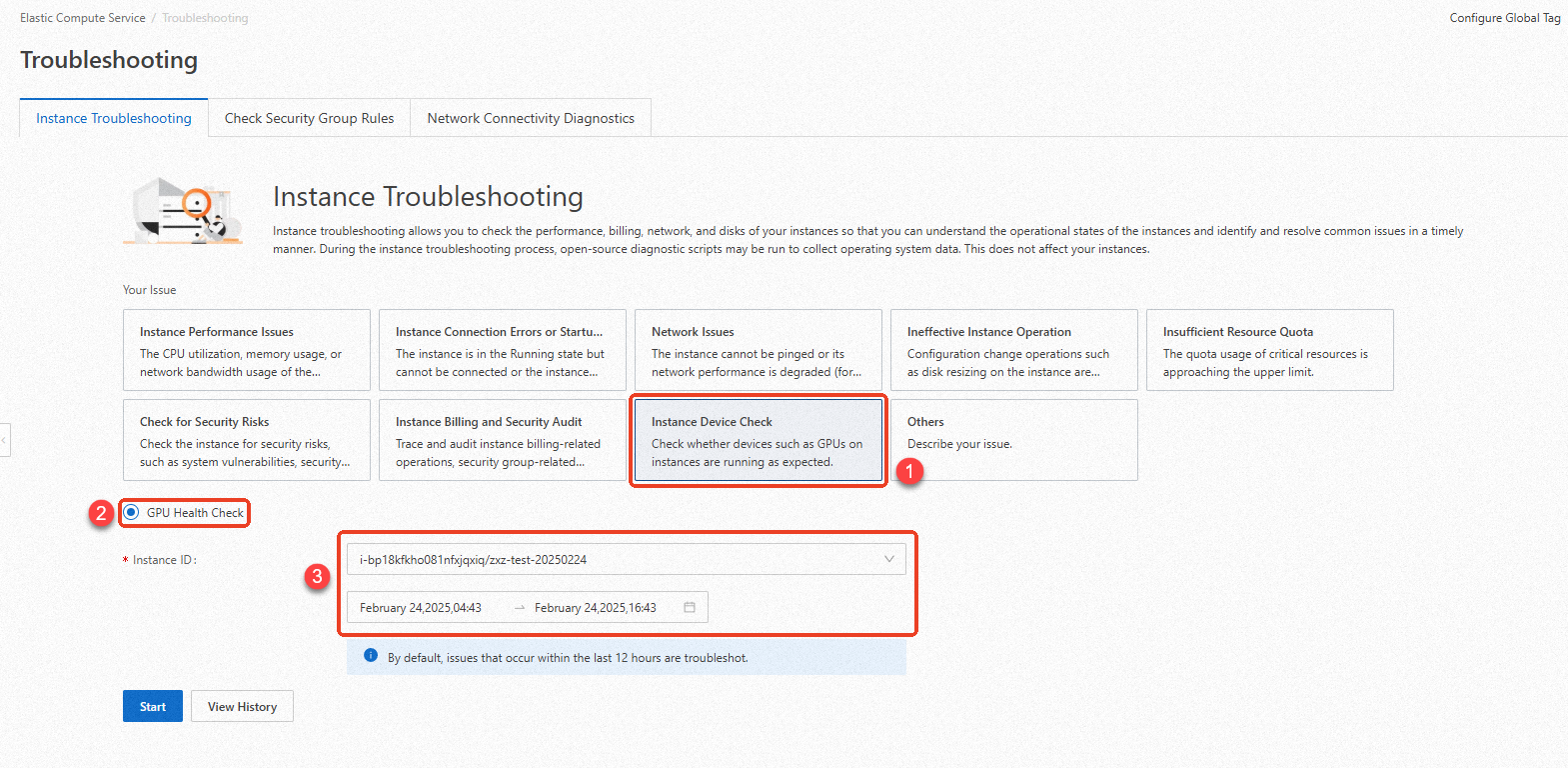
On the Troubleshooting page, specify the issue type, check item, instance ID, and troubleshooting period and click Start.
View the diagnostic report after the diagnosis is complete.
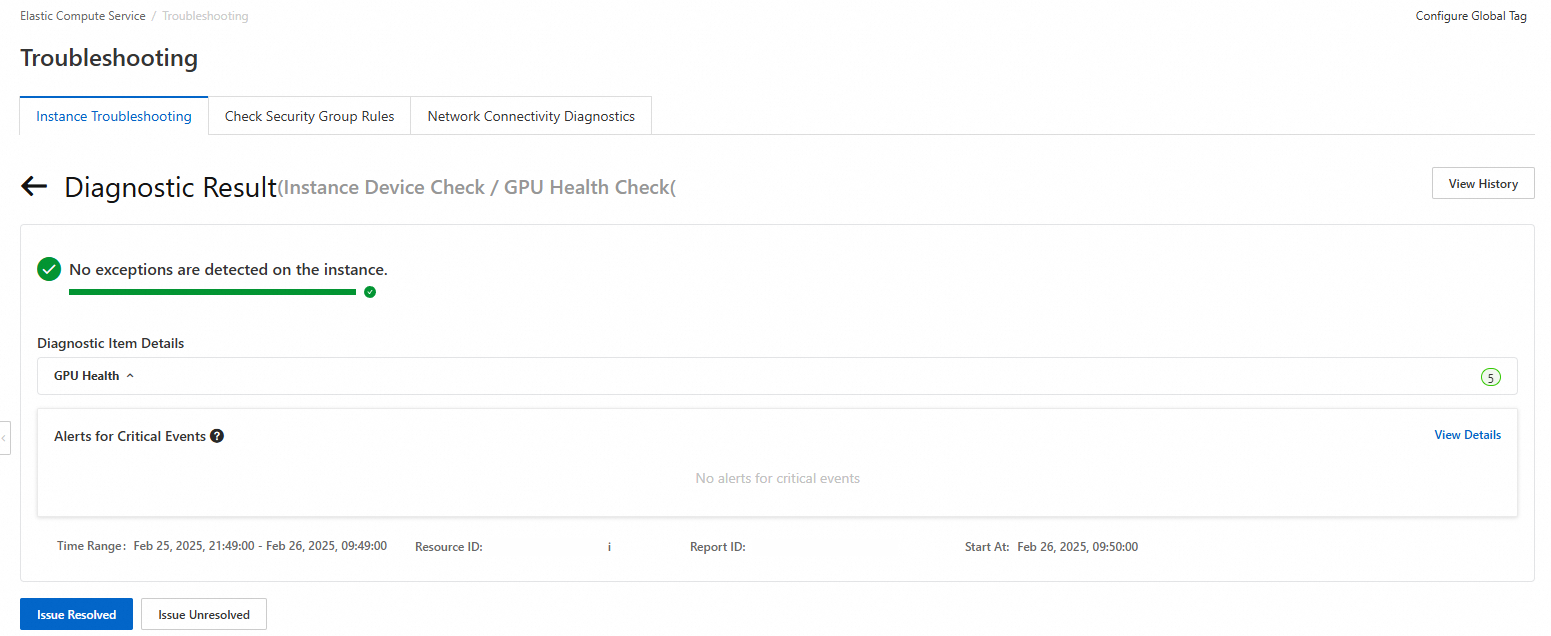
The following table describes the items in the diagnostic report.
Item
Description
Diagnostic result
If all diagnostic items and the memory usage are normal, the system displays "No exceptions are detected on the instance."
If abnormal diagnostic items exist, the system displays "*** exceptions are detected on the instance." Asterisks (***) indicate the number of detected exceptions. The system also provides solutions that you can use to resolve the exceptions.
Diagnostic item details
The details of the diagnostic report include the status of GPUs, NVIDIA transaction ID (XID) exceptions, GPU memory status,
Fabricmanagercomponent exceptions, and GPU driver status. The report also contains alerts of Critical, Warning, and Passed levels.Basic diagnostic information
The resource ID, report ID, diagnostic time range, and start time of the diagnosis.
Diagnose a GPU-accelerated instance by using Cloud Assistant
In the top navigation bar, select the region and resource group of the resource that you want to manage.
On the ECS Instances tab, find the GPU-accelerated instance that you want to diagnose and click Run Command in the Actions column.
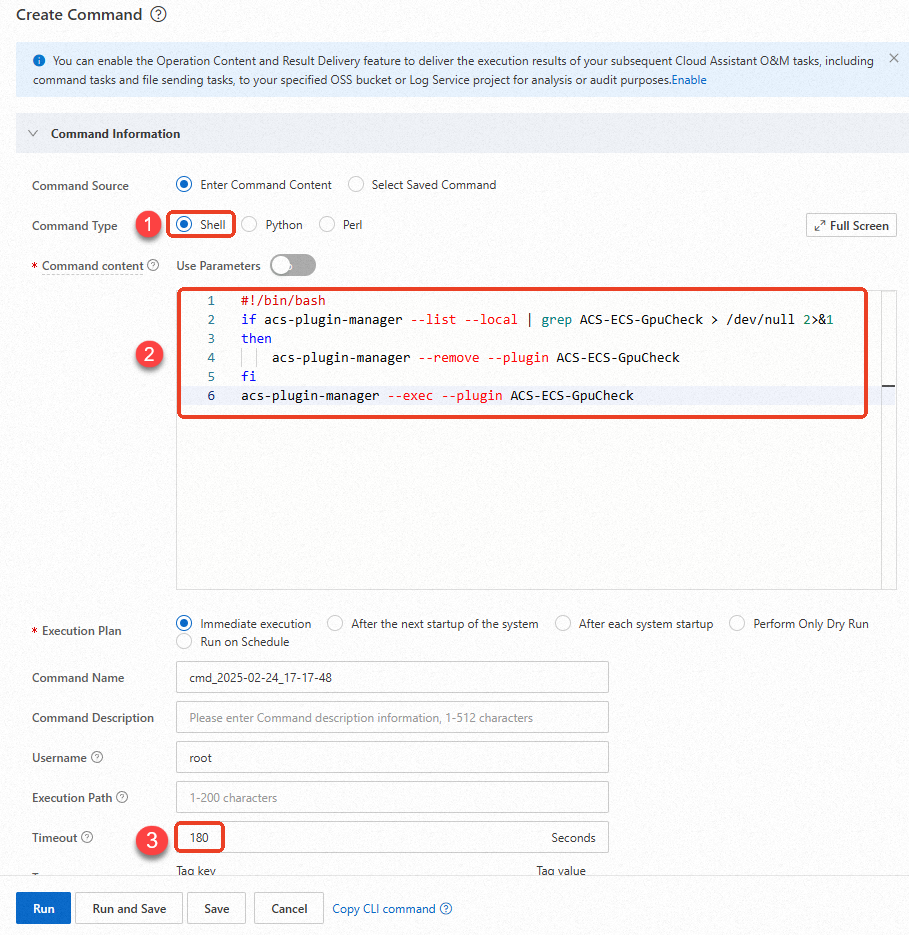
In the Create Command panel, configure parameters in the Command Information section.
The following figure shows the main parameters. Use default values for other parameters. For more information, see Create command.
 Important
You must set the parameters to the following values. Otherwise, Cloud Assistant may fail to run the command.
Command Type: Select Shell.
Command content: Copy and paste the following command. For information about shell commands, see View the system configurations of ECS instances.
if acs-plugin-manager --list --local | grep ACS-ECS-GpuCheck > /dev/null 2>&1
then
    acs-plugin-manager --remove --plugin ACS-ECS-GpuCheck
fi
acs-plugin-manager --exec --plugin ACS-ECS-GpuCheck
Timeout: the timeout period of the command execution. If a command execution times out, Cloud Assistant forcefully stops the command execution.
NoteThe value of the Timeout parameter must be a positive integer that ranges from 10 to 86400. Unit: seconds. A value of 86400 is equivalent to 24 hours.
Click Run to run the command to check the health status of the GPU-accelerated instance by using Cloud Assistant.
If the execution result shows that each diagnostic item is in the
OKstate, the GPUs of the instance do not have anomalies.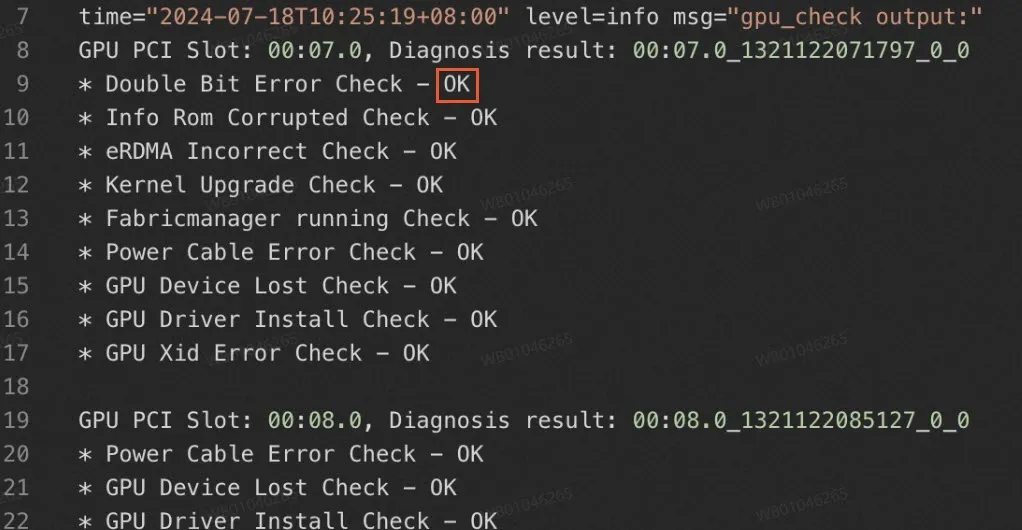
If the execution result shows that one or more diagnostic items are in the
Failedstate, the GPUs have anomalies.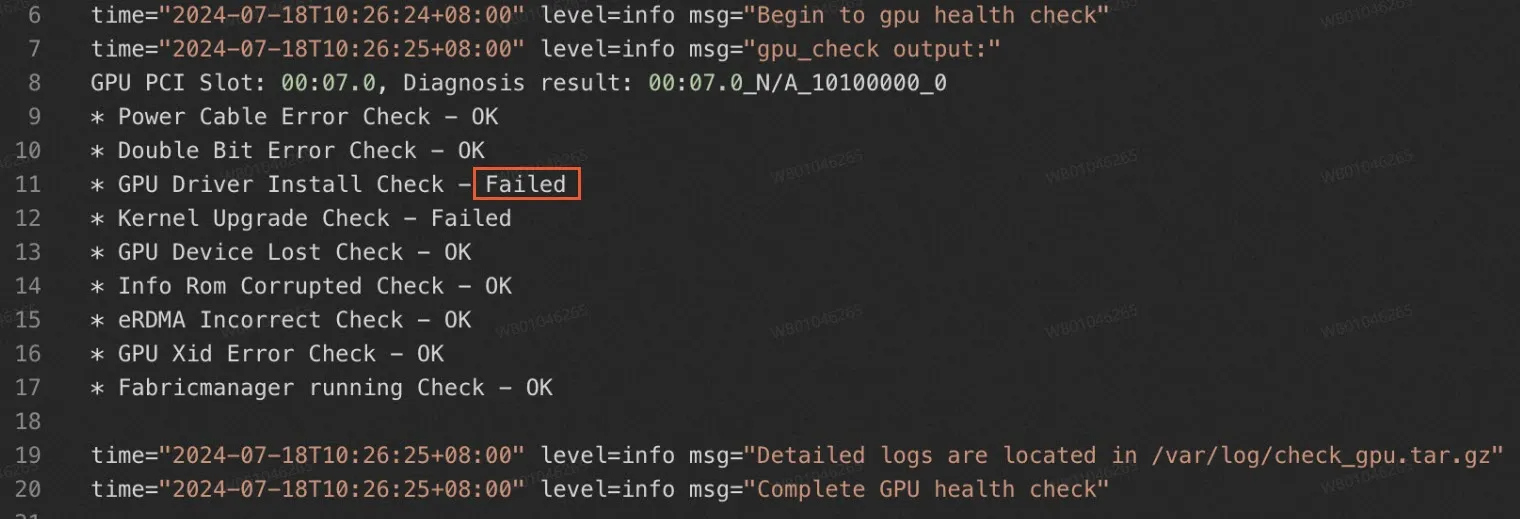
The following table describes diagnostic information in the command output.
Item
Description
Troubleshooting method
Double Bit Error Check
Checks whether double-bit errors exist on the GPUs of the instance.
Restart the instance based on the on-screen instructions. The system determines whether an instance restart is required based on the number of returned errors.
Info Rom Corrupted Check
Checks the infoROM information of the GPUs of the instance.
Perform operations based on the O&M notifications.
eRDMA Incorrect Check
Checks the status of the elastic RDMA interface (ERI) of the GPU-accelerated instance.
Perform operations based on the O&M notifications.
Kernel Upgrade Check
Checks whether driver anomalies occur due to kernel updates.
Uninstall and re-install the driver.
Fabricmanager running Check
Checks the status of the
Fabricmanagercomponent.Install or start the
Fabricmanagercomponent service.Power Cable Error Check
Checks the status of the power cable and power supply of the GPU-accelerated instance.
Perform operations based on the O&M notifications.
GPU Device Lost Check
Checks whether the GPUs can be found.
Perform operations based on the O&M notifications.
GPU Driver Install Check
Checks the installation status of the GPU driver.
Install the GPU driver.
GPU Xid Error Check
Checks whether XID errors exist on the GPUs.
Restart the instance based on the on-screen instructions. The system determines whether an instance restart is required based on the detected XID error.