Message duplication occurs when a consumer receives the same message more than once. In distributed messaging systems, duplication is expected under certain conditions such as acknowledgment (ACK) timeouts, consumer crashes, or broker restarts. Design idempotent consumers that produce the same result regardless of how many times they process a given message.
Why messages get duplicated
ACK timeout (message repush)
ApsaraMQ for RabbitMQ enforces a maximum consumption duration for each message. If a consumer does not acknowledge a message within this limit, the broker requeues the message and repushes it to a consumer.
This typically happens when:
A consumer takes too long to process a message.
The Prefetch Count is too high relative to the per-message processing time, causing later messages in the batch to exceed the timeout.
Consumer crash or restart
If a consumer cannot send an ACK due to a crash or a restart, the broker determines that the message is not processed and redistributes the message to other consumers.
Automatic retry
Business logic or application frameworks sometimes include automatic retry mechanisms that resubmit messages. Check the message trace and message log to determine whether a message was sent multiple times by the producer rather than repushed by the broker.
Broker version or feature release
When the broker restarts for a new version or feature release, a small number of messages may be duplicated. Check the release notes in the region where your ApsaraMQ for RabbitMQ instance resides to determine whether a recent release coincides with the duplication.
Diagnose the cause
Step 1: Check message logs
Enable message log management and filter logs for the affected queue. For details, see Configure message logs.
Each message goes through four lifecycle phases:
| Phase | Description |
|---|---|
| SendMessage | The producer publishes the message to the broker. |
| PushMessage | The broker pushes the message to a consumer. |
| BasicAck | The consumer acknowledges successful processing. |
| DeleteMessage | The broker receives the ACK and deletes the message. |
Compare the counts for each phase to identify the problem:
More pushes than sends (for messages sent to only one queue): A sent-to-pushed ratio below 1 means some messages are being pushed more than once.
Fewer deleted messages than pushed messages: ACK timeouts or consumption failures occurred for some messages.
If the number of deleted messages equals the number of acknowledged messages and pushed messages, no duplication occurred on that queue.

Step 2: Search for the duplicated message
Enter the message ID in the log to find when the message was pushed. If the same message ID appears in multiple PushMessage entries, the message is being repushed repeatedly.

Step 3: Check consumption duration (Enterprise and Enterprise Platinum editions)
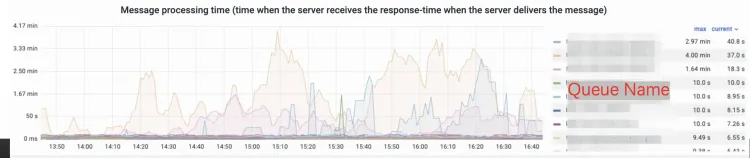
If your instance is Enterprise Edition or Enterprise Platinum Edition, check the consumption duration statistics on the dashboard. The average consumption duration for a specific consumer reveals whether messages are being acknowledged within the timeout.
Solutions
Tune prefetch count to prevent ACK timeouts
Set the QoS and Prefetch Count parameters so that all prefetched messages can be processed within the maximum consumption duration.
Use the following formula to calculate an appropriate value:
Prefetch Count <= max consumption duration / per-message processing timeExample: Each message takes about 1 minute to process and the maximum consumption duration is 5 minutes. Set Prefetch Count to 5 or lower. A higher value means the last prefetched message cannot finish processing before the timeout, triggering repush for that message and all subsequent prefetched messages.
Implement idempotent consumers
Design consumer logic so that processing the same message more than once produces the same result. Idempotent processing is the recommended approach because it handles all duplication causes -- ACK timeouts, crashes, retries, and broker restarts -- without requiring coordination between consumers.
For implementation details, see Message idempotence.
Assign unique business identifiers
Include a unique business identifier in each message, such as an order ID or a message ID. Consumers use this identifier to check whether a specific operation has already been performed, which is essential for both idempotent processing and deduplication.
Deduplicate processed messages
Store the identifiers of processed messages in a hash table or Redis on the consumer client. Before processing a new message, check whether its identifier already exists in the store. This approach works well as a complement to idempotent processing for operations that are inherently non-idempotent, such as sending notification emails.