Usage notes
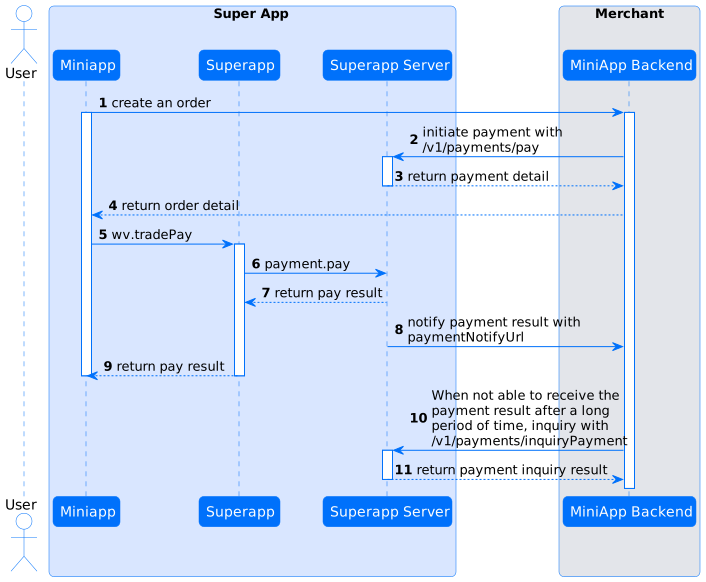
After a user confirms an order, the merchant or partner calls the /v1/payments/pay operation to create a payment order. The system returns the URL of the cashier page and the order number. Then, the merchant or partner calls the wv.tradePay operation to navigate the user to the cashier page on which the user completes the payment.
Request method
HTTPS request method
POST /v1/payments/pay
Request parameters
Common request parameters
Parameter | Type | Required | Maximum length (Unit: characters) | Description | Example |
partnerId | String | Yes | 32 | The partner ID. | 6881407230000718 |
appId | String | No | 32 | The mini program ID. | 1531668559383166619648 |
Operation-specific request parameters
Parameter | Type | Required | Maximum length (Unit: characters) | Description | Example |
productCode | String | No | 32 | The product code that is defined by the wallet, which is used to obtain the configurations of the agreement, including fees and limits. | |
paymentOrderTitle | String | Yes | 256 | The title of the payment order. | |
paymentRequestId | String | Yes | 64 | The unique ID of the payment request that is generated by the merchant. This parameter is used to ensure the idempotence of the request. If multiple payment requests are initiated by using the same value of paymentRequestId and reach the final state, the partner must return the same result. | |
paymentAmount | Amount | Yes | The order amount that is displayed on the payment page. | ||
paymentMethods | PaymentMethods | No | |||
paymentAuthCode | String | No | 128 | ● Set the parameter to the access token of the wallet user if paymentFactor.isAgreementPay is set to true. ● Set the parameter to the authorization code of the wallet user if paymentFactor.isPaymentCode is set to true. | |
paymentFactor | PaymentFactor | No | The payment scenario of mini programs. | {"isPaymentCode" : true} | |
paymentExpiryTime | String/Datetime | No | The time when the payment order is closed. The value must follow the ISO 8601 standard. | 2023-11-08T14:07:05+08:00 | |
paymentRedirectUrl | URL | No | 2048 | The URL of the page to which the user is navigated after the payment is complete. | https://www.merchant.com/redirectxxx |
paymentNotifyUrl | URL | No | 2048 | The URL that is used to receive the payment notification. | https://www.merchant.com/paymentNotifyxxx |
mcc | String | No | 32 | The type of the merchant. | |
extraParams | Map | No | The supplementary parameters that are used to specify the special payment features of the wallet. | ||
extendInfo | String | No | 4096 | The extended information about the merchant. | |
envInfo | EnvInfo | No | The environmental information of the mobile device that is used for payment verification. |
Response parameters
Common response parameters
Parameter | Type | Required | Maximum length (Unit: characters) | Description |
resultStatus | String | Yes | The state of the request. Valid values: ● SUCCESS : The request was successful.● FAIL : The request failed.● UNKNOWN: The state was unknown.The ● ACCEPT: The request was sent and the result was not returned. | |
resultCode | String | Yes | - | The response code of the gateway. |
resultMessage | String | Yes | - | The returned message of the gateway. |
Operation-specific response parameters
Parameter | Type | Required | Maximum length (Unit: characters) | Description | Example |
paymentId | String | No | 64 | The unique ID of the payment that is generated by the wallet. | |
paymentTime | String/Datetime | No | The time when the payment was complete. The value follows the ISO 8601 standard. | 2023-11-09T14:07:05+08:00 | |
actionForm | ActionForm | No | The response action. | ||
authExpiryTime | String/Datetime | No | The validity period of the authorized payment. This parameter is valid only when paymentFactor.isAuthorizationPayment is set to true. | ||
extendInfo | String | No | 4096 | The extended information about the wallet. |
Error codes
Error code | Request state | Description | Solution |
ACCEPT | ACCEPT | The next action is to be or being performed based on the value of actionForm. | Query the payment result by calling the inquiryPayment operation. |
PAYMENT_IN_PROCESS | UNKOWN | The payment is being performed. | Query the payment result by calling the inquiryPayment operation. |
REPEAT_REQ_INCONSISTENT | FAIL | The request is repeatedly submitted and the submitted data is inconsistent. | Change the value of paymentRequestId and initiate a request again. |
PAYMENT_AMOUNT_EXCEED_LIMIT | FAIL | The payment amount exceeds the upper limit. | Contact Alibaba Cloud to increase the limit on the payment amount. Alternatively, enter a lower amount and try again. |
USER_AMOUNT_EXCEED_LIMIT | FAIL | The payment amount exceeds the upper limit specified by the user. | Enter a lower amount and try again. |
USER_NOT_EXIST | FAIL | The user does not exist. | |
USER_STATUS_ABNORMAL | FAIL | The user is in an abnormal state. | |
USER_BALANCE_NOT_ENOUGH | FAIL | The account balance of the user is insufficient. | Create another payment order whose amount does not exceed the account balance of the user. |
PARTNER_NOT_EXIST | FAIL | The partner does not exist. | Enter a valid partner ID. |
PARTNER_STATUS_ABNORMAL | FAIL | The partner is in an abnormal state. | Enter a valid partner ID. |
RISK_REJECT | FAIL | Risks exist in the payment. | Manual intervention is required. We recommend that you contact the technical support of the mini program to obtain more information about payment risk control, and then try again. |
CURRENCY_NOT_SUPPORT | FAIL | The currency is not supported. | Use the supported currencies listed in the agreement and try again. |
ORDER_STATUS_INVALID | FAIL | The order is invalid and is already closed. | The order is complete or is already closed. You can call the inquiryPayment operation to query the information about the order. |
Flowchart