Background information
Specific earlier minor engine versions of MySQL 8.0 may cause data corruption in scenarios that involve Binary Large Object (BLOB) data. We recommend that you update the minor engine version of your ApsaraDB RDS for MySQL instance at the earliest opportunity. The minor engine version is updated online. During the update, an instance switchover may occur. We recommend that you perform the update during off-peak hours and make sure that your application is configured to automatically reconnect to the RDS instance. For more information, see Update the minor engine version.
Data corruption risks in BLOB scenarios
Description
In MySQL 8.0.19, a bug that affects individual tables that contain more than two BLOBs exists. If a BLOB INSERT operation is performed on these tables and then rolled back, metadata errors may occur. For more information, see Bugs.
This bug may cause the following risks to your RDS instance:
If the primary instance reads incorrect metadata when it purges data or requests a page for the second time, the primary instance fails.
You cannot restore the failed primary instance by restarting it.
After the system fails over your workloads to the secondary instance that serves as a hot standby, the secondary instance may fail.
Affected versions
The bug affects RDS instances that run MySQL 8.0 and run a minor engine version of 20201231. The bug is fixed in the minor engine version of 20230630.
Solutions
We recommend that you update the minor engine version of your RDS instance that runs MySQL 8.0 to the latest version at the earliest opportunity to prevent data damage. The minor engine version is updated online. During the update, an instance switchover may occur. We recommend that you perform the operation during off-peak hours and make sure that your application is configured to automatically reconnect to the RDS instance. Procedure
- Go to the Instances page. In the top navigation bar, select the region in which the RDS instance resides. Then, find the RDS instance and click the ID of the instance.
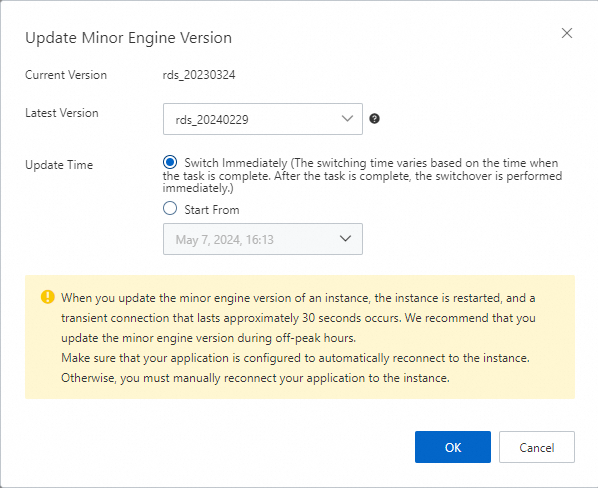
In the Configuration Information section, click Update Minor Engine Version.
 Note
NoteIf this button does not exist, the current version is the latest version.
In the dialog box that appears, configure the Latest Version and Upgrade Time parameters and click OK.