Private DNS is equivalent to an intranet Domain Name System (DNS) that you manage. You can use Private DNS to create zones or subzones that can be accessed only within the specified effective scope. The effective scope can be one or more VPCs.
From April 30, 2025 (UTC+8), the zones created by new users of PrivateZone are acceleration zones by default.
By April 30, 2026 (UTC+8), all built-in authoritative zones in regular zones will be switched to acceleration zones. This may lead to increased DNS requests and higher costs. We recommend that you mitigate the throttling of DNS requests initiated by ECS instances to avoid increased DNS requests when local cache is unavaliable.
Principles
Private DNS implements tunnel isolation for your intranet zones by using the tunneling feature of Alibaba Cloud Virtual Private Cloud (VPC). For more information about the tunnel isolation feature, see What is a VPC? Cross-VPC access is not allowed because zones associated with different VPCs have different tunnel IDs.
Alibaba Cloud DNS adopts a strict verification mechanism to ensure that your private zone is unique within Alibaba Cloud networks and your private zone can be managed only by yourself.
Logical architecture
You can set the effective scope of a built-in authoritative zone (for example, example.com) to one or more VPCs. After the setting of the effective scope takes effect, the specified DNS records can be accessed by clients in the corresponding VPCs.
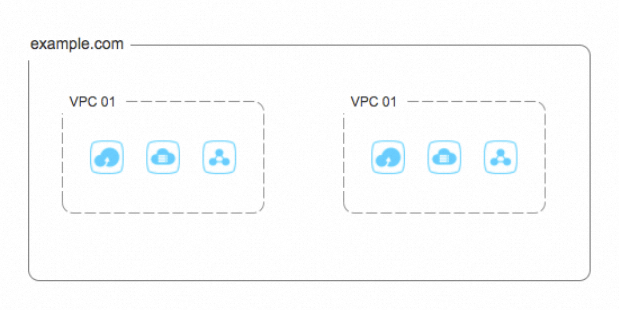
Overview
Zone
Zone: A zone file contains the DNS records of the domain names or subdomain names under your management. Zone files are also used by most DNS software to manage domain name spaces.
Private DNS allows you to add DNS records for multiple zones and subzones. The DNS records for subzones override the DNS records for zones.
Hostname: The prefix of a subdomain name is called a hostname, such as
www. If a primary domain name does not have a prefix, an at sign (@) is used as its hostname.Record type: The following table describes the record types that are supported by Private DNS.
Record type
Description
A
Specifies an IPv4 address (for example,
223.5.XX.XX) for a domain name. If you want to point your domain name to an IPv4 address, you must add an A record.AAAA
Specifies an IPv6 address (for example,
BF02::0:0:0:0:XX:XX)for a domain name. If you want to point your domain name to an IPv6 address, you must add an AAAA record.CNAME
Specifies a domain name as the nickname or alias for another domain name.
MX
Identifies the mail server for a domain name.
TXT
Contains text information about your domain name. A TXT record can contain no more than 512 characters. For example, if you want to apply for Secure Sockets Layer (SSL) certificate verification, you must add a TXT record.
PTR
Maps an IP address to a domain name.
TTL: specifies the period of time for storing DNS records in the cache module. For example, you set TTL for a domain name to 60 seconds. If the DNS record of the domain name is cached by an external DNS system after the external DNS system queries the domain name, the external DNS system uses the cached DNS record to respond to DNS requests within the following 60 seconds. Built-in authoritative zones in Private DNS are classified into regular zone and acceleration zone. The following tables describe the impact of TTL settings configured in different locations.
If the TTL value is configured in a built-in authoritative acceleration zone:
DNS request source
Location for caching DNS records
Description
DNS request initiated by a cloud client to access the IP address 100.100.2.136 or 100.100.2.138
N/A
The DNS record in the acceleration zone is directly returned to the cloud client.
DNS request that is forwarded by an external DNS system (inbound direction)
Cache module of the external DNS system (inbound direction)
The DNS record in the acceleration zone is returned to the cache module of the external DNS system (inbound direction), and the cache module then forwards the DNS record to the client that initiates the DNS request.
If the TTL value is configured in a built-in authoritative regular zone:
DNS request source
Location for caching DNS records
Description
DNS request initiated by a cloud client to access the IP address 100.100.2.136 or 100.100.2.138
Cache module of LocalDNS to which the IP address 100.100.2.136 or 100.100.2.138 corresponds
The DNS record in the regular zone is returned to the cache module of LocalDNS to which the IP address 100.100.2.136 or 100.100.2.138 corresponds, and the cache module of LocalDNS then forwards the DNS record to the cloud client.
DNS request that is forwarded by an external DNS system (inbound direction)
Cache module of the external DNS system (inbound direction) and cache module of LocalDNS to which the IP address 100.100.2.136 or 100.100.2.138 corresponds
The DNS record in the regular zone is returned to the cache module of LocalDNS to which the IP address 100.100.2.136 or 100.100.2.138 corresponds. The cache module of LocalDNS forwards the DNS record to the cache module of the external DNS system (inbound direction). Then, the cache module of the external DNS system forwards the DNS record to the client that initiates the DNS request.
If the TTL value is configured in an external DNS system, such as an on-premises data center DNS or an authoritative public DNS system:
DNS request source
Location for caching DNS records
Description
DNS request initiated by a cloud client to access the IP address 100.100.2.136 or 100.100.2.138
Cache module of LocalDNS to which the IP address 100.100.2.136 or 100.100.2.138 corresponds
The external DNS system (outbound direction) returns the DNS record to the cache module of LocalDNS to which the IP address 100.100.2.136 or 100.100.2.138 corresponds. Then, the cache module of LocalDNS forwards the DNS record to the cloud client.
DNS request that is forwarded by an external DNS system (inbound direction)
Cache module of the external DNS system (inbound direction) and cache module of LocalDNS to which the IP address 100.100.2.136 or 100.100.2.138 corresponds
The external DNS system (outbound direction) returns the DNS record to the cache module of LocalDNS to which the IP address 100.100.2.136 or 100.100.2.138 corresponds. The cache module of LocalDNS forwards the DNS record to the cache module of the external DNS system (inbound direction). Then, the cache module of the external DNS system (inbound direction) forwards the DNS record to the client that initiates the DNS request.
Effective scope
Effective scope of a zone: You can associate a zone with one or more VPCs. Zones with the same name cannot be associated with the same VPC. For example, you cannot associate two zones that have the same name example.com with the same VPC. If you associate them with the same VPC, the DNS servers cannot determine the DNS records that need to be returned for the corresponding DNS requests. When the clients in some VPCs no longer need to access a zone, you can remove these VPCs from the effective scope of the zone.
Reverse DNS lookup
Reverse DNS lookup: A reverse DNS lookup maps an IP address to a domain name. The system obtains the domain name by using a pointer (PTR) record configured for the IP address.
Reverse lookup zone: A reverse lookup zone is a part of the Internet domain name space that is specifically designated for reverse mapping. This part of domain name space is called an
in-addr.arpazone. For example, the zone168.192.in-addr.arpacontains the reverse mapping information for all the hosts whose IP addresses begin with 192.168.PTR record: A PTR record is used for mapping an IP address to a domain name.
Benefits
Rich features
Intelligent DNS resolution: Private DNS can return specific IP addresses for DNS requests that are originated from a specific CIDR block. Currently, Alibaba Cloud DNS resolution lines and custom resolution lines are supported.
Weight-based resolution: If multiple IP addresses or domain names are configured for the same hostname and the same DNS request source, you can set a weight for each record value. This way, the system returns the IP addresses or domain names for DNS requests based on the preset weights. This ensures that resolution traffic is distributed to different servers to achieve load balancing.
Cache retention: You can enable the cache retention feature for hotspot domain names and major domain names so that the DNS records of these domain names are always cached. This improves the speed of DNS resolution for these domain names in Private DNS and prevents the services from being interrupted due to service failures of authoritative DNS vendors.
Cache clearing: In case of emergency changes to some intranet services, the latest DNS records of intranet DNS domain names must be updated in a timely manner. If a domain name is configured as a cache retention domain name, you can use the cache clearing feature to clear the data of this domain name from the cache server within the effective scope of the cache rules.
Forwarding management: Specific DNS requests for the domain names in a VPC can be forwarded to external DNS systems. This meets the requirements for mutual service access in hybrid cloud environments and between cloud and on-premises environments.
Traffic analysis: Private DNS provides an end-to-end and visualized traffic analysis service. This service provides insights into the end-to-end process of receiving a DNS request, resolving the DNS request, and responding to the DNS request. In addition, the service provides graphical reports so that you can adjust your service architecture in a timely manner based on the changes in resolution traffic data.
Secure data isolation
To guarantee data security, Private DNS isolates the data in different VPCs.
The records in your zones cannot be looked up on the Internet. This prevents your internal service information and internal system architecture from being maliciously detected.
The records in your zones can be looked up only in their effective scopes. This helps you better limit the visitors who are allowed to access the core data in the internal system.
The data in your zones is strictly protected by the tunneling feature of Alibaba Cloud VPC. This ensures that your zone data is not compromised.
Flexible management
You can add or customize an unlimited number of intranet zone files.
You can create a zone such as
taobao.comand set an effective scope for the zone. The DNS records oftaobao.comwithin the effective scope override the DNS records of taobao.com on the Internet.You can add custom zones that you cannot register on the Internet, such as
example.testandexample.abcd, to your VPC.You can set different effective scopes for the zones with the same name. This allows clients in VPCs that reside in different regions to access different cloud resources by using the same zone, which achieves nearby access. For example, when the DNS requests for
test.example.comare initiated by clients in VPCs that reside in the China (Beijing) and China (Shanghai) regions, Private DNS returns the addresses of cloud resources in the corresponding regions to the clients.