Stable Diffusion can generate high-quality images quickly, but running it in production has two hard problems: a single pod can only handle one request at a time, and leaving GPU nodes idle between requests is expensive. This guide shows how to use Knative on Container Service for Kubernetes (ACK) to solve both — concurrency-based autoscaling prevents pod overload, and scale-to-zero eliminates idle GPU costs.
Prerequisites
Before you begin, ensure that you have:
-
An ACK cluster running Kubernetes 1.24 or later with GPU-accelerated nodes. Use one of these instance types:
ecs.gn5-c4g1.xlarge,ecs.gn5i-c8g1.2xlarge, orecs.gn5-c8g1.2xlarge. For setup instructions, see Create an ACK managed cluster. -
Knative deployed in the cluster. See Deploy and manage Knative.
-
The
heyload testing tool installed:go install github.com/rakyll/hey@latest. Used in Step 3 to verify autoscaling.
How it works

The key configuration is containerConcurrency: 1, which tells Knative that each pod handles exactly one request at a time. When 5 concurrent requests arrive, Knative scales to 5 pods (5 concurrent requests ÷ 1 per pod = 5 pods). When traffic drops to zero, Knative terminates all pods to stop GPU billing.
Follow the user agreements, usage specifications, and applicable laws and regulations of the third-party model Stable Diffusion. Alibaba Cloud does not guarantee the legitimacy, security, or accuracy of Stable Diffusion and is not liable for any damages from its use.
Step 1: Deploy the Stable Diffusion service
Deploy the Stable Diffusion service on a GPU-accelerated node. The service cannot start without GPU access.
-
Log on to the ACK console and click ACK consoleClusters in the left navigation pane.
-
Click the target cluster name, then choose Applications > Knative in the left navigation pane.
-
Deploy the service using the application template or a YAML file.
Application template
On the Popular Apps tab, click Quick Deployment on the stable-diffusion card.

After deployment, click Services and confirm the Status is Created.
YAML
On the Services tab, select default from the Namespace drop-down list and click Create from Template. Paste the following YAML into the editor and click Create.
apiVersion: serving.knative.dev/v1
kind: Service
metadata:
  name: stable-diffusion
  annotations:
    serving.knative.dev.alibabacloud/affinity: "cookie"
    serving.knative.dev.alibabacloud/cookie-name: "sd"
    serving.knative.dev.alibabacloud/cookie-timeout: "1800"
spec:
  template:
    metadata:
      annotations:
        autoscaling.knative.dev/class: kpa.autoscaling.knative.dev
        autoscaling.knative.dev/maxScale: '10'
        autoscaling.knative.dev/targetUtilizationPercentage: "100"
        k8s.aliyun.com/eci-use-specs: ecs.gn5-c4g1.xlarge,ecs.gn5i-c8g1.2xlarge,ecs.gn5-c8g1.2xlarge
    spec:
      containerConcurrency: 1
      containers:
      - args:
        - --listen
        - --skip-torch-cuda-test
        - --api
        command:
        - python3
        - launch.py
        image: yunqi-registry.cn-shanghai.cr.aliyuncs.com/lab/stable-diffusion@sha256:62b3228f4b02d9e89e221abe6f1731498a894b042925ab8d4326a571b3e992bc
        imagePullPolicy: IfNotPresent
        ports:
        - containerPort: 7860
          name: http1
          protocol: TCP
        name: stable-diffusion
        readinessProbe:
          tcpSocket:
            port: 7860
          initialDelaySeconds: 5
          periodSeconds: 1
          failureThreshold: 3
The service is ready when it shows the following status:

Key autoscaling parameters
| Parameter | Value in this guide | What it controls |
|---|---|---|
containerConcurrency |
1 |
Maximum concurrent requests per pod. 1 means Stable Diffusion's single-threaded inference is not shared between requests. |
autoscaling.knative.dev/maxScale |
10 |
Upper bound on pod count. Prevents unbounded GPU spend. |
autoscaling.knative.dev/targetUtilizationPercentage |
100 |
Scale-out threshold as a percentage of containerConcurrency. At 100, a new pod is added only when the current pod is fully utilized. |
containerConcurrency: 1 is a hard concurrency limit. While appropriate for Stable Diffusion's single-threaded inference, a low value on other services reduces throughput and increases cold-start frequency. Choose a value that matches your application's actual concurrency capacity.
Step 2: Access the Stable Diffusion service
-
On the Services tab, record the gateway IP address and default domain name of the service. If you use ALB Ingress, access the service with this format:
curl -H "Host: stable-diffusion.default.example.com" http://alb-XXX.cn-hangzhou.alb.aliyuncsslb.com # Replace with your ALB Ingress address.For direct domain access, configure a CNAME record for your ALB instance.
-
Add an entry to your local
hostsfile to map the gateway IP to the domain:47.xx.xxx.xx stable-diffusion.default.example.com # Replace with your actual gateway IP address. -
On the Services tab, click the default domain name of the
stable-diffusionservice. A successful connection shows the Stable Diffusion web UI: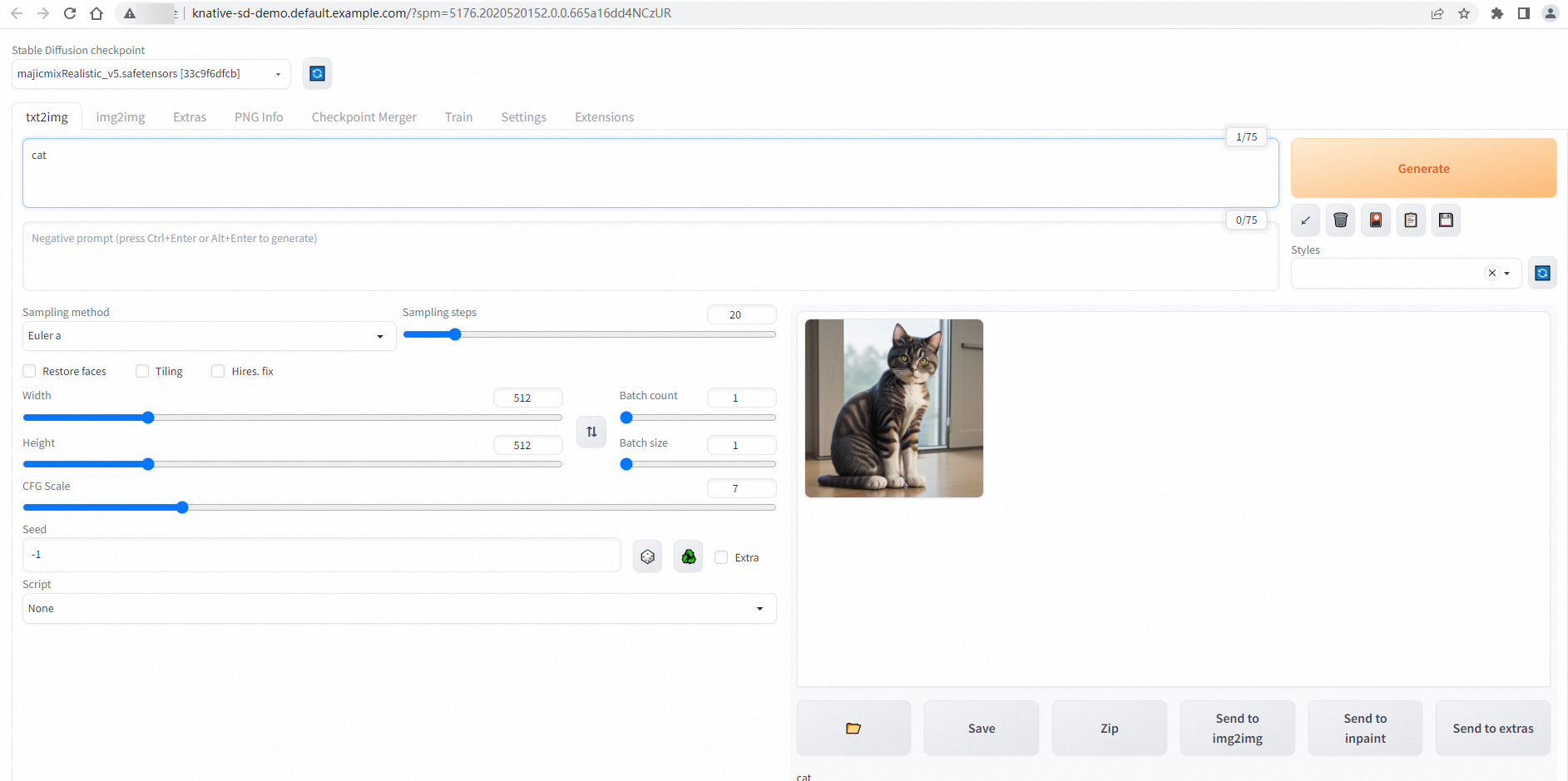
Step 3: Verify autoscaling
Use hey to send 50 requests with 5 concurrent connections, then watch pod count change in real time:
hey -n 50 -c 5 -t 180 -m POST -H "Content-Type: application/json" \
  -d '{"prompt": "pretty dog"}' \
  http://stable-diffusion.default.example.com/sdapi/v1/txt2img
In a separate terminal, watch the pods:
watch -n 1 'kubectl get po'Because containerConcurrency: 1 limits each pod to one request, Knative scales to 5 pods to handle 5 concurrent connections (5 concurrent requests ÷ 1 per pod = 5 pods):
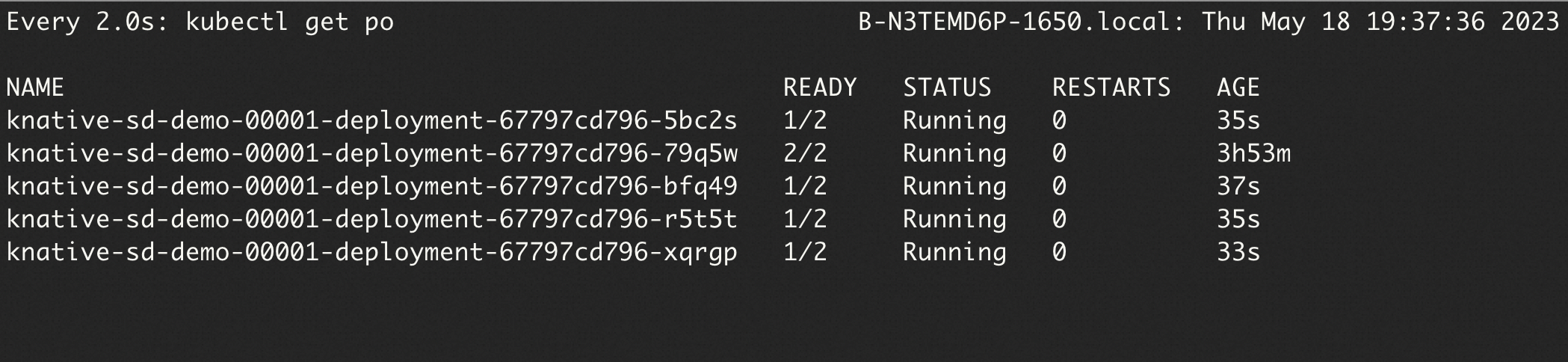
The hey output confirms all 50 requests complete successfully:
Summary:
  Total:	252.1749 secs
  Slowest:	62.4155 secs
  Fastest:	9.9399 secs
  Average:	23.9748 secs
  Requests/sec:	0.1983


Response time histogram:
  9.940 [1]	|■■
  15.187 [17]	|■■■■■■■■■■■■■■■■■■■■■■■■■■■■■■■■■■■■■■■■
  20.435 [9]	|■■■■■■■■■■■■■■■■■■■■■
  25.683 [11]	|■■■■■■■■■■■■■■■■■■■■■■■■■■
  30.930 [1]	|■■
  36.178 [1]	|■■
  41.425 [3]	|■■■■■■■
  46.673 [1]	|■■
  51.920 [2]	|■■■■■
  57.168 [1]	|■■
  62.415 [3]	|■■■■■■■


Latency distribution:
  10% in 10.4695 secs
  25% in 14.8245 secs
  50% in 20.0772 secs
  75% in 30.5207 secs
  90% in 50.7006 secs
  95% in 61.5010 secs
  0% in 0.0000 secs

Details (average, fastest, slowest):
  DNS+dialup:	0.0424 secs, 9.9399 secs, 62.4155 secs
  DNS-lookup:	0.0385 secs, 0.0000 secs, 0.3855 secs
  req write:	0.0000 secs, 0.0000 secs, 0.0004 secs
  resp wait:	23.8850 secs, 9.9089 secs, 62.3562 secs
  resp read:	0.0471 secs, 0.0166 secs, 0.1834 secs

Status code distribution:
  [200]	50 responses
For more information about hey, see hey.
Step 4: View monitoring data
Knative provides built-in observability. View metrics for the Stable Diffusion service on the Monitoring Dashboards page under Knative in the ACK console. To enable dashboards, see View the Knative monitoring dashboard.