JindoFS is a Hadoop-compatible file system (HCFS) built on Alibaba Cloud Object Storage Service (OSS), designed to integrate OSS with open source big data ecosystems. It offers three storage modes—client-only mode (SDK), cache mode, and block storage mode—each optimized for different performance, cost, and operational requirements.
For most data lake and AI training workloads, use client-only mode (SDK) or cache mode. Use block storage mode when your workload requires full POSIX semantics, atomic rename operations, or metadata management independent of OSS.
Background: object storage and file system differences
OSS stores data as objects rather than as a hierarchical file system. This makes object storage highly scalable and cost-effective, but creates gaps for workloads that depend on POSIX file semantics—such as atomic rename, fast seeks, or append operations. JindoFS bridges this gap by layering file system semantics on top of OSS. Each of the three modes trades off simplicity, performance, and operational overhead differently.
Client-only mode (SDK)
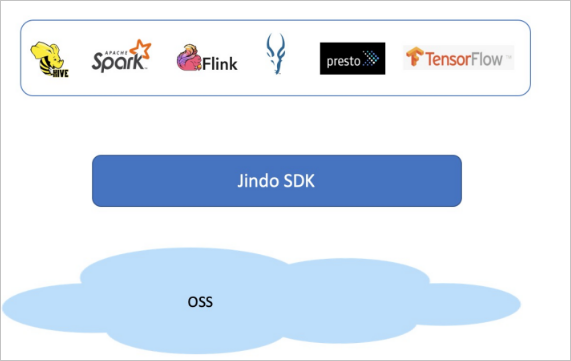
Client-only mode provides a Hadoop-compatible interface to OSS without any distributed services. It works like OSS FileSystem or S3A FileSystem in the Hadoop community, optimizing how computing engines such as Apache Hive and Apache Spark access OSS data.
Files remain stored as objects in OSS—JindoFS adds only client-side connection, extension, and optimized access for the Hadoop ecosystem. To set up this mode, upload the JindoFS SDK JAR package to the classpath directory.
This mode has the lowest operational overhead and the highest scalability. It is well-suited for batch analytics and workloads where simplicity and elastic scaling matter more than caching.
Cache mode
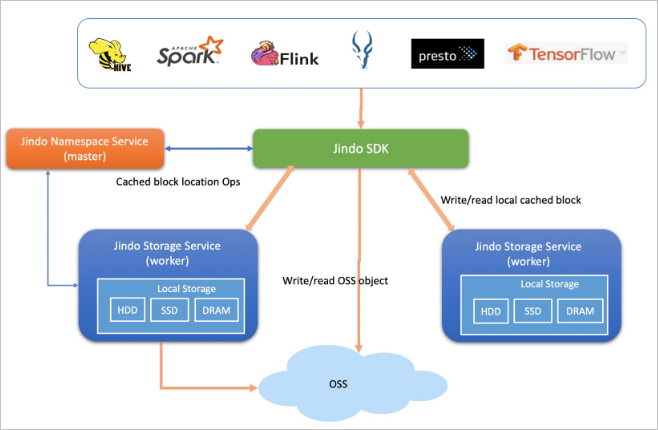
Cache mode extends client-only mode (SDK) with distributed data caching using Jindo's caching layer. It supports metadata caching and distributed data caching, maintaining full data compatibility and synchronization with OSS. Hot data—approximately 20% of total data—is cached locally in memory, SSDs, or basic disks, depending on your cluster configuration.
Cache mode supports two access patterns:
-
oss://<oss_bucket>/<oss_dir>/— Access OSS directly with optional caching enabled. Cross-service access is supported. This is the default method. -
jfs://<your_namespace>/<path_of_file>— Access data through a JindoFS namespace with caching enabled. Cross-service access is not supported.
This mode is well-suited for large-scale data analytics and AI training acceleration where throughput matters and hot data access patterns are predictable.
Block storage mode
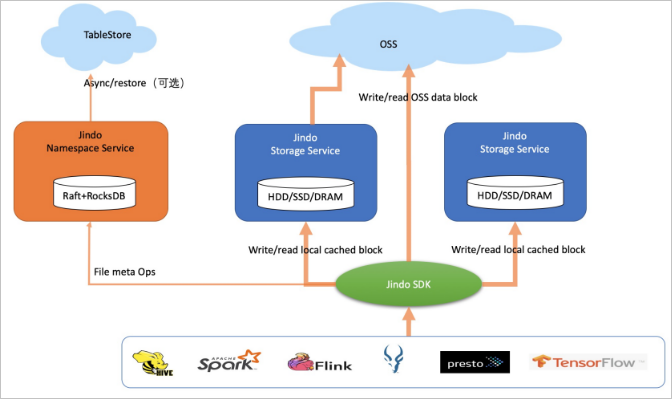
Block storage mode stores files as blocks in OSS rather than as objects. JindoFS manages directories and file metadata independently through its Namespace Service and Storage Service, giving it behavior close to Apache Hadoop HDFS. Data is cached locally—warm data and hot data together account for approximately 60% of total data.
Block storage mode supports high-level storage interfaces including atomic rename, truncate, append, flush, sync, and snapshot operations. These interfaces enable Apache Flink, Apache HBase, Apache Kafka, and Apache Kudu to write directly to OSS as they would to a native file system. Transparent compression is also supported for cold data to reduce storage costs.
Access format: jfs://<your_namespace>/<path_of_file> (cross-service access is not supported).
This mode is well-suited for workloads that require full POSIX semantics, high metadata query performance, or direct integration with stream-processing engines.
Choose a mode
The core difference between modes lies in how files are stored in OSS and how metadata is managed:
-
Client-only mode and cache mode store files as objects in OSS. Metadata management simulates HDFS behavior.
-
Block storage mode stores files as blocks in OSS and manages metadata independently, giving it semantics closer to HDFS.
The following table compares the three modes across key dimensions.
| Dimension | Client-only mode (SDK) | Cache mode | Block storage mode |
|---|---|---|---|
| Best for | Batch analytics, data lake storage, workloads requiring maximum scalability and minimal ops | Large-scale analytics, AI training acceleration, throughput-sensitive workloads with predictable hot data patterns | Workloads requiring full POSIX semantics, stream processing (Flink, HBase, Kafka, Kudu), or metadata management independent of OSS |
| Storage cost | Full data in OSS. Supports Archive storage class. | Full data in OSS. Hot data cached (~20% of total). Supports Archive storage class. | Full data in OSS. Warm and hot data cached (~60% of total). Supports Archive storage class. Supports transparent compression. |
| Scalability | High | Relatively high | Medium |
| Throughput | Depends on OSS bandwidth. Best for sequential batch reads. | Depends on OSS bandwidth plus hot data cache bandwidth. Best for repeated access to hot datasets. | Depends on OSS bandwidth plus warm and hot data cache bandwidth. Best for mixed sequential and random IO with high local cache hit rates. |
| Metadata | Simulates HDFS metadata management; no directory-based storage or file semantics; supports exabyte-scale data | Simulates HDFS metadata management with file data caching; supports exabyte-scale data | Highest metadata performance; close to HDFS compatibility; supports more than 1 billion files |
| Maintenance | Low | Medium — requires O&M of the cache system | Relatively high — requires O&M of Namespace Service and Storage Service |
| Security | AccessKey pair authentication, RAM authentication, OSS access logs, OSS data encryption | AccessKey pair authentication, RAM authentication, OSS access logs, OSS data encryption | AccessKey pair authentication, UNIX commands or Apache Ranger for permission management, AuditLog, data encryption |
| Access format | oss://<oss_bucket>/<oss_dir>/ — cross-service access supported |
oss://<oss_bucket>/<oss_dir>/ (cross-service access supported) or jfs://<your_namespace>/<path_of_file> (cross-service access not supported) |
jfs://<your_namespace>/<path_of_file> — cross-service access not supported |
FAQ
What mode should I use for a typical data lake?
Client-only mode (SDK) or cache mode. Both are fully compatible with OSS object storage semantics, support complete compute-storage separation, and scale flexibly. Cache mode adds local caching for hot data, which improves throughput for access-intensive analytics and AI training.
Why does block storage mode support more files than HDFS?
Block storage mode can handle more than 1 billion files, compared to a maximum of around 400 million for HDFS. It has no on-heap memory limits (HDFS is constrained by JVM heap size), which means performance remains more stable under heavy load. Block storage mode also requires lightweight O&M—damaged disks or node failures don't result in data loss because all data has one backup in OSS, and nodes can be added or removed freely.
What are the unique advantages of block storage mode?
Block storage mode manages both file metadata and file data independently of OSS, which enables it to support high-level storage interfaces that object storage cannot provide natively: atomic rename transactions, high-performance local writes, truncate, append, flush, sync, and snapshot. These interfaces are required to connect big data engines such as Apache Flink, Apache HBase, Apache Kafka, and Apache Kudu directly to OSS.
Block storage mode also has a cost advantage: caching 60% of data locally (warm and hot data) means a large portion of reads are served from the local cluster rather than OSS, reducing egress costs and improving latency for frequently accessed data.